WordPress Chat Widget
Real-time user to user chat experience for WordPress sites
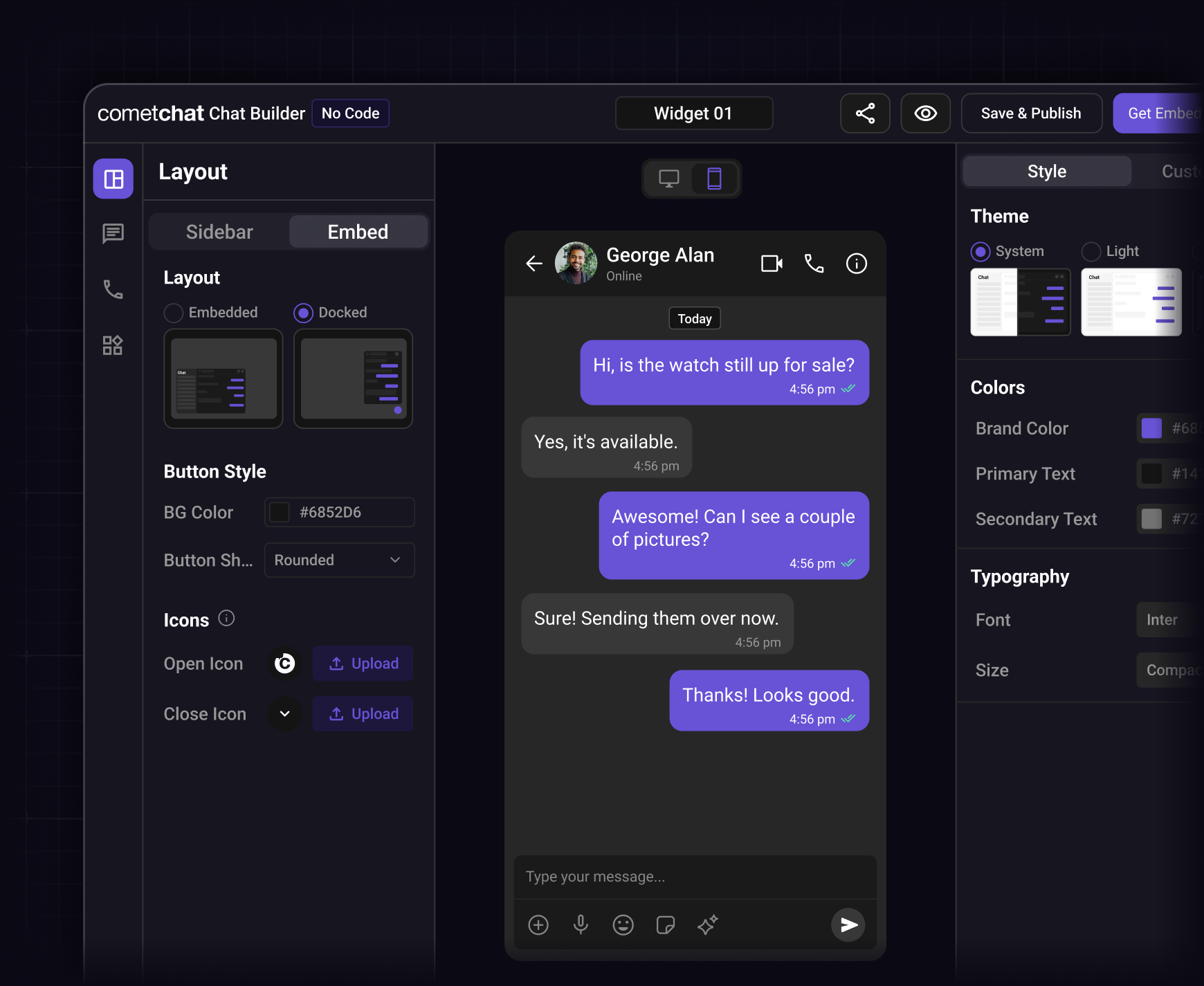


Step 1: Customize the Chat Widget
Design chat to match your WordPress site.
A drag-and-drop-like builder for effortless chat personalization.
-
Configure colors, fonts, and layout to match your site theme
-
Control widget position, launcher style, and behavior.
-
Enable or disable chat features with simple toggles.
-
Preview changes instantly before publishing

Step 2: Embed & Go Live on WordPress
Launch chat on WordPress in minutes
Once customized, copy a single embed snippet and add it to your WordPress site.
-
Works with WordPress.com and self-hosted WordPress.
-
Add via theme files, custom HTML blocks, or header scripts.
-
No backend setup or server configuration required
-
Lightweight by design, no bulky chat plugin.

Integration Methods
Start with any integration method and scale to others as your needs evolve.
UI Kit Builder
A low-code chat builder that is fully customizable, easy to integrate, and scales with your product.

Chat UI Kits
Comprehensive UI kits with all the chat features you need, designed to plug in natively and grow with your app.
Chat SDKs
Open source SDKs and APIs for all popular frameworks to build bespoke chat experiences.
FAQ
Got questions? We’ve got answers.
Most WordPress chat plugins are built for basic live support. CometChat’s WordPress chat widget is designed for real-time, in-app style conversations, whether that’s user-to-user chat, group discussions, or community messaging.
You design and configure your chat experience using CometChat’s no-code Chat Widget Builder. Once ready, you install the official CometChat WordPress plugin, connect your app credentials, and add chat to your site using a shortcode or docked widget mode. No backend setup, custom servers, or WordPress development required.
You'll need an active CometChat account with permissions to create and manage applications in the CometChat Dashboard.
CometChat gives you two flexible display options on WordPress: docked mode and embedded mode. You can choose the mode and placement directly from the WordPress plugin settings or shortcode parameters.
In addition to WordPress, CometChat supports all popular frameworks (HTML, JavaScript, React, Vue, Angular, iOS, Android, Flutter, React Native) and Other no-code platforms like Shopify, Webflow, Wix, and Squarespace.
Yes. Many teams start with the WordPress widget to launch quickly, then move to UI Kits or SDKs as their product grows.
Your chat backend, users, and conversations remain the same—you’re simply changing how the chat UI is rendered.
Let's map out how CometChat works for you.
30 minutes. Real answers. A plan you can actually act on.
Pick a time that works, talk to someone who knows the product.
Your use case shapes the call - no guessing, no repeating yourself.
No commitment. Just a straight conversation about how this fits - and if it doesn't, we'll say so.
Trusted by teams building conversations at scale.