

AI Integration Quick Reference
AI Integration Quick Reference
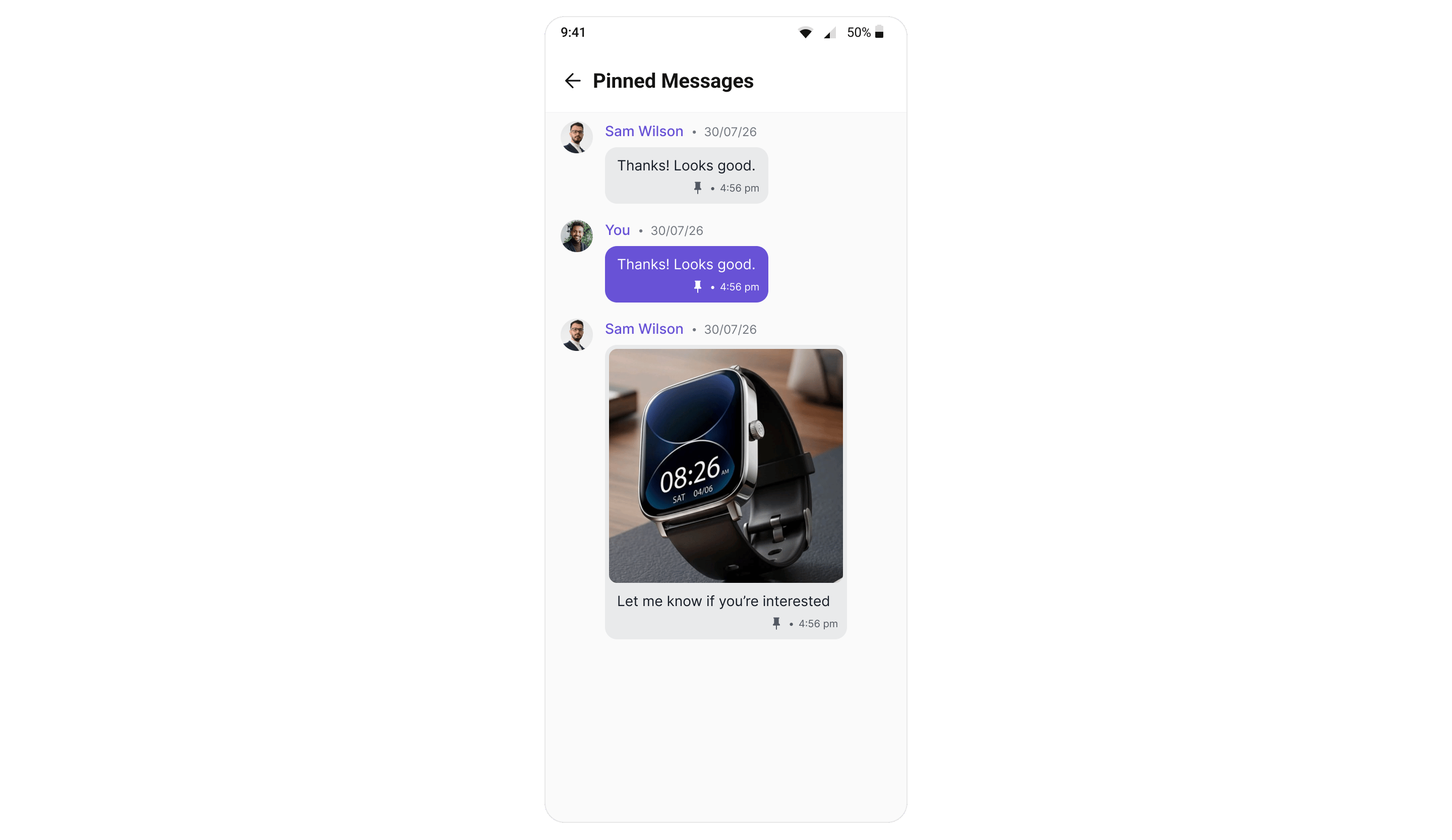
CometChatPinnedMessages lists the messages pinned in one conversation, newest pin first. A pin is conversation-wide and visible to everyone, so this screen shows the same set to every participant.
Where It Fits
Open it from your conversation screen, scoped to the conversation the user is in — the Message Header provides a built-in “Pinned messages” menu item for this. It is a full-screen panel with its own back affordance rather than an inline strip. Each row renders the real message bubble, and a long-press menu offers Message info, Copy, Translate (text messages), Unpin and Delete. There is no Subscribe/Unsubscribe to thread option here: a pin that arrives in real time doesn’t carry its thread’s subscription state, so the panel can’t label the toggle correctly. Messages themselves are pinned and unpinned from the Message List action sheet; wiresetOnMessageClickListener to jump back to a message in context.
Quick Start
- Kotlin (XML Views)
- Jetpack Compose
Add the component to your layout XML:Scope it to the conversation and wire the callbacks:
activity_pinned_messages.xml
PinnedMessagesActivity.kt
Actions and Events
Callback Methods
SDK Events (Real-Time, Automatic)
The list keeps itself up to date — when the logged-in user pins or unpins a message anywhere in the app, the row is added or removed without a refetch, via theMessagePinned / MessageUnpinned events on the UI Kit event bus; see Events. Pins made by other participants appear when the list is next opened or refetched (server-side real-time delivery for pin events is pending rollout).
Functionality
- Real bubbles — each row hosts the message’s actual bubble (text, image, video, audio, file), left-aligned with a
name • dateheader and the sender’s avatar. Your own messages render with the outgoing (primary-color) bubble style and the name You. - Long-press menu — long-press a row for message actions: Message info, Copy, Translate (text messages), Unpin, and Delete. Unpinning asks for confirmation before it is performed.
- Jump to message — tapping a row emits the message through the click callback so you can open the conversation and scroll to it.
- Empty state — a built-in empty state (“No pinned messages yet”) is shown when the conversation has no pinned messages.
- Read-only — the screen never marks messages as read and does not affect unread counts or receipts.
ViewModel
The screen is backed byCometChatPinnedMessagesViewModel (in the shared core module), which fetches via MessagesRequestBuilder().setPinned(true) scoped to the set user or group, applies optimistic unpin with revert-on-error, and observes the event bus for live upkeep. In Compose you can inject your own instance through the viewModel parameter.
Next Steps
- Message List — where messages are pinned and unpinned, and where the bubble pin indicator appears.
- Message Header — the built-in “Pinned messages” menu entry point.
- Saved Messages — the private, cross-conversation counterpart.
- Pin A Message (SDK) — the underlying SDK APIs.