

AI Integration Quick Reference
AI Integration Quick Reference
Where It Fits
CometChatSearch is a composite search component. It searches across conversations and messages in real time and emits the selected result via setOnConversationClicked or setOnMessageClicked. Wire it to navigation so tapping a conversation opens the message view, or tapping a message scrolls to it in context.
- Kotlin (XML Views)
- Jetpack Compose
ChatActivity.kt
Quick Start
Add the component to your layout XML:activity_search.xml
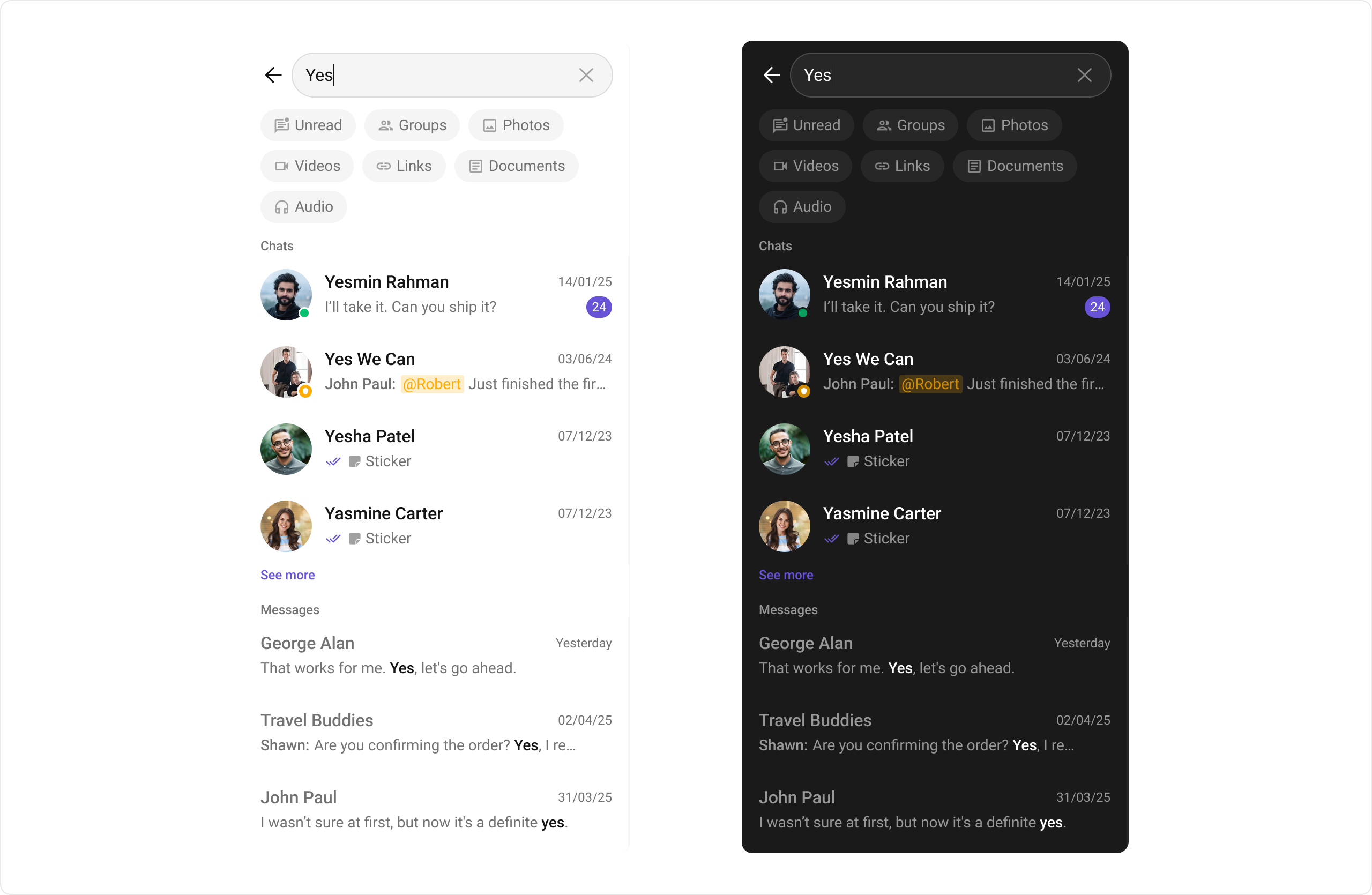
CometChatUIKit.init(), a user logged in, and the com.cometchat:chatuikit-kotlin-android dependency added.
To add programmatically in an Activity:
- Kotlin (XML Views)
- Jetpack Compose
SearchActivity.kt
Actions and Events
Callback Methods
setOnConversationClicked
Fires when a user taps a conversation from the search results. Primary navigation hook — set the active conversation and render the message view.
- Kotlin (XML Views)
- Jetpack Compose
SearchActivity.kt
What this does: Replaces the default conversation-click behavior. When a user taps a conversation item, your custom lambda executes. The callback receives the view, position, and Conversation object.
setOnMessageClicked
Fires when a user taps a message from the search results. Use to navigate to the message in context.
- Kotlin (XML Views)
- Jetpack Compose
SearchActivity.kt
What this does: Registers a callback that fires when the user taps a message in the search results. The callback receives the view, position, and BaseMessage object.
setOnBackPressListener
Fires when the user presses the back button in the search bar. Default: no predefined behavior.
- Kotlin (XML Views)
- Jetpack Compose
SearchActivity.kt
setOnError
Fires on internal errors (network failure, auth issue, SDK exception).
- Kotlin (XML Views)
- Jetpack Compose
SearchActivity.kt
setOnLoadMessages
Fires when the message list is successfully fetched and loaded, helping track when message search results are ready.
- Kotlin (XML Views)
- Jetpack Compose
SearchActivity.kt
setOnLoadConversations
Fires when the conversation list is successfully fetched and loaded, helping track when conversation search results are ready.
- Kotlin (XML Views)
- Jetpack Compose
SearchActivity.kt
setOnEmpty
Fires when the search returns no results, enabling custom handling such as showing a placeholder.
- Kotlin (XML Views)
- Jetpack Compose
SearchActivity.kt
- Verify: After setting an action callback, trigger the corresponding user interaction (tap a conversation result, tap a message result, press back, cause an error, or search for a term with no results) and confirm your custom logic executes.
Global UI Events
TheCometChatSearch component does not produce any global UI events.
SDK Events (Real-Time, Automatic)
TheCometChatSearch component does not listen to any SDK events internally. Search results are fetched on demand when the user types a query.
Functionality
Small functional customizations such as toggling visibility of UI elements and configuring search scope.- Verify: After calling a visibility or functionality method, confirm the corresponding UI element is shown or hidden, or the search scope is correctly applied.
Custom View Slots
Each slot replaces a section of the default UI. Conversation item slots use theConversationsSearchViewHolderListener pattern (createView + bindView). Message item slots use the MessagesSearchViewHolderListener pattern.
setConversationItemView
Replace the entire conversation item row in search results.
- Kotlin (XML Views)
- Jetpack Compose
SearchActivity.kt
What this does: Registers aConversationsSearchViewHolderListenerfor conversation items in search results. ThecreateViewmethod inflates a custom layout, andbindViewpopulates it with the conversation name based on whether it’s a user or group conversation.
setTextMessageItemView
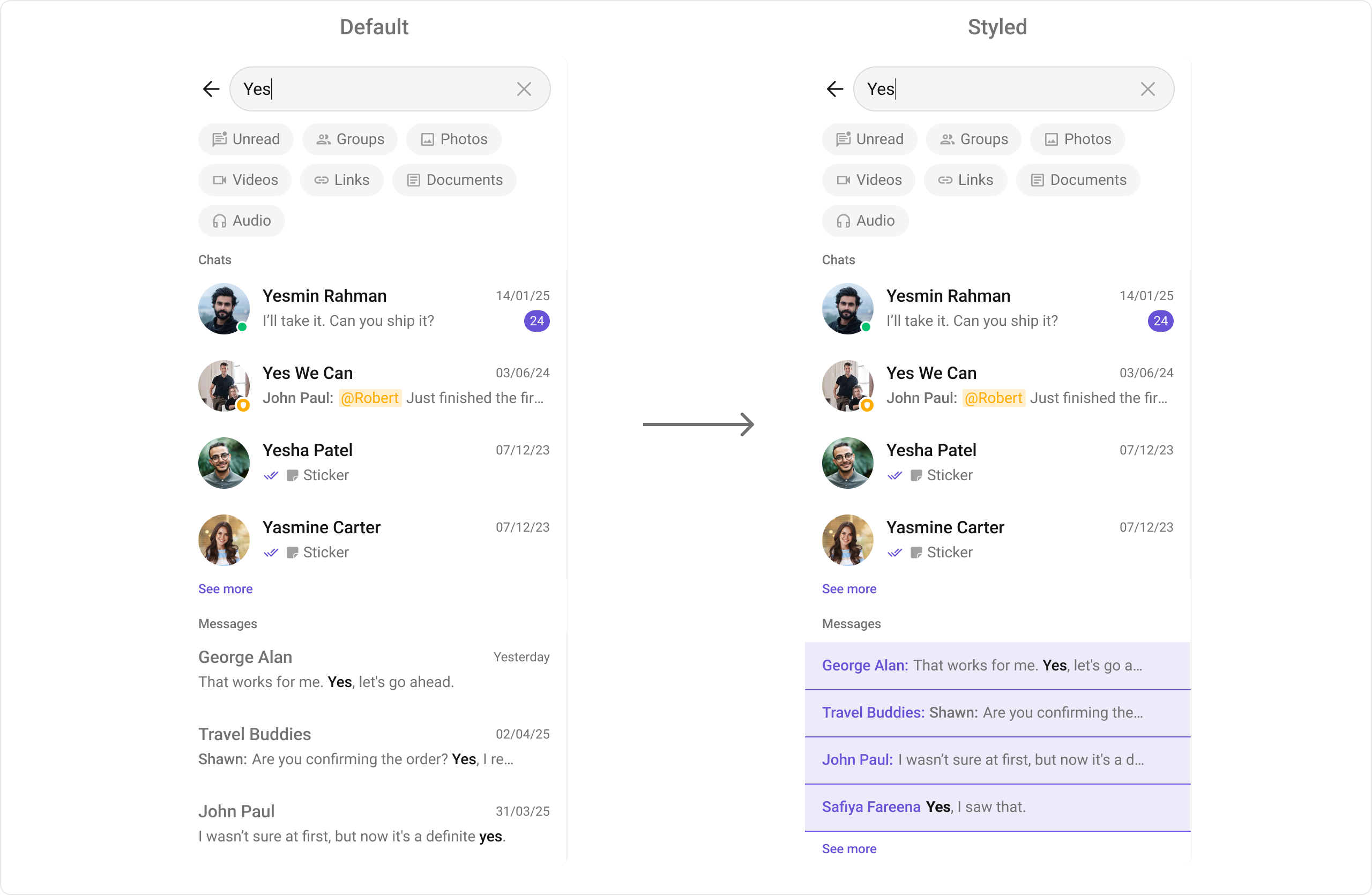
Replace the text message item view in search results.
Define a custom layout XML:
custom_message_item_view.xml
- Kotlin (XML Views)
- Jetpack Compose
SearchActivity.kt
What this does: Registers aMessagesSearchViewHolderListenerfor text messages. ThecreateViewmethod inflates the custom layout, andbindViewpopulates the sender name and message text from theTextMessageobject.
Other Message Item Views
The following message item view methods follow the sameMessagesSearchViewHolderListener pattern as setTextMessageItemView:
setInitialView
Sets a custom view displayed when the search component is rendered and no search has been performed.
- Kotlin (XML Views)
- Jetpack Compose
setEmptyView
Configures a custom view displayed when the search returns no results.
- Kotlin (XML Views)
- Jetpack Compose
setLoadingView
Sets a custom loading view displayed when search results are being fetched.
- Kotlin (XML Views)
- Jetpack Compose
setErrorView
Defines a custom error state view that appears when an issue occurs while searching.
- Kotlin (XML Views)
- Jetpack Compose
- Verify: After setting any custom view slot, confirm the custom view renders in the correct position within the search result items, and the data binding populates correctly for each result.
Common Patterns
Messages-only search
- Kotlin (XML Views)
- Jetpack Compose
Filter by message type
- Kotlin (XML Views)
- Jetpack Compose
Scope search to a specific user
- Kotlin (XML Views)
- Jetpack Compose
Scope search to a specific group
- Kotlin (XML Views)
- Jetpack Compose
Advanced Methods
Search Scope
setUid
Scopes the search to a specific user’s conversation.
- Kotlin (XML Views)
- Jetpack Compose
setGuid
Scopes the search to a specific group’s conversation.
- Kotlin (XML Views)
- Jetpack Compose
Request Builders
setConversationsRequestBuilder
Sets a ConversationsRequest.ConversationsRequestBuilder to filter conversation search results. Pass the builder instance — not the result of .build(). For all available builder options, refer to the ConversationRequestBuilder documentation.
- Kotlin (XML Views)
- Jetpack Compose
setMessagesRequestBuilder
Sets a MessagesRequest.MessagesRequestBuilder to filter message search results. For all available builder options, refer to the MessagesRequestBuilder documentation.
- Kotlin (XML Views)
- Jetpack Compose
Text Formatters
setTextFormatters
Enables developers to define and apply text formatters that dynamically modify or transform message content before rendering it in the UI. Text formatters can be used for:
- Automatically converting URLs into clickable links
- Applying Markdown or rich text styling
- Replacing certain words or patterns with emojis or predefined text
- Censoring specific words for moderation
Date/Time Formatting
setDateTimeFormatter
Provides a custom implementation of DateTimeFormatterCallback to configure how time and date values are displayed in search results.
- Kotlin (XML Views)
- Jetpack Compose
What this does: Provides a custom date/time formatter that displays “Today”, “Yesterday”, “Last Week” for recent messages, a “dd MMM yyyy” format for older messages, and relative time strings like “5 mins ago” or “2 hrs ago” for recent activity.
Other Advanced Methods
Style
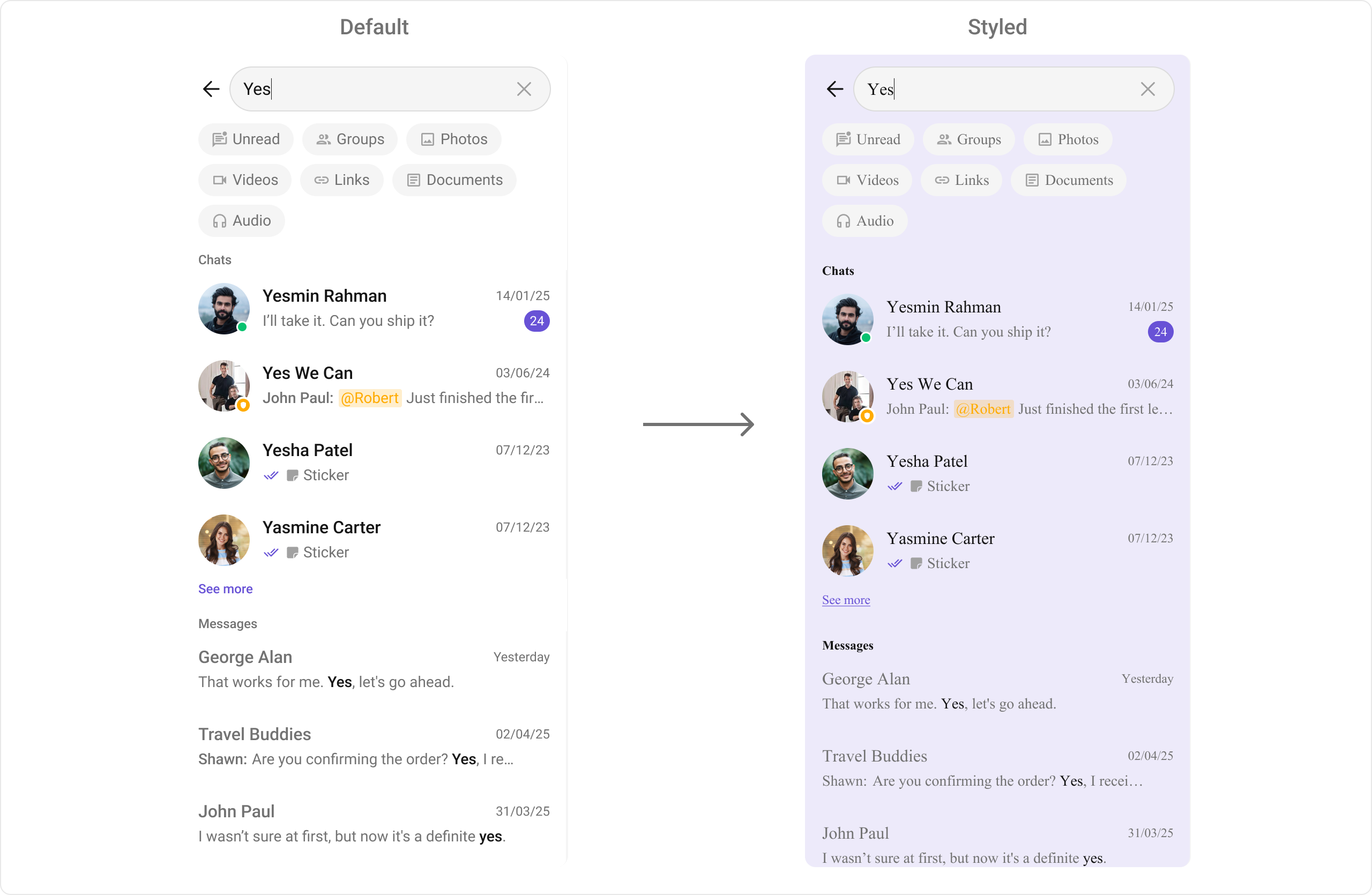
The component uses XML theme styles. Define a custom style with parentCometChatSearchStyle in themes.xml, then apply with setStyle().
themes.xml
What this does: Defines a custom search style that sets a light purple background color (#EDEAFA) for the search component, conversation items, and message items, and applies a Times New Roman font to all text elements including filter chips, section headers, conversation titles/subtitles, message titles/subtitles, timestamps, “see more” text, and the search bar.
- Kotlin (XML Views)
- Jetpack Compose
Programmatic Style Properties
In addition to XML theme styles, the component exposes programmatic setters for fine-grained control: Search Bar
Filter Chips
Section Headers
Conversation Items
Message Items
Other Style Properties
Customization Matrix
Next Steps
Conversations
Browse recent conversations
Users
Browse and search available users
Groups
Browse and search available groups
Message List
Display messages in a conversation