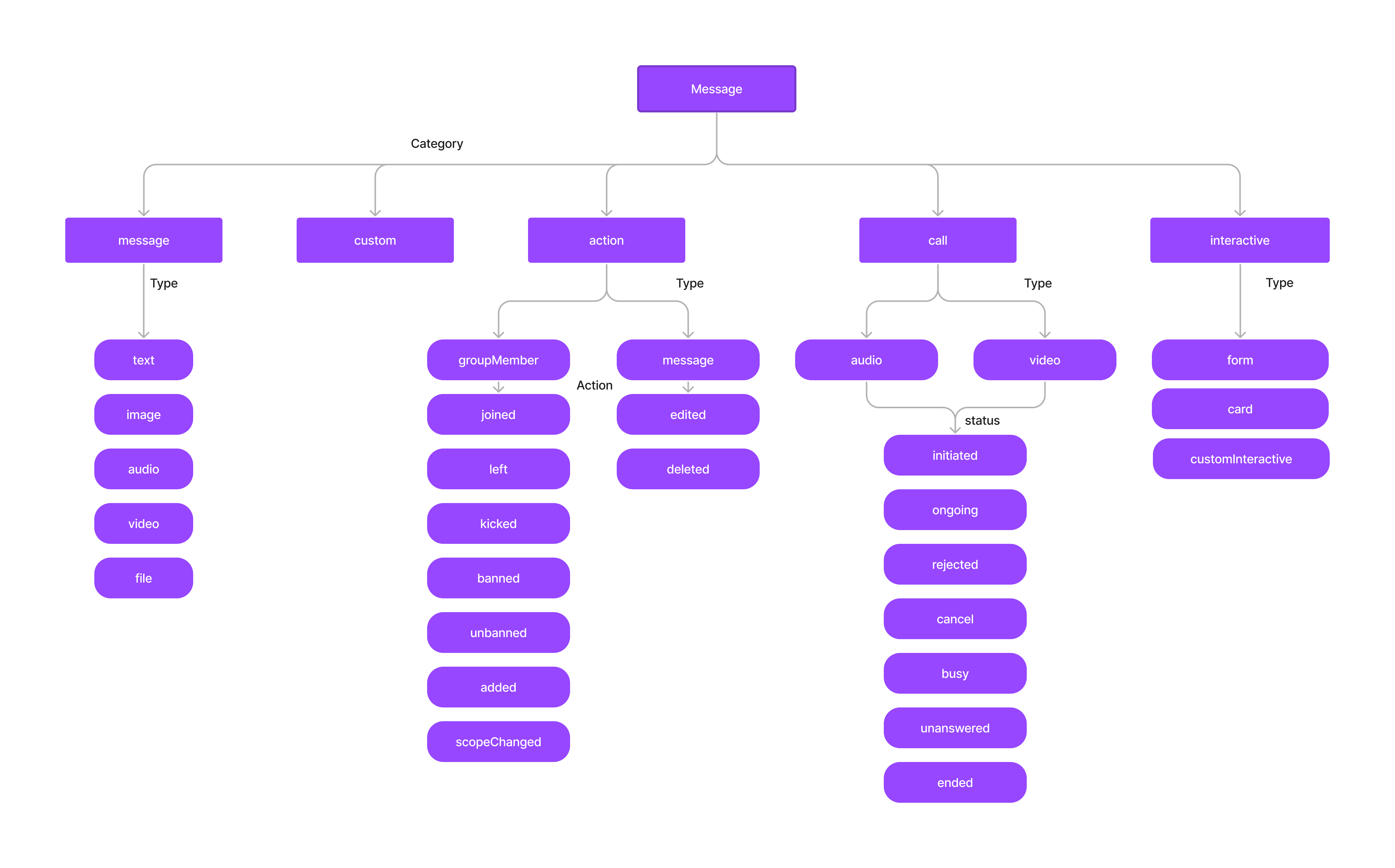
Message Categories:
  • Message: text, image, video, audio, file
  • Custom: Developer-defined types (e.g., location)
  • Interactive: form, card, customInteractive
  • Action: groupMember, message (system-generated)
  • Call: audio, video (with status: initiated, ongoing, ended, etc.)
Check message type:
when (message.category) {
    CometChatConstants.CATEGORY_MESSAGE -> { /* Handle message */ }
    CometChatConstants.CATEGORY_CUSTOM -> { /* Handle custom */ }
    CometChatConstants.CATEGORY_ACTION -> { /* Handle action */ }
    CometChatConstants.CATEGORY_CALL -> { /* Handle call */ }
}
Every message in CometChat belongs to a category and has a specific type within that category. Understanding this hierarchy helps you handle different message types correctly.

Message Hierarchy

Categories Overview

CategoryTypesDescription
messagetext, image, video, audio, fileStandard user messages
customDeveloper-definedCustom data (location, polls, etc.)
interactiveform, card, customInteractiveMessages with actionable UI elements
actiongroupMember, messageSystem-generated events
callaudio, videoCall-related messages

Checking Message Category and Type

Use getCategory() and getType() on a BaseMessage to determine how to handle a received message:
String category = message.getCategory();
String type = message.getType();

switch (category) {
    case CometChatConstants.CATEGORY_MESSAGE:
        if (type.equals(CometChatConstants.MESSAGE_TYPE_TEXT)) {
            TextMessage textMsg = (TextMessage) message;
            Log.d(TAG, "Text: " + textMsg.getText());
        } else if (type.equals(CometChatConstants.MESSAGE_TYPE_IMAGE)) {
            MediaMessage mediaMsg = (MediaMessage) message;
            Log.d(TAG, "Image URL: " + mediaMsg.getAttachment().getFileUrl());
        }
        break;
    case CometChatConstants.CATEGORY_CUSTOM:
        CustomMessage customMsg = (CustomMessage) message;
        Log.d(TAG, "Custom type: " + type + ", data: " + customMsg.getCustomData());
        break;
    case CometChatConstants.CATEGORY_ACTION:
        Action actionMsg = (Action) message;
        Log.d(TAG, "Action: " + actionMsg.getAction());
        break;
    case CometChatConstants.CATEGORY_CALL:
        Call callMsg = (Call) message;
        Log.d(TAG, "Call status: " + callMsg.getCallStatus());
        break;
}

Message

Standard user messages. Types: text, image, video, audio, file.

Custom

Developer-defined messages for content that doesn’t fit standard categories (e.g., location sharing, polls). Set your own type string to identify the custom message.

Interactive

Messages with embedded UI elements users can interact with directly in chat. Types: form, card, customInteractive.
See Interactive Messages for full details.

Action

System-generated messages triggered by actions on group members or messages. Represented as Action objects. Types: groupMember, message. The action property specifies what happened: For groupMember: joined, left, kicked, banned, unbanned, added, scopeChanged For message: edited, deleted

Call

Call-related messages. Types: audio, video. Represented as Call objects. The status property indicates the call state: initiated, ongoing, canceled, rejected, unanswered, busy, ended.

Next Steps

Send Message

Send text, media, and custom messages

Receive Messages

Handle incoming messages of all types

Additional Message Filtering

Filter messages by category, type, and other parameters

Interactive Messages

Create and handle interactive form and card messages