Documentation Index

Fetch the complete documentation index at: https://www.cometchat.com/docs/llms.txt

Use this file to discover all available pages before exploring further.

Once a user is logged in, you can send text messages to other users (1:1) or to groups.

Message Flow


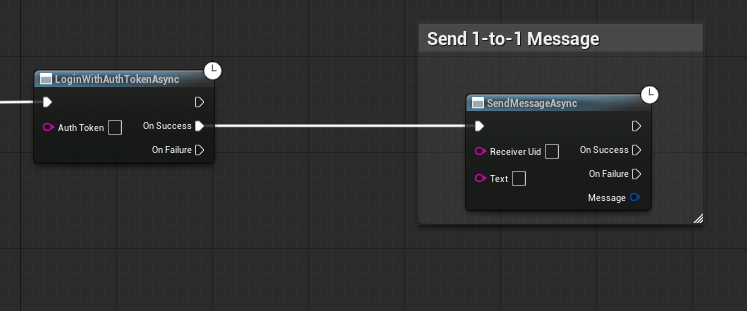
Send a User Message

Send a text message to a specific user by their UID.
  1. Get a reference to the CometChat Subsystem
  2. Call the Send Message Async node
  3. Wire the On Success and On Failure pins
ParameterTypeDescription
Receiver UidFStringThe UID of the user to send the message to
TextFStringThe message body
On Success returns an FCometChatMessage with the sent message details (including the server-assigned Id and SentAt timestamp).

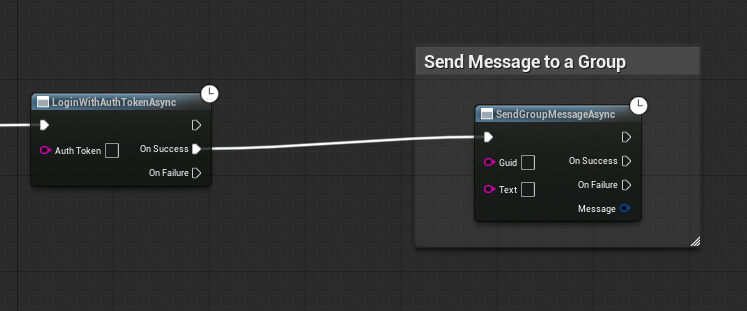
Send a Group Message

Send a text message to a group by its GUID.
Call the Send Group Message Async node.
ParameterTypeDescription
GuidFStringThe unique identifier of the target group
TextFStringThe message body
On Success returns an FCometChatMessage.

The FCometChatMessage Struct

Both send operations return an FCometChatMessage on success. Here’s a quick reference of the key fields:
PropertyTypeDescription
IdFStringServer-assigned unique message ID
SenderUidFStringUID of the sender (the logged-in user)
ReceiverUidFStringUID of the receiver (user UID or group GUID)
TextFStringThe message body
SentAtint64Unix timestamp when the message was sent
TypeFStringtext for text messages
ReceiverTypeFStringuser for 1:1, group for group messages
ConversationIdFStringUnique conversation identifier
For the full struct definition, see Key Concepts → FCometChatMessage.

Next Steps

Receive Messages

Fetch message history and listen for incoming messages in real time.

Groups

Create and manage groups before sending group messages.