

Group Lifecycle
Create a Group
Create a new group with a name and an initial set of member UIDs.- Blueprint
- C++
Call the Create Group Async node.
On Success returns an
FCometChatGroup with the server-assigned Guid.Join a Group
Join an existing group by its GUID.- Blueprint
- C++
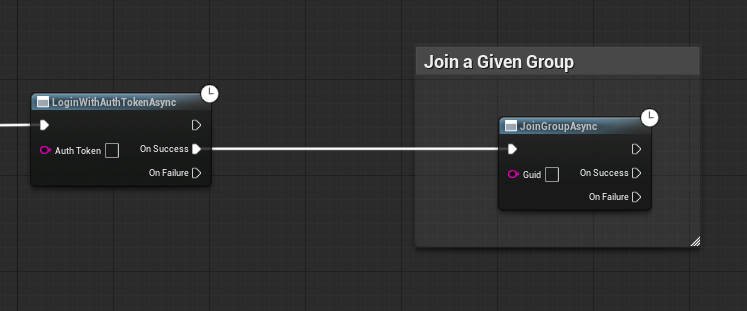
On Success fires with no output — the user is now a member.
Leave a Group
Leave a group you’re currently a member of.- Blueprint
- C++
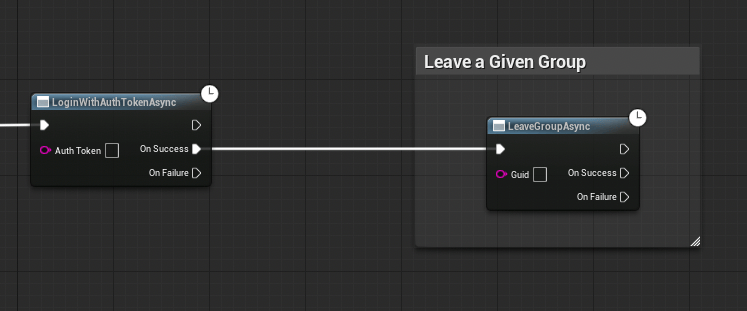
On Success fires with no output.
Fetch Groups
Retrieve a list of groups with optional search and filters.- Blueprint
- C++
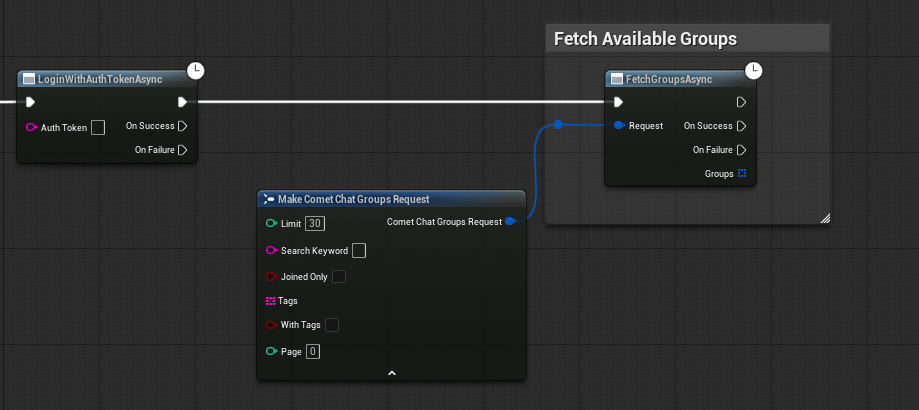
FCometChatGroupsRequest struct. Set bJoinedOnly = true to only fetch groups the user has joined, or leave it false to browse all available groups.Send a Group Message
Send a text message to all members of a group. See Send a Message → Group Messages for details.Fetch Group Message History
Retrieve previous messages from a group with pagination. See Receive Messages → Group Messages for details.FCometChatGroup Properties
Next Steps
Send a Message
Send messages to users and groups.
Real-Time Events
Listen for messages, presence, typing, and more.