AI Integration Quick Reference
Field Value Package @cometchat/chat-uikit-angularKey class CometChatTextFormatter (abstract base class for custom formatters)Required setup CometChatUIKit.init(uiKitSettings) then CometChatUIKit.login("UID")Purpose Extend to create custom inline text patterns with regex, styling, and callbacks Features Text formatting, customizable styles, dynamic text replacement, input field integration, key event callbacks Related ShortCut Formatter | Mentions Formatter | All Guides
CometChatTextFormatter is an abstract class for formatting text in the message composer and message bubbles. Extend it to build custom formatters — hashtags, keywords, or any regex-based pattern.Capability Description Text formatting Auto-format text based on regex patterns and styles Custom styles Set colors, fonts, and backgrounds for matched text Dynamic replacement Regex-based find-and-replace in user input Input integration Real-time monitoring of the composer input field Key event callbacks Hooks for keyUp and keyDown events
Always wrap formatted output in a <span> with a unique CSS class (e.g. "custom-hashtag"). This tells the UI Kit to render it as-is instead of sanitizing it.
Steps 1. Import the base class import { CometChatTextFormatter } from "@cometchat/chat-uikit-angular" ;
2. Extend it class HashTagTextFormatter extends CometChatTextFormatter { // ... }
Set the character that triggers formatting, the regex to match, and the regex to strip formatting back to plain text.
this . setTrackingCharacter ( "#" ); this . setRegexPatterns ([ / \B # ( \w + ) \b / g ]); this . setRegexToReplaceFormatting ([ /<span class="custom-hashtag" style="color: #30b3ff;"># ( \w + ) < \/ span>/ g , ]);
4. Set key event callbacks this . setKeyUpCallBack ( this . onKeyUp . bind ( this )); this . setKeyDownCallBack ( this . onKeyDown . bind ( this ));
getFormattedText ( inputText : string ) { /* ... */ } getOriginalText ( inputText : string ) { /* ... */ } customLogicToFormatText ( inputText : string ) { /* ... */ }
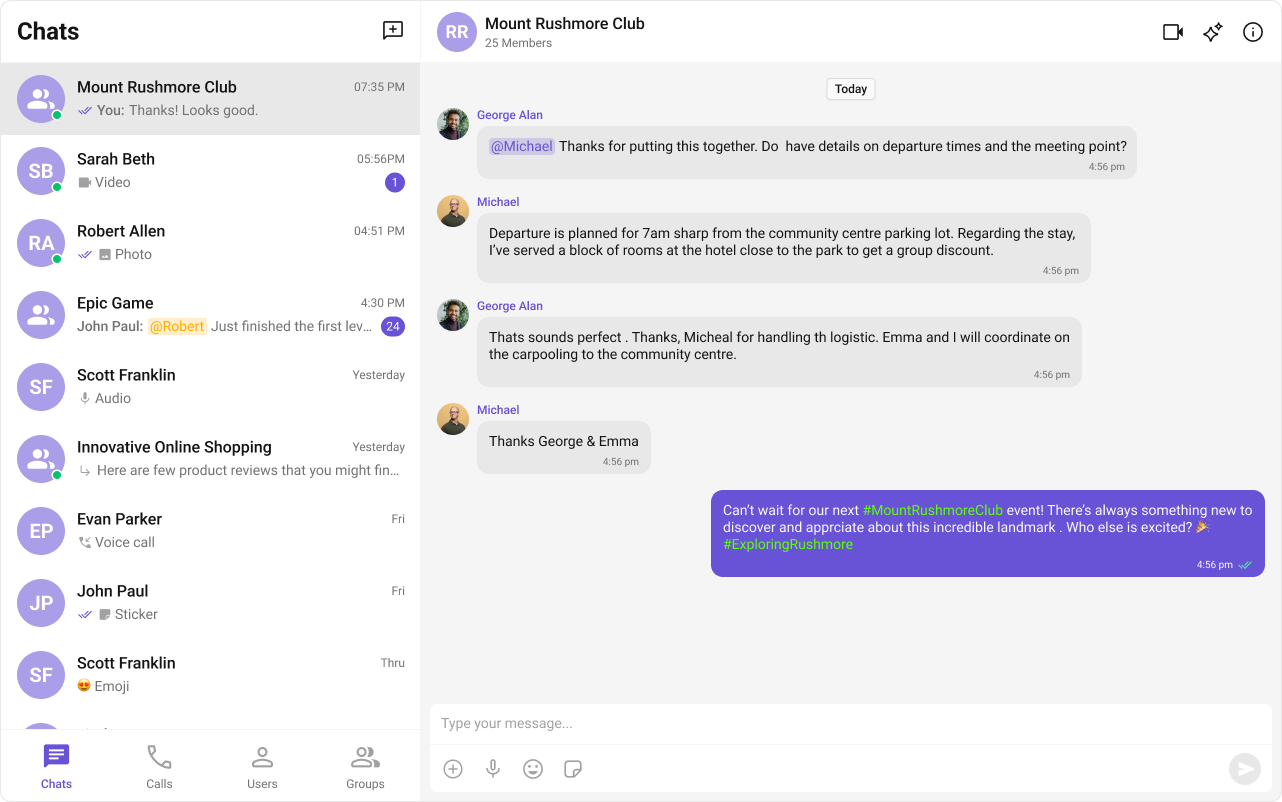
Example A hashtag formatter used with cometchat-message-list and cometchat-message-composer.
HashTagTextFormatter.ts
Component Usage
import { CometChatTextFormatter } from "@cometchat/chat-uikit-angular" ; export class HashTagTextFormatter extends CometChatTextFormatter { constructor () { super (); this . setTrackingCharacter ( "#" ); this . setRegexPatterns ([ / \B # ( \w + ) \b / g ]); this . setRegexToReplaceFormatting ([ /# ( \w + ) / g ]); this . setKeyUpCallBack ( this . onKeyUp . bind ( this )); this . setKeyDownCallBack ( this . onKeyDown . bind ( this )); this . setReRender (() => { console . log ( "Re-rendering message composer to update text content." ); }); } getCaretPosition () : number { if ( ! this . inputElementReference ) return 0 ; const selection = window . getSelection (); if ( ! selection || selection . rangeCount === 0 ) return 0 ; const range = selection . getRangeAt ( 0 ); const clonedRange = range . cloneRange (); clonedRange . selectNodeContents ( this . inputElementReference ); clonedRange . setEnd ( range . endContainer , range . endOffset ); return clonedRange . toString (). length ; } setCaretPosition ( position : number ) { if ( ! this . inputElementReference ) return ; const range = document . createRange (); const selection = window . getSelection (); if ( ! selection ) return ; range . setStart ( this . inputElementReference . childNodes [ 0 ] || this . inputElementReference , position ); range . collapse ( true ); selection . removeAllRanges (); selection . addRange ( range ); } onKeyUp ( event : KeyboardEvent ) { if ( event . key === this . trackCharacter ) { this . startTracking = true ; } if ( this . startTracking && ( event . key === " " || event . key === "Enter" )) { const caretPosition = this . getCaretPosition (); this . formatText (); this . setCaretPosition ( caretPosition ); } if ( this . startTracking && event . key !== " " && event . key !== "Enter" && this . getCaretPosition () === this . inputElementReference ?. innerText ?. length ) { this . startTracking = false ; } } formatText () { const inputValue = this . inputElementReference ?. innerText || this . inputElementReference ?. textContent || "" ; const formattedText = this . getFormattedText ( inputValue ); if ( this . inputElementReference ) { this . inputElementReference . innerHTML = formattedText || "" ; this . reRender (); } } onKeyDown ( event : KeyboardEvent ) {} getFormattedText ( inputText : string ) { if ( ! inputText ) return ; return this . customLogicToFormatText ( inputText ); } customLogicToFormatText ( inputText : string ) { return inputText . replace ( / \B # ( \w + ) \b / g , '<span class="custom-hashtag" style="color: #5dff05;">#$1</span>' ); } getOriginalText ( inputText : string ) { if ( ! inputText ) return "" ; for ( let i = 0 ; i < this . regexToReplaceFormatting . length ; i ++ ) { const regexPattern = this . regexToReplaceFormatting [ i ]; if ( inputText ) { inputText = inputText . replace ( regexPattern , "#$1" ); } } return inputText ; } }
Pass the formatter via the textFormatters input on the message list and composer. import { Component , OnInit } from "@angular/core" ; import { CometChat } from "@cometchat/chat-sdk-javascript" ; import { CometChatMessageListComponent , CometChatMessageComposerComponent } from "@cometchat/chat-uikit-angular" ; import { HashTagTextFormatter } from "./HashTagTextFormatter" ; @ Component ({ selector: "app-message-demo" , standalone: true , imports: [ CometChatMessageListComponent , CometChatMessageComposerComponent ], template: ` <cometchat-message-list [user]="chatUser" [textFormatters]="textFormatters"> </cometchat-message-list> <cometchat-message-composer [user]="chatUser" [textFormatters]="textFormatters"> </cometchat-message-composer> ` , }) export class MessageDemoComponent implements OnInit { chatUser : CometChat . User | undefined ; textFormatters = [ new HashTagTextFormatter ()]; ngOnInit () { CometChat . getUser ( "uid" ). then (( user ) => { this . chatUser = user ; }); } }
Methods Reference Field Setter Description trackCharactersetTrackingCharacter(char)Character that starts tracking (e.g. # for hashtags) currentCaretPositionsetCaretPositionAndRange(selection, range)Current selection set by the composer currentRangesetCaretPositionAndRange(selection, range)Text range or cursor position set by the composer inputElementReferencesetInputElementReference(element)DOM reference to the composer input field regexPatternssetRegexPatterns(patterns)Regex patterns to match text for formatting regexToReplaceFormattingsetRegexToReplaceFormatting(patterns)Regex patterns to strip formatting back to plain text keyUpCallBacksetKeyUpCallBack(fn)Callback for key up events keyDownCallBacksetKeyDownCallBack(fn)Callback for key down events reRendersetReRender(fn)Triggers a re-render of the composer to update displayed text loggedInUsersetLoggedInUser(user)Logged-in user object, set by composer and text bubbles idsetId(id)Unique identifier for the formatter instance
Don’t modify textContent or innerHTML of the input element directly. Call reRender instead — the composer will invoke getFormattedText for all formatters in order.
Override Methods getFormattedText
onKeyUp
onKeyDown
getOriginalText
Returns formatted HTML from input text, or edits at cursor position if inputText is null. getFormattedText ( inputText : string | null , params : any ): string | void { if ( ! inputText ) { return ; // edit at cursor position } return this . customLogicToFormatText ( inputText ); }
Handles keyup events. Start tracking when the track character is typed. onKeyUp ( event : KeyboardEvent ) { if ( event . key === this . trackCharacter ) { this . startTracking = true ; } if ( this . startTracking && event . key === " " ) { this . debouncedFormatTextOnKeyUp (); } }
Handles keydown events. onKeyDown ( event : KeyboardEvent ) {}
Strips formatting and returns plain text. getOriginalText ( inputText : string | null | undefined ): string { if ( ! inputText ) return "" ; for ( let i = 0 ; i < this . regexToReplaceFormatting . length ; i ++ ) { const regexPattern = this . regexToReplaceFormatting [ i ]; if ( inputText ) { inputText = inputText . replace ( regexPattern , "$1" ); } } return inputText ; }
Next Steps Mentions Formatter Add @mentions with styled tokens.
Message Composer Customize the message input component.
All Guides Browse all feature and formatter guides.
ShortCut Formatter Implement text expansion shortcuts.