{
  "component": "CometChatNotificationFeedComponent",
  "package": "@cometchat/chat-uikit-angular",
  "selector": "cometchat-notification-feed",
  "import": "import { CometChatNotificationFeedComponent } from \"@cometchat/chat-uikit-angular\";",
  "description": "Full-screen notification feed with category filtering, timestamp grouping, card rendering via @cometchat/cards-angular, real-time updates, and automatic engagement reporting.",
  "cssRootClass": ".cometchat-notification-feed",
  "inputs": {
    "data": {
      "notificationFeedRequestBuilder": { "type": "CometChat.NotificationFeedRequestBuilder", "default": "SDK default (15 per page)" },
      "notificationCategoriesRequestBuilder": { "type": "CometChat.NotificationCategoriesRequestBuilder", "default": "SDK default" },
      "scrollToItemId": { "type": "string", "default": "undefined" }
    },
    "visibility": {
      "title": { "type": "string", "default": "localized \"Notifications\"" },
      "showHeader": { "type": "boolean", "default": true },
      "showBackButton": { "type": "boolean", "default": false },
      "showFilterChips": { "type": "boolean", "default": true }
    },
    "templates": {
      "headerView": "TemplateRef<any>",
      "emptyStateView": "TemplateRef<any>",
      "errorStateView": "TemplateRef<any>",
      "loadingStateView": "TemplateRef<any>"
    },
    "cards": {
      "cardThemeMode": { "type": "\"auto\" | \"light\" | \"dark\"", "default": "\"auto\"" },
      "cardThemeOverride": { "type": "Record<string, any>", "default": "undefined" }
    },
    "style": { "type": "CometChatNotificationFeedStyle", "default": "undefined" }
  },
  "outputs": {
    "itemClick": "EventEmitter<NotificationFeedItem>",
    "actionClick": "EventEmitter<{ item: NotificationFeedItem; action: CardAction }>",
    "error": "EventEmitter<CometChat.CometChatException>",
    "backClick": "EventEmitter<void>"
  },
  "automaticBehaviors": [
    "Real-time updates via addNotificationFeedListener",
    "Delivery reporting on fetch",
    "Read reporting on viewport visibility (IntersectionObserver)",
    "Unread count polling every 30 seconds",
    "Infinite scroll pagination",
    "Timestamp grouping (Today, Yesterday, day name, date)",
    "Category filter chips with unread badges"
  ]
}
CometChatNotificationFeedComponent displays a scrollable notification feed where each item is rendered as a card using @cometchat/cards-angular. It handles fetching, pagination, category filtering, timestamp grouping, real-time updates, and read/delivered/engagement reporting automatically.
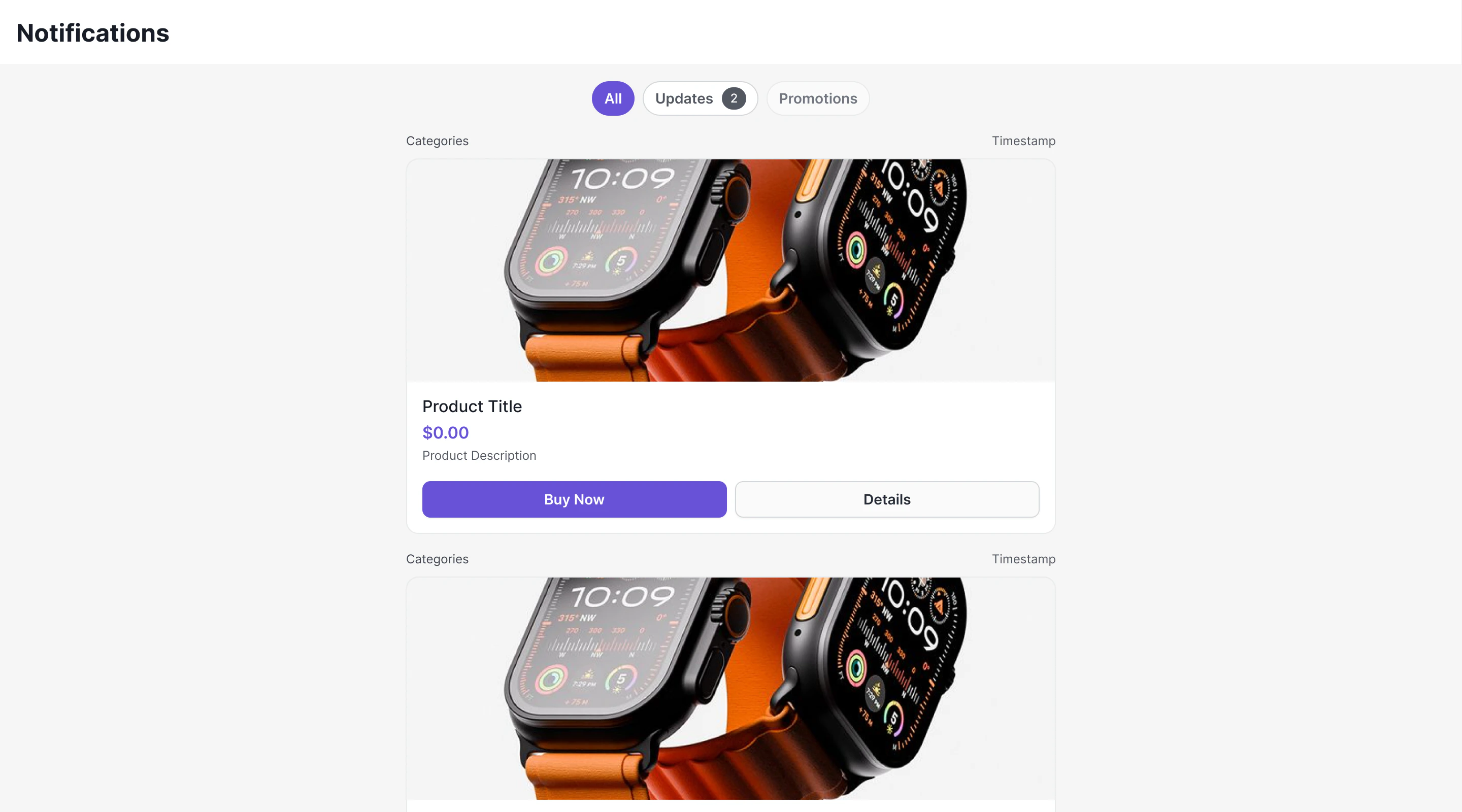
Where It Fits

CometChatNotificationFeedComponent is a full-screen, standalone component. Drop it into a page or route. It manages its own data fetching, state, and real-time listeners — you just handle the navigation outputs.
import { Component } from "@angular/core";
import { CometChatNotificationFeedComponent } from "@cometchat/chat-uikit-angular";

@Component({
  selector: "app-notifications-page",
  standalone: true,
  imports: [CometChatNotificationFeedComponent],
  template: `
    <cometchat-notification-feed
      [showBackButton]="true"
      (backClick)="goBack()"
      (itemClick)="onItemClick($event)"
    ></cometchat-notification-feed>
  `,
})
export class NotificationsPageComponent {
  goBack(): void {
    history.back();
  }

  onItemClick(item: any): void {
    // Handle item click (e.g., open detail or deep link)
  }
}

Minimal Render

import { Component } from "@angular/core";
import { CometChatNotificationFeedComponent } from "@cometchat/chat-uikit-angular";

@Component({
  selector: "app-notifications-demo",
  standalone: true,
  imports: [CometChatNotificationFeedComponent],
  template: `
    <div style="width: 100%; height: 100vh;">
      <cometchat-notification-feed></cometchat-notification-feed>
    </div>
  `,
})
export class NotificationsDemoComponent {}
Prerequisites: CometChat SDK initialized with CometChatUIKit.init() and a user logged in. Root CSS class: .cometchat-notification-feed

Filtering Feed Items

Control what loads using a custom request builder:
import { Component } from "@angular/core";
import { CometChat } from "@cometchat/chat-sdk-javascript";
import { CometChatNotificationFeedComponent } from "@cometchat/chat-uikit-angular";

@Component({
  selector: "app-unread-notifications",
  standalone: true,
  imports: [CometChatNotificationFeedComponent],
  template: `
    <cometchat-notification-feed
      [notificationFeedRequestBuilder]="requestBuilder"
    ></cometchat-notification-feed>
  `,
})
export class UnreadNotificationsComponent {
  requestBuilder = new CometChat.NotificationFeedRequestBuilder()
    .setLimit(30)
    .setReadState("unread")
    .setCategory("promotions")
    .build();
}

Filter Options

Builder MethodDescription
.setLimit(number)Items per page (default 15)
.setReadState(state)"read", "unread", or "all"
.setCategory(string)Filter by category
.setChannelId(string)Filter by channel
.setTags(string[])Filter by tags
.setDateFrom(string)ISO 8601 date lower bound
.setDateTo(string)ISO 8601 date upper bound

Actions and Events

Outputs

itemClick

Fires when a feed item card is clicked. Emits the NotificationFeedItem.
<cometchat-notification-feed
  (itemClick)="onItemClick($event)"
></cometchat-notification-feed>
onItemClick(item: any): void {
  console.log("Item clicked:", item.getId());
}

actionClick

Fires when an interactive element (button, link) inside a card is clicked. Emits { item, action }, where action contains the action type, parameters, and the element ID that triggered it.
<cometchat-notification-feed
  (actionClick)="onActionClick($event)"
></cometchat-notification-feed>
onActionClick(event: { item: any; action: any }): void {
  const { type, params, elementId } = event.action;
  switch (type) {
    case "openUrl":
      window.open(params.url, "_blank");
      break;
    case "chatWithUser":
      // Navigate to chat with params.uid
      break;
    case "chatWithGroup":
      // Navigate to group chat with params.guid
      break;
  }
}

error

Fires when an internal error occurs (network failure, SDK exception). Emits a CometChat.CometChatException.
<cometchat-notification-feed
  (error)="onError($event)"
></cometchat-notification-feed>

backClick

Fires when the back button in the header is clicked. Emits void.
<cometchat-notification-feed
  [showBackButton]="true"
  (backClick)="goBack()"
></cometchat-notification-feed>

Automatic Behaviors

The component handles these automatically — no manual setup needed:
BehaviorDescription
Real-time updatesNew items appear at the top via addNotificationFeedListener
Delivery reportingItems are reported as delivered when fetched (markFeedItemAsDelivered)
Read reportingItems are reported as read when visible in the viewport (IntersectionObserver → markFeedItemAsRead)
Unread count pollingPolls the unread count every 30 seconds to update badges
Infinite scrollFetches the next page when scrolling near the bottom
Timestamp groupingGroups items as “Today”, “Yesterday”, day name, or date
Category filteringFilter chips row with per-category unread badges

Customization

Template Slots

Replace individual regions with your own ng-template. Bind the template reference to the matching input:
<cometchat-notification-feed
  [headerView]="header"
  [emptyStateView]="empty"
  [loadingStateView]="loading"
  [errorStateView]="errorTpl"
></cometchat-notification-feed>

<ng-template #header>
  <!-- custom header -->
</ng-template>
<ng-template #empty>
  <!-- custom empty state -->
</ng-template>
<ng-template #loading>
  <!-- custom loading state -->
</ng-template>
<ng-template #errorTpl>
  <!-- custom error state -->
</ng-template>
InputTypeReplaces
headerViewTemplateRef<any>Entire header bar
loadingStateViewTemplateRef<any>Loading state
emptyStateViewTemplateRef<any>Empty state
errorStateViewTemplateRef<any>Error state

Style Input

Pass a CometChatNotificationFeedStyle object to override colors, fonts, and dimensions without writing CSS:
import { CometChatNotificationFeedStyle } from "@cometchat/chat-uikit-angular";

feedStyle: CometChatNotificationFeedStyle = {
  backgroundColor: "#1a1a2e",
  headerTitleColor: "#ffffff",
  chipActiveBackgroundColor: "#6852d6",
  cardBorderRadius: "12px",
};
<cometchat-notification-feed [style]="feedStyle"></cometchat-notification-feed>
FieldType
backgroundColorstring
width / heightstring
headerTitleColor / headerTitleFontstring
chipActiveBackgroundColor / chipActiveTextColorstring
chipInactiveBackgroundColor / chipInactiveTextColorstring
chipBorderColorstring
badgeBackgroundColor / badgeTextColorstring
separatorColorstring
timestampTextColor / timestampFontstring
cardBackgroundColor / cardBorderColor / cardBorderRadius / cardBorderWidthstring
unreadIndicatorColorstring

CSS Styling

Override design tokens on the component selector:
cometchat-notification-feed {
  --cometchat-background-color-01: #1a1a2e;
  --cometchat-text-color-primary: #ffffff;
}

CSS Classes

ClassDescription
.cometchat-notification-feedRoot container
.cometchat-notification-feed__headerHeader bar
.cometchat-notification-feed__header-titleHeader title text
.cometchat-notification-feed__header-backBack button
.cometchat-notification-feed__chipsFilter chips container
.cometchat-notification-feed__chipIndividual filter chip
.cometchat-notification-feed__chip--activeActive filter chip
.cometchat-notification-feed__chip--inactiveInactive filter chip
.cometchat-notification-feed__chip-badgeChip unread badge
.cometchat-notification-feed__contentScrollable content area
.cometchat-notification-feed__itemFeed item container
.cometchat-notification-feed__item--unreadUnread feed item
.cometchat-notification-feed__unread-indicatorUnread dot indicator
.cometchat-notification-feed__item-metaItem metadata row (category + time)
.cometchat-notification-feed__card-containerCard wrapper
.cometchat-notification-feed__loadingLoading state
.cometchat-notification-feed__emptyEmpty state
.cometchat-notification-feed__errorError state

Inputs

All inputs are optional.
InputTypeDefaultDescription
titlestringlocalized "Notifications"Header title text
showHeaderbooleantrueShows/hides the entire header
showBackButtonbooleanfalseShows/hides the back button in the header
showFilterChipsbooleantrueShows/hides the category filter chips row
scrollToItemIdstringundefinedDeep link: scroll to a specific item by ID on load
notificationFeedRequestBuilderCometChat.NotificationFeedRequestBuilderSDK defaultCustom request builder for fetching feed items
notificationCategoriesRequestBuilderCometChat.NotificationCategoriesRequestBuilderSDK defaultCustom request builder for fetching categories
headerViewTemplateRef<any>Built-in headerCustom header template
emptyStateViewTemplateRef<any>Built-in empty stateCustom empty state template
errorStateViewTemplateRef<any>Built-in error stateCustom error state template
loadingStateViewTemplateRef<any>Built-in loading stateCustom loading state template
styleCometChatNotificationFeedStyleundefinedStructured style overrides
cardThemeMode"auto" | "light" | "dark""auto"Theme mode forwarded to @cometchat/cards-angular
cardThemeOverrideRecord<string, any>undefinedTheme override forwarded to @cometchat/cards-angular

Outputs

OutputPayloadDescription
itemClickNotificationFeedItemA feed item card was clicked
actionClick{ item: NotificationFeedItem; action: CardAction }An interactive element inside a card was clicked
errorCometChat.CometChatExceptionThe component encountered an error
backClickvoidThe back button was pressed
The CardAction object contains:
  • type — Action type (e.g., "openUrl", "chatWithUser")
  • params — Action parameters (e.g., { url: "..." }, { uid: "..." })
  • elementId — ID of the element that triggered the action
  • cardJson — The raw card JSON the action originated from

Common Patterns

Show only unread items

requestBuilder = new CometChat.NotificationFeedRequestBuilder()
  .setReadState("unread")
  .build();
<cometchat-notification-feed
  [notificationFeedRequestBuilder]="requestBuilder"
></cometchat-notification-feed>

Hide filter chips and header

<cometchat-notification-feed
  [showHeader]="false"
  [showFilterChips]="false"
></cometchat-notification-feed>

Embed in a sidebar

<div style="width: 400px; height: 100vh; border-left: 1px solid #E0E0E0;">
  <cometchat-notification-feed
    title="Updates"
    [showBackButton]="false"
  ></cometchat-notification-feed>
</div>
<cometchat-notification-feed
  [scrollToItemId]="announcementId"
></cometchat-notification-feed>

Next Steps

Campaigns Feature

Overview of how campaigns work end-to-end

SDK Campaigns API

Low-level SDK APIs for feed items, categories, and engagement

Theming

Customize colors, fonts, and appearance

Components

Browse all prebuilt UI components