

AI Integration Quick Reference
AI Integration Quick Reference
| Field | Value |
|---|---|
| Package | @cometchat/chat-uikit-react-native |
| Framework | Expo |
| Components | CometChatConversations, CometChatMessageHeader, CometChatMessageList, CometChatMessageComposer |
| Layout | Conversation list → tap → message view |
| Prerequisite | Complete Expo Integration Steps 1–4 first |
| Pattern | WhatsApp, Telegram, Signal |
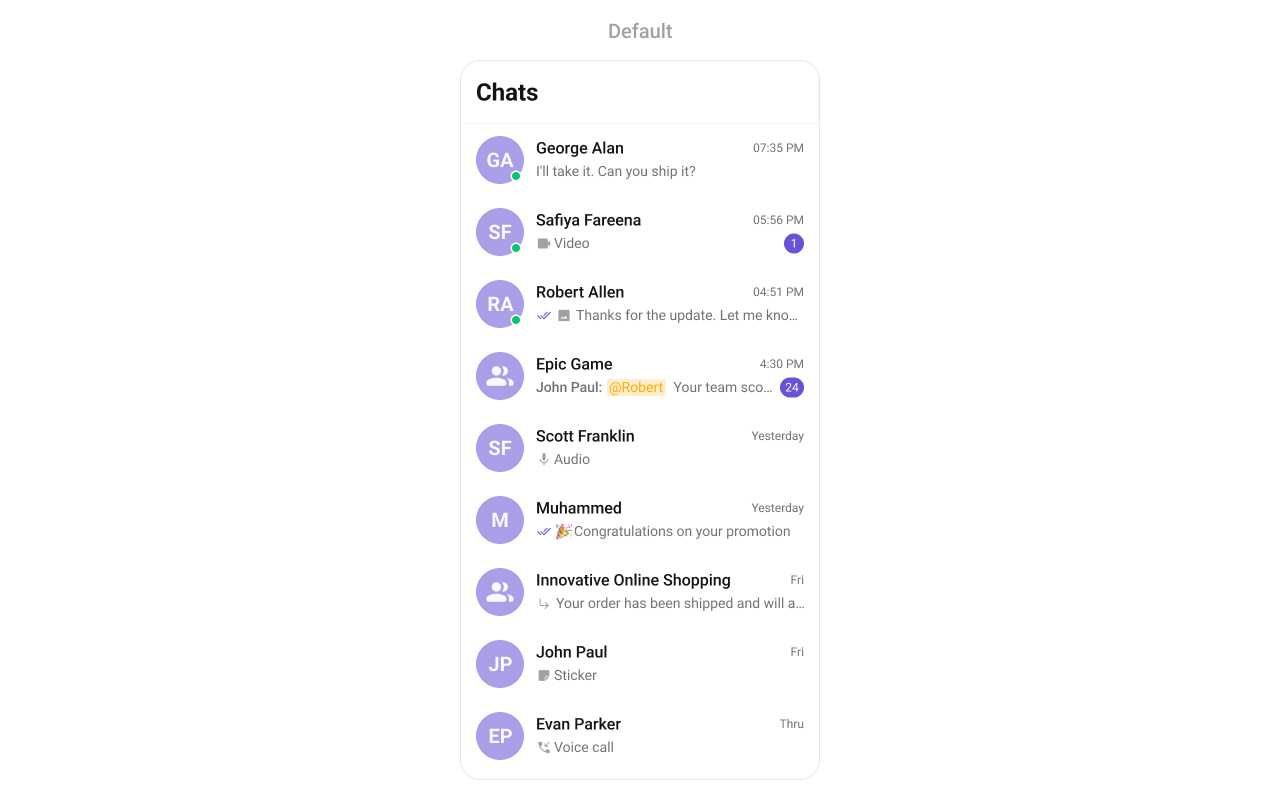
What You’re Building
Two screens working together:- Conversation list — shows all active conversations (users and groups)
- Message view — displays chat messages for the selected conversation with header, message list, and composer
Step 1 — Create the Messages Component
Create aMessages.tsx file that combines the message header, list, and composer:
- TypeScript
- JavaScript
Messages.tsx
import React from "react";
import { View, StyleSheet } from "react-native";
import {
  CometChatMessageHeader,
  CometChatMessageList,
  CometChatMessageComposer,
} from "@cometchat/chat-uikit-react-native";
import { CometChat } from "@cometchat/chat-sdk-react-native";

interface MessagesProps {
  user?: CometChat.User;
  group?: CometChat.Group;
  onBack: () => void;
}

const Messages = ({ user, group, onBack }: MessagesProps) => {
  return (
    <View style={styles.container}>
      <CometChatMessageHeader
        user={user}
        group={group}
        onBack={onBack}
        showBackButton
      />
      <CometChatMessageList user={user} group={group} />
      <CometChatMessageComposer user={user} group={group} />
    </View>
  );
};

const styles = StyleSheet.create({
  container: {
    flex: 1,
  },
});

export default Messages;
Messages.js
import React from "react";
import { View, StyleSheet } from "react-native";
import {
  CometChatMessageHeader,
  CometChatMessageList,
  CometChatMessageComposer,
} from "@cometchat/chat-uikit-react-native";

const Messages = ({ user, group, onBack }) => {
  return (
    <View style={styles.container}>
      <CometChatMessageHeader
        user={user}
        group={group}
        onBack={onBack}
        showBackButton
      />
      <CometChatMessageList user={user} group={group} />
      <CometChatMessageComposer user={user} group={group} />
    </View>
  );
};

const styles = StyleSheet.create({
  container: {
    flex: 1,
  },
});

export default Messages;
Step 2 — Update App.tsx
Wire the conversation list and message components together:- TypeScript
- JavaScript
App.tsx
import React, { useEffect, useState } from "react";
import { ViewStyle } from "react-native";
import { SafeAreaProvider, SafeAreaView } from "react-native-safe-area-context";
import { GestureHandlerRootView } from "react-native-gesture-handler";
import {
  CometChatConversations,
  CometChatUIKit,
  CometChatUiKitConstants,
  UIKitSettings,
  CometChatThemeProvider,
  CometChatI18nProvider,
} from "@cometchat/chat-uikit-react-native";
import { CometChat } from "@cometchat/chat-sdk-react-native";
import Messages from "./Messages";

const APP_ID = "APP_ID";
const AUTH_KEY = "AUTH_KEY";
const REGION = "REGION";
const UID = "cometchat-uid-1";

const App = (): React.ReactElement => {
  const [loggedIn, setLoggedIn] = useState(false);
  const [messageUser, setMessageUser] = useState<CometChat.User>();
  const [messageGroup, setMessageGroup] = useState<CometChat.Group>();

  useEffect(() => {
    const init = async () => {
      const uiKitSettings: UIKitSettings = {
        appId: APP_ID,
        authKey: AUTH_KEY,
        region: REGION,
        subscriptionType: CometChat.AppSettings
          .SUBSCRIPTION_TYPE_ALL_USERS as UIKitSettings["subscriptionType"],
      };

      try {
        await CometChatUIKit.init(uiKitSettings);
        await CometChatUIKit.login({ uid: UID });
        setLoggedIn(true);
      } catch (err) {
        console.error("Init/login error:", err);
      }
    };

    init();
  }, []);

  const handleConversationPress = (conversation: CometChat.Conversation) => {
    const conversationType = conversation.getConversationType();

    if (conversationType === CometChatUiKitConstants.ConversationTypeConstants.user) {
      setMessageUser(conversation.getConversationWith() as CometChat.User);
      setMessageGroup(undefined);
    } else {
      setMessageUser(undefined);
      setMessageGroup(conversation.getConversationWith() as CometChat.Group);
    }
  };

  const handleBack = () => {
    setMessageUser(undefined);
    setMessageGroup(undefined);
  };

  return (
    <GestureHandlerRootView style={{ flex: 1 }}>
      <SafeAreaProvider>
        <CometChatI18nProvider>
          <SafeAreaView style={styles.fullScreen}>
            <CometChatThemeProvider>
              {loggedIn && (
                <>
                  <CometChatConversations
                    style={{
                      containerStyle: {
                        display: messageUser || messageGroup ? "none" : "flex",
                      },
                    }}
                    onItemPress={handleConversationPress}
                  />

                  {(messageUser || messageGroup) && (
                    <Messages
                      user={messageUser}
                      group={messageGroup}
                      onBack={handleBack}
                    />
                  )}
                </>
              )}
            </CometChatThemeProvider>
          </SafeAreaView>
        </CometChatI18nProvider>
      </SafeAreaProvider>
    </GestureHandlerRootView>
  );
};

const styles: { fullScreen: ViewStyle } = {
  fullScreen: { flex: 1 },
};

export default App;
App.js
import React, { useEffect, useState } from "react";
import { SafeAreaProvider, SafeAreaView } from "react-native-safe-area-context";
import { GestureHandlerRootView } from "react-native-gesture-handler";
import {
  CometChatConversations,
  CometChatUIKit,
  CometChatUiKitConstants,
  CometChatThemeProvider,
  CometChatI18nProvider,
} from "@cometchat/chat-uikit-react-native";
import { CometChat } from "@cometchat/chat-sdk-react-native";
import Messages from "./Messages";

const APP_ID = "APP_ID";
const AUTH_KEY = "AUTH_KEY";
const REGION = "REGION";
const UID = "cometchat-uid-1";

const App = () => {
  const [loggedIn, setLoggedIn] = useState(false);
  const [messageUser, setMessageUser] = useState();
  const [messageGroup, setMessageGroup] = useState();

  useEffect(() => {
    const init = async () => {
      const uiKitSettings = {
        appId: APP_ID,
        authKey: AUTH_KEY,
        region: REGION,
        subscriptionType: CometChat.AppSettings.SUBSCRIPTION_TYPE_ALL_USERS,
      };

      try {
        await CometChatUIKit.init(uiKitSettings);
        await CometChatUIKit.login({ uid: UID });
        setLoggedIn(true);
      } catch (err) {
        console.error("Init/login error:", err);
      }
    };

    init();
  }, []);

  const handleConversationPress = (conversation) => {
    const conversationType = conversation.getConversationType();

    if (conversationType === CometChatUiKitConstants.ConversationTypeConstants.user) {
      setMessageUser(conversation.getConversationWith());
      setMessageGroup(undefined);
    } else {
      setMessageUser(undefined);
      setMessageGroup(conversation.getConversationWith());
    }
  };

  const handleBack = () => {
    setMessageUser(undefined);
    setMessageGroup(undefined);
  };

  return (
    <GestureHandlerRootView style={{ flex: 1 }}>
      <SafeAreaProvider>
        <CometChatI18nProvider>
          <SafeAreaView style={{ flex: 1 }}>
            <CometChatThemeProvider>
              {loggedIn && (
                <>
                  <CometChatConversations
                    style={{
                      containerStyle: {
                        display: messageUser || messageGroup ? "none" : "flex",
                      },
                    }}
                    onItemPress={handleConversationPress}
                  />

                  {(messageUser || messageGroup) && (
                    <Messages
                      user={messageUser}
                      group={messageGroup}
                      onBack={handleBack}
                    />
                  )}
                </>
              )}
            </CometChatThemeProvider>
          </SafeAreaView>
        </CometChatI18nProvider>
      </SafeAreaProvider>
    </GestureHandlerRootView>
  );
};

export default App;
Step 3 — Run the Project
- iOS
- Android
npx expo run:ios
npx expo run:android
Next Steps
Theming
Customize colors, fonts, and styles to match your brand
Components Overview
Browse all prebuilt UI components
Expo Integration
Back to the main setup guide
Core Features
Chat features included out of the box