Documentation Index

Fetch the complete documentation index at: https://www.cometchat.com/docs/llms.txt

Use this file to discover all available pages before exploring further.

# Install (pubspec.yaml)
cometchat_sdk: ^4.0.33
import 'package:cometchat_sdk/cometchat_sdk.dart';

AppSettings appSettings = (AppSettingsBuilder()
  ..subscriptionType = CometChatSubscriptionType.allUsers
  ..region = "APP_REGION"
  ..autoEstablishSocketConnection = true
).build();

CometChat.init("APP_ID", appSettings,
  onSuccess: (msg) => debugPrint("Init success"),
  onError: (e) => debugPrint("Init failed: ${e.message}")
);

// Login (dev only)
CometChat.login("UID", "AUTH_KEY",
  onSuccess: (user) => debugPrint("Login success"),
  onError: (e) => debugPrint("Login failed: ${e.message}")
);
Prerequisites: Flutter SDK 1.2+, Android API Level 21+, iOS 11+ Credentials: App ID, Region, Auth Key (dev) or Auth Token (prod) from CometChat Dashboard

Prerequisites

RequirementVersion
Flutter SDK1.2 or higher
Android API Level21 or higher
AndroidXRequired
iOS11 or higher
Get your credentials from the CometChat Dashboard:
  1. Create a new app
  2. Head over to the API & Auth Keys section and note the Auth Key, App ID & Region
Auth Key is for development/testing only. In production, generate Auth Tokens on your server using the REST API. Never expose Auth Keys in production client code.

Installation

Add the following dependency to your pubspec.yaml file and run pub get:
cometchat_sdk: ^4.0.33

iOS Setup

  1. Add the following to your Podfile inside the iOS section of your app:
post_install do |installer|

installer.pods_project.targets.each do |target|

flutter_additional_ios_build_settings(target)

//Copy from here------->

target.build_configurations.each do |build_configuration|

build_configuration.build_settings['EXCLUDED_ARCHS[sdk=iphonesimulator*]'] = 'arm64 i386'

end

//Copy TILL here------->

end

end
  1. Change the deployment target to 11 or higher.
  2. Navigate to your iOS folder in terminal and run pod install. For Apple Silicon systems, use a Rosetta terminal.
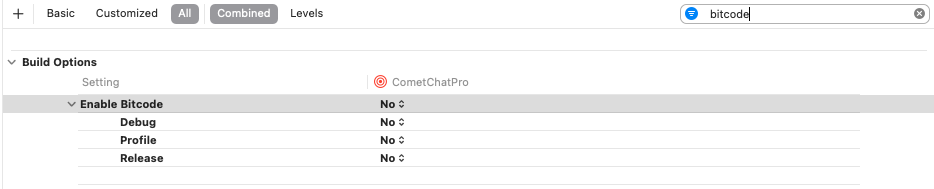
  3. Set Enabled Bitcode to NO in the Build Settings of your Xcode project.

Import the SDK

import 'package:cometchat_sdk/cometchat_sdk.dart';

Initialization

The init() method initializes the SDK and must be called before any other CometChat method. Call it once at app startup, typically in your root widget’s initState() or main() function.
String region = "APP_REGION";
String appId = "APP_ID";

AppSettings appSettings= (AppSettingsBuilder()
    ..subscriptionType = CometChatSubscriptionType.allUsers
    ..region= region
    ..adminHost = "" //optional
    ..clientHost = "" //optional
    ..autoEstablishSocketConnection =  true
).build();

CometChat.init(appId, appSettings,
  onSuccess: (String successMessage) {
    debugPrint("Initialization completed successfully  $successMessage");
  }, onError: (CometChatException excep) {
    debugPrint("Initialization failed with exception: ${excep.message}");
  }
);
Replace APP_ID and APP_REGION with your credentials from the Dashboard.
CometChat.init() must be called before any other SDK method. Calling login(), sendMessage(), or registering listeners before init() will fail.

Parameters

ParameterTypeDescription
appIdStringYour CometChat App ID
appSettingsAppSettingsConfiguration object built with AppSettingsBuilder
onSuccessFunction(String)Callback triggered on successful initialization
onErrorFunction(CometChatException)Callback triggered on initialization failure

AppSettings Options

PropertyTypeDescriptionDefault
subscriptionTypeString?Presence subscription type (CometChatSubscriptionType.allUsers, .roles, .friends)
rolesList<String>?Roles to subscribe to when using role-based presence
regionString?Region where your app was created (us, eu, in)Required
autoEstablishSocketConnectionboolLet SDK manage WebSocket connections automaticallytrue
adminHostString?Custom admin URL (dedicated deployment)
clientHostString?Custom client URL (dedicated deployment)

Presence Subscription

Choose how to subscribe to user presence (online/offline status):
// All users
AppSettings appSettings = (AppSettingsBuilder()
  ..subscriptionType = CometChatSubscriptionType.allUsers
  ..region = region
).build();

// Specific roles
AppSettings appSettings = (AppSettingsBuilder()
  ..subscriptionType = CometChatSubscriptionType.roles
  ..roles = ["admin", "moderator"]
  ..region = region
).build();

// Friends only
AppSettings appSettings = (AppSettingsBuilder()
  ..subscriptionType = CometChatSubscriptionType.friends
  ..region = region
).build();
See User Presence for more details.
On Success — A String message confirming SDK initialization:
ParameterTypeDescriptionSample Value
messageStringSuccess confirmation message"Initialization completed successfully"
ParameterTypeDescriptionSample Value
codeStringError code identifier"ERR_CHAT_API_FAILURE"
messageStringHuman-readable error message"SDK initialization failed."
detailsStringAdditional technical details"Please verify your App ID and region, then try again."

WebSocket Connection

By default, the SDK manages WebSocket connections automatically. To manage them manually:
AppSettings appSettings = (AppSettingsBuilder()
  ..region = region
  ..autoEstablishSocketConnection = false
).build();
See Connection Behaviour for manual control.

Next Steps

Authentication

Log in users with Auth Key or Auth Token

Send Messages

Send your first message