

AI Integration Quick Reference
AI Integration Quick Reference
- Add
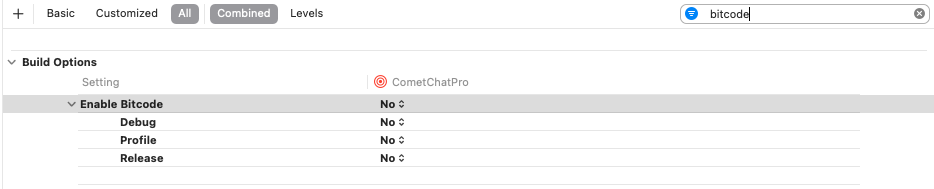
cometchat_sdkto yourpubspec.yamland runflutter pub get - iOS: Update Podfile with simulator architecture exclusions, set deployment target to 11+, disable Bitcode
- Android: Requires API Level 21+, AndroidX compatibility
- Import
package:cometchat_sdk/cometchat_sdk.dartwherever you need the SDK
Add the CometChat Dependency
Add the CometChat SDK to yourpubspec.yaml file:
Platform Configuration
iOS
- Add the following to your Podfile inside the iOS section of your app:
-
Set the deployment target to
11or higher. -
Navigate to your iOS folder in terminal and run
pod install. For Apple Silicon systems, use a Rosetta terminal. - In Xcode, set Enable Bitcode to No in your project’s Build Settings.
Android
- Minimum API Level: 21
- AndroidX compatibility is required
Import the SDK
Import the CometChat SDK in your Dart files:Get Your Credentials
Before initializing the SDK, get your credentials from the CometChat Dashboard:- Sign up or log in
- Create a new app (or use an existing one)
- Go to API & Auth Keys and note your:
- App ID
- Region
- Auth Key
Next Steps
Setup & Initialization
Configure and initialize the SDK in your Flutter app
Authentication
Learn how to authenticate users with Auth Keys and Auth Tokens