Quick Reference - Generate token and start a call session:
// Generate call token
const callToken = await CometChatCalls.generateToken(sessionId, userAuthToken);

// Configure and render
const callSettings = new CometChatCalls.CallSettingsBuilder()
  .enableDefaultLayout(true)
  .setIsAudioOnlyCall(false)
  .build();

// <CometChatCalls.Component callSettings={callSettings} callToken={callToken} />

Overview

This section demonstrates how to start a call session in a React Native application. Previously known as Direct Calling.
Available via: SDK | UI Kits
Before you begin, we strongly recommend you read the calling setup guide.
If you want to implement a complete calling experience with ringing functionality (incoming/outgoing call UI), follow the Ringing guide first. Once the call is accepted, return here to start the call session.

Generate Call Token

A call token is required for secure access to a call session. Each token is unique to a specific session and user combination, ensuring that only authorized users can join the call. Use the generateToken() method to create a call token:
const loggedInUser = await CometChat.getLoggedinUser();
const userAuthToken = loggedInUser.getAuthToken();
const sessionId = "SESSION_ID";

CometChatCalls.generateToken(sessionId, userAuthToken).then(
  (callToken) => {
    console.log("Call token generated:", callToken.token);
  },
  (error) => {
    console.log("Token generation failed:", error);
  }
);
ParameterDescription
sessionIdThe unique random session ID. In case you are using the ringing flow, the session ID is available in the Call object.
userAuthTokenThe user auth token from CometChat.getLoggedinUser().getAuthToken()

Start Call Session

Use the CometChatCalls.Component to render the call UI. This component requires a call token and a CallSettings object.
const callListener = new CometChatCalls.OngoingCallListener({
  onUserJoined: (user) => {
    console.log("User joined:", user);
  },
  onUserLeft: (user) => {
    console.log("User left:", user);
  },
  onUserListUpdated: (userList) => {
    console.log("User list updated:", userList);
  },
  onCallEnded: () => {
    console.log("Call ended");
  },
  onCallEndButtonPressed: () => {
    console.log("End call button pressed");
  },
  onError: (error) => {
    console.log("Call error:", error);
  },
  onAudioModesUpdated: (audioModes) => {
    console.log("Audio modes updated:", audioModes);
  },
  onCallSwitchedToVideo: (event) => {
    console.log("Call switched to video:", event);
  },
  onUserMuted: (event) => {
    console.log("User muted:", event);
  },
  onSessionTimeout: () => {
    console.log("Session timed out");
  }
});

const callSettings = new CometChatCalls.CallSettingsBuilder()
  .enableDefaultLayout(true)
  .setIsAudioOnlyCall(false)
  .setCallEventListener(callListener)
  .build();

return (
  <View style={{ height: '100%', width: '100%', position: 'relative' }}>
    <CometChatCalls.Component callSettings={callSettings} callToken={callToken} />
  </View>
);
ParameterDescription
callTokenThe GenerateToken object received from generateToken() onSuccess
callSettingsObject of CallSettings class configured via CallSettingsBuilder

Call Settings

Configure the call experience using the following CallSettingsBuilder methods:
MethodDescription
enableDefaultLayout(boolean)Enables or disables the default call UI layout. Default: true
setIsAudioOnlyCall(boolean)Sets whether the call is audio-only or audio-video. Default: false
setCallEventListener(OngoingCallListener)Sets the listener to receive call events.
setMode(string)Sets the call UI layout mode. Available: DEFAULT, SPOTLIGHT, SINGLE. Default: DEFAULT
setAvatarMode(string)Sets how avatars are displayed when video is off. Available: circle, square, fullscreen. Default: circle
setDefaultAudioMode(string)Sets the initial audio output device. Available: SPEAKER, EARPIECE, BLUETOOTH, HEADPHONES
startWithAudioMuted(boolean)Starts the call with the microphone muted. Default: false
startWithVideoMuted(boolean)Starts the call with the camera turned off. Default: false
showEndCallButton(boolean)Shows or hides the end call button. Default: true
showSwitchCameraButton(boolean)Shows or hides the switch camera button. Default: true
showMuteAudioButton(boolean)Shows or hides the mute audio button. Default: true
showPauseVideoButton(boolean)Shows or hides the pause video button. Default: true
showAudioModeButton(boolean)Shows or hides the audio mode selection button. Default: true
showSwitchToVideoCallButton(boolean)Shows or hides the button to upgrade an audio call to video. Default: true
setMainVideoContainerSetting(MainVideoContainerSetting)Customizes the main video container. See Video View Customization.
enableVideoTileClick(boolean)Enables or disables click interactions on video tiles in Spotlight mode. Default: true
enableVideoTileDrag(boolean)Enables or disables drag functionality for video tiles in Spotlight mode. Default: true
setIdleTimeoutPeriod(number)Sets idle timeout in seconds. Default: 180 seconds. v4.2.0+

Call Listeners

The OngoingCallListener provides real-time callbacks for call session events. You can register listeners in two ways:
  1. Via CallSettingsBuilder: Use .setCallEventListener(listener) when building call settings
  2. Via addCallEventListener: Use CometChatCalls.addCallEventListener(listenerId, listener) to add multiple listeners
useEffect(() => {
  const listenerId = "UNIQUE_LISTENER_ID";
  
  CometChatCalls.addCallEventListener(listenerId, {
    onUserJoined: (user) => {
      console.log("User joined:", user);
    },
    onUserLeft: (user) => {
      console.log("User left:", user);
    },
    onUserListUpdated: (userList) => {
      console.log("User list updated:", userList);
    },
    onCallEnded: () => {
      console.log("Call ended");
    },
    onCallEndButtonPressed: () => {
      console.log("End call button pressed");
    },
    onError: (error) => {
      console.log("Call error:", error);
    },
    onAudioModesUpdated: (audioModes) => {
      console.log("Audio modes updated:", audioModes);
    },
    onCallSwitchedToVideo: (event) => {
      console.log("Call switched to video:", event);
    },
    onUserMuted: (event) => {
      console.log("User muted:", event);
    },
    onSessionTimeout: () => {
      console.log("Session timed out");
    }
  });

  return () => CometChatCalls.removeCallEventListener(listenerId);
}, []);
Always remove call event listeners when the component unmounts using CometChatCalls.removeCallEventListener(listenerId).

Events

EventDescription
onCallEnded()Invoked when the call session terminates for a 1:1 call.
onSessionTimeout()Invoked when the call is auto-terminated due to inactivity. v4.2.0+
onCallEndButtonPressed()Invoked when the local user taps the end call button.
onUserJoined(user)Invoked when a remote participant joins.
onUserLeft(user)Invoked when a remote participant leaves.
onUserListUpdated(userList)Invoked whenever the participant list changes.
onAudioModesUpdated(audioModes)Invoked when available audio devices change.
onCallSwitchedToVideo(event)Invoked when an audio call is upgraded to video.
onUserMuted(event)Invoked when a participant’s mute state changes.
onScreenShareStarted()Invoked when the local user starts sharing a screen.
onScreenShareStopped()Invoked when the local user stops sharing a screen.
onError(error)Invoked when an error occurs during the call session.

End Call Session

Ringing Flow

When using the Ringing flow, you must coordinate between the CometChat Chat SDK and the Calls SDK.
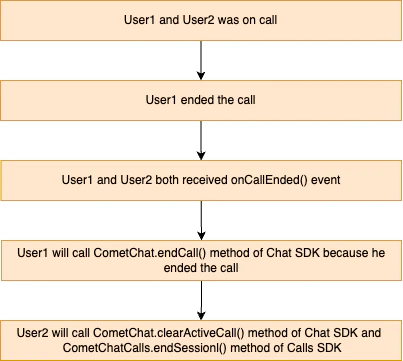
User who initiates the end call:
onCallEndButtonPressed: () => {
  CometChat.endCall(sessionId).then(
    (call) => {
      console.log("Call ended successfully");
      CometChat.clearActiveCall();
      CometChatCalls.endSession();
    },
    (error) => {
      console.log("End call failed:", error);
    }
  );
}
Remote participant (receives the onCallEnded() callback):
onCallEnded: () => {
  CometChat.clearActiveCall();
  CometChatCalls.endSession();
}

Session Only Flow

When using the Session Only flow (direct call without ringing), call CometChatCalls.endSession() in the onCallEndButtonPressed() callback.
onCallEndButtonPressed: () => {
  CometChatCalls.endSession();
}

Methods

These methods are available for performing custom actions during an active call session.
These methods can only be called when a call session is active.

Switch Camera

CometChatCalls.switchCamera();

Mute Audio

CometChatCalls.muteAudio(true); // true to mute, false to unmute

Pause Video

CometChatCalls.pauseVideo(true); // true to pause, false to resume

Set Audio Mode

CometChatCalls.setAudioMode(CometChat.AUDIO_MODE.EARPIECE);

Switch To Video Call

CometChatCalls.switchToVideoCall();

Get Audio Output Modes

CometChatCalls.getAudioOutputModes().then(
  (modes) => {
    console.log("Available audio modes:", modes);
  },
  (error) => {
    console.log("Failed to get audio modes:", error);
  }
);

End Call

CometChatCalls.endSession();
  • Generate call tokens just before use — they are session-specific and time-limited
  • Always handle call end in both flows: Ringing requires both CometChat.endCall() and CometChatCalls.endSession()
  • Clean up listeners on component unmount to prevent memory leaks
  • Wrap the call component in a full-screen container with height: '100%', width: '100%', and position: 'relative'
  • Use unique listener IDs per component instance
  • Call token generation fails: Ensure the user is logged in and the auth token is valid
  • Call UI does not render: Verify the CometChatCalls.Component is wrapped in a View with explicit dimensions
  • Listeners not firing: Check that the listener is registered before the call session starts
  • onCallEnded not triggered in group calls: The callback only fires for 1:1 calls (exactly 2 participants)
  • Audio or video not working: Check device permissions for camera and microphone

Next Steps

Ringing

Implement a complete calling experience with incoming and outgoing call UI

Recording

Record call sessions for playback and compliance

Video View Customisation

Customize the main video container and participant tiles

Presenter Mode

Enable screen sharing and presenter layouts in calls