> ## Documentation Index
> Fetch the complete documentation index at: https://www.cometchat.com/docs/llms.txt
> Use this file to discover all available pages before exploring further.
# CometChat Widget Builder For HTML
> CometChat Widget Builder for HTML is a no-code solution that lets you embed a fully functional chat interface into any HTML website using a simple code snippet.
It provides a ready-to-use chat widget backed by CometChat's real-time infrastructure — no frontend framework required.
With CometChat Widget Builder, you can:
* Embed chat and calling into any HTML page
* Customize themes, colors, and typography
* Toggle features on and off
* Go live with a simple embed code snippet
The widget connects to CometChat's SDK and infrastructure, which manages message transport, sync, and backend scaling.
Go to the Integration Guide
The Chat Widget is not customizable beyond the configuration options available in the Widget Builder in dashboard. If you require deeper customization, consider using our [UI Kits](/ui-kit/react/overview) instead.
**Legacy Widget (v3):** If you previously used the legacy CometChat Widget (v3), the legacy widget section in the Dashboard is only visible for apps that had legacy widgets configured before the migration to Widget Builder. New apps will not see the legacy widget section. For migration guidance, see the [Migration Guide](/articles/migration-guide).
***
## Widget Builder Features
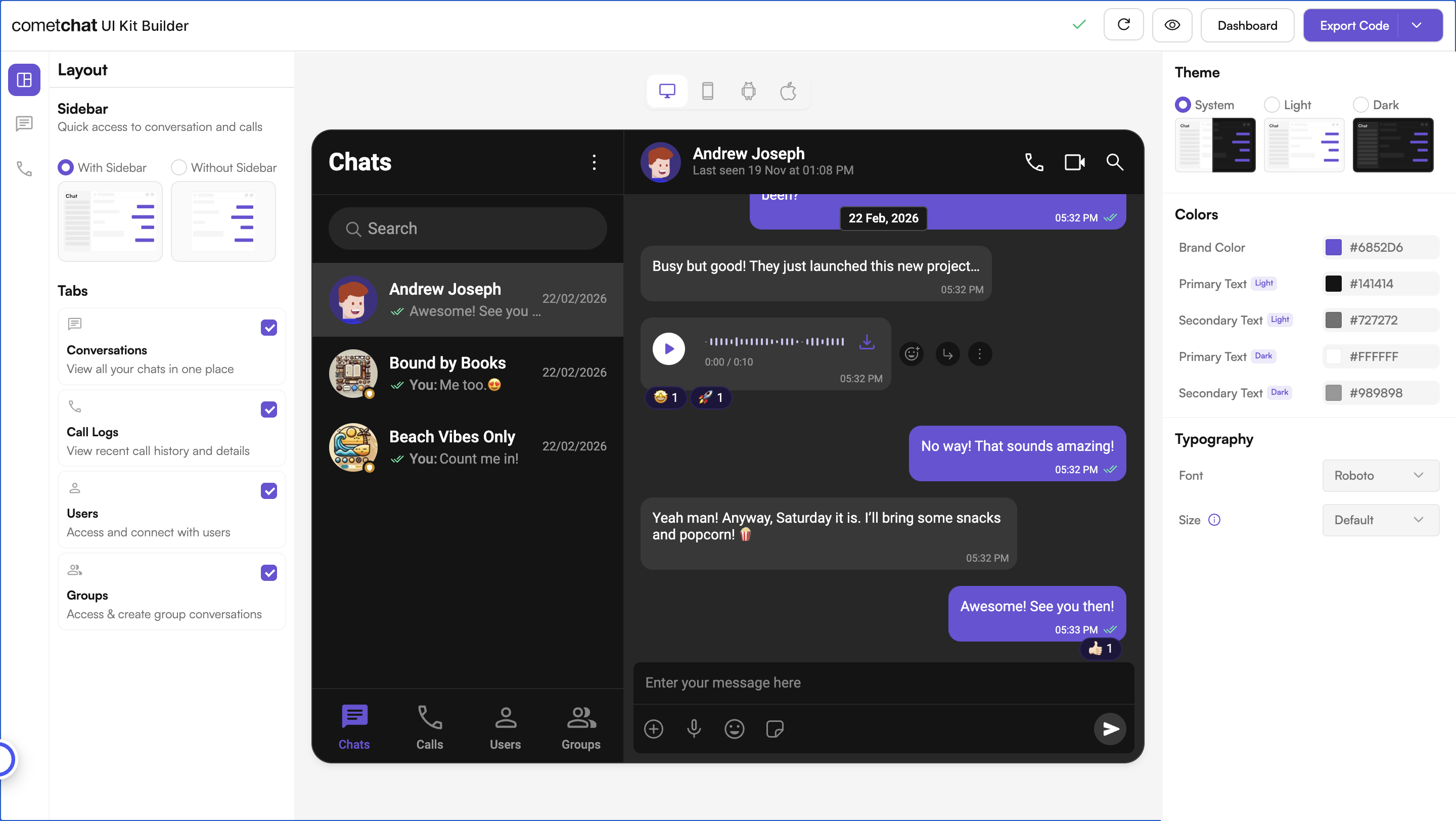
**No-Code Visual Configuration** — Widget Builder provides a visual configuration environment for designing your chat widget before embedding.
**Toggle-Based Feature Control** — Messaging and calling features can be controlled through configuration settings in the Widget Builder in dashboard.
**Ready-to-Embed Code** — After configuration, Widget Builder generates a code snippet you can paste directly into your HTML page.
***
## How to Use Widget Builder
### 1. Design
Customize your chat widget using the visual Widget Builder:
* **Configure layout** — Toggle all the required features in the dashboard.
* **Toggle features** — Turn chat and calling features on and off from the builder interface.
* **Themes** — Select between system, light, and dark themes. Choose custom colors and typography.
### 2. Get Embed Code
Once configured, get the embed code snippet for your widget.
1. Click on **Get Embedded Code**
2. Note your app credentials (App ID, Auth Key, Region, Variant ID)
3. Copy the code snippet
### 3. Integrate
Add the embed code to your HTML page and go live.
1. **Paste the code snippet** into your HTML file
2. **Configure credentials** — Set your App ID, Region, and Auth Key
3. **User Authentication** — CometChat uses a UID (User ID) to identify each user. Authenticate users to enable chat functionality.
4. **Launch** — Open your HTML page and the chat widget is live
Step-by-step instructions for embedding the Widget Builder into your HTML website
***
## Try Live Demo
Experience the CometChat Widget Builder in action:
***
## Need Help?
Connect with other developers and get answers
Contact our support team for assistance
***
## Related Resources
Learn more about the CometChat JavaScript SDK
Explore advanced JavaScript controls — open chats, listen for events, and more
Widget Builder for WordPress websites
Widget Builder for Shopify stores
 ### 2. Get Embed Code
Once configured, get the embed code snippet for your widget.
1. Click on **Get Embedded Code**
2. Note your app credentials (App ID, Auth Key, Region, Variant ID)
3. Copy the code snippet
### 3. Integrate
Add the embed code to your HTML page and go live.
1. **Paste the code snippet** into your HTML file
2. **Configure credentials** — Set your App ID, Region, and Auth Key
3. **User Authentication** — CometChat uses a UID (User ID) to identify each user. Authenticate users to enable chat functionality.
4. **Launch** — Open your HTML page and the chat widget is live
### 2. Get Embed Code
Once configured, get the embed code snippet for your widget.
1. Click on **Get Embedded Code**
2. Note your app credentials (App ID, Auth Key, Region, Variant ID)
3. Copy the code snippet
### 3. Integrate
Add the embed code to your HTML page and go live.
1. **Paste the code snippet** into your HTML file
2. **Configure credentials** — Set your App ID, Region, and Auth Key
3. **User Authentication** — CometChat uses a UID (User ID) to identify each user. Authenticate users to enable chat functionality.
4. **Launch** — Open your HTML page and the chat widget is live