> ## Documentation Index
> Fetch the complete documentation index at: https://www.cometchat.com/docs/llms.txt
> Use this file to discover all available pages before exploring further.
# React UI Kit
> Prebuilt React components for chat, voice, and video calling. Supports React.js, Next.js, React Router, and Astro.
| Field | Value |
| ------------ | ------------------------------------------------------------------------------------------- |
| Package | `@cometchat/chat-uikit-react` v7.0.x |
| Peer deps | `react` >=18, `react-dom` >=18, `@cometchat/chat-sdk-javascript` ^4.1.9, `dompurify` ^3.3.1 |
| Calling | Optional — `@cometchat/calls-sdk-javascript` |
| SSR | SSR-safe — no browser APIs at module scope. Next.js App Router compatible. |
| Localization | 19 languages built-in |
| Source | [GitHub](https://github.com/cometchat/cometchat-uikit-react/tree/v7) |
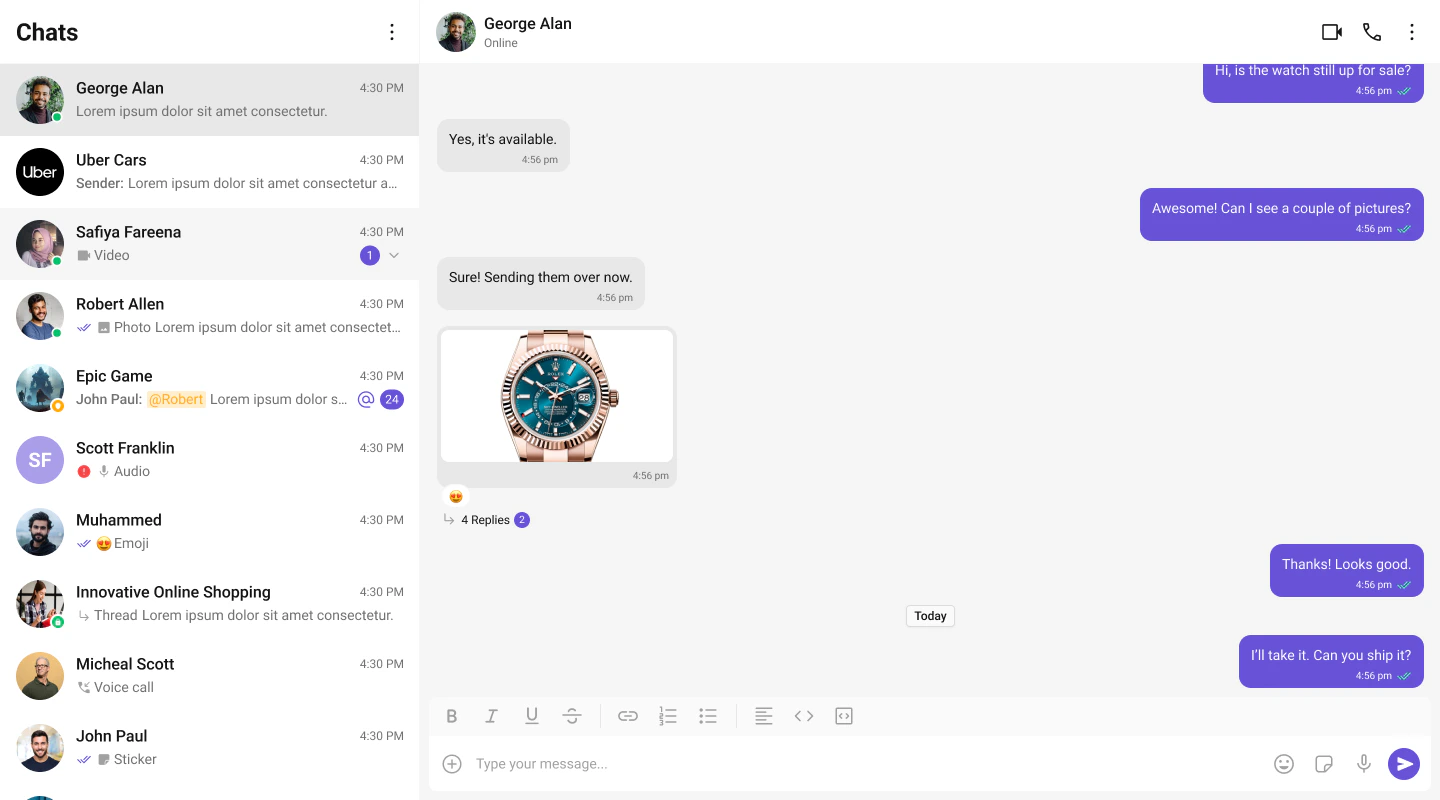
The CometChat React UI Kit provides prebuilt, customizable components for adding chat, voice, and video calling to any React app. Each component handles its own data fetching, real-time listeners, and state — you just drop them into your layout.
 ***
## Try It
Try the full chat experience in your browser
Fork, add your credentials, and start building
***
## Get Started
Pick your framework and follow the step-by-step integration guide:
Vite or Create React App
App Router with client-side rendering
SPA with React Router v6+
React islands with client:only directive
***
## What's Included
* **Compound components** — compose only what you need using namespace sub-components (Root, View, EmptyState, etc.)
* **Plugin system** — extensible message rendering via `CometChatMessagePlugin` interface
* **Theming** — CSS custom properties (`--cometchat-*`) with built-in light and dark themes
* **Localization** — 19 supported languages with customizable translation keys
* **Calling** — optional voice and video calling via `@cometchat/calls-sdk-javascript`
* **SSR-safe** — no browser-only APIs at module scope; Next.js App Router compatible
* **Tree-shakeable** — ESM-first build with dual ESM + CJS output
***
## Prerequisites
Before integrating the UI Kit, ensure you have:
* **Node.js 18+** installed
* A **CometChat account** with the following credentials:
* `appId` — your CometChat application ID
* `region` — your app region (e.g., `"us"` or `"eu"`)
* `authKey` — your CometChat auth key (for client-side authentication)
You can find these values in the [CometChat Dashboard](https://app.cometchat.com).
### Installation
```bash theme={null}
npm install @cometchat/chat-uikit-react @cometchat/chat-sdk-javascript react react-dom dompurify
```
| Package | Version |
| --------------------------------- | ---------------------------------- |
| `@cometchat/chat-uikit-react` | `^7.0.0` |
| `@cometchat/chat-sdk-javascript` | `^4.1.9` |
| `react` | `>=18.0.0 <21.0.0` |
| `react-dom` | `>=18.0.0 <21.0.0` |
| `dompurify` | `^3.3.1` |
| `@cometchat/calls-sdk-javascript` | Optional — for voice/video calling |
***
## Explore
Browse all prebuilt UI components
Colors, fonts, dark mode, and custom styling
Customize message rendering with the plugin system
Threaded messages, new chat, search, and more
***
## Resources
Working reference app
Full UI Kit source on GitHub
Design resources and prototyping
Common issues and fixes
Open a support ticket
Upgrading from v6
***
## Try It
Try the full chat experience in your browser
Fork, add your credentials, and start building
***
## Get Started
Pick your framework and follow the step-by-step integration guide:
Vite or Create React App
App Router with client-side rendering
SPA with React Router v6+
React islands with client:only directive
***
## What's Included
* **Compound components** — compose only what you need using namespace sub-components (Root, View, EmptyState, etc.)
* **Plugin system** — extensible message rendering via `CometChatMessagePlugin` interface
* **Theming** — CSS custom properties (`--cometchat-*`) with built-in light and dark themes
* **Localization** — 19 supported languages with customizable translation keys
* **Calling** — optional voice and video calling via `@cometchat/calls-sdk-javascript`
* **SSR-safe** — no browser-only APIs at module scope; Next.js App Router compatible
* **Tree-shakeable** — ESM-first build with dual ESM + CJS output
***
## Prerequisites
Before integrating the UI Kit, ensure you have:
* **Node.js 18+** installed
* A **CometChat account** with the following credentials:
* `appId` — your CometChat application ID
* `region` — your app region (e.g., `"us"` or `"eu"`)
* `authKey` — your CometChat auth key (for client-side authentication)
You can find these values in the [CometChat Dashboard](https://app.cometchat.com).
### Installation
```bash theme={null}
npm install @cometchat/chat-uikit-react @cometchat/chat-sdk-javascript react react-dom dompurify
```
| Package | Version |
| --------------------------------- | ---------------------------------- |
| `@cometchat/chat-uikit-react` | `^7.0.0` |
| `@cometchat/chat-sdk-javascript` | `^4.1.9` |
| `react` | `>=18.0.0 <21.0.0` |
| `react-dom` | `>=18.0.0 <21.0.0` |
| `dompurify` | `^3.3.1` |
| `@cometchat/calls-sdk-javascript` | Optional — for voice/video calling |
***
## Explore
Browse all prebuilt UI components
Colors, fonts, dark mode, and custom styling
Customize message rendering with the plugin system
Threaded messages, new chat, search, and more
***
## Resources
Working reference app
Full UI Kit source on GitHub
Design resources and prototyping
Common issues and fixes
Open a support ticket
Upgrading from v6