> ## Documentation Index
> Fetch the complete documentation index at: https://www.cometchat.com/docs/llms.txt
> Use this file to discover all available pages before exploring further.
# Campaigns
> Deliver targeted, rich notifications to users via an in-app notification feed powered by the CometChat Cards renderer.
CometChat Campaigns enables you to send rich, interactive notifications to users through an in-app notification feed. Each notification is rendered as a native card using the **CometChat Cards** library — supporting images, text, buttons, layouts, and interactive actions.
Before proceeding, ensure you have completed the [UI Kit integration](/ui-kit/react/integration-react) and the [Dashboard Setup](/campaigns#setup-flow) for Campaigns.
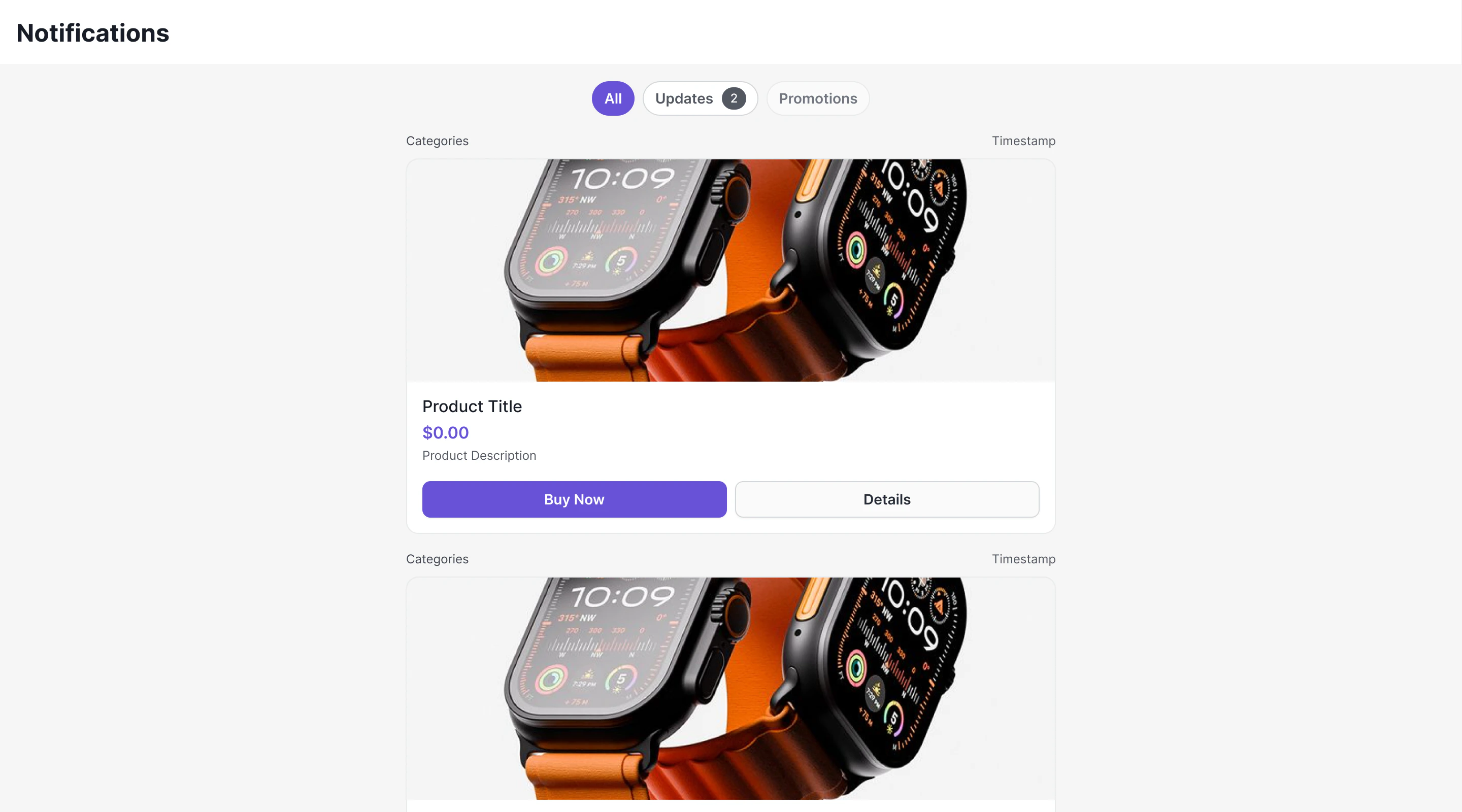 ***
## Overview
Campaigns delivers notifications as **Card Schema JSON** — a structured format that defines the visual layout of each notification card. The system consists of three layers:
1. **CometChat Chat SDK** — Fetches feed items, manages read/delivered state, provides real-time listeners, handles push notification tracking
2. **CometChat Cards Library** (`@cometchat/cards-react`) — Renders Card Schema JSON into native DOM elements
3. **CometChat UI Kit** — Provides the ready-to-use `CometChatNotificationFeed` component that wires everything together
### Architecture Flow
```
Dashboard / API → Campaign Created → Push + WebSocket Delivery
↓
SDK: NotificationFeedRequestBuilder.fetchNext()
↓
NotificationFeedItem.getContent() → Card Schema JSON
↓
Cards Library: CometChatCardView
↓
Native Rendered Card (images, text, buttons, layouts)
↓
User clicks button → onAction callback → Your code handles it
```
***
## How Cards Work
Each `NotificationFeedItem` from the SDK contains a `content` field — an object holding the Card Schema JSON. This JSON is passed directly to the CometChat Cards renderer which produces a DOM element.
The Cards library is a **pure renderer**:
* **Input**: Card Schema JSON string + theme mode + optional action callback
* **Output**: Native DOM element hierarchy
It does not execute actions, manage message state, or call any SDK methods. When users click interactive elements (buttons, links), the library emits the action to your callback. You decide what happens — open a URL, navigate to a chat, make an API call, etc.
### Card Schema JSON Example
```json theme={null}
{
"version": "1.0",
"body": [
{
"type": "column",
"backgroundColor": {
"light": "transparent",
"dark": "transparent"
},
"gap": 5,
"items": [
{
"type": "text",
"content": "📢 Announcement",
"variant": "heading2",
"id": "txt_99323141-2459-4e33-88d3-ca39c5fd2f50"
},
{
"type": "text",
"content": "Your announcement message here.",
"variant": "body",
"id": "txt_61a417bc-5e4a-4ba2-bfe7-b7bc64dbaf35"
},
{
"type": "divider",
"id": "div_80f5c7fb-fd10-41d1-8c2f-51498f0f62d0"
},
{
"type": "button",
"label": "Learn More",
"backgroundColor": {
"light": "transparent",
"dark": "transparent"
},
"textColor": {
"light": "#6C5CE7",
"dark": "#6C5CE7"
},
"size": 40,
"fontSize": 13,
"borderRadius": 6,
"padding": {
"top": 0,
"right": 16,
"bottom": 0,
"left": 16
},
"action": {
"type": "openUrl",
"url": ""
},
"id": "btn_9b87a3f1-b0c6-45b9-a4c2-e22ea590f17f"
}
],
"id": "col_98fed9bd-1a95-4cee-aa81-84a9016e41f2"
}
],
"fallbackText": "",
"style": {
"background": {
"light": "#E8E8E8",
"dark": "#E8E8E8"
},
"borderRadius": 16,
"borderColor": {
"light": "#DFE6E9",
"dark": "#DFE6E9"
},
"padding": 12
}
}
```
The schema supports **20 element types** (text, image, icon, avatar, badge, divider, spacer, chip, progressBar, codeBlock, markdown, row, column, grid, accordion, tabs, button, iconButton, link, table) and **9 action types** (openUrl, chatWithUser, chatWithGroup, sendMessage, copyToClipboard, downloadFile, initiateCall, apiCall, customCallback).
***
## How Cards Work in the UI Kit
The `CometChatNotificationFeed` component uses the **CometChat Cards** library internally to render each notification. Here's what happens under the hood:
1. The component fetches `NotificationFeedItem` objects from the SDK
2. For each item, it extracts the `content` field (Card Schema JSON)
3. It passes the JSON to `CometChatCardView` from `@cometchat/cards-react`
4. The Cards renderer produces native UI — text, images, buttons, layouts — directly from the JSON
5. When users click buttons/links inside a card, the action is emitted back to the component which handles navigation (open URL, navigate to chat, etc.)
You don't need to interact with the Cards library directly when using `CometChatNotificationFeed` — it's all wired up. But if you want to render cards outside the feed (e.g., a standalone card in a modal), you can use the Cards library directly. See the [SDK Campaigns documentation](/sdk/javascript/campaigns#rendering-cards) for standalone usage.
***
## Handling Push Notifications for Campaigns
When a campaign push notification arrives via Web Push or FCM, you should:
1. **Report delivery** — Call `CometChat.markPushNotificationDelivered()` when the notification is received
2. **Report click** — Call `CometChat.markPushNotificationClicked()` when the user clicks the notification
3. **Deep link** — Use the announcement ID from the push payload to fetch the full item via `CometChat.getNotificationFeedItem(id)` and display it
```tsx theme={null}
import { CometChat } from "@cometchat/chat-sdk-javascript";
// When push notification is received (e.g., in service worker)
const pushNotification = new CometChat.PushNotification(pushPayloadData);
CometChat.markPushNotificationDelivered(pushNotification);
// When user clicks the notification
CometChat.markPushNotificationClicked(pushNotification);
// Navigate to feed or show specific item
const item = await CometChat.getNotificationFeedItem(pushNotification.getId());
```
See the [SDK Campaigns documentation](/sdk/javascript/campaigns) for the complete push notification tracking API.
***
## Sending Campaigns
Before integrating the frontend, you need to set up channels, categories, templates, and campaigns in the CometChat Dashboard. Follow the [Dashboard Setup Guide](/campaigns#setup-flow) for step-by-step instructions with screenshots.
***
## Using the UI Kit Component
The easiest way to add a notification feed to your app is the `CometChatNotificationFeed` component. It handles fetching, rendering, pagination, filtering, real-time updates, and engagement reporting out of the box.
```tsx theme={null}
import { CometChatNotificationFeed } from "@cometchat/chat-uikit-react";
function NotificationsScreen() {
return (
{
// Handle item click
}}
onBackPress={() => {
// Navigate back
}}
/>
);
}
```
See the full [CometChatNotificationFeed component documentation](/ui-kit/react/components/notification-feed) for all configuration options, styling, and customization.
***
## Next Steps
Full API reference for feed items, categories, engagement, and push tracking
Ready-to-use component with filtering, real-time updates, and styling
***
## Overview
Campaigns delivers notifications as **Card Schema JSON** — a structured format that defines the visual layout of each notification card. The system consists of three layers:
1. **CometChat Chat SDK** — Fetches feed items, manages read/delivered state, provides real-time listeners, handles push notification tracking
2. **CometChat Cards Library** (`@cometchat/cards-react`) — Renders Card Schema JSON into native DOM elements
3. **CometChat UI Kit** — Provides the ready-to-use `CometChatNotificationFeed` component that wires everything together
### Architecture Flow
```
Dashboard / API → Campaign Created → Push + WebSocket Delivery
↓
SDK: NotificationFeedRequestBuilder.fetchNext()
↓
NotificationFeedItem.getContent() → Card Schema JSON
↓
Cards Library: CometChatCardView
↓
Native Rendered Card (images, text, buttons, layouts)
↓
User clicks button → onAction callback → Your code handles it
```
***
## How Cards Work
Each `NotificationFeedItem` from the SDK contains a `content` field — an object holding the Card Schema JSON. This JSON is passed directly to the CometChat Cards renderer which produces a DOM element.
The Cards library is a **pure renderer**:
* **Input**: Card Schema JSON string + theme mode + optional action callback
* **Output**: Native DOM element hierarchy
It does not execute actions, manage message state, or call any SDK methods. When users click interactive elements (buttons, links), the library emits the action to your callback. You decide what happens — open a URL, navigate to a chat, make an API call, etc.
### Card Schema JSON Example
```json theme={null}
{
"version": "1.0",
"body": [
{
"type": "column",
"backgroundColor": {
"light": "transparent",
"dark": "transparent"
},
"gap": 5,
"items": [
{
"type": "text",
"content": "📢 Announcement",
"variant": "heading2",
"id": "txt_99323141-2459-4e33-88d3-ca39c5fd2f50"
},
{
"type": "text",
"content": "Your announcement message here.",
"variant": "body",
"id": "txt_61a417bc-5e4a-4ba2-bfe7-b7bc64dbaf35"
},
{
"type": "divider",
"id": "div_80f5c7fb-fd10-41d1-8c2f-51498f0f62d0"
},
{
"type": "button",
"label": "Learn More",
"backgroundColor": {
"light": "transparent",
"dark": "transparent"
},
"textColor": {
"light": "#6C5CE7",
"dark": "#6C5CE7"
},
"size": 40,
"fontSize": 13,
"borderRadius": 6,
"padding": {
"top": 0,
"right": 16,
"bottom": 0,
"left": 16
},
"action": {
"type": "openUrl",
"url": ""
},
"id": "btn_9b87a3f1-b0c6-45b9-a4c2-e22ea590f17f"
}
],
"id": "col_98fed9bd-1a95-4cee-aa81-84a9016e41f2"
}
],
"fallbackText": "",
"style": {
"background": {
"light": "#E8E8E8",
"dark": "#E8E8E8"
},
"borderRadius": 16,
"borderColor": {
"light": "#DFE6E9",
"dark": "#DFE6E9"
},
"padding": 12
}
}
```
The schema supports **20 element types** (text, image, icon, avatar, badge, divider, spacer, chip, progressBar, codeBlock, markdown, row, column, grid, accordion, tabs, button, iconButton, link, table) and **9 action types** (openUrl, chatWithUser, chatWithGroup, sendMessage, copyToClipboard, downloadFile, initiateCall, apiCall, customCallback).
***
## How Cards Work in the UI Kit
The `CometChatNotificationFeed` component uses the **CometChat Cards** library internally to render each notification. Here's what happens under the hood:
1. The component fetches `NotificationFeedItem` objects from the SDK
2. For each item, it extracts the `content` field (Card Schema JSON)
3. It passes the JSON to `CometChatCardView` from `@cometchat/cards-react`
4. The Cards renderer produces native UI — text, images, buttons, layouts — directly from the JSON
5. When users click buttons/links inside a card, the action is emitted back to the component which handles navigation (open URL, navigate to chat, etc.)
You don't need to interact with the Cards library directly when using `CometChatNotificationFeed` — it's all wired up. But if you want to render cards outside the feed (e.g., a standalone card in a modal), you can use the Cards library directly. See the [SDK Campaigns documentation](/sdk/javascript/campaigns#rendering-cards) for standalone usage.
***
## Handling Push Notifications for Campaigns
When a campaign push notification arrives via Web Push or FCM, you should:
1. **Report delivery** — Call `CometChat.markPushNotificationDelivered()` when the notification is received
2. **Report click** — Call `CometChat.markPushNotificationClicked()` when the user clicks the notification
3. **Deep link** — Use the announcement ID from the push payload to fetch the full item via `CometChat.getNotificationFeedItem(id)` and display it
```tsx theme={null}
import { CometChat } from "@cometchat/chat-sdk-javascript";
// When push notification is received (e.g., in service worker)
const pushNotification = new CometChat.PushNotification(pushPayloadData);
CometChat.markPushNotificationDelivered(pushNotification);
// When user clicks the notification
CometChat.markPushNotificationClicked(pushNotification);
// Navigate to feed or show specific item
const item = await CometChat.getNotificationFeedItem(pushNotification.getId());
```
See the [SDK Campaigns documentation](/sdk/javascript/campaigns) for the complete push notification tracking API.
***
## Sending Campaigns
Before integrating the frontend, you need to set up channels, categories, templates, and campaigns in the CometChat Dashboard. Follow the [Dashboard Setup Guide](/campaigns#setup-flow) for step-by-step instructions with screenshots.
***
## Using the UI Kit Component
The easiest way to add a notification feed to your app is the `CometChatNotificationFeed` component. It handles fetching, rendering, pagination, filtering, real-time updates, and engagement reporting out of the box.
```tsx theme={null}
import { CometChatNotificationFeed } from "@cometchat/chat-uikit-react";
function NotificationsScreen() {
return (
{
// Handle item click
}}
onBackPress={() => {
// Navigate back
}}
/>
);
}
```
See the full [CometChatNotificationFeed component documentation](/ui-kit/react/components/notification-feed) for all configuration options, styling, and customization.
***
## Next Steps
Full API reference for feed items, categories, engagement, and push tracking
Ready-to-use component with filtering, real-time updates, and styling