> ## Documentation Index
> Fetch the complete documentation index at: https://www.cometchat.com/docs/llms.txt
> Use this file to discover all available pages before exploring further.
# Users
> Fetch user profiles and track user presence in real time.
## Get User
Retrieve a user's profile by their UID.
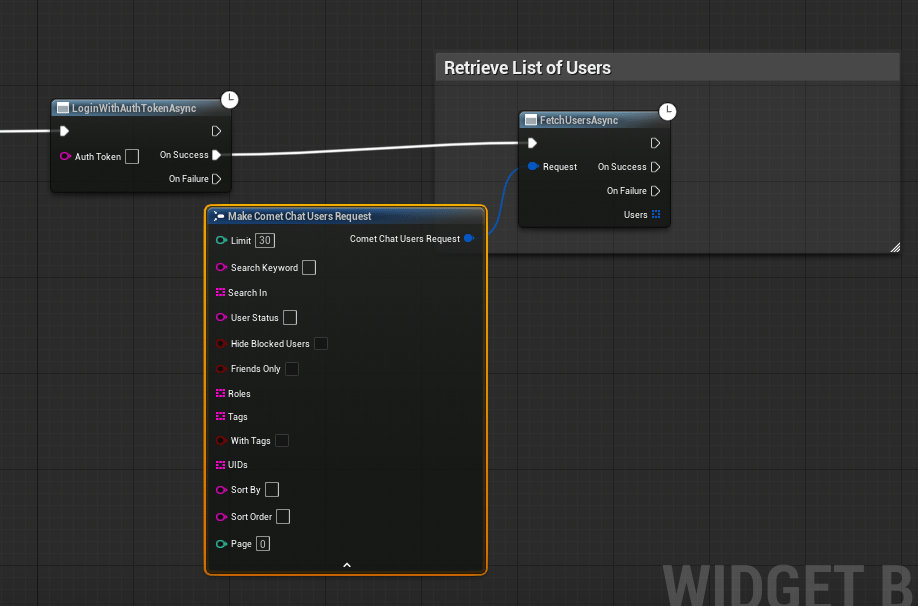 Call the **Get User Async** node.
| Parameter | Type | Description |
| --------- | --------- | ------------------------------------------ |
| Uid | `FString` | The unique identifier of the user to fetch |
**On Success** returns an `FCometChatUser`.
```cpp theme={null}
#include "AsyncActions/CometChatGetUserAction.h"
void AMyActor::FetchUser()
{
auto* Action = UCometChatGetUserAction::GetUserAsync(
this,
TEXT("cometchat-uid-2")
);
Action->OnSuccess.AddDynamic(this, &AMyActor::OnUserFetched);
Action->OnFailure.AddDynamic(this, &AMyActor::OnUserFetchFailed);
Action->Activate();
}
void AMyActor::OnUserFetched(const FCometChatUser& User)
{
UE_LOG(LogTemp, Log, TEXT("User: %s (%s)"), *User.Name, *User.Status);
}
void AMyActor::OnUserFetchFailed(const FString& Error)
{
UE_LOG(LogTemp, Error, TEXT("Fetch user failed: %s"), *Error);
}
```
### FCometChatUser Properties
| Property | Type | Description |
| ----------- | --------- | ------------------------------ |
| `Uid` | `FString` | Unique user identifier |
| `Name` | `FString` | Display name |
| `AvatarUrl` | `FString` | URL to the user's avatar image |
| `Status` | `FString` | Current status text |
***
## User Presence
Track when users come online, go offline, or go away by binding to the `OnPresenceChanged` delegate on the Subsystem.
1. Get a reference to the **CometChat Subsystem**
2. Drag off and search for **On Presence Changed**
3. Use **Bind Event** to connect it to a custom event
4. The custom event receives an `FCometChatPresence` parameter
```cpp theme={null}
void AMyActor::BeginPlay()
{
Super::BeginPlay();
UCometChatSubsystem* Chat = GetGameInstance()->GetSubsystem();
Chat->OnPresenceChanged.AddDynamic(this, &AMyActor::HandlePresence);
}
void AMyActor::HandlePresence(const FCometChatPresence& Presence)
{
switch (Presence.Status)
{
case ECometChatPresenceStatus::Online:
UE_LOG(LogTemp, Log, TEXT("%s is online"), *Presence.Uid);
break;
case ECometChatPresenceStatus::Offline:
UE_LOG(LogTemp, Log, TEXT("%s went offline"), *Presence.Uid);
break;
case ECometChatPresenceStatus::Away:
UE_LOG(LogTemp, Log, TEXT("%s is away"), *Presence.Uid);
break;
}
}
```
### FCometChatPresence Properties
| Property | Type | Description |
| -------------- | -------------------------- | ------------------------------------------ |
| `Uid` | `FString` | The user whose presence changed |
| `Status` | `ECometChatPresenceStatus` | `Online`, `Offline`, or `Away` |
| `LastActiveAt` | `int64` | Unix timestamp of the user's last activity |
### ECometChatPresenceStatus
| Value | Description |
| --------- | -------------------------- |
| `Online` | User is currently active |
| `Offline` | User is not connected |
| `Away` | User is connected but idle |
Use presence data to show green/gray status dots next to player names in your friends list or lobby UI.
***
## Next Steps
Create, join, and manage groups.
All five real-time delegates in one place.
Call the **Get User Async** node.
| Parameter | Type | Description |
| --------- | --------- | ------------------------------------------ |
| Uid | `FString` | The unique identifier of the user to fetch |
**On Success** returns an `FCometChatUser`.
```cpp theme={null}
#include "AsyncActions/CometChatGetUserAction.h"
void AMyActor::FetchUser()
{
auto* Action = UCometChatGetUserAction::GetUserAsync(
this,
TEXT("cometchat-uid-2")
);
Action->OnSuccess.AddDynamic(this, &AMyActor::OnUserFetched);
Action->OnFailure.AddDynamic(this, &AMyActor::OnUserFetchFailed);
Action->Activate();
}
void AMyActor::OnUserFetched(const FCometChatUser& User)
{
UE_LOG(LogTemp, Log, TEXT("User: %s (%s)"), *User.Name, *User.Status);
}
void AMyActor::OnUserFetchFailed(const FString& Error)
{
UE_LOG(LogTemp, Error, TEXT("Fetch user failed: %s"), *Error);
}
```
### FCometChatUser Properties
| Property | Type | Description |
| ----------- | --------- | ------------------------------ |
| `Uid` | `FString` | Unique user identifier |
| `Name` | `FString` | Display name |
| `AvatarUrl` | `FString` | URL to the user's avatar image |
| `Status` | `FString` | Current status text |
***
## User Presence
Track when users come online, go offline, or go away by binding to the `OnPresenceChanged` delegate on the Subsystem.
1. Get a reference to the **CometChat Subsystem**
2. Drag off and search for **On Presence Changed**
3. Use **Bind Event** to connect it to a custom event
4. The custom event receives an `FCometChatPresence` parameter
```cpp theme={null}
void AMyActor::BeginPlay()
{
Super::BeginPlay();
UCometChatSubsystem* Chat = GetGameInstance()->GetSubsystem();
Chat->OnPresenceChanged.AddDynamic(this, &AMyActor::HandlePresence);
}
void AMyActor::HandlePresence(const FCometChatPresence& Presence)
{
switch (Presence.Status)
{
case ECometChatPresenceStatus::Online:
UE_LOG(LogTemp, Log, TEXT("%s is online"), *Presence.Uid);
break;
case ECometChatPresenceStatus::Offline:
UE_LOG(LogTemp, Log, TEXT("%s went offline"), *Presence.Uid);
break;
case ECometChatPresenceStatus::Away:
UE_LOG(LogTemp, Log, TEXT("%s is away"), *Presence.Uid);
break;
}
}
```
### FCometChatPresence Properties
| Property | Type | Description |
| -------------- | -------------------------- | ------------------------------------------ |
| `Uid` | `FString` | The user whose presence changed |
| `Status` | `ECometChatPresenceStatus` | `Online`, `Offline`, or `Away` |
| `LastActiveAt` | `int64` | Unix timestamp of the user's last activity |
### ECometChatPresenceStatus
| Value | Description |
| --------- | -------------------------- |
| `Online` | User is currently active |
| `Offline` | User is not connected |
| `Away` | User is connected but idle |
Use presence data to show green/gray status dots next to player names in your friends list or lobby UI.
***
## Next Steps
Create, join, and manage groups.
All five real-time delegates in one place.