> ## Documentation Index
> Fetch the complete documentation index at: https://www.cometchat.com/docs/llms.txt
> Use this file to discover all available pages before exploring further.
# Receive Messages
> Fetch message history and listen for incoming messages in real time.
There are two ways to get messages in the CometChat Unreal SDK:
1. **Fetch history** — pull previous messages for a conversation using async nodes
2. **Real-time push** — listen for new messages as they arrive via the `OnMessageReceived` delegate
### How Messages Flow
```mermaid theme={null}
flowchart TD
subgraph Fetch["Fetch History"]
A["Get Messages Async"] --> B["CometChat REST API"] --> C["Returns message array"]
end
subgraph Realtime["Real-Time Push"]
D["CometChat Cloud"] -.->|"WebSocket"| E["OnMessageReceived delegate fires"]
end
C --> F["Display in Chat UI"]
E --> F
style A fill:#333,stroke:#666,color:#fff
style B fill:#444,stroke:#888,color:#fff
style C fill:#333,stroke:#666,color:#fff
style D fill:#555,stroke:#999,color:#ccc
style E fill:#333,stroke:#666,color:#fff
style F fill:#444,stroke:#888,color:#fff
style Fetch fill:#2a2a2a,stroke:#555,color:#ccc
style Realtime fill:#2a2a2a,stroke:#555,color:#ccc
```
***
## Fetch User Messages
Retrieve the message history for a 1:1 conversation.
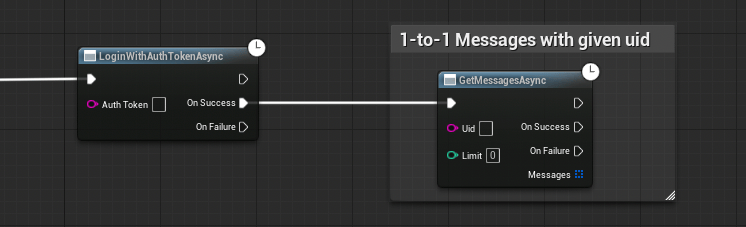 Call the **Get Messages Async** node.
| Parameter | Type | Description |
| --------- | --------- | -------------------------------------------------- |
| Uid | `FString` | The UID of the other user in the conversation |
| Limit | `int32` | Maximum number of messages to return (default: 50) |
**On Success** returns a `TArray` — an array of messages sorted by timestamp.
```cpp theme={null}
#include "AsyncActions/CometChatGetMessagesAction.h"
void AMyActor::FetchMessages()
{
auto* Action = UCometChatGetMessagesAction::GetMessagesAsync(
this,
TEXT("cometchat-uid-2"), // Other user's UID
30 // Limit
);
Action->OnSuccess.AddDynamic(this, &AMyActor::OnMessagesFetched);
Action->OnFailure.AddDynamic(this, &AMyActor::OnFetchFailed);
Action->Activate();
}
void AMyActor::OnMessagesFetched(const TArray& Messages)
{
for (const FCometChatMessage& Msg : Messages)
{
UE_LOG(LogTemp, Log, TEXT("[%s]: %s"), *Msg.SenderName, *Msg.Text);
}
}
void AMyActor::OnFetchFailed(const FString& Error)
{
UE_LOG(LogTemp, Error, TEXT("Fetch failed: %s"), *Error);
}
```
***
## Fetch Group Messages
Retrieve the message history for a group conversation, with pagination support.
Call the **Get Messages Async** node.
| Parameter | Type | Description |
| --------- | --------- | -------------------------------------------------- |
| Uid | `FString` | The UID of the other user in the conversation |
| Limit | `int32` | Maximum number of messages to return (default: 50) |
**On Success** returns a `TArray` — an array of messages sorted by timestamp.
```cpp theme={null}
#include "AsyncActions/CometChatGetMessagesAction.h"
void AMyActor::FetchMessages()
{
auto* Action = UCometChatGetMessagesAction::GetMessagesAsync(
this,
TEXT("cometchat-uid-2"), // Other user's UID
30 // Limit
);
Action->OnSuccess.AddDynamic(this, &AMyActor::OnMessagesFetched);
Action->OnFailure.AddDynamic(this, &AMyActor::OnFetchFailed);
Action->Activate();
}
void AMyActor::OnMessagesFetched(const TArray& Messages)
{
for (const FCometChatMessage& Msg : Messages)
{
UE_LOG(LogTemp, Log, TEXT("[%s]: %s"), *Msg.SenderName, *Msg.Text);
}
}
void AMyActor::OnFetchFailed(const FString& Error)
{
UE_LOG(LogTemp, Error, TEXT("Fetch failed: %s"), *Error);
}
```
***
## Fetch Group Messages
Retrieve the message history for a group conversation, with pagination support.
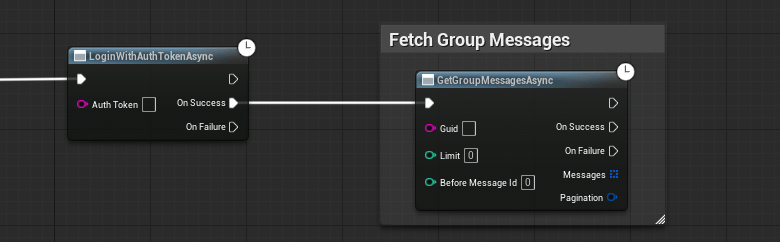 Call the **Get Group Messages Async** node.
| Parameter | Type | Description |
| ----------------- | --------- | ----------------------------------------------------------------------------------------------------------------------------------- |
| Guid | `FString` | The group's unique identifier |
| Limit | `int32` | Maximum messages per page (default: 50) |
| Before Message Id | `int32` | Pass `0` for the first page. For subsequent pages, pass the `NextCursor` value from the previous response's `FCometChatPagination`. |
**On Success** returns two outputs:
* `TArray` — the messages for this page
* `FCometChatPagination` — pagination metadata including `HasMore` and `NextCursor`
```cpp theme={null}
#include "AsyncActions/CometChatGetGroupMessagesAction.h"
void AMyActor::FetchGroupMessages(int32 BeforeId)
{
auto* Action = UCometChatGetGroupMessagesAction::GetGroupMessagesAsync(
this,
TEXT("group-abc-123"), // Group GUID
20, // Limit
BeforeId // 0 for first page
);
Action->OnSuccess.AddDynamic(this, &AMyActor::OnGroupMessagesFetched);
Action->OnFailure.AddDynamic(this, &AMyActor::OnGroupFetchFailed);
Action->Activate();
}
void AMyActor::OnGroupMessagesFetched(
const TArray& Messages,
const FCometChatPagination& Pagination)
{
for (const FCometChatMessage& Msg : Messages)
{
UE_LOG(LogTemp, Log, TEXT("[%s]: %s"), *Msg.SenderName, *Msg.Text);
}
if (Pagination.HasMore)
{
// Load next page
FetchGroupMessages(Pagination.NextCursor);
}
}
```
### Pagination
The `FCometChatPagination` struct tells you where you are in the message history:
| Property | Type | Description |
| ------------ | ------- | --------------------------------------------------- |
| `Total` | `int32` | Total messages available in the conversation |
| `Count` | `int32` | Messages returned in this page |
| `PerPage` | `int32` | Page size that was requested |
| `HasMore` | `bool` | `true` if there are older messages to fetch |
| `NextCursor` | `int32` | Pass this as `BeforeMessageId` to get the next page |
**Infinite scroll pattern**: Start with `BeforeMessageId = 0`, then keep passing `NextCursor` from each response until `HasMore` is `false`.
***
## Real-Time: Incoming Messages
To receive messages as they arrive (without polling), bind to the `OnMessageReceived` delegate on the Subsystem.
1. Get a reference to the **CometChat Subsystem**
2. Drag off and search for **On Message Received**
3. Use **Bind Event** to connect it to a custom event
4. The custom event receives an `FCometChatMessage` parameter
Bind this **before** calling Login so you don't miss any messages.
```cpp theme={null}
void AMyActor::BeginPlay()
{
Super::BeginPlay();
UCometChatSubsystem* Chat = GetGameInstance()->GetSubsystem();
Chat->OnMessageReceived.AddDynamic(this, &AMyActor::HandleNewMessage);
}
void AMyActor::HandleNewMessage(const FCometChatMessage& Message)
{
// This fires on the Game Thread — safe to update UI
UE_LOG(LogTemp, Log, TEXT("New message from %s: %s"),
*Message.SenderName, *Message.Text);
// Check if it's a group or user message
if (Message.ReceiverType == TEXT("group"))
{
// Group message — Message.ReceiverUid is the group GUID
}
else
{
// 1:1 message — Message.SenderUid is the other user
}
}
```
The `OnMessageReceived` delegate fires for **all** conversations — both 1:1 and group. Use `ReceiverType` to distinguish between them, and `ConversationId` to route messages to the right chat window.
***
## Next Steps
Fetch user profiles and track presence.
Create, join, and leave groups.
All five real-time delegates explained in detail.
Call the **Get Group Messages Async** node.
| Parameter | Type | Description |
| ----------------- | --------- | ----------------------------------------------------------------------------------------------------------------------------------- |
| Guid | `FString` | The group's unique identifier |
| Limit | `int32` | Maximum messages per page (default: 50) |
| Before Message Id | `int32` | Pass `0` for the first page. For subsequent pages, pass the `NextCursor` value from the previous response's `FCometChatPagination`. |
**On Success** returns two outputs:
* `TArray` — the messages for this page
* `FCometChatPagination` — pagination metadata including `HasMore` and `NextCursor`
```cpp theme={null}
#include "AsyncActions/CometChatGetGroupMessagesAction.h"
void AMyActor::FetchGroupMessages(int32 BeforeId)
{
auto* Action = UCometChatGetGroupMessagesAction::GetGroupMessagesAsync(
this,
TEXT("group-abc-123"), // Group GUID
20, // Limit
BeforeId // 0 for first page
);
Action->OnSuccess.AddDynamic(this, &AMyActor::OnGroupMessagesFetched);
Action->OnFailure.AddDynamic(this, &AMyActor::OnGroupFetchFailed);
Action->Activate();
}
void AMyActor::OnGroupMessagesFetched(
const TArray& Messages,
const FCometChatPagination& Pagination)
{
for (const FCometChatMessage& Msg : Messages)
{
UE_LOG(LogTemp, Log, TEXT("[%s]: %s"), *Msg.SenderName, *Msg.Text);
}
if (Pagination.HasMore)
{
// Load next page
FetchGroupMessages(Pagination.NextCursor);
}
}
```
### Pagination
The `FCometChatPagination` struct tells you where you are in the message history:
| Property | Type | Description |
| ------------ | ------- | --------------------------------------------------- |
| `Total` | `int32` | Total messages available in the conversation |
| `Count` | `int32` | Messages returned in this page |
| `PerPage` | `int32` | Page size that was requested |
| `HasMore` | `bool` | `true` if there are older messages to fetch |
| `NextCursor` | `int32` | Pass this as `BeforeMessageId` to get the next page |
**Infinite scroll pattern**: Start with `BeforeMessageId = 0`, then keep passing `NextCursor` from each response until `HasMore` is `false`.
***
## Real-Time: Incoming Messages
To receive messages as they arrive (without polling), bind to the `OnMessageReceived` delegate on the Subsystem.
1. Get a reference to the **CometChat Subsystem**
2. Drag off and search for **On Message Received**
3. Use **Bind Event** to connect it to a custom event
4. The custom event receives an `FCometChatMessage` parameter
Bind this **before** calling Login so you don't miss any messages.
```cpp theme={null}
void AMyActor::BeginPlay()
{
Super::BeginPlay();
UCometChatSubsystem* Chat = GetGameInstance()->GetSubsystem();
Chat->OnMessageReceived.AddDynamic(this, &AMyActor::HandleNewMessage);
}
void AMyActor::HandleNewMessage(const FCometChatMessage& Message)
{
// This fires on the Game Thread — safe to update UI
UE_LOG(LogTemp, Log, TEXT("New message from %s: %s"),
*Message.SenderName, *Message.Text);
// Check if it's a group or user message
if (Message.ReceiverType == TEXT("group"))
{
// Group message — Message.ReceiverUid is the group GUID
}
else
{
// 1:1 message — Message.SenderUid is the other user
}
}
```
The `OnMessageReceived` delegate fires for **all** conversations — both 1:1 and group. Use `ReceiverType` to distinguish between them, and `ConversationId` to route messages to the right chat window.
***
## Next Steps
Fetch user profiles and track presence.
Create, join, and leave groups.
All five real-time delegates explained in detail.