> ## Documentation Index
> Fetch the complete documentation index at: https://www.cometchat.com/docs/llms.txt
> Use this file to discover all available pages before exploring further.
# Overview
> Log users in and out of CometChat in your Unreal Engine project.
## Create User
Before you log in a user, the user must exist in CometChat.
1. **For proof of concept / MVPs**: Create users via the [CometChat Dashboard](https://app.cometchat.com).
2. **For production apps**: Use the [Create User REST API](https://api-explorer.cometchat.com/reference/creates-user) when your user signs up.
**Sample Users**
CometChat provides 5 pre-created users for testing: `cometchat-uid-1`, `cometchat-uid-2`, `cometchat-uid-3`, `cometchat-uid-4`, and `cometchat-uid-5`.
***
## Login using Auth Key
This authentication method is ideal for **proof-of-concept** development or early-stage apps. For production environments, we recommend using an **Auth Token** instead of an Auth Key for enhanced security.
### Auth Flow
```mermaid theme={null}
flowchart LR
A["Configure"] --> B["Bind Delegates"] --> C["Login Async"]
C -->|"Success"| D["User Authenticated"]
C -->|"Failure"| E["Handle Error"]
D --> F["SDK Ready — Send messages, fetch data"]
style A fill:#333,stroke:#666,color:#fff
style B fill:#333,stroke:#666,color:#fff
style C fill:#444,stroke:#888,color:#fff
style D fill:#333,stroke:#666,color:#fff
style E fill:#555,stroke:#999,color:#ccc
style F fill:#333,stroke:#666,color:#fff
```
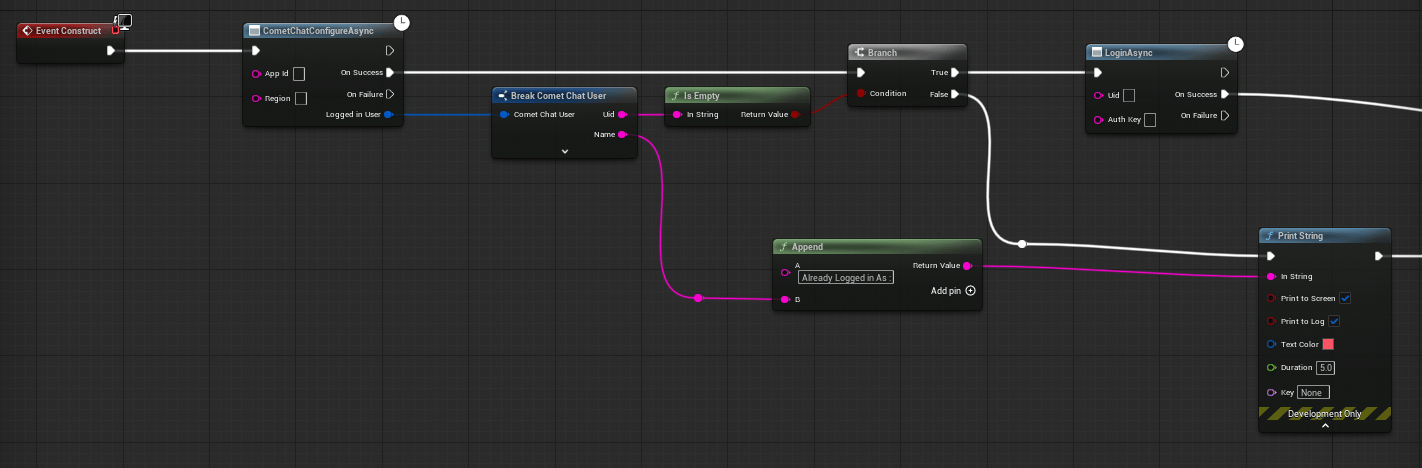 1. Get a reference to the **CometChat Subsystem**
2. Call the **Login Async** node
3. Wire the **On Success** and **On Failure** pins
| Parameter | Type | Description |
| --------- | --------- | ----------------------------------- |
| Uid | `FString` | The unique ID of the user to log in |
| Auth Key | `FString` | Your CometChat Auth Key |
```cpp theme={null}
#include "CometChatSubsystem.h"
#include "AsyncActions/CometChatLoginAction.h"
void AMyActor::BeginPlay()
{
Super::BeginPlay();
// 1. Configure the SDK (do this once)
UCometChatSubsystem* Chat = GetGameInstance()->GetSubsystem();
Chat->Configure(TEXT("YOUR_APP_ID"), TEXT("us"));
// 2. Bind real-time events before login
Chat->OnMessageReceived.AddDynamic(this, &AMyActor::OnMessage);
// 3. Login
if (!Chat->IsLoggedIn())
{
auto* Login = UCometChatLoginAction::LoginAsync(
this,
TEXT("cometchat-uid-1"),
TEXT("YOUR_AUTH_KEY")
);
Login->OnSuccess.AddDynamic(this, &AMyActor::OnLoginSuccess);
Login->OnFailure.AddDynamic(this, &AMyActor::OnLoginFailed);
Login->Activate();
}
}
void AMyActor::OnLoginSuccess()
{
UE_LOG(LogTemp, Log, TEXT("Login successful!"));
}
void AMyActor::OnLoginFailed(const FString& Error)
{
UE_LOG(LogTemp, Error, TEXT("Login failed: %s"), *Error);
}
```
**UID format**: UIDs can be alphanumeric with underscores and hyphens. Spaces, punctuation, and other special characters are not allowed.
***
## Login using Auth Token
This is the **recommended authentication method for production** apps. Auth Tokens are generated server-side using the CometChat REST API and provide enhanced security since your Auth Key is never exposed on the client.
### How Auth Tokens Work
```mermaid theme={null}
flowchart LR
A["Your Backend"] --> B["CometChat REST API"]
B -->|"Returns Auth Token"| A
A -->|"Sends Token to Client"| C["Unreal Client"]
C --> D["Login with Auth Token"]
D -->|"Success"| E["User Authenticated"]
D -->|"Failure"| F["Handle Error"]
style A fill:#333,stroke:#666,color:#fff
style B fill:#333,stroke:#666,color:#fff
style C fill:#444,stroke:#888,color:#fff
style D fill:#444,stroke:#888,color:#fff
style E fill:#333,stroke:#666,color:#fff
style F fill:#555,stroke:#999,color:#ccc
```
1. Your backend calls the [Create Auth Token REST API](https://api-explorer.cometchat.com/reference/create-authtoken) with the user's UID
2. The API returns an Auth Token
3. Your backend sends the token to the Unreal client
4. The client calls `LoginWithAuthTokenAsync` with the token
1. Get a reference to the **CometChat Subsystem**
2. Call the **Login Async** node
3. Wire the **On Success** and **On Failure** pins
| Parameter | Type | Description |
| --------- | --------- | ----------------------------------- |
| Uid | `FString` | The unique ID of the user to log in |
| Auth Key | `FString` | Your CometChat Auth Key |
```cpp theme={null}
#include "CometChatSubsystem.h"
#include "AsyncActions/CometChatLoginAction.h"
void AMyActor::BeginPlay()
{
Super::BeginPlay();
// 1. Configure the SDK (do this once)
UCometChatSubsystem* Chat = GetGameInstance()->GetSubsystem();
Chat->Configure(TEXT("YOUR_APP_ID"), TEXT("us"));
// 2. Bind real-time events before login
Chat->OnMessageReceived.AddDynamic(this, &AMyActor::OnMessage);
// 3. Login
if (!Chat->IsLoggedIn())
{
auto* Login = UCometChatLoginAction::LoginAsync(
this,
TEXT("cometchat-uid-1"),
TEXT("YOUR_AUTH_KEY")
);
Login->OnSuccess.AddDynamic(this, &AMyActor::OnLoginSuccess);
Login->OnFailure.AddDynamic(this, &AMyActor::OnLoginFailed);
Login->Activate();
}
}
void AMyActor::OnLoginSuccess()
{
UE_LOG(LogTemp, Log, TEXT("Login successful!"));
}
void AMyActor::OnLoginFailed(const FString& Error)
{
UE_LOG(LogTemp, Error, TEXT("Login failed: %s"), *Error);
}
```
**UID format**: UIDs can be alphanumeric with underscores and hyphens. Spaces, punctuation, and other special characters are not allowed.
***
## Login using Auth Token
This is the **recommended authentication method for production** apps. Auth Tokens are generated server-side using the CometChat REST API and provide enhanced security since your Auth Key is never exposed on the client.
### How Auth Tokens Work
```mermaid theme={null}
flowchart LR
A["Your Backend"] --> B["CometChat REST API"]
B -->|"Returns Auth Token"| A
A -->|"Sends Token to Client"| C["Unreal Client"]
C --> D["Login with Auth Token"]
D -->|"Success"| E["User Authenticated"]
D -->|"Failure"| F["Handle Error"]
style A fill:#333,stroke:#666,color:#fff
style B fill:#333,stroke:#666,color:#fff
style C fill:#444,stroke:#888,color:#fff
style D fill:#444,stroke:#888,color:#fff
style E fill:#333,stroke:#666,color:#fff
style F fill:#555,stroke:#999,color:#ccc
```
1. Your backend calls the [Create Auth Token REST API](https://api-explorer.cometchat.com/reference/create-authtoken) with the user's UID
2. The API returns an Auth Token
3. Your backend sends the token to the Unreal client
4. The client calls `LoginWithAuthTokenAsync` with the token
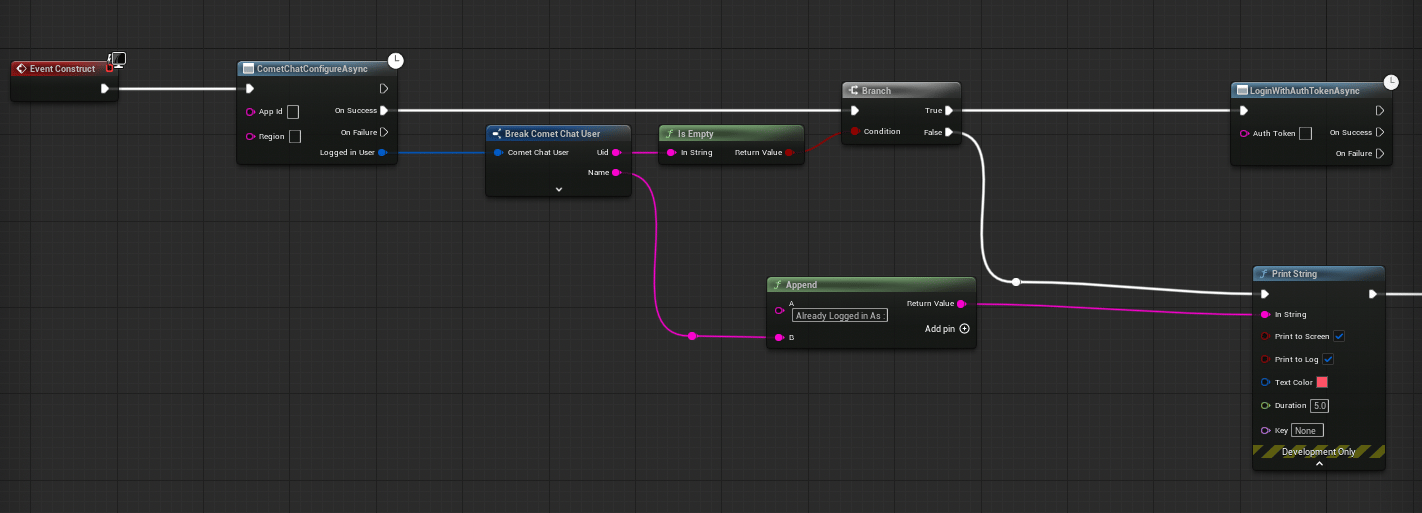 1. Get a reference to the **CometChat Subsystem**
2. Call the **Login With Auth Token Async** node
3. Wire the **On Success** and **On Failure** pins
| Parameter | Type | Description |
| ---------- | --------- | ----------------------------------------- |
| Auth Token | `FString` | The auth token received from your backend |
```cpp theme={null}
#include "CometChatSubsystem.h"
#include "AsyncActions/CometChatLoginWithAuthTokenAction.h"
void AMyActor::LoginWithToken(const FString& AuthToken)
{
UCometChatSubsystem* Chat = GetGameInstance()->GetSubsystem();
if (!Chat->IsLoggedIn())
{
auto* Login = UCometChatLoginWithAuthTokenAction::LoginWithAuthTokenAsync(
this,
AuthToken
);
Login->OnSuccess.AddDynamic(this, &AMyActor::OnLoginSuccess);
Login->OnFailure.AddDynamic(this, &AMyActor::OnLoginFailed);
Login->Activate();
}
}
void AMyActor::OnLoginSuccess()
{
UE_LOG(LogTemp, Log, TEXT("Auth token login successful!"));
}
void AMyActor::OnLoginFailed(const FString& Error)
{
UE_LOG(LogTemp, Error, TEXT("Auth token login failed: %s"), *Error);
}
```
**Security**: Never hardcode Auth Tokens in your client. Always fetch them from your backend at runtime.
***
## Check Login State
Before performing operations, you can check whether a user is currently logged in.
1. Get a reference to the **CometChat Subsystem**
2. Call the **Login With Auth Token Async** node
3. Wire the **On Success** and **On Failure** pins
| Parameter | Type | Description |
| ---------- | --------- | ----------------------------------------- |
| Auth Token | `FString` | The auth token received from your backend |
```cpp theme={null}
#include "CometChatSubsystem.h"
#include "AsyncActions/CometChatLoginWithAuthTokenAction.h"
void AMyActor::LoginWithToken(const FString& AuthToken)
{
UCometChatSubsystem* Chat = GetGameInstance()->GetSubsystem();
if (!Chat->IsLoggedIn())
{
auto* Login = UCometChatLoginWithAuthTokenAction::LoginWithAuthTokenAsync(
this,
AuthToken
);
Login->OnSuccess.AddDynamic(this, &AMyActor::OnLoginSuccess);
Login->OnFailure.AddDynamic(this, &AMyActor::OnLoginFailed);
Login->Activate();
}
}
void AMyActor::OnLoginSuccess()
{
UE_LOG(LogTemp, Log, TEXT("Auth token login successful!"));
}
void AMyActor::OnLoginFailed(const FString& Error)
{
UE_LOG(LogTemp, Error, TEXT("Auth token login failed: %s"), *Error);
}
```
**Security**: Never hardcode Auth Tokens in your client. Always fetch them from your backend at runtime.
***
## Check Login State
Before performing operations, you can check whether a user is currently logged in.
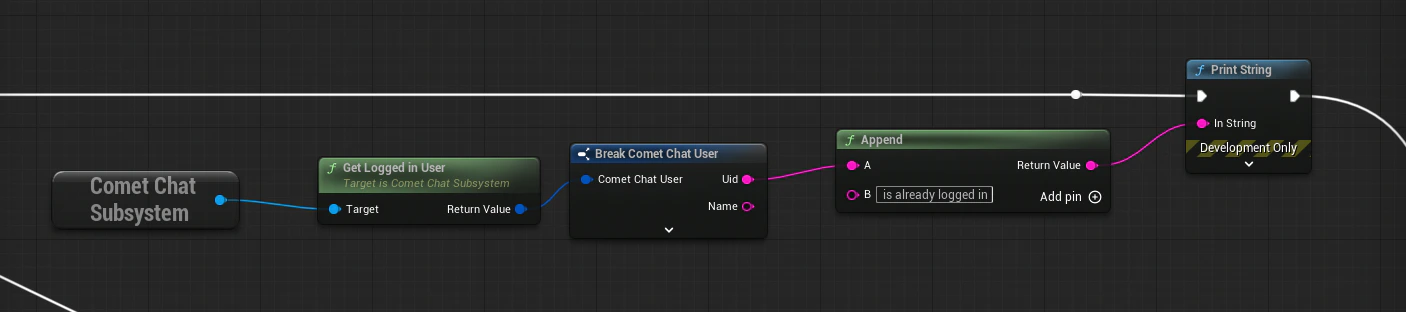 Call the **Get Logged In User** node on the CometChat Subsystem. It returns an `FCometChatUser` — if the `Uid` is empty, no user is logged in.
```cpp theme={null}
UCometChatSubsystem* Chat = GetGameInstance()->GetSubsystem();
if (Chat->IsLoggedIn())
{
// User is authenticated — safe to send messages, fetch data, etc.
}
```
***
## Logout
Logs the current user out and disconnects the real-time WebSocket.
Call the **Get Logged In User** node on the CometChat Subsystem. It returns an `FCometChatUser` — if the `Uid` is empty, no user is logged in.
```cpp theme={null}
UCometChatSubsystem* Chat = GetGameInstance()->GetSubsystem();
if (Chat->IsLoggedIn())
{
// User is authenticated — safe to send messages, fetch data, etc.
}
```
***
## Logout
Logs the current user out and disconnects the real-time WebSocket.
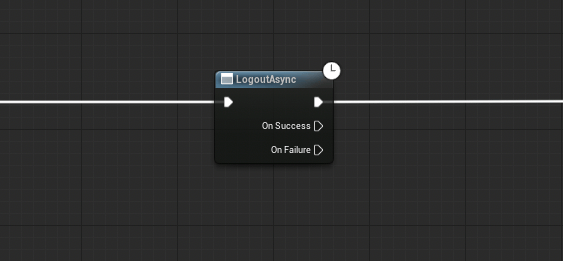 Call the **Logout Async** node on the CometChat Subsystem. Wire the **On Success** and **On Failure** pins.
```cpp theme={null}
#include "AsyncActions/CometChatLogoutAction.h"
void AMyActor::PerformLogout()
{
auto* Logout = UCometChatLogoutAction::LogoutAsync(this);
Logout->OnSuccess.AddDynamic(this, &AMyActor::OnLogoutSuccess);
Logout->OnFailure.AddDynamic(this, &AMyActor::OnLogoutFailed);
Logout->Activate();
}
```
***
## Shutdown
To fully tear down the SDK (e.g., when your game is closing), call **Shutdown** on the Subsystem. This releases all resources and closes connections.
Call the **Shutdown** node on the CometChat Subsystem.
```cpp theme={null}
UCometChatSubsystem* Chat = GetGameInstance()->GetSubsystem();
Chat->Shutdown();
```
You typically don't need to call Shutdown manually — the Subsystem's `Deinitialize` handles cleanup when the game instance is destroyed.
***
## Next Steps
Return to the SDK overview and architecture.
Send your first text message after logging in.
Listen for incoming messages and presence updates.
Call the **Logout Async** node on the CometChat Subsystem. Wire the **On Success** and **On Failure** pins.
```cpp theme={null}
#include "AsyncActions/CometChatLogoutAction.h"
void AMyActor::PerformLogout()
{
auto* Logout = UCometChatLogoutAction::LogoutAsync(this);
Logout->OnSuccess.AddDynamic(this, &AMyActor::OnLogoutSuccess);
Logout->OnFailure.AddDynamic(this, &AMyActor::OnLogoutFailed);
Logout->Activate();
}
```
***
## Shutdown
To fully tear down the SDK (e.g., when your game is closing), call **Shutdown** on the Subsystem. This releases all resources and closes connections.
Call the **Shutdown** node on the CometChat Subsystem.
```cpp theme={null}
UCometChatSubsystem* Chat = GetGameInstance()->GetSubsystem();
Chat->Shutdown();
```
You typically don't need to call Shutdown manually — the Subsystem's `Deinitialize` handles cleanup when the game instance is destroyed.
***
## Next Steps
Return to the SDK overview and architecture.
Send your first text message after logging in.
Listen for incoming messages and presence updates.