> ## Documentation Index
> Fetch the complete documentation index at: https://www.cometchat.com/docs/llms.txt
> Use this file to discover all available pages before exploring further.
# Web Push Notifications
> Set up FCM web push for CometChat React UI Kit—service worker, VAPID keys, token registration, and foreground/background handlers.
Reference implementation of React UI Kit, FCM and Push Notification Setup.
## What this guide covers
* CometChat dashboard setup (FCM provider + Provider ID) and Firebase web config + VAPID key.
* Service worker + Firebase Messaging wiring for foreground/background pushes.
* Token registration/unregistration with `CometChatNotifications` and navigation on notification click.
* Testing and troubleshooting tips for web push.
## How CometChat + FCM work on web
* **Provider ID**: Tells CometChat which Firebase credentials to use when sending to your web app.
* **Tokens**: `getToken` returns a browser token (per origin/device). Register it after login:
`CometChatNotifications.registerPushToken(token, CometChatNotifications.PushPlatforms.FCM_WEB, providerId)`.
* **Handlers**: Foreground messages come via `messaging.onMessage`; background uses `firebase-messaging-sw.js` with `onBackgroundMessage`.
* **Navigation**: Service worker sends a postMessage or focuses the client; the app routes to the right view.
## 1. Dashboard: enable push + add FCM provider
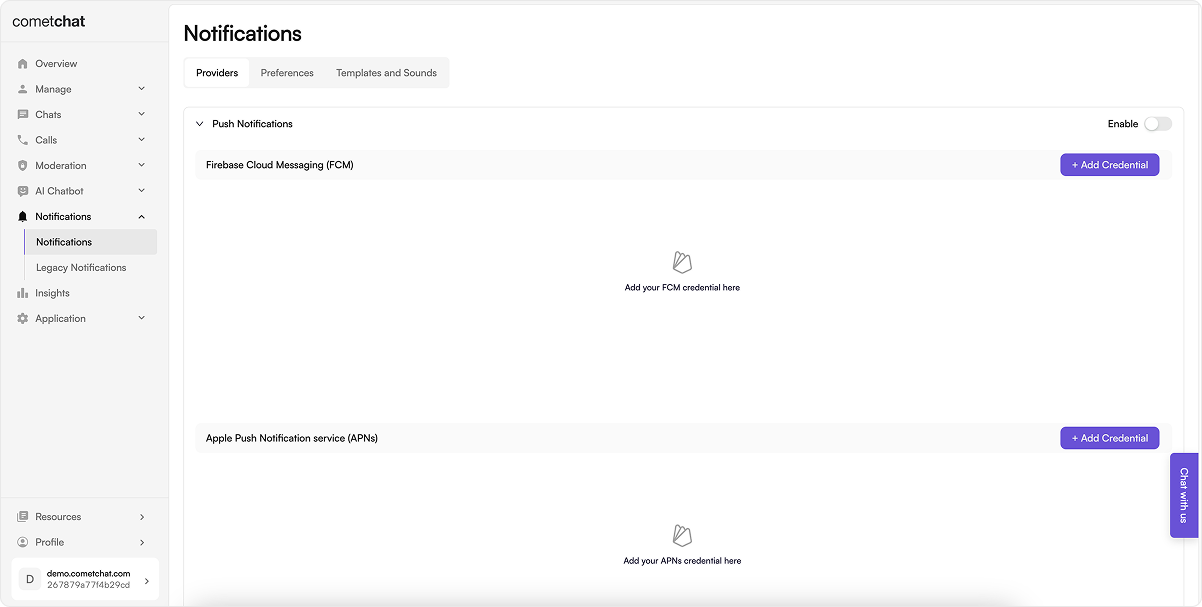
1. Go to **Notifications → Settings** and enable **Push Notifications**.
2. Add/configure an **FCM** provider and copy the **Provider ID** (used in code).
 ## 2. Firebase setup (web app + VAPID)
1. In Firebase Console, create/select a project.
2. Add a **Web** app (``), copy the **Firebase config** object.
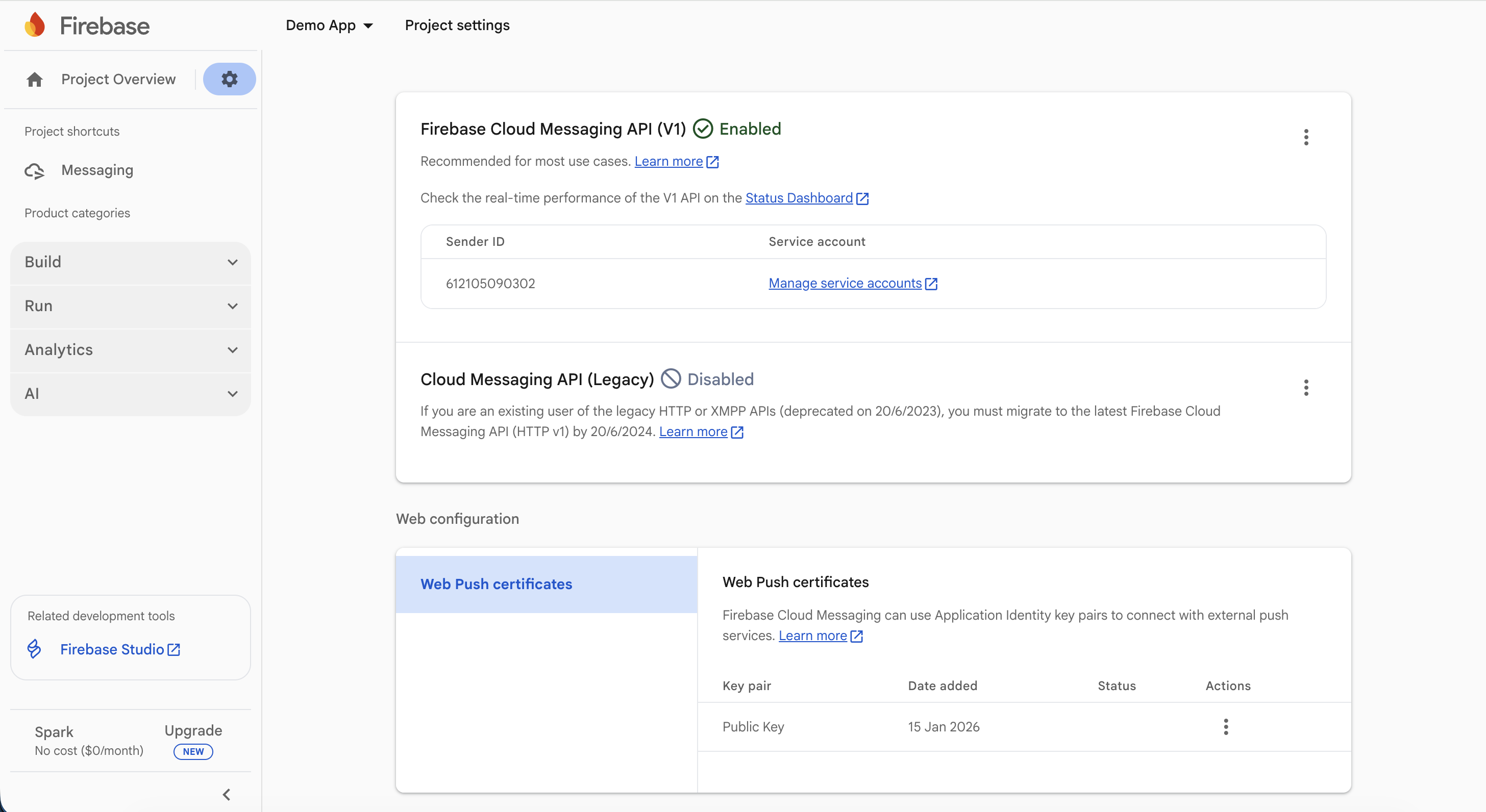
3. In **Project settings → Cloud Messaging**, generate/copy the **VAPID key** under Web Push certificates.
## 2. Firebase setup (web app + VAPID)
1. In Firebase Console, create/select a project.
2. Add a **Web** app (``), copy the **Firebase config** object.
3. In **Project settings → Cloud Messaging**, generate/copy the **VAPID key** under Web Push certificates.
 ## 3. Install dependencies
Install firebase SDK:
```bash theme={null}
npm install firebase@^10.3.1
```
## 4. Constants
File: `src/AppConstants.js` (or equivalent)
Set the CometChat Constants from your dashboard and Firebase config + VAPID key.
```js lines highlight={2-5, 9-15, 18} theme={null}
export const COMETCHAT_CONSTANTS = {
APP_ID: "",
REGION: "",
AUTH_KEY: "",
FCM_PROVIDER_ID: "",
};
export const FIREBASE_CONFIG = {
apiKey: "",
authDomain: "",
projectId: "",
storageBucket: "",
messagingSenderId: "",
appId: "",
measurementId: ""
};
export const FIREBASE_VAPID_KEY = "";
```
## 4. Configure Firebase (frontend)
File: `src/firebase.js` (or equivalent)
This code:
* Initializes Firebase app and messaging.
* Requests notification permission, fetches FCM token, and registers it with CometChat after login.
* Sets up foreground message handler to show notifications.
```js lines theme={null}
import { initializeApp } from "firebase/app";
import { getMessaging, getToken, onMessage } from "firebase/messaging";
import { CometChatNotifications } from "@cometchat/chat-sdk-javascript";
import { COMETCHAT_CONSTANTS, FIREBASE_CONFIG, FIREBASE_VAPID_KEY } from "./AppConstants";
let messagingInstance = null;
export default async function firebaseInitialize(navigate) {
try {
// Check if Firebase is already initialized
let app;
try {
app = initializeApp(FIREBASE_CONFIG);
} catch (error) {
// Firebase might already be initialized
const { getApps } = await import("firebase/app");
const apps = getApps();
if (apps.length > 0) {
app = apps[0];
} else {
throw error;
}
}
messagingInstance = getMessaging(app);
// Check notification permission first
if (Notification.permission === "default") {
return;
}
if (Notification.permission !== "granted") {
return;
}
// Get FCM token
const currentToken = await getToken(messagingInstance, {
vapidKey: FIREBASE_VAPID_KEY,
});
if (currentToken) {
// Check if user is logged in before registering
const { CometChat } = await import("@cometchat/chat-sdk-javascript");
const loggedInUser = await CometChat.getLoggedinUser();
if (!loggedInUser) {
return;
}
// Register push token with CometChat
try {
const payload = await CometChatNotifications.registerPushToken(
currentToken,
CometChatNotifications.PushPlatforms.FCM_WEB,
COMETCHAT_CONSTANTS.FCM_PROVIDER_ID
);
} catch (err) {
console.error("Firebase initialization error:", err);
}
} else {
console.error("No registration token available. Request permission to generate one.");
}
} catch (err) {
console.error("Firebase initialization error:", err);
}
// Set up foreground message handler
if (messagingInstance) {
onMessage(messagingInstance, function (payload) {
// Show notification when app is in foreground
if (Notification.permission === "granted") {
const notificationTitle = payload.data?.title || "New Message";
let notificationBody = payload.data?.body || "";
// Handle call notifications
if (payload.data?.type === "call") {
switch (payload.data.callAction) {
case "cancelled":
notificationBody = "Call cancelled";
break;
case "initiated":
notificationBody = `Incoming ${payload.data.callType} call`;
break;
default:
break;
}
}
const notificationOptions = {
body: notificationBody,
icon: payload.data?.senderAvatar || "/logo192.png",
data: payload.data,
tag: payload.data?.tag,
requireInteraction: false,
};
new Notification(notificationTitle, notificationOptions);
}
});
}
}
// Function to register push token after login
export async function registerPushTokenAfterLogin() {
if (!messagingInstance) {
return;
}
try {
const currentToken = await getToken(messagingInstance, {
vapidKey: FIREBASE_VAPID_KEY,
});
if (currentToken) {
const payload = await CometChatNotifications.registerPushToken(
currentToken,
CometChatNotifications.PushPlatforms.FCM_WEB,
COMETCHAT_CONSTANTS.FCM_PROVIDER_ID
);
}
} catch (err) {
console.error("Error registering push token after login:", err);
}
}
```
Use your **VAPID key** in `getToken` calls.
## 5. Service worker (background pushes)
File: `public/firebase-messaging-sw.js`
This code:
* Initializes Firebase app in the service worker.
* Handles background messages with `onBackgroundMessage`.
* Manages notification clicks to focus the app and send data for navigation.
* Ensure your app registers the service worker (e.g., in `index.tsx`) and listens for `message` events to navigate.
```js lines theme={null}
/* eslint-disable no-restricted-globals */
/* eslint-disable no-undef */
// required to setup background notification handler when browser is not in focus or in background and
// In order to receive the onMessage event, app must define the Firebase messaging service worker
// self.importScripts("localforage.js");
importScripts(
"https://www.gstatic.com/firebasejs/9.15.0/firebase-app-compat.js"
);
importScripts(
"https://www.gstatic.com/firebasejs/9.15.0/firebase-messaging-compat.js"
);
var TAG = "[Firebase-sw.js]";
self.addEventListener("notificationclick", async function (event) {
console.log(TAG, "notificationclick", event, event.clientId);
if (event?.notification?.data) {
let data = event.notification.data;
event.waitUntil(
self.clients
.matchAll({ type: "window", includeUncontrolled: true })
.then((clientList) => {
if (clientList.length > 0) {
clientList[0].postMessage({
message: data,
});
return (
clientList[0]
.focus()
.catch((error) => {
console.log(error);
return self.clients.openWindow(clientList[0].url); // Adjust this URL as necessary for your application
})
);
} else {
// Open a new client (tab) if there are no existing clients
self.clients.openWindow("/");
setTimeout(() => {
self.clients
.matchAll({ type: "window", includeUncontrolled: true })
.then((clientList) => {
if (clientList.length > 0) {
clientList[0].postMessage({
message: {...data,fromBackground: true},
});
}
return;
});
}, 1500);
}
})
);
}
event.notification.close();
});
// "Default" Firebase configuration (prevents errors)
const defaultConfig = {
apiKey: true,
projectId: true,
messagingSenderId: true,
appId: true,
};
// Initialize Firebase app
firebase.initializeApp(self.firebaseConfig || defaultConfig);
let messaging;
try {
messaging = firebase.messaging();
// Customize background notification handling here
messaging.onBackgroundMessage((payload) => {
console.log("Background Message:", payload);
const notificationTitle = payload.data.title;
if (
payload.data.type === "call" &&
(payload.data.callAction === "unanswered" ||
payload.data.callAction === "busy" ||
payload.data.callAction === "ongoing")
) {
return;
}
let body = payload.data.body;
if (payload.data.type === "call") {
switch (payload.data.callAction) {
case "cancelled":
body = `Call cancelled`;
break;
case "initiated":
body = `Incoming ${payload.data.callType} call`;
break;
default:
break;
}
}
const notificationOptions = {
title: payload.data.title,
icon: payload.data.senderAvatar,
data: payload.data,
tag: payload.data.tag,
body: body,
};
self.registration.showNotification(notificationTitle, notificationOptions);
});
} catch (err) {
console.error("Failed to initialize Firebase Messaging", err);
}
```
Ensure your app registers the service worker (e.g., in `index.tsx`) and listens for `message` events to navigate.
## 6. Request permission + register token after login
In your app initialization (e.g., `App.tsx`):
This code:
* Requests notification permission.
* Fetches FCM token and registers it with CometChat after user login.
* Handles token refresh by re-registering if it changes.
```ts lines theme={null}
const token = await getToken(messaging, { vapidKey: VAPID_KEY });
await CometChatNotifications.registerPushToken(
token,
CometChatNotifications.PushPlatforms.FCM_WEB,
COMETCHAT_CONSTANTS.FCM_PROVIDER_ID
);
```
* Run after the user logs in; retry on failure.
* On logout: `CometChatNotifications.unregisterPushToken()` before ending the session.
* Handle token refresh by calling `getToken` again and re-registering if it changes.
**Example Implementation**:
This code:
* Initializes CometChat UI Kit.
* Initializes Firebase messaging.
* Logs in the user if not already logged in.
* Mounts the React app.
* Registers the push token after login.
```tsx lines highlight={11, 13, 41, 57} theme={null}
import { StrictMode } from "react";
import { createRoot } from "react-dom/client";
import "./index.css";
import App from "./App.tsx";
import { COMETCHAT_CONSTANTS } from "./AppConstants.ts";
import { CometChatUIKit, UIKitSettingsBuilder } from "@cometchat/chat-uikit-react";
// Your firebase helper (from firebase.js)
// Adjust the path if your file lives somewhere else.
import firebaseInitialize, { registerPushTokenAfterLogin } from "./firebase";
const UID = "cometchat-uid-1";
/**
* Configure the CometChat UI Kit using the UIKitSettingsBuilder.
*/
const UIKitSettings = new UIKitSettingsBuilder()
.setAppId(COMETCHAT_CONSTANTS.APP_ID)
.setRegion(COMETCHAT_CONSTANTS.REGION)
.setAuthKey(COMETCHAT_CONSTANTS.AUTH_KEY)
.subscribePresenceForAllUsers()
.build();
function mountApp() {
createRoot(document.getElementById("root")!).render(
);
}
async function boot() {
try {
// 1) Init CometChat UIKit
await CometChatUIKit.init(UIKitSettings);
console.log("CometChat UI Kit initialized successfully.");
// 2) Init Firebase messaging + foreground handlers once
// (This sets up messagingInstance and onMessage handler in your firebase.js)
await firebaseInitialize();
// 3) Login if needed
const existing = await CometChatUIKit.getLoggedinUser();
if (!existing) {
const user = await CometChatUIKit.login(UID);
console.log("Login Successful:", { user });
} else {
console.log("User already logged in:", { user: existing });
}
// 4) Mount UI (don’t block UI on push)
mountApp();
// 5) Register push AFTER login (requests permission if needed)
// Non-blocking so app loads even if user denies permission
void registerPushTokenAfterLogin();
} catch (error) {
console.error("CometChat UI Kit initialization/login failed:", error);
}
}
boot();
```
## 7. Foreground + background handling
* **Foreground**: `messaging.onMessage` → show a `Notification` or in-app toast; deep link using payload data.
* **Background/killed**: service worker `onBackgroundMessage` shows the notification; `notificationclick` focuses the tab and sends a message for navigation.
* Suppress duplicates if the conversation is already active.
## 8. Testing checklist
1. Service worker registered (DevTools → Application → Service Workers shows “activated”).
2. Permission prompt appears and is granted (`Notification.permission === "granted"`).
3. Login → token fetched → `registerPushToken` succeeds (check console/logs).
4. Foreground message shows a notification; click navigates to the right chat.
5. Background/tab inactive message shows a notification; click focuses tab and routes correctly.
6. Logout → `unregisterPushToken` runs without errors.
## 9. Troubleshooting
| Symptom | Quick checks |
| ------------------------ | ---------------------------------------------------------------------------------------------------------------- |
| No notification | Service worker registered? Permission granted? VAPID key matches Firebase project? FCM Provider ID set in code? |
| Token registration fails | Run after login; confirm Provider ID; ensure correct Firebase config domain/origin; check console errors. |
| Click does nothing | Ensure `notificationclick` handler posts a message or opens the client; app listens for postMessage to navigate. |
| Foreground only | Verify `onBackgroundMessage` in service worker; confirm service worker file is in `/public` and registered. |
| Wrong project | Config/VAPID from a different Firebase project will invalidate tokens—recreate tokens after updating. |
## 3. Install dependencies
Install firebase SDK:
```bash theme={null}
npm install firebase@^10.3.1
```
## 4. Constants
File: `src/AppConstants.js` (or equivalent)
Set the CometChat Constants from your dashboard and Firebase config + VAPID key.
```js lines highlight={2-5, 9-15, 18} theme={null}
export const COMETCHAT_CONSTANTS = {
APP_ID: "",
REGION: "",
AUTH_KEY: "",
FCM_PROVIDER_ID: "",
};
export const FIREBASE_CONFIG = {
apiKey: "",
authDomain: "",
projectId: "",
storageBucket: "",
messagingSenderId: "",
appId: "",
measurementId: ""
};
export const FIREBASE_VAPID_KEY = "";
```
## 4. Configure Firebase (frontend)
File: `src/firebase.js` (or equivalent)
This code:
* Initializes Firebase app and messaging.
* Requests notification permission, fetches FCM token, and registers it with CometChat after login.
* Sets up foreground message handler to show notifications.
```js lines theme={null}
import { initializeApp } from "firebase/app";
import { getMessaging, getToken, onMessage } from "firebase/messaging";
import { CometChatNotifications } from "@cometchat/chat-sdk-javascript";
import { COMETCHAT_CONSTANTS, FIREBASE_CONFIG, FIREBASE_VAPID_KEY } from "./AppConstants";
let messagingInstance = null;
export default async function firebaseInitialize(navigate) {
try {
// Check if Firebase is already initialized
let app;
try {
app = initializeApp(FIREBASE_CONFIG);
} catch (error) {
// Firebase might already be initialized
const { getApps } = await import("firebase/app");
const apps = getApps();
if (apps.length > 0) {
app = apps[0];
} else {
throw error;
}
}
messagingInstance = getMessaging(app);
// Check notification permission first
if (Notification.permission === "default") {
return;
}
if (Notification.permission !== "granted") {
return;
}
// Get FCM token
const currentToken = await getToken(messagingInstance, {
vapidKey: FIREBASE_VAPID_KEY,
});
if (currentToken) {
// Check if user is logged in before registering
const { CometChat } = await import("@cometchat/chat-sdk-javascript");
const loggedInUser = await CometChat.getLoggedinUser();
if (!loggedInUser) {
return;
}
// Register push token with CometChat
try {
const payload = await CometChatNotifications.registerPushToken(
currentToken,
CometChatNotifications.PushPlatforms.FCM_WEB,
COMETCHAT_CONSTANTS.FCM_PROVIDER_ID
);
} catch (err) {
console.error("Firebase initialization error:", err);
}
} else {
console.error("No registration token available. Request permission to generate one.");
}
} catch (err) {
console.error("Firebase initialization error:", err);
}
// Set up foreground message handler
if (messagingInstance) {
onMessage(messagingInstance, function (payload) {
// Show notification when app is in foreground
if (Notification.permission === "granted") {
const notificationTitle = payload.data?.title || "New Message";
let notificationBody = payload.data?.body || "";
// Handle call notifications
if (payload.data?.type === "call") {
switch (payload.data.callAction) {
case "cancelled":
notificationBody = "Call cancelled";
break;
case "initiated":
notificationBody = `Incoming ${payload.data.callType} call`;
break;
default:
break;
}
}
const notificationOptions = {
body: notificationBody,
icon: payload.data?.senderAvatar || "/logo192.png",
data: payload.data,
tag: payload.data?.tag,
requireInteraction: false,
};
new Notification(notificationTitle, notificationOptions);
}
});
}
}
// Function to register push token after login
export async function registerPushTokenAfterLogin() {
if (!messagingInstance) {
return;
}
try {
const currentToken = await getToken(messagingInstance, {
vapidKey: FIREBASE_VAPID_KEY,
});
if (currentToken) {
const payload = await CometChatNotifications.registerPushToken(
currentToken,
CometChatNotifications.PushPlatforms.FCM_WEB,
COMETCHAT_CONSTANTS.FCM_PROVIDER_ID
);
}
} catch (err) {
console.error("Error registering push token after login:", err);
}
}
```
Use your **VAPID key** in `getToken` calls.
## 5. Service worker (background pushes)
File: `public/firebase-messaging-sw.js`
This code:
* Initializes Firebase app in the service worker.
* Handles background messages with `onBackgroundMessage`.
* Manages notification clicks to focus the app and send data for navigation.
* Ensure your app registers the service worker (e.g., in `index.tsx`) and listens for `message` events to navigate.
```js lines theme={null}
/* eslint-disable no-restricted-globals */
/* eslint-disable no-undef */
// required to setup background notification handler when browser is not in focus or in background and
// In order to receive the onMessage event, app must define the Firebase messaging service worker
// self.importScripts("localforage.js");
importScripts(
"https://www.gstatic.com/firebasejs/9.15.0/firebase-app-compat.js"
);
importScripts(
"https://www.gstatic.com/firebasejs/9.15.0/firebase-messaging-compat.js"
);
var TAG = "[Firebase-sw.js]";
self.addEventListener("notificationclick", async function (event) {
console.log(TAG, "notificationclick", event, event.clientId);
if (event?.notification?.data) {
let data = event.notification.data;
event.waitUntil(
self.clients
.matchAll({ type: "window", includeUncontrolled: true })
.then((clientList) => {
if (clientList.length > 0) {
clientList[0].postMessage({
message: data,
});
return (
clientList[0]
.focus()
.catch((error) => {
console.log(error);
return self.clients.openWindow(clientList[0].url); // Adjust this URL as necessary for your application
})
);
} else {
// Open a new client (tab) if there are no existing clients
self.clients.openWindow("/");
setTimeout(() => {
self.clients
.matchAll({ type: "window", includeUncontrolled: true })
.then((clientList) => {
if (clientList.length > 0) {
clientList[0].postMessage({
message: {...data,fromBackground: true},
});
}
return;
});
}, 1500);
}
})
);
}
event.notification.close();
});
// "Default" Firebase configuration (prevents errors)
const defaultConfig = {
apiKey: true,
projectId: true,
messagingSenderId: true,
appId: true,
};
// Initialize Firebase app
firebase.initializeApp(self.firebaseConfig || defaultConfig);
let messaging;
try {
messaging = firebase.messaging();
// Customize background notification handling here
messaging.onBackgroundMessage((payload) => {
console.log("Background Message:", payload);
const notificationTitle = payload.data.title;
if (
payload.data.type === "call" &&
(payload.data.callAction === "unanswered" ||
payload.data.callAction === "busy" ||
payload.data.callAction === "ongoing")
) {
return;
}
let body = payload.data.body;
if (payload.data.type === "call") {
switch (payload.data.callAction) {
case "cancelled":
body = `Call cancelled`;
break;
case "initiated":
body = `Incoming ${payload.data.callType} call`;
break;
default:
break;
}
}
const notificationOptions = {
title: payload.data.title,
icon: payload.data.senderAvatar,
data: payload.data,
tag: payload.data.tag,
body: body,
};
self.registration.showNotification(notificationTitle, notificationOptions);
});
} catch (err) {
console.error("Failed to initialize Firebase Messaging", err);
}
```
Ensure your app registers the service worker (e.g., in `index.tsx`) and listens for `message` events to navigate.
## 6. Request permission + register token after login
In your app initialization (e.g., `App.tsx`):
This code:
* Requests notification permission.
* Fetches FCM token and registers it with CometChat after user login.
* Handles token refresh by re-registering if it changes.
```ts lines theme={null}
const token = await getToken(messaging, { vapidKey: VAPID_KEY });
await CometChatNotifications.registerPushToken(
token,
CometChatNotifications.PushPlatforms.FCM_WEB,
COMETCHAT_CONSTANTS.FCM_PROVIDER_ID
);
```
* Run after the user logs in; retry on failure.
* On logout: `CometChatNotifications.unregisterPushToken()` before ending the session.
* Handle token refresh by calling `getToken` again and re-registering if it changes.
**Example Implementation**:
This code:
* Initializes CometChat UI Kit.
* Initializes Firebase messaging.
* Logs in the user if not already logged in.
* Mounts the React app.
* Registers the push token after login.
```tsx lines highlight={11, 13, 41, 57} theme={null}
import { StrictMode } from "react";
import { createRoot } from "react-dom/client";
import "./index.css";
import App from "./App.tsx";
import { COMETCHAT_CONSTANTS } from "./AppConstants.ts";
import { CometChatUIKit, UIKitSettingsBuilder } from "@cometchat/chat-uikit-react";
// Your firebase helper (from firebase.js)
// Adjust the path if your file lives somewhere else.
import firebaseInitialize, { registerPushTokenAfterLogin } from "./firebase";
const UID = "cometchat-uid-1";
/**
* Configure the CometChat UI Kit using the UIKitSettingsBuilder.
*/
const UIKitSettings = new UIKitSettingsBuilder()
.setAppId(COMETCHAT_CONSTANTS.APP_ID)
.setRegion(COMETCHAT_CONSTANTS.REGION)
.setAuthKey(COMETCHAT_CONSTANTS.AUTH_KEY)
.subscribePresenceForAllUsers()
.build();
function mountApp() {
createRoot(document.getElementById("root")!).render(
);
}
async function boot() {
try {
// 1) Init CometChat UIKit
await CometChatUIKit.init(UIKitSettings);
console.log("CometChat UI Kit initialized successfully.");
// 2) Init Firebase messaging + foreground handlers once
// (This sets up messagingInstance and onMessage handler in your firebase.js)
await firebaseInitialize();
// 3) Login if needed
const existing = await CometChatUIKit.getLoggedinUser();
if (!existing) {
const user = await CometChatUIKit.login(UID);
console.log("Login Successful:", { user });
} else {
console.log("User already logged in:", { user: existing });
}
// 4) Mount UI (don’t block UI on push)
mountApp();
// 5) Register push AFTER login (requests permission if needed)
// Non-blocking so app loads even if user denies permission
void registerPushTokenAfterLogin();
} catch (error) {
console.error("CometChat UI Kit initialization/login failed:", error);
}
}
boot();
```
## 7. Foreground + background handling
* **Foreground**: `messaging.onMessage` → show a `Notification` or in-app toast; deep link using payload data.
* **Background/killed**: service worker `onBackgroundMessage` shows the notification; `notificationclick` focuses the tab and sends a message for navigation.
* Suppress duplicates if the conversation is already active.
## 8. Testing checklist
1. Service worker registered (DevTools → Application → Service Workers shows “activated”).
2. Permission prompt appears and is granted (`Notification.permission === "granted"`).
3. Login → token fetched → `registerPushToken` succeeds (check console/logs).
4. Foreground message shows a notification; click navigates to the right chat.
5. Background/tab inactive message shows a notification; click focuses tab and routes correctly.
6. Logout → `unregisterPushToken` runs without errors.
## 9. Troubleshooting
| Symptom | Quick checks |
| ------------------------ | ---------------------------------------------------------------------------------------------------------------- |
| No notification | Service worker registered? Permission granted? VAPID key matches Firebase project? FCM Provider ID set in code? |
| Token registration fails | Run after login; confirm Provider ID; ensure correct Firebase config domain/origin; check console errors. |
| Click does nothing | Ensure `notificationclick` handler posts a message or opens the client; app listens for postMessage to navigate. |
| Foreground only | Verify `onBackgroundMessage` in service worker; confirm service worker file is in `/public` and registered. |
| Wrong project | Config/VAPID from a different Firebase project will invalidate tokens—recreate tokens after updating. |