> ## Documentation Index
> Fetch the complete documentation index at: https://www.cometchat.com/docs/llms.txt
> Use this file to discover all available pages before exploring further.
# React Native Push Notifications (iOS)
> Bring the SampleAppWithPushNotifications experience—APNs + VoIP—into any React Native project using CometChat UI Kit.
| Field | Value |
| -------------- | ------------------------------------------------------------------------------------------ |
| Platform | iOS (APNs + PushKit/CallKit) |
| Key Classes | `CometChatNotifications`, `VoipNotificationHandler`, `PendingCallManager` |
| Key Methods | `registerPushToken()`, `unregisterPushToken()`, `PushNotificationIOS.requestPermissions()` |
| Push Platforms | `APNS_REACT_NATIVE_DEVICE`, `APNS_REACT_NATIVE_VOIP` |
| Prerequisites | CometChat SDK initialized, user logged in, APNs `.p8` key uploaded, physical iOS device |
Reference implementation of React Native UI Kit and APNs Push Notification setup.
## What this guide covers
* CometChat Dashboard setup (enable push, add APNs provider).
* Platform credentials (Apple entitlements).
* Copying the sample notification stack and aligning IDs/provider IDs.
* Native glue for iOS (capabilities + PushKit/CallKit for VoIP).
* Token registration, navigation from pushes, testing, and troubleshooting.
## What you need first
* CometChat app credentials (App ID, Region, Auth Key) and Push Notifications enabled with an **APNs provider (React Native iOS)**; add an **APNs VoIP provider** if you plan to receive call invites via PushKit.
* Apple push setup: APNs `.p8` key/cert in CometChat, iOS project with Push Notifications + Background Modes (Remote notifications) permissions.
* React Native 0.81+, Node 18+, physical iOS device for reliable push/call testing.
## How APNs + CometChat work together
* **APNs (iOS) is the transport:** Apple issues the APNs token and delivers payloads to devices.
* **CometChat provider holds your credentials:** The APNs provider you add stores your `.p8` key/cert.
* **Registration flow:** Request permission → APNs returns token → after `CometChat.login`, register with `CometChatNotifications.registerPushToken(token, platform, providerId)` using `APNS_REACT_NATIVE_DEVICE` → CometChat sends pushes to APNs on your behalf → the app handles taps/foreground events via `PushNotificationIOS`.
## 1. Enable push and add providers (CometChat Dashboard)
1. Go to **Notifications → Settings** and enable **Push Notifications**.
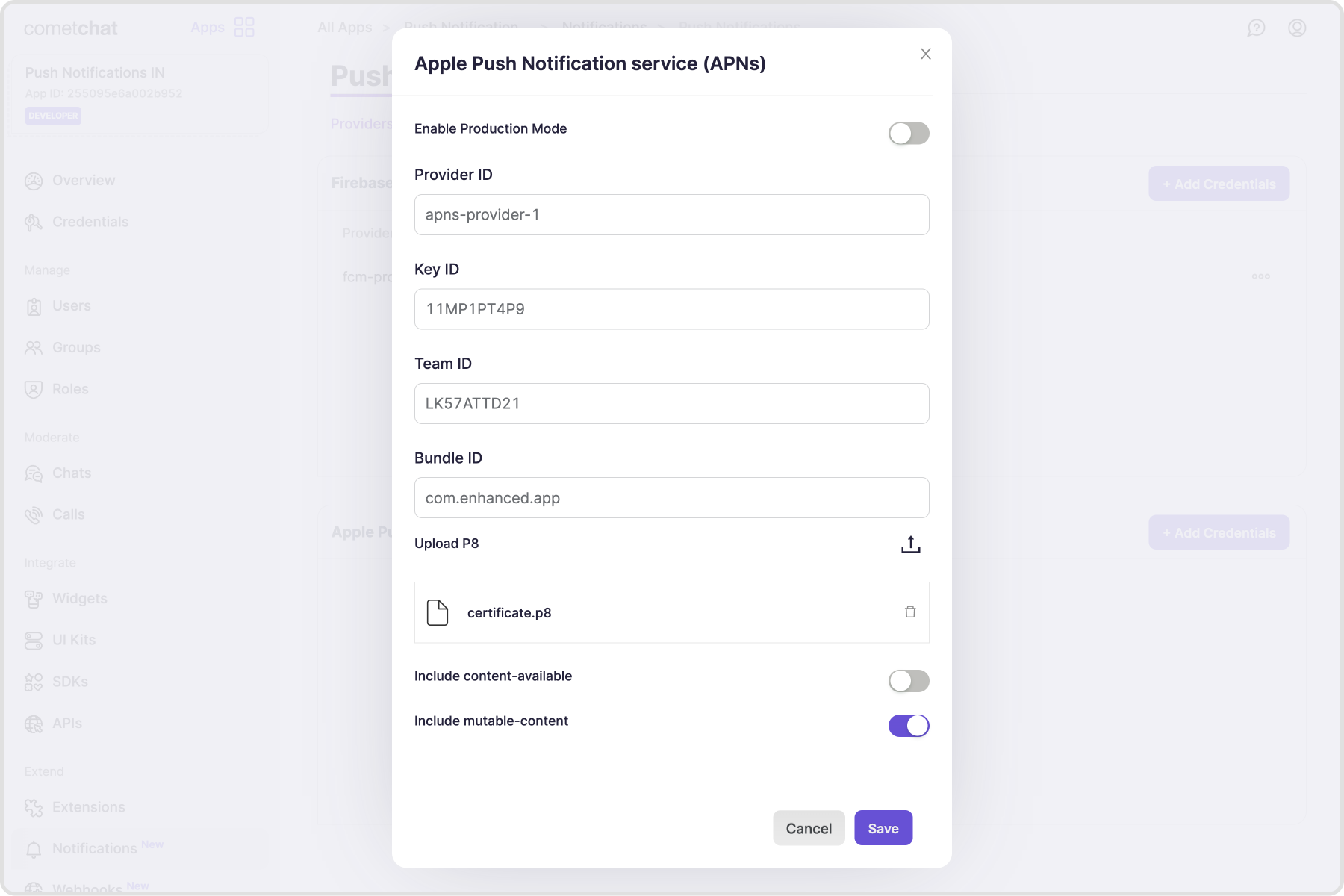
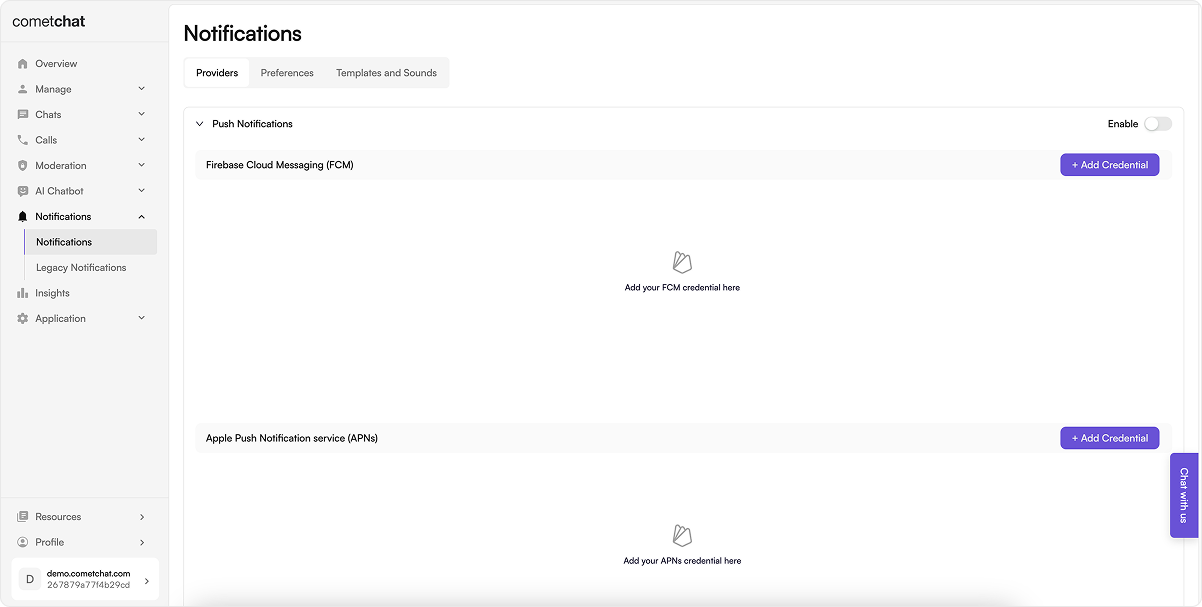 2. Add an **APNs** provider for iOS and copy the Provider ID.
 ## 2. Prepare platform credentials
### Apple Developer portal
For iOS we use Apple Push Notification service (APNs) for both standard and VoIP pushes. Follow these steps to create the credentials you’ll upload to CometChat.
1. Open **Keychain Access** → Certificate Assistant → *Request a Certificate From a Certificate Authority*.
## 2. Prepare platform credentials
### Apple Developer portal
For iOS we use Apple Push Notification service (APNs) for both standard and VoIP pushes. Follow these steps to create the credentials you’ll upload to CometChat.
1. Open **Keychain Access** → Certificate Assistant → *Request a Certificate From a Certificate Authority*.
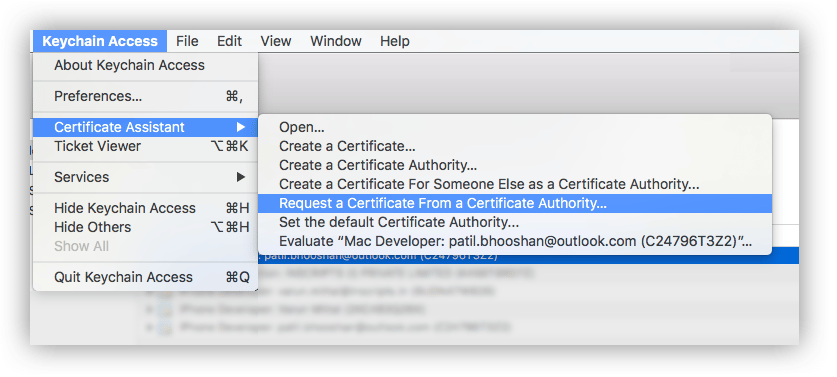 2. In **Certificate Information**, enter your Apple Developer email and a common name; choose **Saved to disk**, then **Continue**.
3. Save the CSR file locally—this contains your public/private key pair.
1. Sign in to the [Apple Developer Member Center](https://developer.apple.com/membercenter) → **Certificates, Identifiers & Profiles**.
2. In **Certificate Information**, enter your Apple Developer email and a common name; choose **Saved to disk**, then **Continue**.
3. Save the CSR file locally—this contains your public/private key pair.
1. Sign in to the [Apple Developer Member Center](https://developer.apple.com/membercenter) → **Certificates, Identifiers & Profiles**.
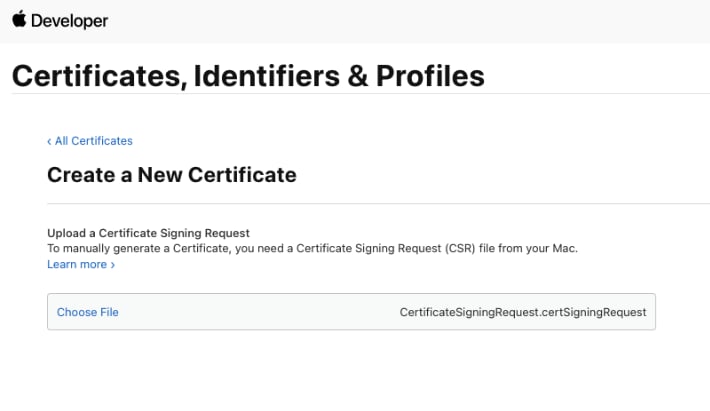
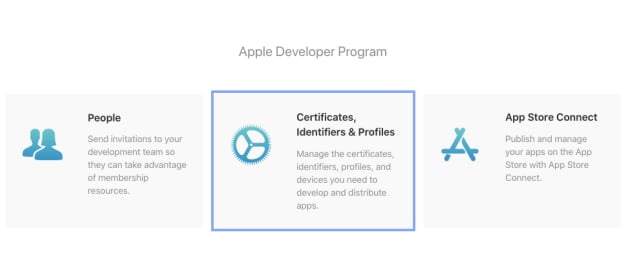 2. Click **+** to add a certificate.
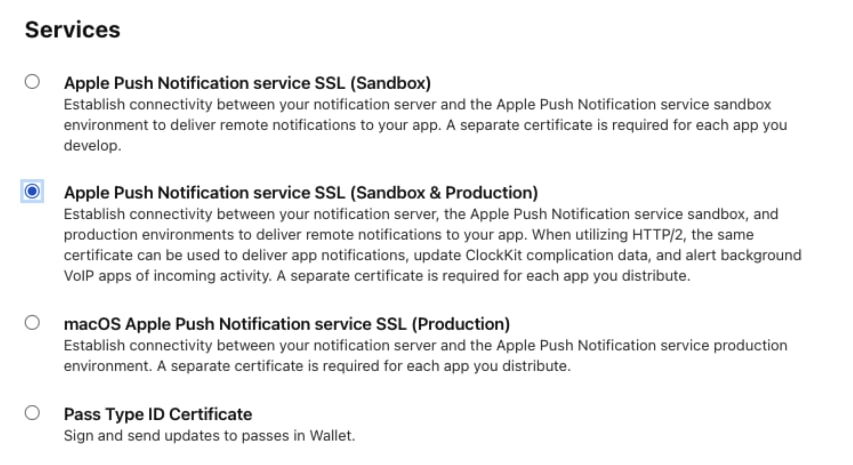
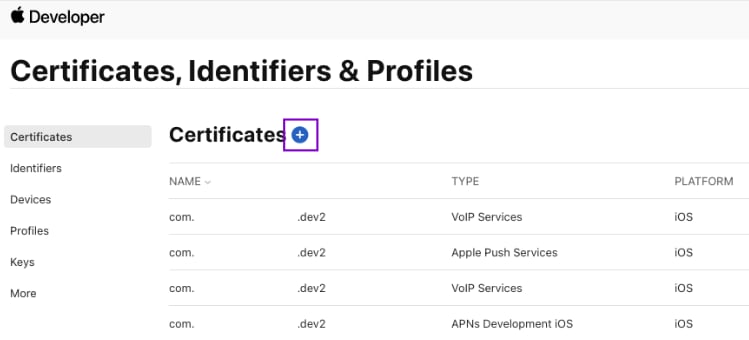 3. Under **Services**, pick **Apple Push Notification service SSL (Sandbox & Production)**.
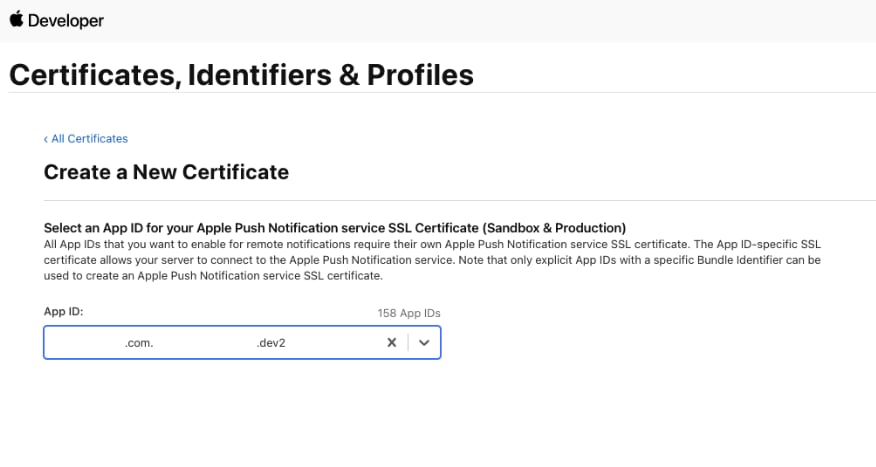
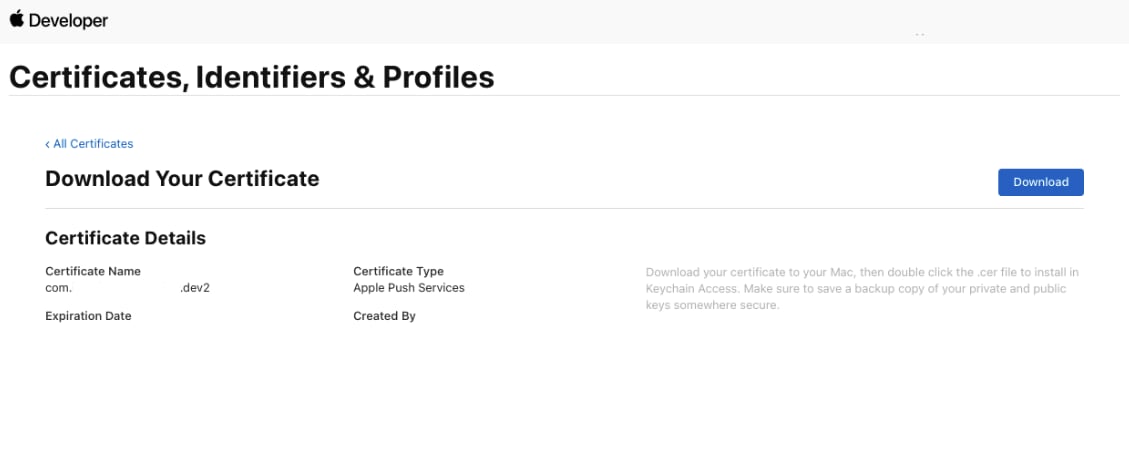
 4. Select your App ID, upload the CSR, continue, and download the generated `.cer` file.
 &
&
 &
&
 1. In **Certificates, IDs & Profiles**, open **Keys** → click **+**.
2. Enter a key name, check **Apple Push Notification service (APNs)**, then **Continue** → **Register**.
3. Download the `.p8` file and note the **Key ID**, **Team ID**, and your **Bundle ID**—you’ll enter these in CometChat.
4. *(Optional)* If you still use `.p12`, export it from the downloaded key without an export password; keep it handy for upload.
**`.p12` certificates are deprecated.** Apple recommends using `.p8` Auth Keys for push notifications. `.p8` keys are simpler to manage (one key works for all your apps), never expire, and are the only format actively supported going forward. Migrate to `.p8` if you haven't already.
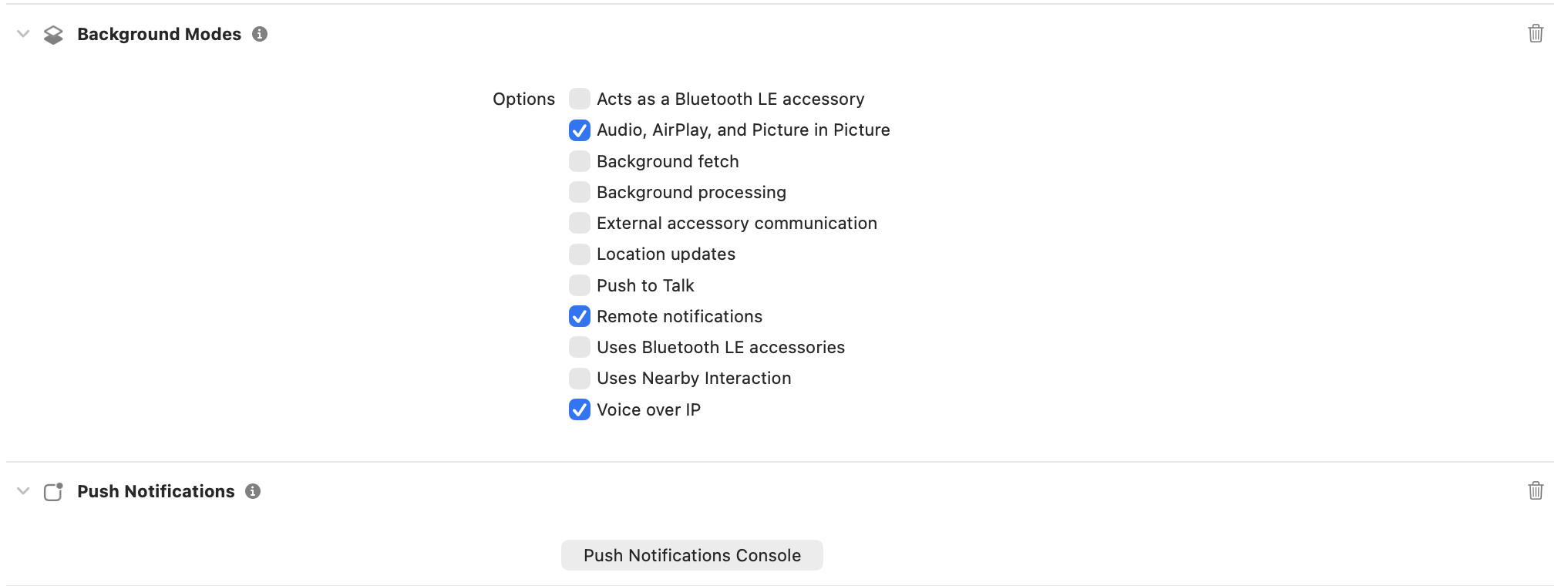
Enable **Push Notifications** plus **Background Modes → Remote notifications** on the bundle ID.
1. In **Certificates, IDs & Profiles**, open **Keys** → click **+**.
2. Enter a key name, check **Apple Push Notification service (APNs)**, then **Continue** → **Register**.
3. Download the `.p8` file and note the **Key ID**, **Team ID**, and your **Bundle ID**—you’ll enter these in CometChat.
4. *(Optional)* If you still use `.p12`, export it from the downloaded key without an export password; keep it handy for upload.
**`.p12` certificates are deprecated.** Apple recommends using `.p8` Auth Keys for push notifications. `.p8` keys are simpler to manage (one key works for all your apps), never expire, and are the only format actively supported going forward. Migrate to `.p8` if you haven't already.
Enable **Push Notifications** plus **Background Modes → Remote notifications** on the bundle ID.
 ## 3. Local configuration
* Update `src/utils/AppConstants.tsx` with `appId`, `authKey`, `region`, and `apnProviderId`.
* Keep `app.json` name consistent with your bundle ID / applicationId.
```ts lines theme={null}
const APP_ID = "";
const AUTH_KEY = "";
const REGION = "";
const DEMO_UID = "cometchat-uid-1";
```
### 3.1 Dependencies snapshot (from Sample App)
Install these dependencies in your React Native app:
```npm lines theme={null}
npm install \
@cometchat/chat-sdk-react-native@4.0.18 \
@cometchat/calls-sdk-react-native@4.4.0 \
@cometchat/chat-uikit-react-native@5.2.6 \
@notifee/react-native@9.1.8 \
@react-native-async-storage/async-storage@2.2.0 \
@react-native-community/push-notification-ios@1.12.0 \
react-native-push-notification@8.1.1 \
react-native-callkeep@4.3.16 \
react-native-voip-push-notification@3.3.3
```
Match these or newer compatible versions in your app.
## 4. iOS App setup
### 4.1 Project Setup
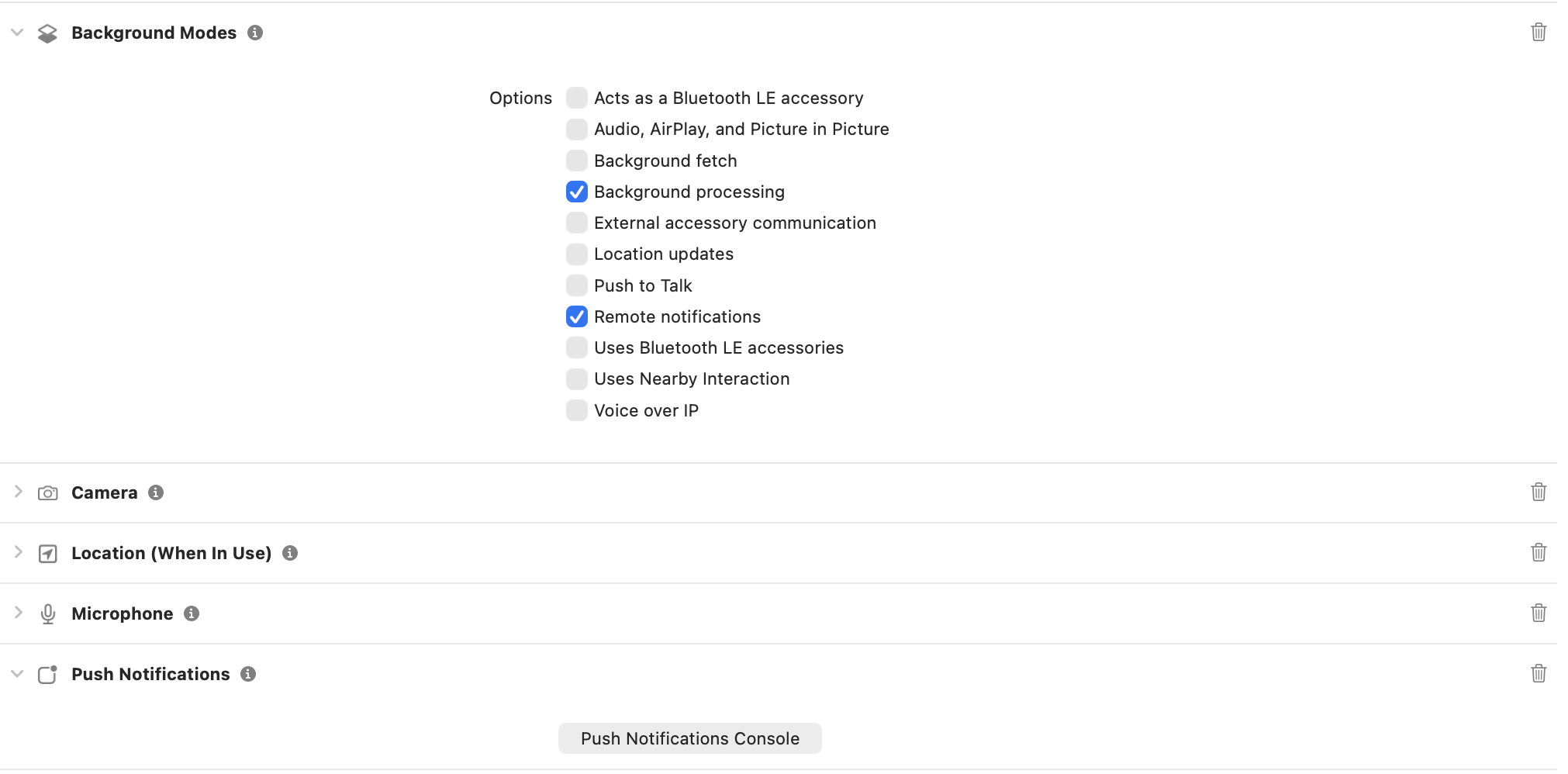
Enable **Push Notifications** and **Background Modes** (Remote notifications) in Xcode.
## 3. Local configuration
* Update `src/utils/AppConstants.tsx` with `appId`, `authKey`, `region`, and `apnProviderId`.
* Keep `app.json` name consistent with your bundle ID / applicationId.
```ts lines theme={null}
const APP_ID = "";
const AUTH_KEY = "";
const REGION = "";
const DEMO_UID = "cometchat-uid-1";
```
### 3.1 Dependencies snapshot (from Sample App)
Install these dependencies in your React Native app:
```npm lines theme={null}
npm install \
@cometchat/chat-sdk-react-native@4.0.18 \
@cometchat/calls-sdk-react-native@4.4.0 \
@cometchat/chat-uikit-react-native@5.2.6 \
@notifee/react-native@9.1.8 \
@react-native-async-storage/async-storage@2.2.0 \
@react-native-community/push-notification-ios@1.12.0 \
react-native-push-notification@8.1.1 \
react-native-callkeep@4.3.16 \
react-native-voip-push-notification@3.3.3
```
Match these or newer compatible versions in your app.
## 4. iOS App setup
### 4.1 Project Setup
Enable **Push Notifications** and **Background Modes** (Remote notifications) in Xcode.
 ### 4.2 Install dependencies + pods
After running the npm install above, install pods from the `ios` directory:
```bash lines theme={null}
cd ios
pod install
```
### 4.3 AppDelegate.swift modifications:
Add imports at the top:
```swift lines theme={null}
import UserNotifications
import RNCPushNotificationIOS
```
Add `UNUserNotificationCenterDelegate` to the `AppDelegate` class declaration:
```swift theme={null}
class AppDelegate: UIResponder, UIApplicationDelegate, UNUserNotificationCenterDelegate
```
Add the following inside the `didFinishLaunchingWithOptions` method:
```swift lines theme={null}
UNUserNotificationCenter.current().delegate = self
UNUserNotificationCenter.current().requestAuthorization(
options: [.alert, .badge, .sound]
) {
granted,
error in
if granted {
DispatchQueue.main.async {
application.registerForRemoteNotifications()
}
} else {
print("Push Notification permission not granted: \(String(describing: error))")
}
}
```
Add the following methods to handle push notification events:
```swift lines theme={null}
func application(_ application: UIApplication, didRegisterForRemoteNotificationsWithDeviceToken deviceToken: Data) {
print("APNs device token received: \(deviceToken)")
RNCPushNotificationIOS.didRegisterForRemoteNotifications(withDeviceToken: deviceToken)
}
func application(_ application: UIApplication, didFailToRegisterForRemoteNotificationsWithError error: Error) {
print("APNs registration failed: \(error)")
RNCPushNotificationIOS.didFailToRegisterForRemoteNotificationsWithError(error)
}
func application(_ application: UIApplication, didReceiveRemoteNotification userInfo: [AnyHashable: Any], fetchCompletionHandler completionHandler: @escaping (UIBackgroundFetchResult) -> Void) {
RNCPushNotificationIOS.didReceiveRemoteNotification(userInfo, fetchCompletionHandler: completionHandler)
}
func userNotificationCenter(_ center: UNUserNotificationCenter, willPresent notification: UNNotification, withCompletionHandler completionHandler: @escaping (UNNotificationPresentationOptions) -> Void) {
completionHandler([.banner, .sound, .badge])
}
func userNotificationCenter(_ center: UNUserNotificationCenter, didReceive response: UNNotificationResponse, withCompletionHandler completionHandler: @escaping () -> Void) {
RNCPushNotificationIOS.didReceive(response)
completionHandler()
}
```
Add the following to `Podfile` to avoid framework linkage issues:
```ruby theme={null}
use_frameworks! :linkage => :static
```
You might have to remove below code if already present in your Podfile:
```ruby lines theme={null}
linkage = ENV['USE_FRAMEWORKS']
if linkage != nil
Pod::UI.puts "Configuring Pod with #{linkage}ally linked Frameworks".green
use_frameworks! :linkage => linkage.to_sym
end
```
Then lets install pods and open the workspace:
```bash lines theme={null}
cd ios
pod install
open YourProjectName.xcworkspace
```
### 4.4 App.tsx modifications:
Import CometChatNotifications and PushNotificationIOS:
```tsx theme={null}
import { CometChat, CometChatNotifications } from "@cometchat/chat-sdk-react-native";
import PushNotificationIOS from "@react-native-community/push-notification-ios";
```
Get device token and store it in a ref:
Also, define your APNs provider ID from the CometChat Dashboard.
And request permissions on mount:
```tsx lines theme={null}
const APNS_PROVIDER_ID = 'YOUR_APNS_PROVIDER_ID'; // from CometChat Dashboard
const apnsTokenRef = useRef < string | null > (null);
useEffect(() => {
if (Platform.OS !== 'ios') return;
const onRegister = (deviceToken: string) => {
console.log(' APNs device token captured:', deviceToken);
apnsTokenRef.current = deviceToken;
};
PushNotificationIOS.addEventListener('register', onRegister);
PushNotificationIOS.addEventListener('registrationError', error => {
console.error(' APNs registration error:', error);
});
// Trigger permission + native registration
PushNotificationIOS.requestPermissions().then(p =>
console.log('Push permissions:', p),
);
return () => {
PushNotificationIOS.removeEventListener('register');
PushNotificationIOS.removeEventListener('registrationError');
};
}, []);
```
After user login, register the APNs token:
```tsx lines theme={null}
// Register token ONLY if we already have it
if (apnsTokenRef.current) {
await CometChatNotifications.registerPushToken(
apnsTokenRef.current,
CometChatNotifications.PushPlatforms.APNS_REACT_NATIVE_DEVICE,
APNS_PROVIDER_ID
);
console.log(' APNs token registered with CometChat');
}
```
Prior to logout, unregister the APNs token:
```tsx theme={null}
await CometChatNotifications.unregisterPushToken();
```
## 5. VoIP call notifications (iOS)
These steps are iOS-only—copy/paste and fill your IDs.
### 5.1 Enable capabilities in Xcode
* Target ➜ Signing & Capabilities: add **Push Notifications**.
* Add **Background Modes** → enable **Voice over IP** and **Remote notifications**.
* Run on a real device (PushKit/CallKit don’t work on the simulator).
### 5.2 AppDelegate.swift (PushKit + CallKit bridge)
Update your `AppDelegate` to register for VoIP pushes ASAP and forward events to JS/CallKeep:
```swift lines theme={null}
import PushKit
import RNVoipPushNotification
import RNCallKeep
// ...
@main
class AppDelegate: UIResponder, UIApplicationDelegate, UNUserNotificationCenterDelegate, PKPushRegistryDelegate {
// ...
func application(_ application: UIApplication, didFinishLaunchingWithOptions launchOptions: [UIApplication.LaunchOptionsKey: Any]? = nil) -> Bool {
// existing UNUserNotificationCenter code ...
RNVoipPushNotificationManager.voipRegistration() // triggers PushKit token
return true
}
// APNs device token handlers stay unchanged
// PushKit token -> JS
func pushRegistry(_ registry: PKPushRegistry, didUpdate pushCredentials: PKPushCredentials, for type: PKPushType) {
RNVoipPushNotificationManager.didUpdate(pushCredentials, forType: type.rawValue)
}
// Incoming VoIP push -> CallKit + JS
func pushRegistry(_ registry: PKPushRegistry, didReceiveIncomingPushWith payload: PKPushPayload, for type: PKPushType, completion: @escaping () -> Void) {
let dict = payload.dictionaryPayload
let uuid = (dict["uuid"] as? String) ?? UUID().uuidString
RNVoipPushNotificationManager.addCompletionHandler(uuid, completionHandler: completion)
RNVoipPushNotificationManager.didReceiveIncomingPush(with: payload, forType: type.rawValue)
RNCallKeep.reportNewIncomingCall(uuid, handle: (dict["handle"] as? String) ?? "Unknown", handleType: "generic", hasVideo: false, localizedCallerName: (dict["callerName"] as? String) ?? "Incoming Call", supportsHolding: true, supportsDTMF: true, supportsGrouping: true, supportsUngrouping: true, fromPushKit: true, payload: nil)
}
}
```
### 5.3 Drop in `VoipNotificationHandler.ts`
Handles CallKeep UI, defers acceptance until login, and listens for PushKit events.
```ts lines theme={null}
import { Platform } from "react-native";
import notifee, { AndroidImportance } from "@notifee/react-native";
import RNCallKeep, { IOptions } from "react-native-callkeep";
import { CometChat } from "@cometchat/chat-sdk-react-native";
import VoipPushNotification from "react-native-voip-push-notification";
import { setPendingAnsweredCall } from "./PendingCallManager";
const options: IOptions = {
ios: { appName: "YourAppName" },
android: { alertTitle: "VOIP required", alertDescription: "Allow phone account access", cancelButton: "Cancel", okButton: "OK", imageName: "ic_notification" },
};
type IncomingPayload = { sessionId?: string; senderName?: string; callerName?: string; name?: string; type?: string; [k: string]: any; };
class VoipNotificationHandler {
channelId = "";
isRinging = false;
isAnswered = false;
pendingAcceptance = false;
callerId = "";
msg: IncomingPayload | null = null;
initialized = false;
private setupPromise: Promise | null = null;
private listenersAttached = false;
private lastSessionId: string | null = null;
private lastRingAt = 0;
async initialize() {
if (this.initialized && this.setupPromise) { await this.setupPromise; return; }
if (!this.setupPromise) {
this.setupPromise = (async () => {
if (Platform.OS === "android") { await this.createNotificationChannel(); }
await this.setupCallKeep();
this.setupEventListeners();
this.initialized = true;
})().catch(err => { this.setupPromise = null; throw err; });
}
await this.setupPromise;
}
private async setupCallKeep() {
await RNCallKeep.setup(options);
RNCallKeep.setAvailable(true);
if (Platform.OS === "android") { RNCallKeep.setReachable(); }
}
private async createNotificationChannel() {
this.channelId = await notifee.createChannel({ id: "message", name: "Messages", lights: true, vibration: true, importance: AndroidImportance.HIGH });
}
async displayIncomingCall(payload: IncomingPayload) {
this.msg = payload || {};
const sessionId = this.msg?.sessionId;
const now = Date.now();
if (sessionId && this.lastSessionId === sessionId && now - this.lastRingAt < 5000) return;
if (this.isAnswered || this.pendingAcceptance) return;
await this.initialize();
const callerName = this.msg?.senderName || this.msg?.callerName || this.msg?.name || "Incoming Call";
this.callerId = this.callerId || Math.random().toString();
this.isRinging = true;
await RNCallKeep.displayIncomingCall(this.callerId, callerName, callerName, "generic", true);
this.lastSessionId = sessionId || null;
this.lastRingAt = now;
}
onAnswerCall = async ({ callUUID }: { callUUID: string }) => {
if (this.isAnswered) return;
this.isRinging = false; this.isAnswered = true;
const sessionID = this.msg?.sessionId; if (!sessionID) return;
RNCallKeep.backToForeground();
setTimeout(async () => {
const loggedInUser = await CometChat.getLoggedinUser().catch(() => null);
if (!loggedInUser) { this.pendingAcceptance = true; await setPendingAnsweredCall({ sessionId: sessionID, raw: this.msg, storedAt: Date.now() }); return; }
try { await CometChat.acceptCall(sessionID); } catch (error: any) { if (error?.code !== "ERR_CALL_USER_ALREADY_JOINED") throw error; }
RNCallKeep.endAllCalls(); this.pendingAcceptance = false;
}, 350);
};
endCall = async ({ callUUID }: { callUUID: string }) => {
const sessionID = this.msg?.sessionId;
if (sessionID) {
const loggedInUser = await CometChat.getLoggedinUser().catch(() => null);
if (this.isAnswered) { await CometChat.endCall(sessionID).catch(() => {}); }
else if (loggedInUser) { await CometChat.rejectCall(sessionID, CometChat.CALL_STATUS.REJECTED).catch(() => {}); }
}
const id = callUUID || this.callerId;
if (id) RNCallKeep.endCall(id);
RNCallKeep.endAllCalls();
this.isRinging = false; this.isAnswered = false; this.pendingAcceptance = false; this.callerId = ""; this.msg = null; this.lastSessionId = null; this.lastRingAt = 0;
};
setupEventListeners() {
if (this.listenersAttached) return;
if (Platform.OS === "ios") {
VoipPushNotification.addEventListener("notification", (notification: any) => this.displayIncomingCall(notification));
VoipPushNotification.addEventListener("didLoadWithEvents", (events: any[]) => {
(events || []).forEach(event => {
if (event?.name === VoipPushNotification.RNVoipPushRemoteNotificationReceivedEvent) {
this.displayIncomingCall(event.data);
}
});
});
}
RNCallKeep.addEventListener("answerCall", this.onAnswerCall);
RNCallKeep.addEventListener("endCall", this.endCall);
RNCallKeep.addEventListener("didDisplayIncomingCall", ({ callUUID }) => { if (callUUID) this.callerId = callUUID; this.isRinging = true; });
this.listenersAttached = true;
}
}
export const voipHandler = new VoipNotificationHandler();
```
### 5.4 Add `PendingCallManager.ts`
Stores an answered call during cold start so you can accept it after login/navigation is ready.
```ts lines theme={null}
import AsyncStorage from "@react-native-async-storage/async-storage";
export interface PendingAnsweredCallPayload { sessionId: string; raw: any; storedAt: number; }
let inMemoryPending: PendingAnsweredCallPayload | null = null;
const STORAGE_KEY = "pendingAnsweredCall";
export async function setPendingAnsweredCall(payload: PendingAnsweredCallPayload) {
inMemoryPending = payload; try { await AsyncStorage.setItem(STORAGE_KEY, JSON.stringify(payload)); } catch {}
}
export async function consumePendingAnsweredCall(): Promise {
if (inMemoryPending) { const tmp = inMemoryPending; inMemoryPending = null; try { await AsyncStorage.removeItem(STORAGE_KEY); } catch {} return tmp; }
try { const raw = await AsyncStorage.getItem(STORAGE_KEY); if (raw) { await AsyncStorage.removeItem(STORAGE_KEY); return JSON.parse(raw); } } catch {}
return null;
}
export function isPendingStale(p: PendingAnsweredCallPayload, maxAgeMs = 2 * 60 * 1000) {
return Date.now() - p.storedAt > maxAgeMs;
}
```
### 5.5 Wire `App.tsx` for APNs + VoIP token registration and handler init
```tsx lines theme={null}
import PushNotificationIOS from "@react-native-community/push-notification-ios";
import VoipPushNotification from "react-native-voip-push-notification";
import { voipHandler } from "./VoipNotificationHandler";
import { consumePendingAnsweredCall, isPendingStale } from "./PendingCallManager";
const APNS_PROVIDER_ID = "YOUR_APNS_PROVIDER_ID";
// Capture APNs device token
useEffect(() => {
if (Platform.OS !== "ios") return;
const onRegister = (deviceToken: string) => { apnsTokenRef.current = deviceToken; };
PushNotificationIOS.addEventListener("register", onRegister);
PushNotificationIOS.requestPermissions();
return () => PushNotificationIOS.removeEventListener("register");
}, []);
// Capture VoIP token
useEffect(() => {
if (Platform.OS !== "ios") return;
const onVoipRegister = (token: string) => {
CometChatNotifications.registerPushToken(
token,
CometChatNotifications.PushPlatforms.APNS_REACT_NATIVE_VOIP,
APNS_PROVIDER_ID
).catch(err => console.log("[VoIP] register failed", err));
};
VoipPushNotification.addEventListener("register", onVoipRegister);
// token request is triggered in AppDelegate via RNVoipPushNotificationManager.voipRegistration()
return () => VoipPushNotification.removeEventListener("register");
}, []);
// After login: register APNs token + init VoIP handler + consume pending accepts
useEffect(() => {
const run = async () => {
if (!loggedIn || Platform.OS !== "ios") return;
const pending = await consumePendingAnsweredCall();
if (pending && !isPendingStale(pending)) { await CometChat.acceptCall(pending.sessionId).catch(console.log); }
const token = apnsTokenRef.current;
if (token) {
await CometChatNotifications.registerPushToken(
token,
CometChatNotifications.PushPlatforms.APNS_REACT_NATIVE_DEVICE,
APNS_PROVIDER_ID
);
}
await voipHandler.initialize();
};
run();
}, [loggedIn]);
```
### 5.6 VoIP push payload (APNs / PushKit)
Send a VoIP push with `push_type=voip` via APNs using a payload shaped like:
```json theme={null}
{
"aps": { "alert": { "title": "Alice", "body": "Incoming call" }, "content-available": 1 },
"sessionId": "",
"callerName": "Alice",
"handle": "alice",
"type": "call",
"uuid": ""
}
```
## 6. Handling notification taps and navigation
To handle notification taps and navigate to the appropriate chat screen, you need to set up handlers for both foreground and background notifications.
## 7. Badge Count Implementation
CometChat's Enhanced Push Notification payload includes an `unreadMessageCount` field that represents the total number of unread messages across all conversations for the logged-in user. You can use this value to update the app icon badge, providing users with a visual indicator of unread messages.
### 7.1 Enable Unread Badge Count on the CometChat Dashboard
Go to **CometChat Dashboard → Notifications Engine → Settings → Preferences → Push Notification Preferences**.
Scroll down and enable the **Unread Badge Count** toggle.
Once enabled, CometChat automatically includes the `unreadMessageCount` field in every push payload sent to your app.
### 7.2 Expected Payload Format
CometChat sends APNs payloads with the following structure:
```json theme={null}
{
"aps": {
"alert": {
"title": "New Message",
"body": "John: Hello!"
},
"badge": 5,
"sound": "default"
},
"unreadMessageCount": "5",
"conversationId": "user_abc123"
}
```
The `aps.badge` field is set server-side by CometChat. iOS automatically updates the app icon badge when the push notification is delivered.
### 7.3 Handle Badge Count from Notifications
Update your iOS notification handler to set the badge count programmatically:
```typescript theme={null}
import PushNotificationIOS from "@react-native-community/push-notification-ios";
export async function onRemoteNotificationIOS(notification: any) {
// Extract badge count from push payload
const data = notification.getData();
const unreadCount = data?.unreadMessageCount;
if (unreadCount !== undefined && unreadCount !== null) {
const count = parseInt(unreadCount, 10);
if (!isNaN(count) && count >= 0) {
PushNotificationIOS.setApplicationIconBadgeNumber(count);
console.log("Badge count updated (iOS):", count);
}
}
// Handle notification tap
const isClicked = data?.userInteraction === 1;
if (isClicked && data?.type === "chat") {
// Navigate to conversation...
}
// Required: Notify iOS that processing is complete
notification.finish(PushNotificationIOS.FetchResult.NoData);
}
```
### 7.4 Register Notification Listener
In your `App.tsx`, set up the notification listener:
```typescript theme={null}
import PushNotificationIOS from "@react-native-community/push-notification-ios";
useEffect(() => {
if (Platform.OS === "ios") {
const onNotification = async (notification: any) => {
try {
await onRemoteNotificationIOS(notification);
} catch (error) {
console.log("Error in onRemoteNotificationIOS:", error);
}
};
PushNotificationIOS.addEventListener("notification", onNotification);
return () => {
PushNotificationIOS.removeEventListener("notification");
};
}
}, []);
```
### 7.5 Clear Badge When App Becomes Active
Clear the badge count when the app launches or returns to the foreground:
```typescript theme={null}
import { AppState, AppStateStatus, Platform } from "react-native";
import PushNotificationIOS from "@react-native-community/push-notification-ios";
useEffect(() => {
const handleAppStateChange = async (nextState: AppStateStatus) => {
if (nextState === "active" && Platform.OS === "ios") {
PushNotificationIOS.setApplicationIconBadgeNumber(0);
console.log("Badge cleared (iOS)");
}
};
const subscription = AppState.addEventListener("change", handleAppStateChange);
return () => subscription.remove();
}, []);
```
### 7.6 Clear Badge on Logout
When a user logs out, clear the badge so it doesn't show a stale count on the login screen or for the next user:
```typescript theme={null}
import PushNotificationIOS from "@react-native-community/push-notification-ios";
import { CometChat, CometChatNotifications } from "@cometchat/chat-sdk-react-native";
const handleLogout = async () => {
// Unregister push token first
await CometChatNotifications.unregisterPushToken();
// Clear badge before logout
PushNotificationIOS.setApplicationIconBadgeNumber(0);
// Logout from CometChat
await CometChat.logout();
console.log("User logged out, badge cleared");
};
```
### 7.7 Clear Badge on Fresh Install / No Logged-In User
On iOS, the badge count may persist after app uninstall and reinstall in certain scenarios. Clear the badge during app initialization when no user is logged in:
```typescript theme={null}
import PushNotificationIOS from "@react-native-community/push-notification-ios";
import { CometChat } from "@cometchat/chat-sdk-react-native";
// During app initialization, after CometChat.init()
const initializeApp = async () => {
// Initialize CometChat first
await CometChatUIKit.init(uiKitSettings);
// Check if user is logged in
const loggedInUser = await CometChat.getLoggedinUser();
if (!loggedInUser) {
// No user logged in - clear any stale badge
PushNotificationIOS.setApplicationIconBadgeNumber(0);
console.log("No logged-in user, badge cleared");
}
};
```
### 7.8 Clear Badge in Login Listener (Safety Net)
Register a login listener to clear the badge on logout as a backup mechanism:
```typescript theme={null}
import PushNotificationIOS from "@react-native-community/push-notification-ios";
import { CometChat } from "@cometchat/chat-sdk-react-native";
useEffect(() => {
const listenerID = "BADGE_LOGOUT_LISTENER";
CometChat.addLoginListener(
listenerID,
new CometChat.LoginListener({
logoutOnSuccess: () => {
// Safety net: clear badge when logout succeeds
PushNotificationIOS.setApplicationIconBadgeNumber(0);
console.log("Logout listener: badge cleared");
},
})
);
return () => {
CometChat.removeLoginListener(listenerID);
};
}, []);
```
### 7.9 Key Implementation Notes
| Consideration | Details |
| ------------------------------ | ---------------------------------------------------------------------------------------------------------------------------------------------------------------------------------------------------- |
| **Backend-driven badge count** | The `unreadMessageCount` value comes directly from CometChat's backend via the push payload, ensuring consistency across all devices. |
| **iOS server-side badge** | For iOS using APNs, the `aps.badge` field is set server-side by CometChat, so the badge updates automatically even without client-side code. However, you still need to clear it when the app opens. |
| **Clear on app active** | Always clear the badge when the app becomes active. New notifications will update the badge with the fresh `unreadMessageCount` from the backend. |
| **Clear on logout** | Always clear the badge when a user logs out to prevent stale counts for the next user. |
| **Clear on fresh install** | On iOS, the badge count may persist after app reinstall in certain scenarios. Clear the badge during app initialization when no user is logged in. |
| **Login listener safety net** | Use CometChat's login listener as a backup to ensure badge is cleared on logout. |
| **Title enhancement** | Optionally display the unread count in the notification title (e.g., "John (5 unread)") for additional visibility. |
### 7.10 Cross-Platform App State Handler
If you're building a cross-platform app, use this combined handler for both iOS and Android:
```typescript theme={null}
import { AppState, AppStateStatus, Platform } from "react-native";
import PushNotificationIOS from "@react-native-community/push-notification-ios";
import notifee from "@notifee/react-native";
useEffect(() => {
const handleAppStateChange = async (nextState: AppStateStatus) => {
if (nextState === "active") {
// Clear badge for iOS
if (Platform.OS === "ios") {
PushNotificationIOS.setApplicationIconBadgeNumber(0);
console.log("Badge cleared (iOS)");
}
// Clear all notifications for Android (also resets badge)
else if (Platform.OS === "android") {
await notifee.cancelAllNotifications();
console.log("Notifications cleared (Android)");
}
}
};
const subscription = AppState.addEventListener("change", handleAppStateChange);
return () => subscription.remove();
}, []);
```
## 8. Testing Checklist
1. Install on a physical iOS device, log in, and verify APNs token registration succeeds.
2. Send a message from another user:
* **Foreground:** Banner appears unless that chat is already open.
* **Background/terminated:** Tap opens the correct conversation; handler runs.
3. **VoIP:** Send a PushKit VoIP push (payload above); expect CallKit incoming UI; answer and confirm CometChat call connects; end clears the dialer.
4. Rotate tokens (reinstall or revoke) and confirm `onTokenRefresh` re-registers the new token.
## 9. Troubleshooting
| Symptom | Quick Checks |
| ------------------------ | -------------------------------------------------------------------------------------------------------------------- |
| No pushes | Confirm APNs key uploaded, bundle ID matches, Push extension enabled with correct provider IDs, permissions granted. |
| Token registration fails | Ensure registration runs **after login**, provider IDs are set, and `registerForRemoteNotifications()` is called. |
{/* | Call UI not showing | Verify PushKit VoIP capability, CallKeep entitlements/permissions, and that `voipHandler.initialize()` runs after login. | */}
***
## Next Steps
Set up FCM push notifications for Android
Strip HTML tags and customize notification content
Learn how to send different types of messages
Handle incoming messages in real time
### 4.2 Install dependencies + pods
After running the npm install above, install pods from the `ios` directory:
```bash lines theme={null}
cd ios
pod install
```
### 4.3 AppDelegate.swift modifications:
Add imports at the top:
```swift lines theme={null}
import UserNotifications
import RNCPushNotificationIOS
```
Add `UNUserNotificationCenterDelegate` to the `AppDelegate` class declaration:
```swift theme={null}
class AppDelegate: UIResponder, UIApplicationDelegate, UNUserNotificationCenterDelegate
```
Add the following inside the `didFinishLaunchingWithOptions` method:
```swift lines theme={null}
UNUserNotificationCenter.current().delegate = self
UNUserNotificationCenter.current().requestAuthorization(
options: [.alert, .badge, .sound]
) {
granted,
error in
if granted {
DispatchQueue.main.async {
application.registerForRemoteNotifications()
}
} else {
print("Push Notification permission not granted: \(String(describing: error))")
}
}
```
Add the following methods to handle push notification events:
```swift lines theme={null}
func application(_ application: UIApplication, didRegisterForRemoteNotificationsWithDeviceToken deviceToken: Data) {
print("APNs device token received: \(deviceToken)")
RNCPushNotificationIOS.didRegisterForRemoteNotifications(withDeviceToken: deviceToken)
}
func application(_ application: UIApplication, didFailToRegisterForRemoteNotificationsWithError error: Error) {
print("APNs registration failed: \(error)")
RNCPushNotificationIOS.didFailToRegisterForRemoteNotificationsWithError(error)
}
func application(_ application: UIApplication, didReceiveRemoteNotification userInfo: [AnyHashable: Any], fetchCompletionHandler completionHandler: @escaping (UIBackgroundFetchResult) -> Void) {
RNCPushNotificationIOS.didReceiveRemoteNotification(userInfo, fetchCompletionHandler: completionHandler)
}
func userNotificationCenter(_ center: UNUserNotificationCenter, willPresent notification: UNNotification, withCompletionHandler completionHandler: @escaping (UNNotificationPresentationOptions) -> Void) {
completionHandler([.banner, .sound, .badge])
}
func userNotificationCenter(_ center: UNUserNotificationCenter, didReceive response: UNNotificationResponse, withCompletionHandler completionHandler: @escaping () -> Void) {
RNCPushNotificationIOS.didReceive(response)
completionHandler()
}
```
Add the following to `Podfile` to avoid framework linkage issues:
```ruby theme={null}
use_frameworks! :linkage => :static
```
You might have to remove below code if already present in your Podfile:
```ruby lines theme={null}
linkage = ENV['USE_FRAMEWORKS']
if linkage != nil
Pod::UI.puts "Configuring Pod with #{linkage}ally linked Frameworks".green
use_frameworks! :linkage => linkage.to_sym
end
```
Then lets install pods and open the workspace:
```bash lines theme={null}
cd ios
pod install
open YourProjectName.xcworkspace
```
### 4.4 App.tsx modifications:
Import CometChatNotifications and PushNotificationIOS:
```tsx theme={null}
import { CometChat, CometChatNotifications } from "@cometchat/chat-sdk-react-native";
import PushNotificationIOS from "@react-native-community/push-notification-ios";
```
Get device token and store it in a ref:
Also, define your APNs provider ID from the CometChat Dashboard.
And request permissions on mount:
```tsx lines theme={null}
const APNS_PROVIDER_ID = 'YOUR_APNS_PROVIDER_ID'; // from CometChat Dashboard
const apnsTokenRef = useRef < string | null > (null);
useEffect(() => {
if (Platform.OS !== 'ios') return;
const onRegister = (deviceToken: string) => {
console.log(' APNs device token captured:', deviceToken);
apnsTokenRef.current = deviceToken;
};
PushNotificationIOS.addEventListener('register', onRegister);
PushNotificationIOS.addEventListener('registrationError', error => {
console.error(' APNs registration error:', error);
});
// Trigger permission + native registration
PushNotificationIOS.requestPermissions().then(p =>
console.log('Push permissions:', p),
);
return () => {
PushNotificationIOS.removeEventListener('register');
PushNotificationIOS.removeEventListener('registrationError');
};
}, []);
```
After user login, register the APNs token:
```tsx lines theme={null}
// Register token ONLY if we already have it
if (apnsTokenRef.current) {
await CometChatNotifications.registerPushToken(
apnsTokenRef.current,
CometChatNotifications.PushPlatforms.APNS_REACT_NATIVE_DEVICE,
APNS_PROVIDER_ID
);
console.log(' APNs token registered with CometChat');
}
```
Prior to logout, unregister the APNs token:
```tsx theme={null}
await CometChatNotifications.unregisterPushToken();
```
## 5. VoIP call notifications (iOS)
These steps are iOS-only—copy/paste and fill your IDs.
### 5.1 Enable capabilities in Xcode
* Target ➜ Signing & Capabilities: add **Push Notifications**.
* Add **Background Modes** → enable **Voice over IP** and **Remote notifications**.
* Run on a real device (PushKit/CallKit don’t work on the simulator).
### 5.2 AppDelegate.swift (PushKit + CallKit bridge)
Update your `AppDelegate` to register for VoIP pushes ASAP and forward events to JS/CallKeep:
```swift lines theme={null}
import PushKit
import RNVoipPushNotification
import RNCallKeep
// ...
@main
class AppDelegate: UIResponder, UIApplicationDelegate, UNUserNotificationCenterDelegate, PKPushRegistryDelegate {
// ...
func application(_ application: UIApplication, didFinishLaunchingWithOptions launchOptions: [UIApplication.LaunchOptionsKey: Any]? = nil) -> Bool {
// existing UNUserNotificationCenter code ...
RNVoipPushNotificationManager.voipRegistration() // triggers PushKit token
return true
}
// APNs device token handlers stay unchanged
// PushKit token -> JS
func pushRegistry(_ registry: PKPushRegistry, didUpdate pushCredentials: PKPushCredentials, for type: PKPushType) {
RNVoipPushNotificationManager.didUpdate(pushCredentials, forType: type.rawValue)
}
// Incoming VoIP push -> CallKit + JS
func pushRegistry(_ registry: PKPushRegistry, didReceiveIncomingPushWith payload: PKPushPayload, for type: PKPushType, completion: @escaping () -> Void) {
let dict = payload.dictionaryPayload
let uuid = (dict["uuid"] as? String) ?? UUID().uuidString
RNVoipPushNotificationManager.addCompletionHandler(uuid, completionHandler: completion)
RNVoipPushNotificationManager.didReceiveIncomingPush(with: payload, forType: type.rawValue)
RNCallKeep.reportNewIncomingCall(uuid, handle: (dict["handle"] as? String) ?? "Unknown", handleType: "generic", hasVideo: false, localizedCallerName: (dict["callerName"] as? String) ?? "Incoming Call", supportsHolding: true, supportsDTMF: true, supportsGrouping: true, supportsUngrouping: true, fromPushKit: true, payload: nil)
}
}
```
### 5.3 Drop in `VoipNotificationHandler.ts`
Handles CallKeep UI, defers acceptance until login, and listens for PushKit events.
```ts lines theme={null}
import { Platform } from "react-native";
import notifee, { AndroidImportance } from "@notifee/react-native";
import RNCallKeep, { IOptions } from "react-native-callkeep";
import { CometChat } from "@cometchat/chat-sdk-react-native";
import VoipPushNotification from "react-native-voip-push-notification";
import { setPendingAnsweredCall } from "./PendingCallManager";
const options: IOptions = {
ios: { appName: "YourAppName" },
android: { alertTitle: "VOIP required", alertDescription: "Allow phone account access", cancelButton: "Cancel", okButton: "OK", imageName: "ic_notification" },
};
type IncomingPayload = { sessionId?: string; senderName?: string; callerName?: string; name?: string; type?: string; [k: string]: any; };
class VoipNotificationHandler {
channelId = "";
isRinging = false;
isAnswered = false;
pendingAcceptance = false;
callerId = "";
msg: IncomingPayload | null = null;
initialized = false;
private setupPromise: Promise | null = null;
private listenersAttached = false;
private lastSessionId: string | null = null;
private lastRingAt = 0;
async initialize() {
if (this.initialized && this.setupPromise) { await this.setupPromise; return; }
if (!this.setupPromise) {
this.setupPromise = (async () => {
if (Platform.OS === "android") { await this.createNotificationChannel(); }
await this.setupCallKeep();
this.setupEventListeners();
this.initialized = true;
})().catch(err => { this.setupPromise = null; throw err; });
}
await this.setupPromise;
}
private async setupCallKeep() {
await RNCallKeep.setup(options);
RNCallKeep.setAvailable(true);
if (Platform.OS === "android") { RNCallKeep.setReachable(); }
}
private async createNotificationChannel() {
this.channelId = await notifee.createChannel({ id: "message", name: "Messages", lights: true, vibration: true, importance: AndroidImportance.HIGH });
}
async displayIncomingCall(payload: IncomingPayload) {
this.msg = payload || {};
const sessionId = this.msg?.sessionId;
const now = Date.now();
if (sessionId && this.lastSessionId === sessionId && now - this.lastRingAt < 5000) return;
if (this.isAnswered || this.pendingAcceptance) return;
await this.initialize();
const callerName = this.msg?.senderName || this.msg?.callerName || this.msg?.name || "Incoming Call";
this.callerId = this.callerId || Math.random().toString();
this.isRinging = true;
await RNCallKeep.displayIncomingCall(this.callerId, callerName, callerName, "generic", true);
this.lastSessionId = sessionId || null;
this.lastRingAt = now;
}
onAnswerCall = async ({ callUUID }: { callUUID: string }) => {
if (this.isAnswered) return;
this.isRinging = false; this.isAnswered = true;
const sessionID = this.msg?.sessionId; if (!sessionID) return;
RNCallKeep.backToForeground();
setTimeout(async () => {
const loggedInUser = await CometChat.getLoggedinUser().catch(() => null);
if (!loggedInUser) { this.pendingAcceptance = true; await setPendingAnsweredCall({ sessionId: sessionID, raw: this.msg, storedAt: Date.now() }); return; }
try { await CometChat.acceptCall(sessionID); } catch (error: any) { if (error?.code !== "ERR_CALL_USER_ALREADY_JOINED") throw error; }
RNCallKeep.endAllCalls(); this.pendingAcceptance = false;
}, 350);
};
endCall = async ({ callUUID }: { callUUID: string }) => {
const sessionID = this.msg?.sessionId;
if (sessionID) {
const loggedInUser = await CometChat.getLoggedinUser().catch(() => null);
if (this.isAnswered) { await CometChat.endCall(sessionID).catch(() => {}); }
else if (loggedInUser) { await CometChat.rejectCall(sessionID, CometChat.CALL_STATUS.REJECTED).catch(() => {}); }
}
const id = callUUID || this.callerId;
if (id) RNCallKeep.endCall(id);
RNCallKeep.endAllCalls();
this.isRinging = false; this.isAnswered = false; this.pendingAcceptance = false; this.callerId = ""; this.msg = null; this.lastSessionId = null; this.lastRingAt = 0;
};
setupEventListeners() {
if (this.listenersAttached) return;
if (Platform.OS === "ios") {
VoipPushNotification.addEventListener("notification", (notification: any) => this.displayIncomingCall(notification));
VoipPushNotification.addEventListener("didLoadWithEvents", (events: any[]) => {
(events || []).forEach(event => {
if (event?.name === VoipPushNotification.RNVoipPushRemoteNotificationReceivedEvent) {
this.displayIncomingCall(event.data);
}
});
});
}
RNCallKeep.addEventListener("answerCall", this.onAnswerCall);
RNCallKeep.addEventListener("endCall", this.endCall);
RNCallKeep.addEventListener("didDisplayIncomingCall", ({ callUUID }) => { if (callUUID) this.callerId = callUUID; this.isRinging = true; });
this.listenersAttached = true;
}
}
export const voipHandler = new VoipNotificationHandler();
```
### 5.4 Add `PendingCallManager.ts`
Stores an answered call during cold start so you can accept it after login/navigation is ready.
```ts lines theme={null}
import AsyncStorage from "@react-native-async-storage/async-storage";
export interface PendingAnsweredCallPayload { sessionId: string; raw: any; storedAt: number; }
let inMemoryPending: PendingAnsweredCallPayload | null = null;
const STORAGE_KEY = "pendingAnsweredCall";
export async function setPendingAnsweredCall(payload: PendingAnsweredCallPayload) {
inMemoryPending = payload; try { await AsyncStorage.setItem(STORAGE_KEY, JSON.stringify(payload)); } catch {}
}
export async function consumePendingAnsweredCall(): Promise {
if (inMemoryPending) { const tmp = inMemoryPending; inMemoryPending = null; try { await AsyncStorage.removeItem(STORAGE_KEY); } catch {} return tmp; }
try { const raw = await AsyncStorage.getItem(STORAGE_KEY); if (raw) { await AsyncStorage.removeItem(STORAGE_KEY); return JSON.parse(raw); } } catch {}
return null;
}
export function isPendingStale(p: PendingAnsweredCallPayload, maxAgeMs = 2 * 60 * 1000) {
return Date.now() - p.storedAt > maxAgeMs;
}
```
### 5.5 Wire `App.tsx` for APNs + VoIP token registration and handler init
```tsx lines theme={null}
import PushNotificationIOS from "@react-native-community/push-notification-ios";
import VoipPushNotification from "react-native-voip-push-notification";
import { voipHandler } from "./VoipNotificationHandler";
import { consumePendingAnsweredCall, isPendingStale } from "./PendingCallManager";
const APNS_PROVIDER_ID = "YOUR_APNS_PROVIDER_ID";
// Capture APNs device token
useEffect(() => {
if (Platform.OS !== "ios") return;
const onRegister = (deviceToken: string) => { apnsTokenRef.current = deviceToken; };
PushNotificationIOS.addEventListener("register", onRegister);
PushNotificationIOS.requestPermissions();
return () => PushNotificationIOS.removeEventListener("register");
}, []);
// Capture VoIP token
useEffect(() => {
if (Platform.OS !== "ios") return;
const onVoipRegister = (token: string) => {
CometChatNotifications.registerPushToken(
token,
CometChatNotifications.PushPlatforms.APNS_REACT_NATIVE_VOIP,
APNS_PROVIDER_ID
).catch(err => console.log("[VoIP] register failed", err));
};
VoipPushNotification.addEventListener("register", onVoipRegister);
// token request is triggered in AppDelegate via RNVoipPushNotificationManager.voipRegistration()
return () => VoipPushNotification.removeEventListener("register");
}, []);
// After login: register APNs token + init VoIP handler + consume pending accepts
useEffect(() => {
const run = async () => {
if (!loggedIn || Platform.OS !== "ios") return;
const pending = await consumePendingAnsweredCall();
if (pending && !isPendingStale(pending)) { await CometChat.acceptCall(pending.sessionId).catch(console.log); }
const token = apnsTokenRef.current;
if (token) {
await CometChatNotifications.registerPushToken(
token,
CometChatNotifications.PushPlatforms.APNS_REACT_NATIVE_DEVICE,
APNS_PROVIDER_ID
);
}
await voipHandler.initialize();
};
run();
}, [loggedIn]);
```
### 5.6 VoIP push payload (APNs / PushKit)
Send a VoIP push with `push_type=voip` via APNs using a payload shaped like:
```json theme={null}
{
"aps": { "alert": { "title": "Alice", "body": "Incoming call" }, "content-available": 1 },
"sessionId": "",
"callerName": "Alice",
"handle": "alice",
"type": "call",
"uuid": ""
}
```
## 6. Handling notification taps and navigation
To handle notification taps and navigate to the appropriate chat screen, you need to set up handlers for both foreground and background notifications.
## 7. Badge Count Implementation
CometChat's Enhanced Push Notification payload includes an `unreadMessageCount` field that represents the total number of unread messages across all conversations for the logged-in user. You can use this value to update the app icon badge, providing users with a visual indicator of unread messages.
### 7.1 Enable Unread Badge Count on the CometChat Dashboard
Go to **CometChat Dashboard → Notifications Engine → Settings → Preferences → Push Notification Preferences**.
Scroll down and enable the **Unread Badge Count** toggle.
Once enabled, CometChat automatically includes the `unreadMessageCount` field in every push payload sent to your app.
### 7.2 Expected Payload Format
CometChat sends APNs payloads with the following structure:
```json theme={null}
{
"aps": {
"alert": {
"title": "New Message",
"body": "John: Hello!"
},
"badge": 5,
"sound": "default"
},
"unreadMessageCount": "5",
"conversationId": "user_abc123"
}
```
The `aps.badge` field is set server-side by CometChat. iOS automatically updates the app icon badge when the push notification is delivered.
### 7.3 Handle Badge Count from Notifications
Update your iOS notification handler to set the badge count programmatically:
```typescript theme={null}
import PushNotificationIOS from "@react-native-community/push-notification-ios";
export async function onRemoteNotificationIOS(notification: any) {
// Extract badge count from push payload
const data = notification.getData();
const unreadCount = data?.unreadMessageCount;
if (unreadCount !== undefined && unreadCount !== null) {
const count = parseInt(unreadCount, 10);
if (!isNaN(count) && count >= 0) {
PushNotificationIOS.setApplicationIconBadgeNumber(count);
console.log("Badge count updated (iOS):", count);
}
}
// Handle notification tap
const isClicked = data?.userInteraction === 1;
if (isClicked && data?.type === "chat") {
// Navigate to conversation...
}
// Required: Notify iOS that processing is complete
notification.finish(PushNotificationIOS.FetchResult.NoData);
}
```
### 7.4 Register Notification Listener
In your `App.tsx`, set up the notification listener:
```typescript theme={null}
import PushNotificationIOS from "@react-native-community/push-notification-ios";
useEffect(() => {
if (Platform.OS === "ios") {
const onNotification = async (notification: any) => {
try {
await onRemoteNotificationIOS(notification);
} catch (error) {
console.log("Error in onRemoteNotificationIOS:", error);
}
};
PushNotificationIOS.addEventListener("notification", onNotification);
return () => {
PushNotificationIOS.removeEventListener("notification");
};
}
}, []);
```
### 7.5 Clear Badge When App Becomes Active
Clear the badge count when the app launches or returns to the foreground:
```typescript theme={null}
import { AppState, AppStateStatus, Platform } from "react-native";
import PushNotificationIOS from "@react-native-community/push-notification-ios";
useEffect(() => {
const handleAppStateChange = async (nextState: AppStateStatus) => {
if (nextState === "active" && Platform.OS === "ios") {
PushNotificationIOS.setApplicationIconBadgeNumber(0);
console.log("Badge cleared (iOS)");
}
};
const subscription = AppState.addEventListener("change", handleAppStateChange);
return () => subscription.remove();
}, []);
```
### 7.6 Clear Badge on Logout
When a user logs out, clear the badge so it doesn't show a stale count on the login screen or for the next user:
```typescript theme={null}
import PushNotificationIOS from "@react-native-community/push-notification-ios";
import { CometChat, CometChatNotifications } from "@cometchat/chat-sdk-react-native";
const handleLogout = async () => {
// Unregister push token first
await CometChatNotifications.unregisterPushToken();
// Clear badge before logout
PushNotificationIOS.setApplicationIconBadgeNumber(0);
// Logout from CometChat
await CometChat.logout();
console.log("User logged out, badge cleared");
};
```
### 7.7 Clear Badge on Fresh Install / No Logged-In User
On iOS, the badge count may persist after app uninstall and reinstall in certain scenarios. Clear the badge during app initialization when no user is logged in:
```typescript theme={null}
import PushNotificationIOS from "@react-native-community/push-notification-ios";
import { CometChat } from "@cometchat/chat-sdk-react-native";
// During app initialization, after CometChat.init()
const initializeApp = async () => {
// Initialize CometChat first
await CometChatUIKit.init(uiKitSettings);
// Check if user is logged in
const loggedInUser = await CometChat.getLoggedinUser();
if (!loggedInUser) {
// No user logged in - clear any stale badge
PushNotificationIOS.setApplicationIconBadgeNumber(0);
console.log("No logged-in user, badge cleared");
}
};
```
### 7.8 Clear Badge in Login Listener (Safety Net)
Register a login listener to clear the badge on logout as a backup mechanism:
```typescript theme={null}
import PushNotificationIOS from "@react-native-community/push-notification-ios";
import { CometChat } from "@cometchat/chat-sdk-react-native";
useEffect(() => {
const listenerID = "BADGE_LOGOUT_LISTENER";
CometChat.addLoginListener(
listenerID,
new CometChat.LoginListener({
logoutOnSuccess: () => {
// Safety net: clear badge when logout succeeds
PushNotificationIOS.setApplicationIconBadgeNumber(0);
console.log("Logout listener: badge cleared");
},
})
);
return () => {
CometChat.removeLoginListener(listenerID);
};
}, []);
```
### 7.9 Key Implementation Notes
| Consideration | Details |
| ------------------------------ | ---------------------------------------------------------------------------------------------------------------------------------------------------------------------------------------------------- |
| **Backend-driven badge count** | The `unreadMessageCount` value comes directly from CometChat's backend via the push payload, ensuring consistency across all devices. |
| **iOS server-side badge** | For iOS using APNs, the `aps.badge` field is set server-side by CometChat, so the badge updates automatically even without client-side code. However, you still need to clear it when the app opens. |
| **Clear on app active** | Always clear the badge when the app becomes active. New notifications will update the badge with the fresh `unreadMessageCount` from the backend. |
| **Clear on logout** | Always clear the badge when a user logs out to prevent stale counts for the next user. |
| **Clear on fresh install** | On iOS, the badge count may persist after app reinstall in certain scenarios. Clear the badge during app initialization when no user is logged in. |
| **Login listener safety net** | Use CometChat's login listener as a backup to ensure badge is cleared on logout. |
| **Title enhancement** | Optionally display the unread count in the notification title (e.g., "John (5 unread)") for additional visibility. |
### 7.10 Cross-Platform App State Handler
If you're building a cross-platform app, use this combined handler for both iOS and Android:
```typescript theme={null}
import { AppState, AppStateStatus, Platform } from "react-native";
import PushNotificationIOS from "@react-native-community/push-notification-ios";
import notifee from "@notifee/react-native";
useEffect(() => {
const handleAppStateChange = async (nextState: AppStateStatus) => {
if (nextState === "active") {
// Clear badge for iOS
if (Platform.OS === "ios") {
PushNotificationIOS.setApplicationIconBadgeNumber(0);
console.log("Badge cleared (iOS)");
}
// Clear all notifications for Android (also resets badge)
else if (Platform.OS === "android") {
await notifee.cancelAllNotifications();
console.log("Notifications cleared (Android)");
}
}
};
const subscription = AppState.addEventListener("change", handleAppStateChange);
return () => subscription.remove();
}, []);
```
## 8. Testing Checklist
1. Install on a physical iOS device, log in, and verify APNs token registration succeeds.
2. Send a message from another user:
* **Foreground:** Banner appears unless that chat is already open.
* **Background/terminated:** Tap opens the correct conversation; handler runs.
3. **VoIP:** Send a PushKit VoIP push (payload above); expect CallKit incoming UI; answer and confirm CometChat call connects; end clears the dialer.
4. Rotate tokens (reinstall or revoke) and confirm `onTokenRefresh` re-registers the new token.
## 9. Troubleshooting
| Symptom | Quick Checks |
| ------------------------ | -------------------------------------------------------------------------------------------------------------------- |
| No pushes | Confirm APNs key uploaded, bundle ID matches, Push extension enabled with correct provider IDs, permissions granted. |
| Token registration fails | Ensure registration runs **after login**, provider IDs are set, and `registerForRemoteNotifications()` is called. |
{/* | Call UI not showing | Verify PushKit VoIP capability, CallKeep entitlements/permissions, and that `voipHandler.initialize()` runs after login. | */}
***
## Next Steps
Set up FCM push notifications for Android
Strip HTML tags and customize notification content
Learn how to send different types of messages
Handle incoming messages in real time