> ## Documentation Index
> Fetch the complete documentation index at: https://www.cometchat.com/docs/llms.txt
> Use this file to discover all available pages before exploring further.
# Preferences
> Configure CometChat notification preferences for push, email, and SMS defaults, user overrides, muted conversations, and DND.
Preferences define how CometChat notifies users and which parts they can change.
Set app-wide defaults in **Dashboard -> Notifications -> Preferences**, then decide which settings end users can override. The SDK returns the merged view (admin defaults + user choices) and silently ignores updates to non-overridable fields so admin rules always win.
 **How it flows**
* Admin sets defaults and override rules in the dashboard.
* Users inherit those defaults until they change a setting the admin allows.
* `CometChatNotifications.fetchPreferences()` returns the current merged view.
* `CometChatNotifications.updatePreferences()` saves allowed changes and returns the updated snapshot.
**Key SDK helpers**
* `CometChatNotifications.fetchPreferences()` / `updatePreferences()`
* `CometChatNotifications.getMutedConversations()` / `muteConversations()` / `unmuteConversations()`
* `CometChatNotifications.resetPreferences()` to restore dashboard defaults
Each section pairs the dashboard defaults with matching client-side snippets so you can mirror the same behavior in your app.
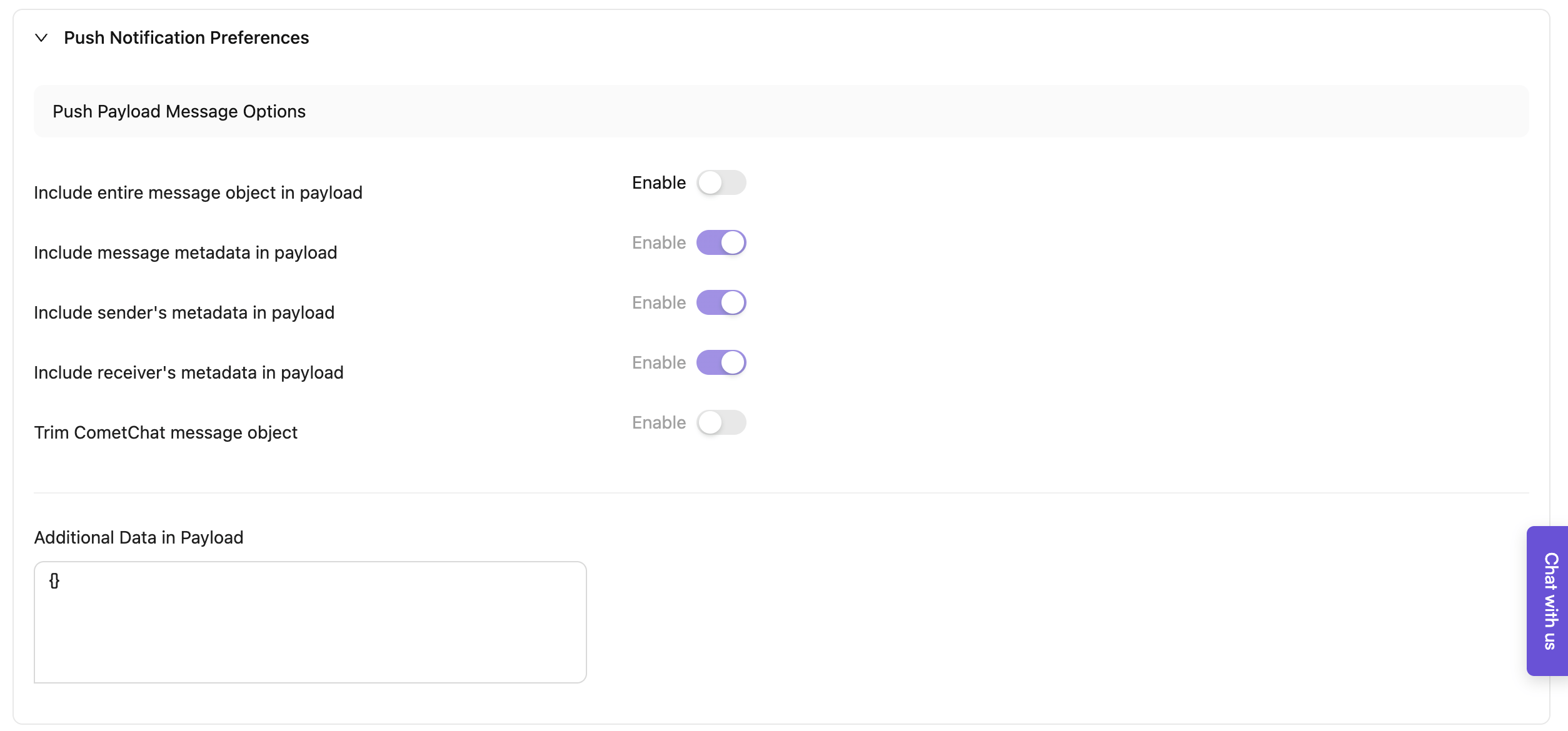
## Push payload message options
These control what CometChat includes in push payloads. All are optional toggles:
* Include entire message object in payload (largest footprint)
* Include message metadata in payload
* Include sender's metadata in payload
* Include receiver's metadata in payload
* Trim CometChat message object (strip down to stay within provider limits)
* Include badge count in payload (Premium feature - adds `unreadMessageCount` field with total unread messages for the user)
* Additional data in payload (JSON you add)
Use a minimal combination to stay under \~4 KB for FCM/APNs.
### Group preferences
#### Dashboard configuration
As the name suggests, these preferences help you to configure Notifications for events generated in group conversations.
| Categories | Events | Available preferences | Can user override? |
| --------------- | --------------------------- | -------------------------------------------------------------------------------------------------------------------------------------- | ----------------------------- |
| Conversations | New messages | • Don't notify
**How it flows**
* Admin sets defaults and override rules in the dashboard.
* Users inherit those defaults until they change a setting the admin allows.
* `CometChatNotifications.fetchPreferences()` returns the current merged view.
* `CometChatNotifications.updatePreferences()` saves allowed changes and returns the updated snapshot.
**Key SDK helpers**
* `CometChatNotifications.fetchPreferences()` / `updatePreferences()`
* `CometChatNotifications.getMutedConversations()` / `muteConversations()` / `unmuteConversations()`
* `CometChatNotifications.resetPreferences()` to restore dashboard defaults
Each section pairs the dashboard defaults with matching client-side snippets so you can mirror the same behavior in your app.
## Push payload message options
These control what CometChat includes in push payloads. All are optional toggles:
* Include entire message object in payload (largest footprint)
* Include message metadata in payload
* Include sender's metadata in payload
* Include receiver's metadata in payload
* Trim CometChat message object (strip down to stay within provider limits)
* Include badge count in payload (Premium feature - adds `unreadMessageCount` field with total unread messages for the user)
* Additional data in payload (JSON you add)
Use a minimal combination to stay under \~4 KB for FCM/APNs.
### Group preferences
#### Dashboard configuration
As the name suggests, these preferences help you to configure Notifications for events generated in group conversations.
| Categories | Events | Available preferences | Can user override? |
| --------------- | --------------------------- | -------------------------------------------------------------------------------------------------------------------------------------- | ----------------------------- |
| Conversations | New messages | • Don't notify
• **Notify for all messages (Default)**
• Notify for messages with mentions | • **Yes (Default)**
• No |
| | New replies | • Don't notify
• **Notify for all replies (Default)**
• Notify for replies with mentions | • **Yes (Default)**
• No |
| | New quoted replies | • Don't notify
• **Notify for all replies (Default)**
• Notify for replies with mentions | • **Yes (Default)**
• No |
| Message actions | Message is edited | • Don't notify
• **Notify (Default)** | • Yes
• **No (Default)** |
| | Message is deleted | • Don't notify
• **Notify (Default)** | • Yes
• **No (Default)** |
| | Message receives a reaction | • Don't notify
• Notify for reactions received on all messages
• **Notify for reactions received on own messages (Default)** | • **Yes (Default)**
• No |
| Group actions | A member leaves | • **Don't notify (Default)**
• Notify | • **Yes (Default)**
• No |
| | A new member is added | • **Don't notify (Default)**
• Notify | • **Yes (Default)**
• No |
| | A new member joins | • **Don't notify (Default)**
• Notify | • **Yes (Default)**
• No |
| | A member is kicked | • **Don't notify (Default)**
• Notify | • **Yes (Default)**
• No |
| | A member is banned | • **Don't notify (Default)**
• Notify | • **Yes (Default)**
• No |
| | A member is unbanned | • **Don't notify (Default)**
• Notify | • **Yes (Default)**
• No |
| | A member's scope changes | • **Don't notify (Default)**
• Notify | • **Yes (Default)**
• No |
Regarding Message edited & Message deleted events
Push notifications should be triggered for the message edited and message deleted events in order to retract the notification displaying the original message. Turning them off is not recommended.
#### Client-side implementation
The fetch/update pattern shown here applies to group, one-on-one, mute, and schedule preferences; only the preference classes change.
**1. Fetch group preferences**
`CometChatNotifications.fetchPreferences()` method retrieves the notification preferences as an instance of `NotificationPreferences` class. If the user has not configured any preferences, the default preferences defined by the CometChat administrator via the dashboard will be returned.
```js theme={null}
// This is applicable for web, React native, Ionic cordova (Ionic Cordova is deprecated - use JavaScript SDK)
const preferences = await CometChatNotifications.fetchPreferences();
// Display Group preferences
const groupPreferences = preferences.getGroupPreferences();
const groupMessagesPreference = groupPreferences.getMessagesPreference();
const groupRepliesPreference = groupPreferences.getRepliesPreference();
const groupQuotedRepliesPreference = groupPreferences.getQuotedRepliesPreference();
const groupReactionsPreference = groupPreferences.getReactionsPreference();
const memberLeftPreference = groupPreferences.getMemberLeftPreference();
const memberAddedPreference = groupPreferences.getMemberAddedPreference();
const memberJoinedPreference = groupPreferences.getMemberJoinedPreference();
const memberKickedPreference = groupPreferences.getMemberKickedPreference();
const memberBannedPreference = groupPreferences.getMemberBannedPreference();
const memberUnbannedPreference = groupPreferences.getMemberUnbannedPreference();
const memberScopeChangedPreference =
groupPreferences.getMemberScopeChangedPreference();
```
```kotlin theme={null}
CometChatNotifications.fetchPreferences(new CometChat.CallbackListener() {
@Override
public void onSuccess(NotificationPreferences notificationPreferences) {
// Display group preferences
GroupPreferences groupPreferences = notificationPreferences.getGroupPreferences();
MessagesOptions groupMessagesPreference = groupPreferences.getMessagesPreference();
RepliesOptions groupRepliesPreference = groupPreferences.getRepliesPreference();
RepliesOptions groupQuotedRepliesPreference = groupPreferences.getQuotedRepliesPreference();
ReactionsOptions groupReactionsPreference = groupPreferences.getReactionsPreference();
MemberActionsOptions memberAddedPreference = groupPreferences.getMemberAddedPreference();
MemberActionsOptions memberLeftPreference = groupPreferences.getMemberLeftPreference();
MemberActionsOptions memberJoinedPreference = groupPreferences.getMemberJoinedPreference();
MemberActionsOptions memberKickedPreference = groupPreferences.getMemberKickedPreference();
MemberActionsOptions memberBannedPreference = groupPreferences.getMemberBannedPreference();
MemberActionsOptions memberUnbannedPreference = groupPreferences.getMemberUnbannedPreference();
MemberActionsOptions memberScopeChangedPreference = groupPreferences.getMemberScopeChangedPreference();
}
@Override
public void onError(CometChatException e) {
// Something went wrong while fetching notification preferences
}
});
```
```swift theme={null}
CometChatNotifications.fetchPreferences { notificationPreferences in
// Display group preferences
let groupPreferences = notificationPreferences.groupPreferences;
let groupMessages = groupPreferences?.messagesPreference;
let groupReplies = groupPreferences?.repliesPreference;
let groupReactions = groupPreferences?.reactionsPreference;
let left = groupPreferences?.memberLeftPreference;
let added = groupPreferences?.memberAddedPreference;
let joined = groupPreferences?.memberJoinedPreference;
let kicked = groupPreferences?.memberKickedPreference;
let banned = groupPreferences?.memberBannedPreference;
let unbanned = groupPreferences?.memberUnbannedPreference;
let scope = groupPreferences?.memberScopeChangedPreference;
} onError: { error in
// Something went wrong while fetching notification preferences.
print("fetchPreferences: \(error.errorCode) \(error.errorDescription)");
}
```
```dart theme={null}
CometChatNotifications.fetchPreferences(
onSuccess: (notificationPreferences) {
// Display group preferences
GroupPreferences? groupPreferences = notificationPreferences.groupPreferences;
MessagesOptions? messagesPreference = groupPreferences?.messages;
RepliesOptions? repliesPreference = groupPreferences?.replies;
RepliesOptions? quotedRepliesPreference = groupPreferences?.quotedReplies;
ReactionsOptions? reactionsPreference = groupPreferences?.reactions;
MemberActionsOptions? memberAddedPreference = groupPreferences?.memberAdded;
MemberActionsOptions? memberJoinedPreference = groupPreferences?.memberJoined;
MemberActionsOptions? memberLeftPreference = groupPreferences?.memberLeft;
MemberActionsOptions? memberKickedPreference = groupPreferences?.memberKicked;
MemberActionsOptions? memberBannedPreference = groupPreferences?.memberBanned;
MemberActionsOptions? memberUnbannedPreference = groupPreferences?.memberUnbanned;
MemberActionsOptions? memberScopeChangedPreference = groupPreferences?.memberScopeChanged;
},
onError: (e) {
debugPrint("fetchPreferences:error ${e.toString()}");
});
```
**2. Update group preferences**
`CometChatNotifications.updatePreferences()` method is used to update a user's notification preferences. The "**override**" toggle defined in the dashboard is crucial when updating preferences. If any preference is non-overridable, the method doesn't generate an error; it instead returns the `NotificationPreferences` object with the updated values where overrides are allowed.
Use this sparingly, only when you must temporarily override preferences for a critical event, so users are not surprised by unexpected notification changes.
It is unnecessary to specify all values; only set and save the preferences that have been changed.
Since the user is performing this action, enums have values as `SUBSCRIBE` or `DONT_SUBSCRIBE`. It is equivalent to "Notify" and "Don't notify" respectively, from the dashboard preferences.
```js theme={null}
// This is applicable for web, React native, Ionic cordova (Ionic Cordova is deprecated - use JavaScript SDK)
// The example demonstrates modifying all values; however, modifying only the changed values is sufficient.
// Instantiate the NotificationPreferences.
const updatedPreferences = new NotificationPreferences();
// Instantiate the preferences that you want to update.
const groupPreferences = new GroupPreferences();
// Change group preferences
groupPreferences.setMessagesPreference(MessagesOptions.DONT_SUBSCRIBE);
groupPreferences.setRepliesPreference(RepliesOptions.DONT_SUBSCRIBE);
groupPreferences.setQuotedRepliesPreference(RepliesOptions.DONT_SUBSCRIBE);
groupPreferences.setReactionsPreference(ReactionsOptions.DONT_SUBSCRIBE);
groupPreferences.setMemberAddedPreference(MemberActionsOptions.SUBSCRIBE);
groupPreferences.setMemberKickedPreference(MemberActionsOptions.SUBSCRIBE);
groupPreferences.setMemberJoinedPreference(MemberActionsOptions.SUBSCRIBE);
groupPreferences.setMemberLeftPreference(MemberActionsOptions.SUBSCRIBE);
groupPreferences.setMemberBannedPreference(MemberActionsOptions.SUBSCRIBE);
groupPreferences.setMemberUnbannedPreference(MemberActionsOptions.SUBSCRIBE);
groupPreferences.setMemberScopeChangedPreference(
MemberActionsOptions.SUBSCRIBE
);
// Load the updates in the NotificationPreferences instance.
updatedPreferences.setGroupPreferences(groupPreferences);
// Update the preferences and receive the updated copy.
const preferences = await CometChatNotifications.updatePreferences(
updatedPreferences
);
```
```kt theme={null}
// The example demonstrates modifying all values; however, modifying only the changed values is sufficient.
// Instantiate the NotificationPreferences.
NotificationPreferences updatedPreferences = new NotificationPreferences();
// Instantiate the preferences that you want to update.
GroupPreferences groupPreferences = new GroupPreferences();
// Change group preferences
groupPreferences.setMessagesPreference(MessagesOptions.DONT_SUBSCRIBE);
groupPreferences.setRepliesPreference(RepliesOptions.DONT_SUBSCRIBE);
groupPreferences.setQuotedRepliesPreference(RepliesOptions.DONT_SUBSCRIBE);
groupPreferences.setReactionsPreference(ReactionsOptions.DONT_SUBSCRIBE);
groupPreferences.setMemberAddedPreference(MemberActionsOptions.SUBSCRIBE);
groupPreferences.setMemberKickedPreference(MemberActionsOptions.SUBSCRIBE);
groupPreferences.setMemberJoinedPreference(MemberActionsOptions.SUBSCRIBE);
groupPreferences.setMemberLeftPreference(MemberActionsOptions.SUBSCRIBE);
groupPreferences.setMemberBannedPreference(MemberActionsOptions.SUBSCRIBE);
groupPreferences.setMemberUnbannedPreference(MemberActionsOptions.SUBSCRIBE);
groupPreferences.setMemberScopeChangedPreference(MemberActionsOptions.SUBSCRIBE);
// Load the updates in the NotificationPreferences instance.
updatedPreferences.setGroupPreferences(groupPreferences);
// Update the preferences.
CometChatNotifications.updatePreferences(updatedPreferences, new CometChat.CallbackListener() {
@Override
public void onSuccess(NotificationPreferences notificationPreferences) {
// Updated notificationPreferences
}
@Override
public void onError(CometChatException e) {
// Something went wrong
}
});
```
```swift theme={null}
// The example demonstrates modifying all values; however, modifying only the changed values is sufficient.
// Instantiate the NotificationPreferences.
let updatedPreferences = CometChatNotifications.NotificationPreferences();
// Instantiate the preferences that you want to update.
let groupPreferences = CometChatNotifications.GroupPreferences();
// Change group preferences
groupPreferences.set(messagesPreference: .DONT_SUBSCRIBE)
groupPreferences.set(repliesPreference: .DONT_SUBSCRIBE)
groupPreferences.set(quotedRepliesPreference: .DONT_SUBSCRIBE)
groupPreferences.set(reactionsPreference: .DONT_SUBSCRIBE)
groupPreferences.set(memberAddedPreference: .SUBSCRIBE)
groupPreferences.set(memberKickedPreference: .SUBSCRIBE)
groupPreferences.set(memberJoinedPreference: .SUBSCRIBE)
groupPreferences.set(memberLeftPreference: .SUBSCRIBE)
groupPreferences.set(memberBannedPreference: .SUBSCRIBE)
groupPreferences.set(memberUnbannedPreference: .SUBSCRIBE)
groupPreferences.set(memberScopeChangedPreference: .SUBSCRIBE)
// Load the updates in the NotificationPreferences instance.
updatedPreferences.set(groupPreferences: groupPreferences)
// Update the preferences.
CometChatNotifications.updatePreferences(updatedPreferences) { updatedPreferences in
print("updatePreferences: \(updatedPreferences)")
} onError: { error in
print("updatePreferences: \(error.errorCode) \(error.errorDescription)")
}
```
```dart theme={null}
// The example demonstrates modifying all values; however, modifying only the changed values is sufficient.
// Instantiate the NotificationPreferences
NotificationPreferences updatedPreferences = NotificationPreferences();
GroupPreferences groupPreferences = GroupPreferences(
messages: MessagesOptions.SUBSCRIBE_TO_MENTIONS,
replies: RepliesOptions.SUBSCRIBE_TO_ALL,
quotedReplies: RepliesOptions.SUBSCRIBE_TO_ALL,
reactions: ReactionsOptions.SUBSCRIBE_TO_REACTIONS_ON_ALL_MESSAGES,
memberAdded: MemberActionsOptions.SUBSCRIBE,
memberJoined: MemberActionsOptions.SUBSCRIBE,
memberLeft: MemberActionsOptions.SUBSCRIBE,
memberKicked: MemberActionsOptions.SUBSCRIBE,
memberBanned: MemberActionsOptions.SUBSCRIBE,
memberUnbanned: MemberActionsOptions.SUBSCRIBE,
memberScopeChanged: MemberActionsOptions.SUBSCRIBE,
);
updatedPreferences.groupPreferences = groupPreferences;
// Update the preferences.
CometChatNotifications.updatePreferences(updatedPreferences,
onSuccess: (preferencesAfterUpdate) {
debugPrint("updatePreferences:success");
// Use the preferencesAfterUpdate
}, onError: (e) {
debugPrint("updatePreferences:error: ${e.toString()}");
});
```
### One-on-one preferences
#### Dashboard configuration
As the name suggests, these preferences help you to configure Notifications for events generated in one-on-one conversations.
| Categories | Events | Available preferences | Can user override? |
| --------------- | --------------------------- | -------------------------------------------------------------------------------------------------------------------------------------- | ----------------------------- |
| Conversations | New messages | • Don't notify
• **Notify for all messages (Default)**
• Notify for messages with mentions | • **Yes (Default)**
• No |
| | New replies | • Don't notify
• **Notify for all replies (Default)**
• Notify for replies with mentions | • **Yes (Default)**
• No |
| | New quoted replies | • Don't notify
• **Notify for all replies (Default)**
• Notify for replies with mentions | • **Yes (Default)**
• No |
| Message actions | Message is edited | • Don't notify
• **Notify (Default)** | • Yes
• **No (Default)** |
| | Message is deleted | • Don't notify
• **Notify (Default)** | • Yes
• **No (Default)** |
| | Message receives a reaction | • Don't notify
• Notify for reactions received on all messages
• **Notify for reactions received on own messages (Default)** | • **Yes (Default)**
• No |
Regarding Message edited & Message deleted events
Push notifications should be triggered for the message edited and message deleted events in order to retract the notification displaying the original message. Turning them off is not recommended.
#### Client-side implementation
`CometChatNotifications.fetchPreferences()` method retrieves the notification preferences saved by the user as an instance of `NotificationPreferences` class. If the user has not configured any preferences, the default preferences defined by the CometChat administrator via the dashboard will be returned.
**1. Fetch one-on-one preferences**
```js theme={null}
// This is applicable for web, React native, Ionic cordova (Ionic Cordova is deprecated - use JavaScript SDK)
const preferences = await CometChatNotifications.fetchPreferences();
// Display One-on-One preferences
const oneOnOnePreferences = preferences.getOneOnOnePreferences();
const oneOnOneMessagesPreference = oneOnOnePreferences.getMessagesPreference();
const oneOnOneRepliesPreference = oneOnOnePreferences.getRepliesPreference();
const oneOnOneQuotedRepliesPreference = oneOnOnePreferences.getQuotedRepliesPreference();
const oneOnOneReactionsPreference =
oneOnOnePreferences.getReactionsPreference();
```
```kotlin theme={null}
CometChatNotifications.fetchPreferences(new CometChat.CallbackListener() {
@Override
public void onSuccess(NotificationPreferences notificationPreferences) {
// Display one-on-one preferences
OneOnOnePreferences oneOnOnePreferences = notificationPreferences.getOneOnOnePreferences();
MessagesOptions oneOnOneMessagesPreference = oneOnOnePreferences.getMessagesPreference();
RepliesOptions oneOnOneRepliesPreference = oneOnOnePreferences.getRepliesPreference();
RepliesOptions oneOnOneQuotedRepliesPreference = oneOnOnePreferences.getQuotedRepliesPreference();
ReactionsOptions oneOnOneReactionsPreference = oneOnOnePreferences.getReactionsPreference();
}
@Override
public void onError(CometChatException e) {
// Something went wrong while fetching notification preferences
}
});
```
```swift theme={null}
CometChatNotifications.fetchPreferences { notificationPreferences in
// Display one-on-one preferences
let oneOnOnePreferences = notificationPreferences.oneOnOnePreferences;
let oneMessages = oneOnOnePreferences?.messagesPreference;
let oneReplies = oneOnOnePreferences?.repliesPreference;
let oneReactions = oneOnOnePreferences?.reactionsPreference;
} onError: { error in
// Something went wrong while fetching notification preferences.
print("fetchPreferences: \(error.errorCode) \(error.errorDescription)");
}
```
```dart theme={null}
CometChatNotifications.fetchPreferences(
onSuccess: (notificationPreferences) {
// Display one-on-one preferences
OneOnOnePreferences? oneOnOnePreferences = notificationPreferences.oneOnOnePreferences;
MessagesOptions? oneOnOneMessagesPreference = oneOnOnePreferences?.messages;
RepliesOptions? oneOnOneRepliesPreference = oneOnOnePreferences?.replies;
RepliesOptions? oneOnOneQuotedRepliesPreference = oneOnOnePreferences?.quotedReplies;
ReactionsOptions? oneOnOneReactionsPreference = oneOnOnePreferences?.reactions;
},
onError: (e) {
debugPrint("fetchPreferences:error ${e.toString()}");
});
```
**2. Update one-on-one preferences**
`CometChatNotifications.updatePreferences()` method is used to update a user's notification preferences. The "**override**" toggle defined in the dashboard is crucial when updating preferences. If any preference is non-overridable, the method doesn't generate an error; it instead returns the `NotificationPreferences` object with the updated values where overrides are allowed.
Use this sparingly, only when you must temporarily override preferences for a critical event, so users are not surprised by unexpected notification changes.
It is unnecessary to specify all values; only set and save the preferences that have been changed.
```js theme={null}
// This is applicable for web, React native, Ionic cordova (Ionic Cordova is deprecated - use JavaScript SDK)
// The example demonstrates modifying all values; however, modifying only the changed values is sufficient.
// Instantiate the NotificationPreferences.
const updatedPreferences = new NotificationPreferences();
// Instantiate the preferences that you want to update.
const oneOnOnePreferences = new OneOnOnePreferences();
// Change one-on-one preferences
oneOnOnePreferences.setMessagesPreference(MessagesOptions.DONT_SUBSCRIBE);
oneOnOnePreferences.setRepliesPreference(RepliesOptions.DONT_SUBSCRIBE);
oneOnOnePreferences.setQuotedRepliesPreference(RepliesOptions.DONT_SUBSCRIBE);
oneOnOnePreferences.setReactionsPreference(ReactionsOptions.DONT_SUBSCRIBE);
// Load the updates in the NotificationPreferences instance.
updatedPreferences.setOneOnOnePreferences(oneOnOnePreferences);
// Update the preferences and receive the updated copy.
const preferences = await CometChatNotifications.updatePreferences(
updatedPreferences
);
```
```kotlin theme={null}
// The example demonstrates modifying all values; however, modifying only the changed values is sufficient.
// Instantiate the NotificationPreferences.
NotificationPreferences updatedPreferences = new NotificationPreferences();
// Instantiate the preferences that you want to update.
OneOnOnePreferences oneOnOnePreferences = new OneOnOnePreferences();
// Change one-on-one preferences
oneOnOnePreferences.setMessagesPreference(MessagesOptions.DONT_SUBSCRIBE);
oneOnOnePreferences.setRepliesPreference(RepliesOptions.DONT_SUBSCRIBE);
oneOnOnePreferences.setQuotedRepliesPreference(RepliesOptions.DONT_SUBSCRIBE);
oneOnOnePreferences.setReactionsPreference(ReactionsOptions.DONT_SUBSCRIBE);
// Load the updates in the NotificationPreferences instance.
updatedPreferences.setOneOnOnePreferences(oneOnOnePreferences);
// Update the preferences.
CometChatNotifications.updatePreferences(updatedPreferences, new CometChat.CallbackListener() {
@Override
public void onSuccess(NotificationPreferences notificationPreferences) {
// Updated notificationPreferences
}
@Override
public void onError(CometChatException e) {
// Something went wrong
}
});
```
```swift theme={null}
// The example demonstrates modifying all values; however, modifying only the changed values is sufficient.
// Instantiate the NotificationPreferences.
let updatedPreferences = CometChatNotifications.NotificationPreferences();
// Instantiate the preferences that you want to update.
let oneOnOnePreferences = CometChatNotifications.OneOnOnePreferences();
// Change one-on-one preferences
oneOnOnePreferences.set(messagesPreference: .DONT_SUBSCRIBE)
oneOnOnePreferences.set(repliesPreference: .DONT_SUBSCRIBE)
oneOnOnePreferences.set(quotedRepliesPreference: .DONT_SUBSCRIBE)
oneOnOnePreferences.set(reactionsPreference: .DONT_SUBSCRIBE)
// Load the updates in the NotificationPreferences instance.
updatedPreferences.set(oneOnOnePreferences: oneOnOnePreferences)
// Update the preferences.
CometChatNotifications.updatePreferences(updatedPreferences) { updatedPreferences in
print("updatePreferences: \(updatedPreferences)")
} onError: { error in
print("updatePreferences: \(error.errorCode) \(error.errorDescription)")
}
```
```dart theme={null}
// The example demonstrates modifying all values; however, modifying only the changed values is sufficient.
// Instantiate the NotificationPreferences
NotificationPreferences updatedPreferences = NotificationPreferences();
// Instantiate the preferences that you want to update.
OneOnOnePreferences oneOnOnePreferences = OneOnOnePreferences(
messages: MessagesOptions.SUBSCRIBE_TO_ALL,
replies: RepliesOptions.SUBSCRIBE_TO_MENTIONS,
quotedReplies: RepliesOptions.SUBSCRIBE_TO_MENTIONS,
reactions: ReactionsOptions.SUBSCRIBE_TO_REACTIONS_ON_ALL_MESSAGES);
// Load the updates in the NotificationPreferences instance.
updatedPreferences.oneOnOnePreferences = oneOnOnePreferences;
// Update the preferences.
CometChatNotifications.updatePreferences(updatedPreferences,
onSuccess: (preferencesAfterUpdate) {
debugPrint("updatePreferences:success");
// Use the preferencesAfterUpdate
}, onError: (e) {
debugPrint("updatePreferences:error: ${e.toString()}");
});
```
### Mute preferences
#### Dashboard configuration
These preferences control whether end users can change mute settings in the client.
| Mute preferences | Can user configure? |
| ----------------------------- | ---------------------------------------------------------------------------------------------------------------------------- |
| Mute all notifications (DND) | • **Yes (Default)** - *Users can activate the Do Not Disturb (DND) feature.*
• No |
| Mute group conversations | • **Yes (Default)** - *Users can mute notifications for chosen group conversations for a specified duration.*
• No |
| Mute one-on-one conversations | • **Yes (Default)** - *Users can mute notifications for chosen one-on-one conversations for a specified duration.*
• No |
#### Client-side implementation
**1. Fetch mute preferences**
`CometChatNotifications.fetchPreferences()` method retrieves the notification preferences saved by the user as an instance of `NotificationPreferences` class. If the user has not configured any preferences, the default preferences defined by the CometChat administrator via the dashboard will be utilized.
You can use the `CometChatNotifications.getMutedConversations()` method to display a list of conversations that have been muted by users. The method will return an array of `MutedConversations` object.
```js theme={null}
// This is applicable for web, React native, Ionic cordova (Ionic Cordova is deprecated - use JavaScript SDK)
// Fetch mute preferences
const preferences = await CometChatNotifications.fetchPreferences();
// Display Mute preferences
const mutePreferences = preferences.getMutePreferences();
const DNDPreference = mutePreferences.getDNDPreference();
// Fetch muted conversations
const mutedConversations = await CometChatNotifications.getMutedConversations();
```
```kotlin theme={null}
// Fetch mute preferences
CometChatNotifications.fetchPreferences(new CometChat.CallbackListener() {
@Override
public void onSuccess(NotificationPreferences notificationPreferences) {
// Display mute preferences
MutePreferences mutePreferences = notificationPreferences.getMutePreferences();
DNDOptions dndPreference = mutePreferences.getDNDPreference();
}
@Override
public void onError(CometChatException e) {
// Something went wrong while fetching notification preferences
}
});
// Fetch muted conversations
CometChatNotifications.getMutedConversations(new CometChat.CallbackListener>() {
@Override
public void onSuccess(List mutedConversations) {
// List of muted conversations
}
@Override
public void onError(CometChatException e) {
// Fetching muted conversations failed.
}
});
```
```swift theme={null}
CometChatNotifications.fetchPreferences { notificationPreferences in
// Display mute preferences
let mutePreferences = notificationPreferences.mutePreferences;
let dndPreference = mutePreferences?.DNDPreference;
} onError: { error in
// Something went wrong while fetching notification preferences.
print("fetchPreferences: \(error.errorCode) \(error.errorDescription)");
}
// Fetch muted conversations
CometChatNotifications.getMutedConversations { mutedConversations in
print("getMutedConversations: \(mutedConversations)")
} onError: { error in
print("getMutedConversations: \(error.errorCode) \(error.errorDescription)")
}
```
```dart theme={null}
// Fetch mute preferences
CometChatNotifications.fetchPreferences(
onSuccess: (notificationPreferences) {
// Display mute preferences
MutePreferences? mutePreferences = notificationPreferences.mutePreferences;
DNDOptions? dndPreference = mutePreferences?.dnd;
},
onError: (e) {
debugPrint("fetchPreferences:error ${e.toString()}");
});
// Fetch muted conversations
CometChatNotifications.getMutedConversations(
onSuccess: (mutedConversations) {
debugPrint("getMutedConversations:success");
// use mutedConversations
}, onError: (e) {
debugPrint("getMutedConversations:error ${e.toString()}");
});
```
**2. Update mute preferences**
`CometChatNotifications.updatePreferences()` method is used to update a user's notification preferences. The "**override**" toggle defined in the dashboard is crucial when updating preferences. If any preference is non-overridable, the method doesn't generate an error; it instead returns the `NotificationPreferences` object with the updated values where overrides are allowed.
Use this sparingly, only when you must temporarily override preferences for a critical event, so users are not surprised by unexpected notification changes.
It is unnecessary to specify all values; only set and save the preferences that have been changed.
**To mute** one or more group or one-on-one conversations, utilize the `CometChatNotifications.muteConversations()` method. This method requires an array of `MutedConversation` objects, each containing the following properties:
| Property | Type | Description |
| -------- | ------ | ------------------------------------------------------------- |
| `id` | String | This can either be `uid` or `guid`. |
| `type` | String | This can either be `oneOnOne` or `group`. |
| `until` | Number | This is a valid timestamp from the future. Eg: 1710696964705. |
**To unmute** one or more group or one-on-one conversations that were muted by the user, utilize the `CometChatNotifications.unmuteConversations()` method. This method requires an array of `UnmutedConversation` objects, each containing the following properties:
| Property | Type | Description |
| -------- | ------ | ----------------------------------------- |
| `id` | String | This can either be `uid` or `guid`. |
| `type` | String | This can either be `oneOnOne` or `group`. |
```js theme={null}
// This is applicable for web, React native, Ionic cordova (Ionic Cordova is deprecated - use JavaScript SDK)
// The example demonstrates modifying all values; however, modifying only the changed values is sufficient.
// Instantiate the NotificationPreferences.
const updatedPreferences = new NotificationPreferences();
const mutePreferences = new MutePreferences();
// Change mute preferences
mutePreferences.setDNDPreference(DNDOptions.ENABLED);
// Load the updates in the NotificationPreferences instance.
updatedPreferences.setMutePreferences(mutePreferences);
// Update the preferences and receive the updated copy.
const notificationPreferences = await CometChatNotifications.updatePreferences(
updatedPreferences
);
// Mute conversations
const until = Date.now() + 86400000; // Mute for 1 day
const mutedUser = new MutedConversation();
mutedUser.setId('cometchat-uid-1');
mutedUser.setType(CometChatNotifications.MutedConversationType.ONE_ON_ONE);
mutedUser.setUntil(until);
const mutedGroup = new MutedConversation();
mutedGroup.setId('cometchat-guid-1');
mutedGroup.setType(CometChatNotifications.MutedConversationType.GROUP);
mutedGroup.setUntil(until);
await CometChatNotifications.muteConversations([mutedUser, mutedGroup]);
// Unmute conversations
const unmutedUser = new UnmutedConversation();
unmutedUser.setId('cometchat-uid-1');
unmutedUser.setType(CometChatNotifications.MutedConversationType.ONE_ON_ONE);
const unmuteList = [unmutedUser];
await CometChatNotifications.unmuteConversations(unmuteList);
```
```kotlin theme={null}
// The example demonstrates modifying all values; however, modifying only the changed values is sufficient.
// Instantiate the NotificationPreferences.
NotificationPreferences updatedPreferences = new NotificationPreferences();
// Instantiate the preferences that you want to update.
MutePreferences mutePreferences = new MutePreferences();
// Change mute preferences
mutePreferences.setDNDPreference(DNDOptions.ENABLED);
// Load the updates in the NotificationPreferences instance.
updatedPreferences.setMutePreferences(mutePreferences);
// Update the preferences.
CometChatNotifications.updatePreferences(updatedPreferences, new CometChat.CallbackListener() {
@Override
public void onSuccess(NotificationPreferences notificationPreferences) {
// Updated notificationPreferences
}
@Override
public void onError(CometChatException e) {
// Something went wrong
}
});
// Mute conversations
long until = System.currentTimeMillis() + 86400000; // Mute for 1 day
MutedConversation mutedUser = new MutedConversation();
mutedUser.setId("cometchat-uid-1");
mutedUser.setType(MutedConversationType.ONE_ON_ONE);
mutedUser.setUntil(until);
MutedConversation mutedGroup = new MutedConversation();
mutedGroup.setId("cometchat-guid-1");
mutedGroup.setType(MutedConversationType.GROUP);
mutedGroup.setUntil(until);
List allMuted = new ArrayList<>();
allMuted.add(mutedUser);
allMuted.add(mutedGroup);
CometChatNotifications.muteConversations(allMuted, new CometChat.CallbackListener() {
@Override
public void onSuccess(String s) {
// Mute success
}
@Override
public void onError(CometChatException e) {
// Mute failed
}
});
// Unmute conversations
UnmutedConversation u = new UnmutedConversation();
u.setId("cometchat-uid-1");
u.setType(MutedConversationType.ONE_ON_ONE);
List unmuteList = new ArrayList<>();
unmuteList.add(u);
CometChatNotifications.unmuteConversations(unmuteList, new CometChat.CallbackListener() {
@Override
public void onSuccess(String s) {
// Unmute success
}
@Override
public void onError(CometChatException e) {
// Unmute failed
}
});
```
```swift theme={null}
// The example demonstrates modifying all values; however, modifying only the changed values is sufficient.
// Instantiate the NotificationPreferences.
let updatedPreferences = CometChatNotifications.NotificationPreferences();
// Instantiate the preferences that you want to update.
let mutePreferences = CometChatNotifications.MutePreferences();
// Change mute preferences
mutePreferences.set(DNDPreference:.ENABLED)
// Load the updates in the NotificationPreferences instance.
updatedPreferences.set(mutePreferences: mutePreferences);
// Update the preferences.
CometChatNotifications.updatePreferences(updatedPreferences) { updatedPreferences in
print("updatePreferences: \(updatedPreferences)")
} onError: { error in
print("updatePreferences: \(error.errorCode) \(error.errorDescription)")
}
// Mute conversations
let untilInterval = Date().addingTimeInterval(86400) // Mute for 1 day
let until = Int(untilInterval.timeIntervalSince1970 * 1000) // Convert to milliseconds
var mutedUser = CometChatNotifications.MutedConversation()
mutedUser.id = "cometchat-uid-1"
mutedUser.type = .ONE_ON_ONE
mutedUser.until = until
var mutedGroup = CometChatNotifications.MutedConversation()
mutedGroup.id = "cometchat-guid-1"
mutedGroup.type = .GROUP
mutedGroup.until = until
let allMuted = [mutedUser, mutedGroup]
CometChatNotifications.muteConversations(allMuted) { success in
print("muteConversations: \(success)")
} onError: { error in
print("muteConversations: \(error.errorCode) \(error.errorDescription)")
}
// Unmute conversations
var unmutedUser = CometChatNotifications.UnmutedConversation()
unmutedUser.id = "cometchat-uid-1"
unmutedUser.type = .ONE_ON_ONE
let unmuteList = [unmutedUser]
CometChatNotifications.unmuteConversations(unmuteList) { success in
print("unmuteConversations: \(success)")
} onError: { error in
print("unmuteConversations: \(error.errorCode) \(error.errorDescription)")
}
```
```dart theme={null}
// The example demonstrates modifying all values; however, modifying only the changed values is sufficient.
// Instantiate the NotificationPreferences
NotificationPreferences updatedPreferences = NotificationPreferences();
MutePreferences mutePreferences = MutePreferences(dnd: DNDOptions.DISABLED);
updatedPreferences.mutePreferences = mutePreferences;
// Update the preferences.
CometChatNotifications.updatePreferences(updatedPreferences,
onSuccess: (preferencesAfterUpdate) {
debugPrint("updatePreferences:success");
// Use the preferencesAfterUpdate
}, onError: (e) {
debugPrint("updatePreferences:error: ${e.toString()}");
});
// Mute conversations
int current = DateTime.now().millisecondsSinceEpoch;
int oneDayMillis = 24 * 60 * 60 * 1000;
int until = current + oneDayMillis;
MutedConversation mutedUser = MutedConversation(
id: "cometchat-uid-1", type: MutedConversationType.ONE_ON_ONE, until: until);
MutedConversation mutedGroup = MutedConversation(
id: "cometchat-guid-1", type: MutedConversationType.GROUP, until: until);
List mutedConversations = [];
mutedConversations.add(mutedUser);
mutedConversations.add(mutedGroup);
CometChatNotifications.muteConversations(
mutedConversations,
onSuccess: (response) {
debugPrint("muteConversations:success ${response.toString()}");
},
onError: (e) {
debugPrint("muteConversations:error ${e.toString()}");
},
);
// Unmute conversations
UnmutedConversation unmutedUser = UnmutedConversation(id: "cometchat-uid-1", type: MutedConversationType.ONE_ON_ONE);
List unmuteList = [];
unmuteList.add(unmutedUser);
CometChatNotifications.unmuteConversations(unmuteList, onSuccess: (response) {
debugPrint("unmuteConversations:success ${response.toString()}");
},onError: (e) {
debugPrint("unmuteConversations:success ${e.toString()}");
});
```
### Notification schedule
#### Dashboard configuration
Notifications will be delivered based on the specified daily timetable, adhering to the user's local time zone. Select **"None"** to disable Notifications for that day. For instance, this can be applied to weekends, such as Saturday and Sunday.
| Day | From | To | Can user override? |
| --------- | ---------------------------------------- | -------------------------------- | ------------------------------------------------------------------------------------------- |
| Monday | • 0 to 2359 **(Default: 0)**
• None | • Up to 2359 **(Default: 2359)** | • **Yes (Default)** - *Users can configure a personalized notification schedule.*
• No |
| Tuesday | • 0 to 2359 **(Default: 0)**
• None | • Up to 2359 **(Default: 2359)** | |
| Wednesday | • 0 to 2359 **(Default: 0)**
• None | • Up to 2359 **(Default: 2359)** | |
| Thursday | • 0 to 2359 **(Default: 0)**
• None | • Up to 2359 **(Default: 2359)** | |
| Friday | • 0 to 2359 **(Default: 0)**
• None | • Up to 2359 **(Default: 2359)** | |
| Saturday | • 0 to 2359 **(Default: 0)**
• None | • Up to 2359 **(Default: 2359)** | |
| Sunday | • 0 to 2359 **(Default: 0)**
• None | • Up to 2359 **(Default: 2359)** | |
#### Client-side implementation
**1. Fetch schedule preferences**
`CometChatNotifications.fetchPreferences()` method retrieves the notification preferences saved by the user as an instance of `NotificationPreferences` class. If the user has not configured any preferences, the default preferences defined by the CometChat administrator via the dashboard will be utilized.
```js theme={null}
// This is applicable for web, React native, Ionic cordova (Ionic Cordova is deprecated - use JavaScript SDK)
const preferences = await CometChatNotifications.fetchPreferences();
// Display schedule preferences
const mutePreferences = preferences.getMutePreferences();
const schedulePreference = mutePreferences.getSchedulePreference();
const mondaySchedule = schedulePreference.get(DayOfWeek.MONDAY);
const tuesdaySchedule = schedulePreference.get(DayOfWeek.TUESDAY);
const wednesdaySchedule = schedulePreference.get(DayOfWeek.WEDNESDAY);
const thursdaySchedule = schedulePreference.get(DayOfWeek.THURSDAY);
const fridaySchedule = schedulePreference.get(DayOfWeek.FRIDAY);
const saturdaySchedule = schedulePreference.get(DayOfWeek.SATURDAY);
const sundaySchedule = schedulePreference.get(DayOfWeek.SUNDAY);
// This action can be performed on other days of the week.
const mondayFrom = mondaySchedule?.getFrom();
const mondayTo = mondaySchedule?.getTo();
const mondayDnd = mondaySchedule?.getDND();
```
```kotlin theme={null}
CometChatNotifications.fetchPreferences(new CometChat.CallbackListener() {
@Override
public void onSuccess(NotificationPreferences notificationPreferences) {
// Display schedule preferences
MutePreferences mutePreferences = notificationPreferences.getMutePreferences();
Map scheduleMap = mutePreferences.getSchedulePreference();
DaySchedule monday = scheduleMap.get(DayOfWeek.MONDAY);
DaySchedule tuesday = scheduleMap.get(DayOfWeek.TUESDAY);
DaySchedule wednesday = scheduleMap.get(DayOfWeek.WEDNESDAY);
DaySchedule thursday = scheduleMap.get(DayOfWeek.THURSDAY);
DaySchedule friday = scheduleMap.get(DayOfWeek.FRIDAY);
DaySchedule saturday = scheduleMap.get(DayOfWeek.SATURDAY);
DaySchedule sunday = scheduleMap.get(DayOfWeek.SUNDAY);
// This action can be performed on other days of the week.
int mondayFrom = monday.getFrom();
int mondayTo = monday.getTo();
boolean mondayDnd = monday.getDnd();
}
@Override
public void onError(CometChatException e) {
// Something went wrong while fetching notification preferences
}
});
```
```swift theme={null}
CometChatNotifications.fetchPreferences { notificationPreferences in
// Display schedule preferences
let mutePreferences = notificationPreferences.mutePreferences;
let schedulePref = mutePreferences?.schedulePreference;
let mondaySchedule = schedulePref?[.MONDAY];
let tuesdaySchedule = schedulePref?[.TUESDAY];
let wednesdaySchedule = schedulePref?[.WEDNESDAY];
let thursdaySchedule = schedulePref?[.THURSDAY];
let fridaySchedule = schedulePref?[.FRIDAY];
let saturdaySchedule = schedulePref?[.SATURDAY];
let sundaySchedule = schedulePref?[.SUNDAY];
// This action can be performed on other days of the week.
let mondayFrom = mondaySchedule?.from;
let mondayTo = mondaySchedule?.to;
let mondayDND = mondaySchedule?.dnd;
} onError: { error in
// Something went wrong while fetching notification preferences.
print("fetchPreferences: \(error.errorCode) \(error.errorDescription)");
}
```
```dart theme={null}
CometChatNotifications.fetchPreferences(
// Display schedule preferences
MutePreferences? mutePreferences = notificationPreferences.mutePreferences;
Map? scheduleMap = mutePreferences?.schedule;
DaySchedule? mondaySchedule = scheduleMap?[DayOfWeek.MONDAY];
DaySchedule? tuesdaySchedule = scheduleMap?[DayOfWeek.TUESDAY];
DaySchedule? wednesdaySchedule = scheduleMap?[DayOfWeek.WEDNESDAY];
DaySchedule? thursdaySchedule = scheduleMap?[DayOfWeek.THURSDAY];
DaySchedule? fridaySchedule = scheduleMap?[DayOfWeek.FRIDAY];
DaySchedule? saturdaySchedule = scheduleMap?[DayOfWeek.SATURDAY];
DaySchedule? sundaySchedule = scheduleMap?[DayOfWeek.SUNDAY];
// This action can be performed on other days of the week.
int? mondayFrom = mondaySchedule?.from;
int? mondayTo = mondaySchedule?.to;
bool? mondayDnd = mondaySchedule?.dnd;
},
onError: (e) {
debugPrint("fetchPreferences:error ${e.toString()}");
});
```
**2. Update schedule preferences**
`CometChatNotifications.updatePreferences()` method is used to update a user's notification preferences. The "**override**" toggle defined in the dashboard is crucial when updating preferences. If any preference is non-overridable, the method doesn't generate an error; it instead returns the `NotificationPreferences` object with the updated values where overrides are allowed.
Use this sparingly, only when you must temporarily override preferences for a critical event, so users are not surprised by unexpected notification changes.
It is unnecessary to specify all values; only set and save the preferences that have been changed.
```js theme={null}
// This is applicable for web, React native, Ionic cordova (Ionic Cordova is deprecated - use JavaScript SDK)
// The example demonstrates modifying all values; however, modifying only the changed values is sufficient.
// Instantiate the NotificationPreferences.
const updatedPreferences = new NotificationPreferences();
// Instantiate the preferences that you want to update.
const mutePreferences = new MutePreferences();
// Change schedule preferences
const scheduleMap = new Map();
const mondaySchedule = new DaySchedule(2015, 2345, false);
scheduleMap.set(DayOfWeek.MONDAY, mondaySchedule);
mutePreferences.setSchedulePreference(scheduleMap);
// Load the updates in the NotificationPreferences instance.
updatedPreferences.setOneOnOnePreferences(oneOnOnePreferences);
updatedPreferences.setGroupPreferences(groupPreferences);
updatedPreferences.setMutePreferences(mutePreferences);
// Update the preferences and receive the updated copy.
const preferences = await CometChatNotifications.updatePreferences(updatedPreferences);
```
```kotlin theme={null}
// The example demonstrates modifying all values; however, modifying only the changed values is sufficient.
// Instantiate the NotificationPreferences.
NotificationPreferences updatedPreferences = new NotificationPreferences();
// Instantiate the preferences that you want to update.
MutePreferences mutePreferences = new MutePreferences();
// Change schedule preferences
Map scheduleMap = new ArrayMap();
DaySchedule mondaySchedule = new DaySchedule();
mondaySchedule.setFrom(2015);
mondaySchedule.setTo(2345);
mondaySchedule.setDnd(false);
scheduleMap.put(DayOfWeek.MONDAY, mondaySchedule);
mutePreferences.setSchedulePreference(scheduleMap);
// Load the updates in the NotificationPreferences instance.
updatedPreferences.setMutePreferences(mutePreferences);
// Update the preferences.
CometChatNotifications.updatePreferences(updatedPreferences, new CometChat.CallbackListener() {
@Override
public void onSuccess(NotificationPreferences notificationPreferences) {
// Updated notificationPreferences
}
@Override
public void onError(CometChatException e) {
// Something went wrong
}
});
```
```swift theme={null}
// The example demonstrates modifying all values; however, modifying only the changed values is sufficient.
// Instantiate the NotificationPreferences.
let updatedPreferences = CometChatNotifications.NotificationPreferences();
// Instantiate the preferences that you want to update.
let mutePreferences = CometChatNotifications.MutePreferences();
// Change schedule preferences
var dictionary = [CometChatNotifications.DayOfWeek:CometChatNotifications.DaySchedule]();
dictionary[.MONDAY] = CometChatNotifications.DaySchedule(from: 2015, to: 2345, dnd: false)
mutePreferences.set(schedulePreference: dictionary)
// Load the updates in the NotificationPreferences instance.
updatedPreferences.set(mutePreferences: mutePreferences);
// Update the preferences.
CometChatNotifications.updatePreferences(updatedPreferences) { updatedPreferences in
print("updatePreferences: \(updatedPreferences)")
} onError: { error in
print("updatePreferences: \(error.errorCode) \(error.errorDescription)")
}
```
```dart theme={null}
// The example demonstrates modifying all values; however, modifying only the changed values is sufficient.
// Instantiate the NotificationPreferences
NotificationPreferences updatedPreferences = NotificationPreferences();
// Instantiate the preferences that you want to update.
MutePreferences mutePreferences = MutePreferences(dnd: DNDOptions.DISABLED);
Map scheduleMap = {};
DaySchedule mondaySchedule = DaySchedule(from: 2015, to: 2345, dnd: false);
scheduleMap[DayOfWeek.MONDAY] = mondaySchedule;
mutePreferences.schedule = scheduleMap;
updatedPreferences.mutePreferences = mutePreferences;
// Update the preferences.
CometChatNotifications.updatePreferences(updatedPreferences,
onSuccess: (preferencesAfterUpdate) {
debugPrint("updatePreferences:success");
// Use the preferencesAfterUpdate
}, onError: (e) {
debugPrint("updatePreferences:error: ${e.toString()}");
});
```
### Bypass preferences for mentions
If this setting is enabled, end users who have enabled Do Not Disturb (DND), muted a conversation, or set up a schedule will still receive notifications when they are mentioned in a new message or reply.
### Bypass preferences for @all
If this setting is enabled, end users who have enabled Do Not Disturb (DND), muted a conversation, or set up a schedule will still receive notifications when **@all** (a mention that notifies all group members) is used in a group message. This ensures all group members are notified regardless of their individual notification preferences.
### Calls preferences
Push notifications are triggered for calling events. These notifications are not delivered via Email or SMS.
| Events | Available preferences | Can user override? |
| --------------- | ------------------------------------------ | ------------------ |
| Call initiated | • Don't notify
• **Notify (Default)** | No |
| Call ongoing | • Don't notify
• **Notify (Default)** | No |
| Call cancelled | • Don't notify
• **Notify (Default)** | No |
| Call rejected | • Don't notify
• **Notify (Default)** | No |
| Call unanswered | • Don't notify
• **Notify (Default)** | No |
| Call busy | • Don't notify
• **Notify (Default)** | No |
| Call ended | • Don't notify
• **Notify (Default)** | No |
### Reset preferences
`CometChatNotifications.resetPreferences()` method is used to reset the preferences for a user to their default state. The default state of preferences is defined by the CometChat administrator via the dashboard.
```js theme={null}
// This is applicable for web, React native, Ionic cordova (Ionic Cordova is deprecated - use JavaScript SDK)
const defaultPreferences = await CometChatNotifications.resetPreferences();
```
```kotlin theme={null}
CometChatNotifications.resetPreferences(new CometChat.CallbackListener() {
@Override
public void onSuccess(NotificationPreferences defaultPreferences) {
// Display the defaultPreferences.
}
@Override
public void onError(CometChatException e) {
// Something went wrong.
}
});
```
```swift theme={null}
CometChatNotifications.resetPreferences { defaultPreferences in
print("resetPreferences: defaultPreferences \(defaultPreferences)");
} onError: { error in
print("resetPreferences: \(error.errorCode) \(error.errorDescription)");
}
```
```dart theme={null}
CometChatNotifications.resetPreferences(onSuccess: (defaultPreferences) {
debugPrint("resetPreferences:success");
// defaultPreferences are available after reset.
},onError: (e) {
debugPrint("resetPreferences:error ${e.toString()}");
});
```