> ## Documentation Index
> Fetch the complete documentation index at: https://www.cometchat.com/docs/llms.txt
> Use this file to discover all available pages before exploring further.
# iOS FCM Push Notifications
> Guide to integrating Firebase Cloud Messaging (FCM) push notifications in iOS apps using CometChat.
FCM doesn't support VoIP pushes; use APNs + PushKit for VoIP calls.
Reference implementation of iOS UIKit, FCM and Push Notification Setup.
## What this guide covers
* CometChat dashboard setup (enable push, add FCM iOS + APNs providers) with screenshots.
* Firebase/FCM + CometChat provider wiring (credentials, Podfile, capabilities).
* Token registration/rotation with CometChat Push Notifications (FCM iOS provider).
* Incoming message/call handling and deep links.
* Badge count and grouped notifications.
* Payload customization and testing.
## How FCM + CometChat work together
* **FCM’s role:** Firebase issues the iOS FCM registration token and delivers the push payload. On iOS, FCM hands off to APNs using the APNs key/cert you upload in Firebase.
* **CometChat Notifications’ role:** The FCM iOS provider you create in the CometChat dashboard holds your Firebase service account. When you call `CometChatNotifications.registerPushToken(..., .FCM_IOS, providerId)`, CometChat binds that FCM token to the logged-in user and sends pushes to FCM on your behalf.
* **Flow (same bridge used in `android-push-notifications.mdx`):** Request permission → register for remote notifications → FCM returns the registration token → after `CometChat.login` succeeds, register that token with `CometChatNotifications` using the FCM provider ID → CometChat sends payloads to FCM → FCM hands to APNs → `UNUserNotificationCenterDelegate` surfaces the notification/tap.
## 1. Enable push and add providers (CometChat Dashboard)
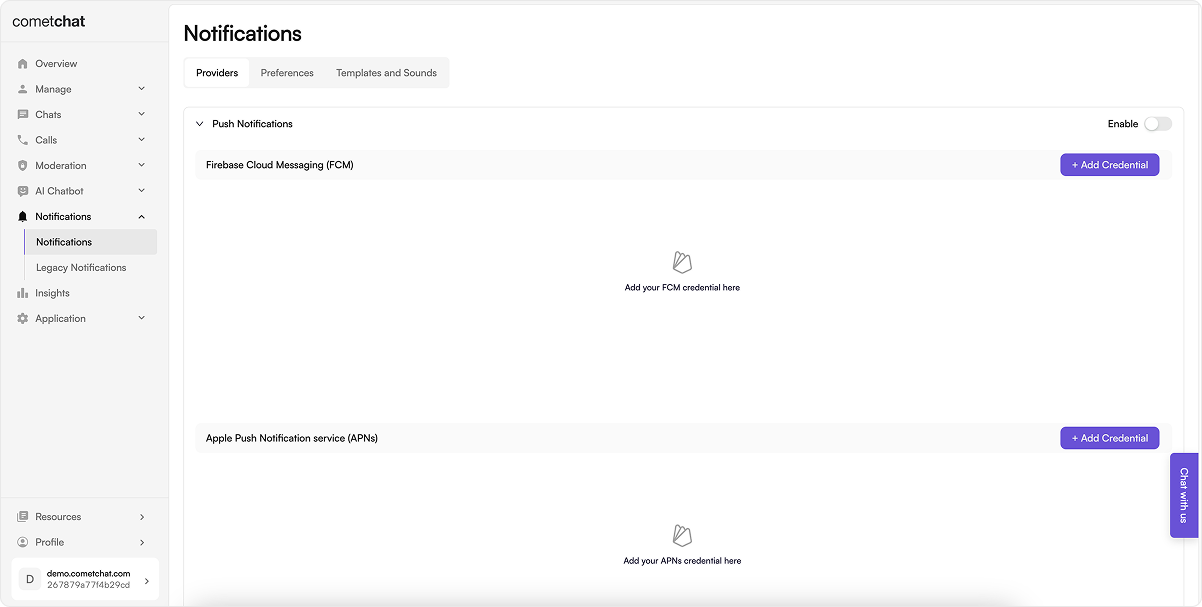
1. Go to **Notifications → Settings** and enable **Push Notifications**.
 2. On Firebase:
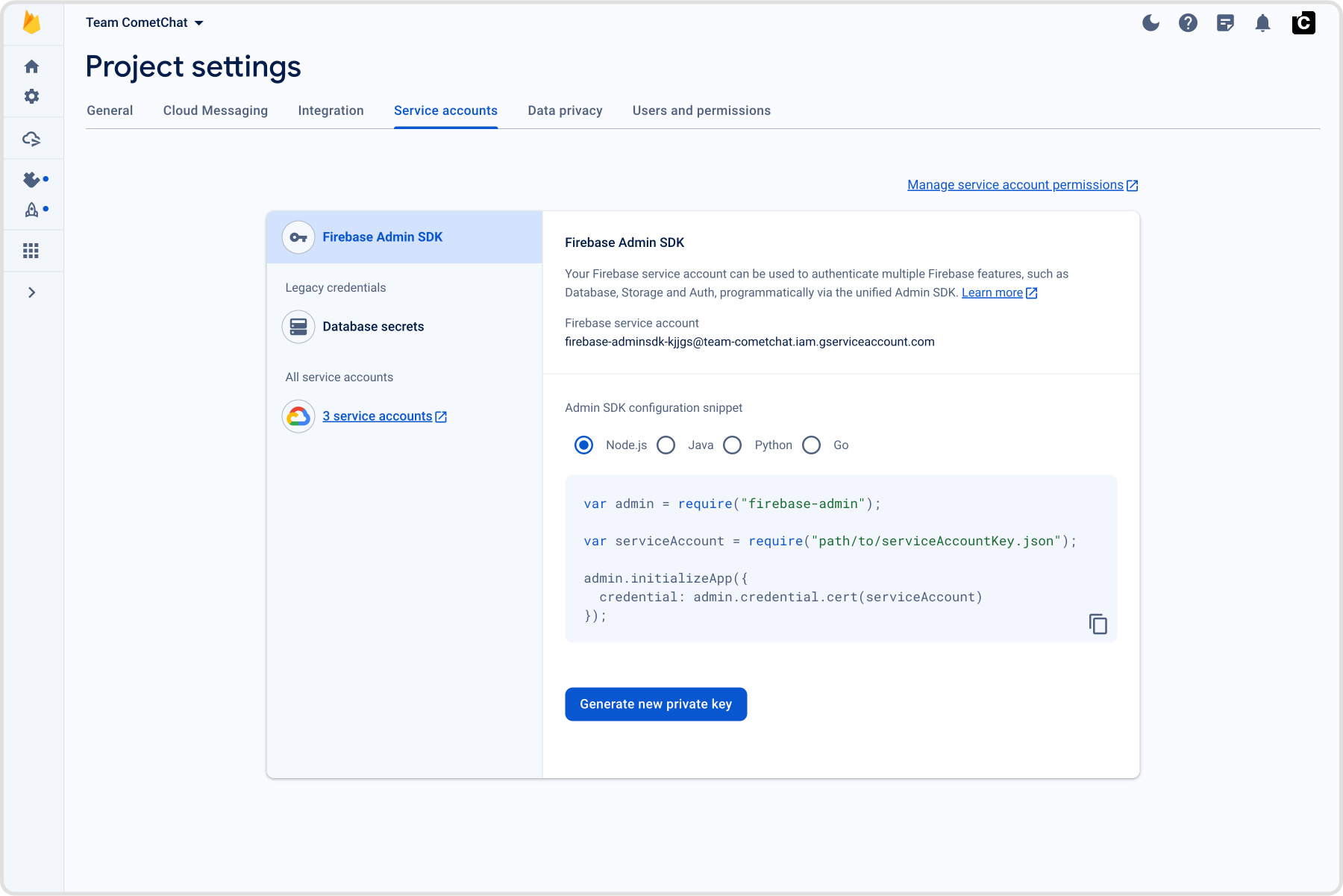
* Go to **Project Settings → Service accounts** and generate a new private key; download the JSON file.
2. On Firebase:
* Go to **Project Settings → Service accounts** and generate a new private key; download the JSON file.
 3. On CometChat Dashboard:
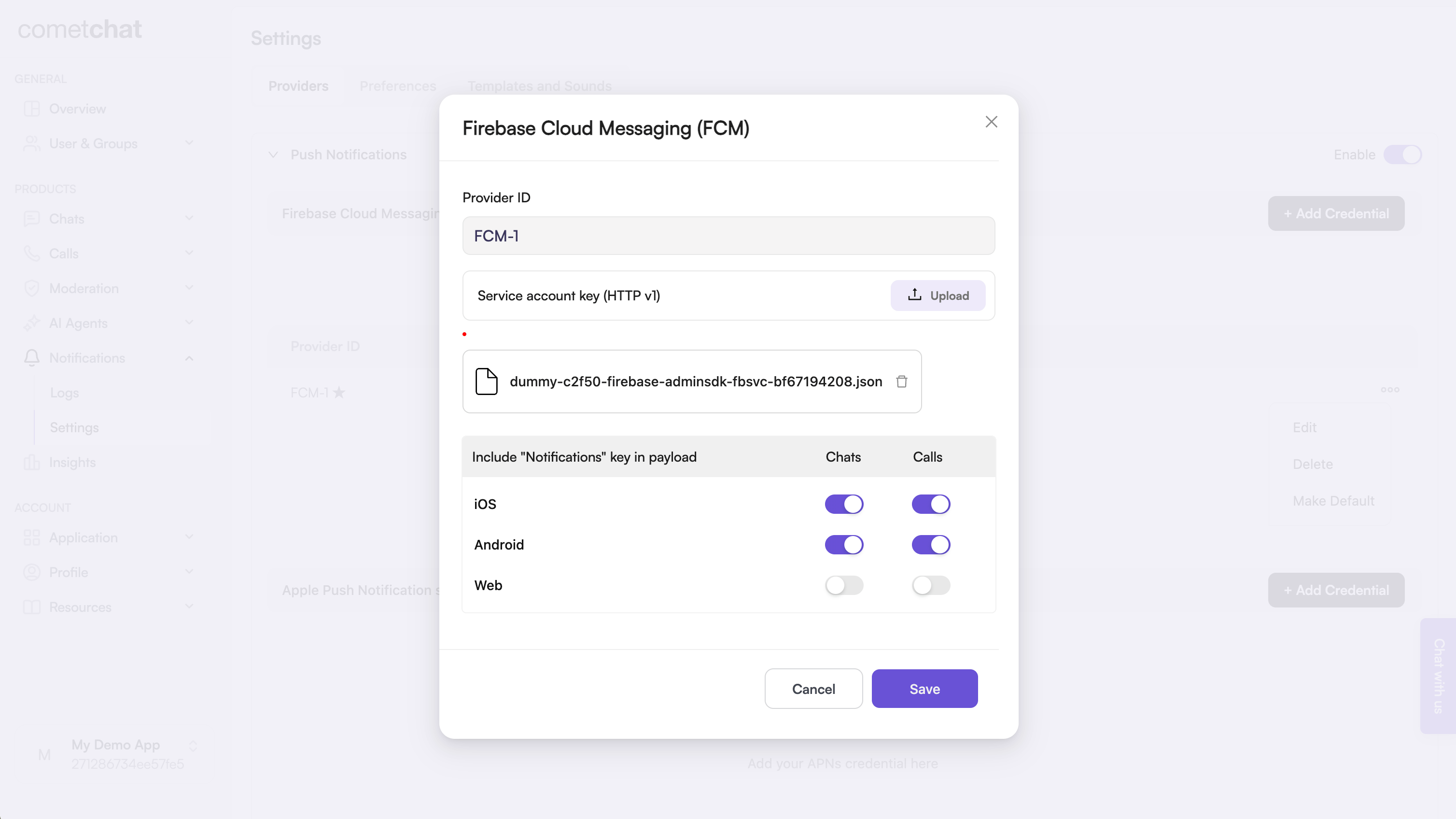
* Add an **FCM iOS provider** and upload your Firebase service account JSON; copy the Provider ID.
3. On CometChat Dashboard:
* Add an **FCM iOS provider** and upload your Firebase service account JSON; copy the Provider ID.
 ## 2. Upload your APNs Certificates
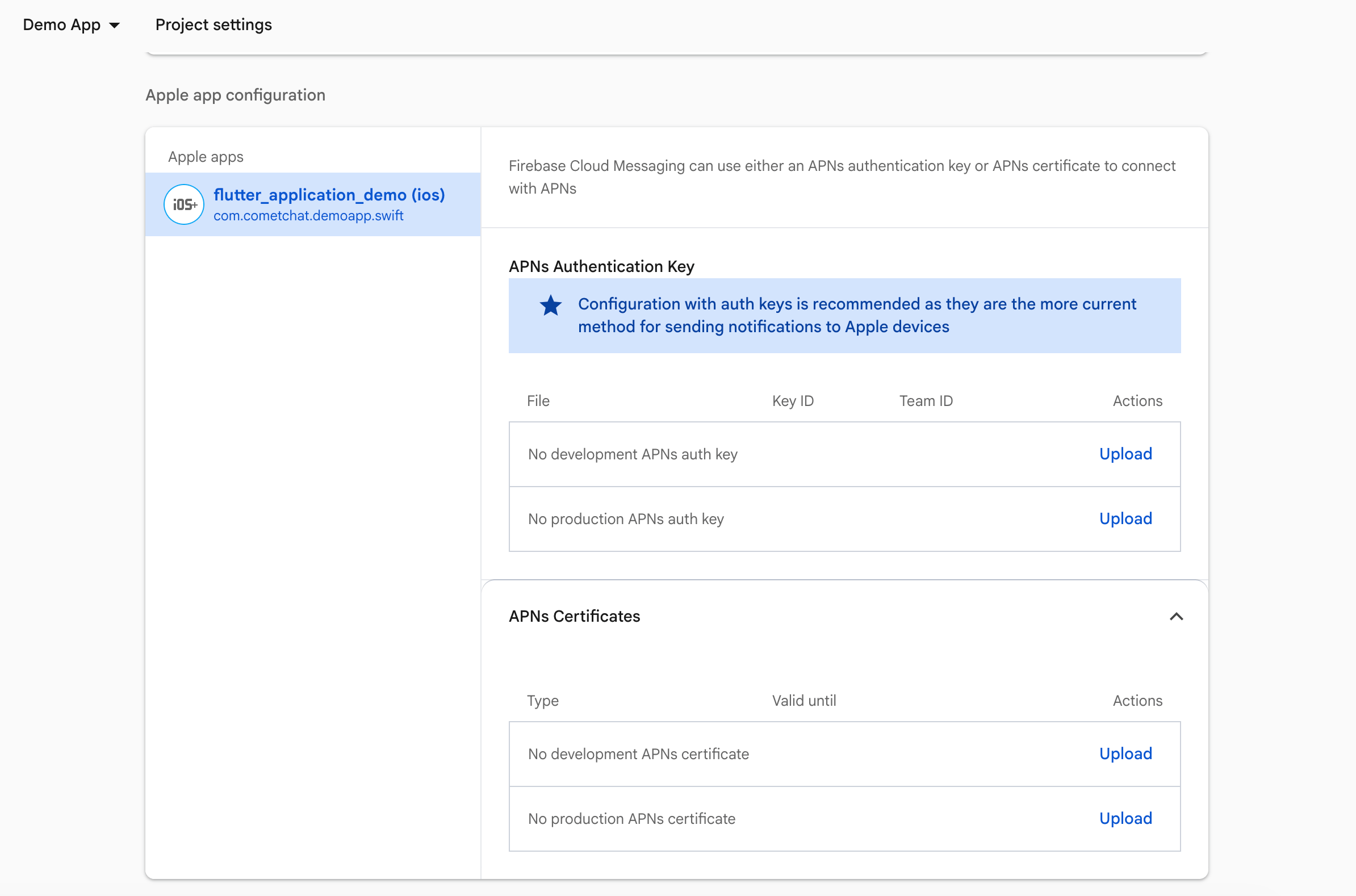
1. In the **Firebase Console**, go to **Project Settings → Cloud Messaging**.
2. Under **iOS app configuration**, upload your APNs authentication key or certificates.
## 2. Upload your APNs Certificates
1. In the **Firebase Console**, go to **Project Settings → Cloud Messaging**.
2. Under **iOS app configuration**, upload your APNs authentication key or certificates.
 ## 3. Prepare Firebase and CometChat
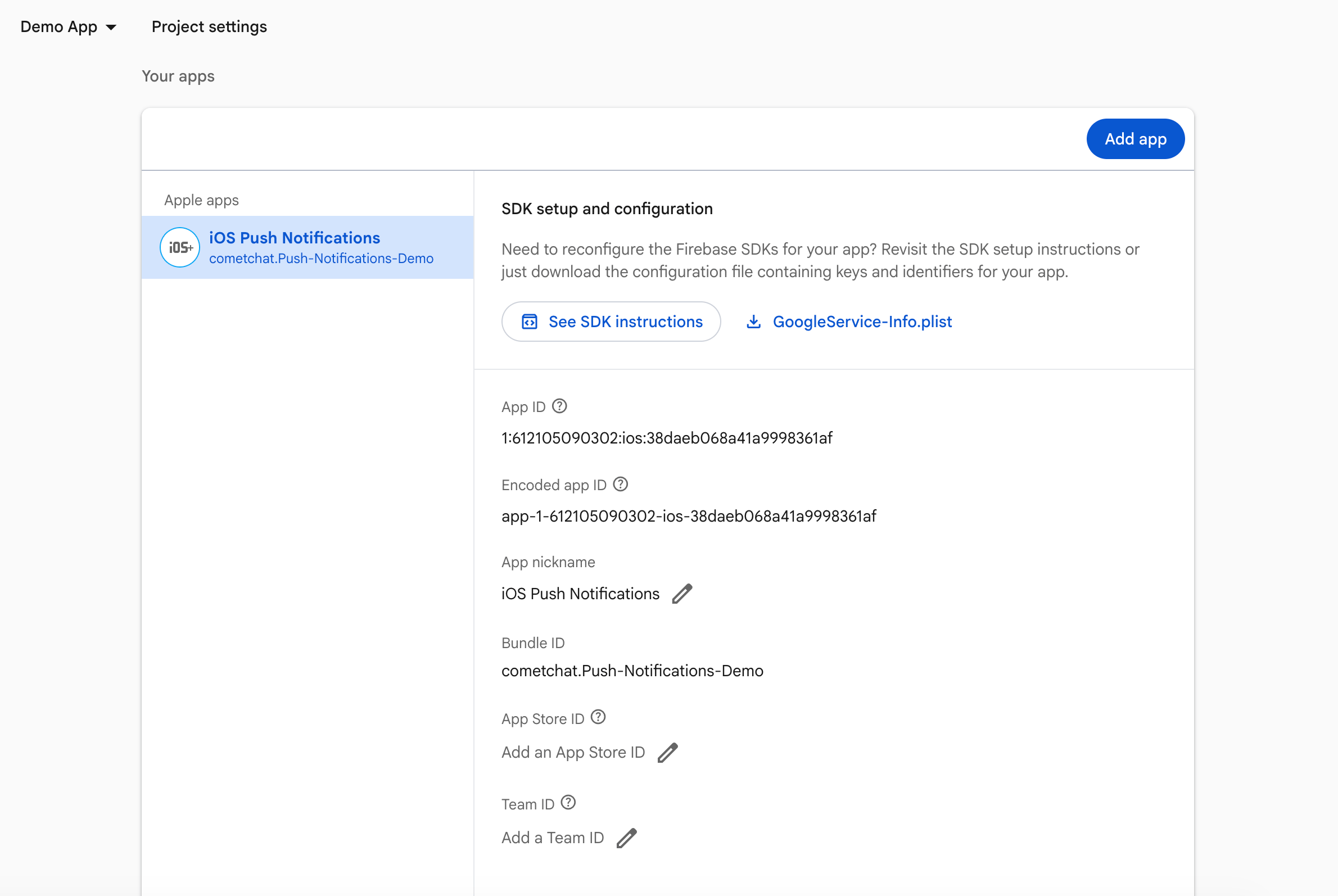
1. Firebase Console: download and add `GoogleService-Info.plist` to your target.
## 3. Prepare Firebase and CometChat
1. Firebase Console: download and add `GoogleService-Info.plist` to your target.
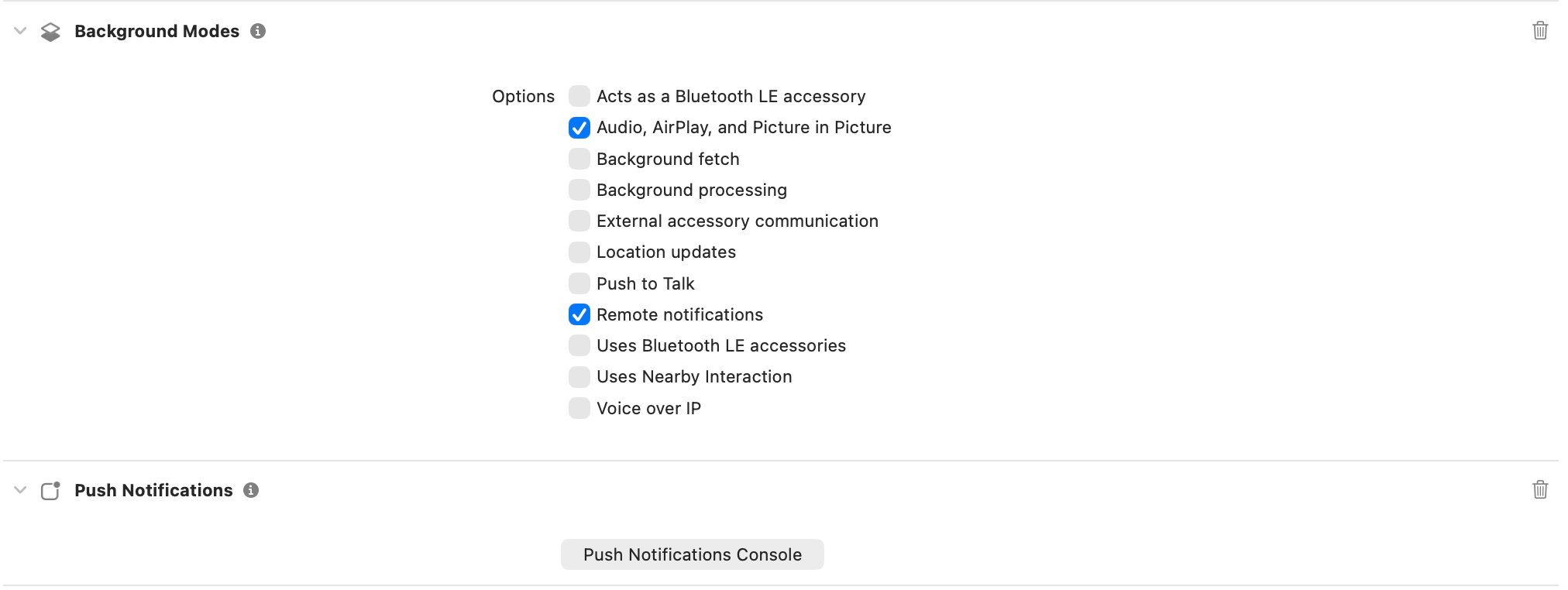
 2. Xcode capabilities: Push Notifications, Background Modes → Remote notifications.
 ## 4. Add dependencies (Podfile)
```ruby lines theme={null}
target 'YourApp' do
use_frameworks!
pod 'CometChatCallsSDK'
pod 'CometChatUIKitSwift', '5.1.7'
pod 'Firebase/Messaging' # add for FCM
end
```
Run `pod install`.
## 5. Wire AppDelegate (Firebase + delegates)
```swift lines highlight={15, 17, 19-37} theme={null}
import UIKit
import FirebaseCore
import FirebaseMessaging
import CometChatUIKitSwift
import CometChatSDK
@main
class AppDelegate: UIResponder, UIApplicationDelegate, UNUserNotificationCenterDelegate, MessagingDelegate {
func application(
_ application: UIApplication,
didFinishLaunchingWithOptions launchOptions: [UIApplication.LaunchOptionsKey: Any]?
) -> Bool {
FirebaseApp.configure()
Messaging.messaging().delegate = self
UNUserNotificationCenter.current().delegate = self
UNUserNotificationCenter.current().requestAuthorization(
options: [.alert, .badge, .sound]
) { granted, error in
print("Notification permission granted:", granted)
if let error = error {
print("Permission error:", error.localizedDescription)
}
// Only register for remote notifications if permission granted
if granted {
DispatchQueue.main.async {
print("Registering for remote notifications...")
application.registerForRemoteNotifications()
}
} else {
print("Push notification permission denied by user")
}
}
return true
}
func application(
_ application: UIApplication,
didRegisterForRemoteNotificationsWithDeviceToken deviceToken: Data
) {
Messaging.messaging().apnsToken = deviceToken
// Store the token for later registration after login
let hexString = deviceToken.map { String(format: "%02.2hhx", $0) }.joined()
UserDefaults.standard.set(hexString, forKey: "apnsPushToken")
print("APNs token received and stored: \(hexString)")
}
func application(
_ application: UIApplication,
didFailToRegisterForRemoteNotificationsWithError error: Error
) {
print("Failed to register for remote notifications: \(error.localizedDescription)")
}
func application(
_ application: UIApplication,
didReceiveRemoteNotification userInfo: [AnyHashable : Any],
fetchCompletionHandler completionHandler: @escaping (UIBackgroundFetchResult) -> Void
) {
print("Background notification received:", userInfo)
completionHandler(.newData)
}
func messaging(
_ messaging: Messaging,
didReceiveRegistrationToken fcmToken: String?
) {
guard let fcmToken = fcmToken else {
print("FCM token is nil")
return
}
print("FCM Token received:", fcmToken)
// Store FCM token as well
UserDefaults.standard.set(fcmToken, forKey: "fcmPushToken")
if let apnsToken = UserDefaults.standard.string(forKey: "apnsPushToken") {
print("Registering APNs token with CometChat: \(apnsToken)")
CometChatNotifications.registerPushToken(
pushToken: fcmToken,
platform: CometChatNotifications.PushPlatforms.FCM_IOS,
providerId: AppConstants.PROVIDER_ID,
onSuccess: { success in
print("APNs token registered with CometChat: \(success)")
},
onError: { error in
print("APNs token registration failed: \(error.errorCode) - \(error.errorDescription)")
}
)
} else {
print("No stored APNs token found - Check if Push Notifications capability is enabled in Xcode")
}
}
func userNotificationCenter(
_ center: UNUserNotificationCenter,
willPresent notification: UNNotification,
withCompletionHandler completionHandler: @escaping (UNNotificationPresentationOptions) -> Void
) {
completionHandler([.banner, .sound, .badge])
}
// Call this method AFTER CometChat login succeeds
static func registerStoredPushToken() {
guard CometChat.getLoggedInUser() != nil else {
print("Cannot register push token: User not logged in")
return
}
// Register APNs token
if let apnsToken = UserDefaults.standard.string(forKey: "apnsPushToken") {
print("Registering APNs token with CometChat: \(apnsToken)")
CometChatNotifications.registerPushToken(
pushToken: apnsToken,
platform: CometChatNotifications.PushPlatforms.APNS_IOS_DEVICE,
providerId: AppConstants.PROVIDER_ID,
onSuccess: { success in
print("APNs token registered with CometChat: \(success)")
},
onError: { error in
print("APNs token registration failed: \(error.errorCode) - \(error.errorDescription)")
}
)
} else {
print("No stored APNs token found - Check if Push Notifications capability is enabled in Xcode")
}
// Register FCM token
if let fcmToken = UserDefaults.standard.string(forKey: "fcmPushToken") {
print("Registering FCM token with CometChat...")
CometChat.registerTokenForPushNotification(
token: fcmToken,
onSuccess: { message in
print("CometChat FCM token registered successfully")
},
onError: { error in
print("CometChat FCM token registration failed:", error?.errorDescription ?? "Unknown error")
}
)
} else {
print("No stored FCM token found")
}
}
}
```
**What this code is doing**
* Initializes Firebase, sets `MessagingDelegate` and `UNUserNotificationCenterDelegate`, asks for alert/badge/sound permission, and registers for remote notifications.
* Sets `Messaging.messaging().apnsToken` so FCM can map the APNs token and later deliver via APNs.
* Stores the FCM registration token and calls `registerStoredPushToken()` so CometChat can bind the token to your logged-in user (using the Provider ID you configured).
* Leaves `willPresent` to show banners/sounds in foreground instead of silently ignoring the notification.
## 6. Create FCM helper
Create `CometChatFCMHelper.swift` and add:
```swift theme={null}
import UIKit
import UserNotifications
final class CometChatFCMHelper {
static let shared = CometChatFCMHelper()
private init() {}
/// Configure push notifications (iOS-safe)
func configure(application: UIApplication, delegate: UNUserNotificationCenterDelegate) {
// 1. Request permission
UNUserNotificationCenter.current().requestAuthorization(
options: [.alert, .badge, .sound]
) { granted, error in
print("Notification permission:", granted)
if let error = error {
print("Permission error:", error.localizedDescription)
}
}
// 2. Set delegate
UNUserNotificationCenter.current().delegate = delegate
// 3. Register for APNs
DispatchQueue.main.async {
application.registerForRemoteNotifications()
}
}
}
```
**What this helper is doing**
* Wraps permission prompts + delegate wiring so you can call one method from `AppDelegate`.
* Sets the notification delegate early and registers for APNs on the main queue (Apple requirement).
* Keeps all push setup in a reusable singleton to call from tests, scenes, or multi-target setups.
## 7. Badge count and grouped notifications
CometChat's Enhanced Push Notification payload includes an `unreadMessageCount` field (a string) representing the total unread messages across all conversations for the logged-in user. Use this to set the app icon badge and enrich local notifications.
### 7.1 Enable unread badge count on the CometChat Dashboard
Go to **CometChat Dashboard → Notifications → Settings → Preferences → Push
Notification Preferences**.
Scroll to the bottom and enable the **Unread Badge Count** toggle.
This ensures CometChat includes the `unreadMessageCount` field in every push payload sent to your app.
### 7.2 Clear badge count when app becomes active
Add the following to your `SceneDelegate.swift` to reset the badge when the user opens the app:
```swift theme={null}
func sceneDidBecomeActive(_ scene: UIScene) {
// Clear badge count when user opens the app
UIApplication.shared.applicationIconBadgeNumber = 0
print("Badge count cleared")
}
```
### 7.3 Update badge count from push notifications
Update your `AppDelegate.swift` to handle badge count updates in both foreground and background states:
```swift theme={null}
func userNotificationCenter(
_ center: UNUserNotificationCenter,
willPresent notification: UNNotification,
withCompletionHandler completionHandler: @escaping (UNNotificationPresentationOptions) -> Void
) {
let userInfo = notification.request.content.userInfo
print("Will present notification: \(userInfo)")
// Update badge count from payload
if let unreadCountString = userInfo["unreadMessageCount"] as? String,
let unreadCount = Int(unreadCountString) {
if unreadCount >= 0 {
UIApplication.shared.applicationIconBadgeNumber = unreadCount
print("Badge count updated (foreground): \(unreadCount)")
}
} else {
print("No unreadMessageCount in payload")
}
completionHandler([.banner, .badge, .sound])
}
```
```swift theme={null}
func application(
_ application: UIApplication,
didReceiveRemoteNotification userInfo: [AnyHashable: Any],
fetchCompletionHandler completionHandler: @escaping (UIBackgroundFetchResult) -> Void
) {
print("Received remote notification: \(userInfo)")
// Update badge count from payload
if let unreadCountString = userInfo["unreadMessageCount"] as? String,
let unreadCount = Int(unreadCountString) {
if unreadCount >= 0 {
UIApplication.shared.applicationIconBadgeNumber = unreadCount
print("Badge count updated (background): \(unreadCount)")
}
} else {
print("No unreadMessageCount in payload")
}
completionHandler(.newData)
}
```
The `unreadMessageCount` field is sent as a string in the payload. Always
parse it to an integer and validate it's non-negative before updating the
badge.
## 8. Testing checklist
1. `FirebaseApp.configure()` runs; FCM token logs after login; registration with CometChat succeeds.
2. Message from another user:
* Foreground: `willPresent` behavior as expected.
* Background/terminated: tap opens the correct chat.
3. Rotate the FCM token (`didReceiveRegistrationToken`) and confirm re-registration.
4. VoIP: VoIP token registers; incoming call shows CallKit; Accept/Decline controls the CometChat call.
## 9. Troubleshooting
| Symptom | Quick checks |
| ------------------------ | ----------------------------------------------------------------------------------------------------------------------- |
| No FCM pushes | `GoogleService-Info.plist` present; APNs key uploaded to Firebase; bundle ID matches; permission granted. |
| Token registration fails | Run after login; provider ID matches FCM iOS provider; `Messaging.messaging().delegate` set. |
| Taps ignored | Ensure `UNUserNotificationCenterDelegate` methods fire and navigation is ready before routing. |
| Call UI missing | Add PushKit + CallKit wiring; register VoIP token with an APNs VoIP provider; ensure VoIP/background modes are enabled. |
## 4. Add dependencies (Podfile)
```ruby lines theme={null}
target 'YourApp' do
use_frameworks!
pod 'CometChatCallsSDK'
pod 'CometChatUIKitSwift', '5.1.7'
pod 'Firebase/Messaging' # add for FCM
end
```
Run `pod install`.
## 5. Wire AppDelegate (Firebase + delegates)
```swift lines highlight={15, 17, 19-37} theme={null}
import UIKit
import FirebaseCore
import FirebaseMessaging
import CometChatUIKitSwift
import CometChatSDK
@main
class AppDelegate: UIResponder, UIApplicationDelegate, UNUserNotificationCenterDelegate, MessagingDelegate {
func application(
_ application: UIApplication,
didFinishLaunchingWithOptions launchOptions: [UIApplication.LaunchOptionsKey: Any]?
) -> Bool {
FirebaseApp.configure()
Messaging.messaging().delegate = self
UNUserNotificationCenter.current().delegate = self
UNUserNotificationCenter.current().requestAuthorization(
options: [.alert, .badge, .sound]
) { granted, error in
print("Notification permission granted:", granted)
if let error = error {
print("Permission error:", error.localizedDescription)
}
// Only register for remote notifications if permission granted
if granted {
DispatchQueue.main.async {
print("Registering for remote notifications...")
application.registerForRemoteNotifications()
}
} else {
print("Push notification permission denied by user")
}
}
return true
}
func application(
_ application: UIApplication,
didRegisterForRemoteNotificationsWithDeviceToken deviceToken: Data
) {
Messaging.messaging().apnsToken = deviceToken
// Store the token for later registration after login
let hexString = deviceToken.map { String(format: "%02.2hhx", $0) }.joined()
UserDefaults.standard.set(hexString, forKey: "apnsPushToken")
print("APNs token received and stored: \(hexString)")
}
func application(
_ application: UIApplication,
didFailToRegisterForRemoteNotificationsWithError error: Error
) {
print("Failed to register for remote notifications: \(error.localizedDescription)")
}
func application(
_ application: UIApplication,
didReceiveRemoteNotification userInfo: [AnyHashable : Any],
fetchCompletionHandler completionHandler: @escaping (UIBackgroundFetchResult) -> Void
) {
print("Background notification received:", userInfo)
completionHandler(.newData)
}
func messaging(
_ messaging: Messaging,
didReceiveRegistrationToken fcmToken: String?
) {
guard let fcmToken = fcmToken else {
print("FCM token is nil")
return
}
print("FCM Token received:", fcmToken)
// Store FCM token as well
UserDefaults.standard.set(fcmToken, forKey: "fcmPushToken")
if let apnsToken = UserDefaults.standard.string(forKey: "apnsPushToken") {
print("Registering APNs token with CometChat: \(apnsToken)")
CometChatNotifications.registerPushToken(
pushToken: fcmToken,
platform: CometChatNotifications.PushPlatforms.FCM_IOS,
providerId: AppConstants.PROVIDER_ID,
onSuccess: { success in
print("APNs token registered with CometChat: \(success)")
},
onError: { error in
print("APNs token registration failed: \(error.errorCode) - \(error.errorDescription)")
}
)
} else {
print("No stored APNs token found - Check if Push Notifications capability is enabled in Xcode")
}
}
func userNotificationCenter(
_ center: UNUserNotificationCenter,
willPresent notification: UNNotification,
withCompletionHandler completionHandler: @escaping (UNNotificationPresentationOptions) -> Void
) {
completionHandler([.banner, .sound, .badge])
}
// Call this method AFTER CometChat login succeeds
static func registerStoredPushToken() {
guard CometChat.getLoggedInUser() != nil else {
print("Cannot register push token: User not logged in")
return
}
// Register APNs token
if let apnsToken = UserDefaults.standard.string(forKey: "apnsPushToken") {
print("Registering APNs token with CometChat: \(apnsToken)")
CometChatNotifications.registerPushToken(
pushToken: apnsToken,
platform: CometChatNotifications.PushPlatforms.APNS_IOS_DEVICE,
providerId: AppConstants.PROVIDER_ID,
onSuccess: { success in
print("APNs token registered with CometChat: \(success)")
},
onError: { error in
print("APNs token registration failed: \(error.errorCode) - \(error.errorDescription)")
}
)
} else {
print("No stored APNs token found - Check if Push Notifications capability is enabled in Xcode")
}
// Register FCM token
if let fcmToken = UserDefaults.standard.string(forKey: "fcmPushToken") {
print("Registering FCM token with CometChat...")
CometChat.registerTokenForPushNotification(
token: fcmToken,
onSuccess: { message in
print("CometChat FCM token registered successfully")
},
onError: { error in
print("CometChat FCM token registration failed:", error?.errorDescription ?? "Unknown error")
}
)
} else {
print("No stored FCM token found")
}
}
}
```
**What this code is doing**
* Initializes Firebase, sets `MessagingDelegate` and `UNUserNotificationCenterDelegate`, asks for alert/badge/sound permission, and registers for remote notifications.
* Sets `Messaging.messaging().apnsToken` so FCM can map the APNs token and later deliver via APNs.
* Stores the FCM registration token and calls `registerStoredPushToken()` so CometChat can bind the token to your logged-in user (using the Provider ID you configured).
* Leaves `willPresent` to show banners/sounds in foreground instead of silently ignoring the notification.
## 6. Create FCM helper
Create `CometChatFCMHelper.swift` and add:
```swift theme={null}
import UIKit
import UserNotifications
final class CometChatFCMHelper {
static let shared = CometChatFCMHelper()
private init() {}
/// Configure push notifications (iOS-safe)
func configure(application: UIApplication, delegate: UNUserNotificationCenterDelegate) {
// 1. Request permission
UNUserNotificationCenter.current().requestAuthorization(
options: [.alert, .badge, .sound]
) { granted, error in
print("Notification permission:", granted)
if let error = error {
print("Permission error:", error.localizedDescription)
}
}
// 2. Set delegate
UNUserNotificationCenter.current().delegate = delegate
// 3. Register for APNs
DispatchQueue.main.async {
application.registerForRemoteNotifications()
}
}
}
```
**What this helper is doing**
* Wraps permission prompts + delegate wiring so you can call one method from `AppDelegate`.
* Sets the notification delegate early and registers for APNs on the main queue (Apple requirement).
* Keeps all push setup in a reusable singleton to call from tests, scenes, or multi-target setups.
## 7. Badge count and grouped notifications
CometChat's Enhanced Push Notification payload includes an `unreadMessageCount` field (a string) representing the total unread messages across all conversations for the logged-in user. Use this to set the app icon badge and enrich local notifications.
### 7.1 Enable unread badge count on the CometChat Dashboard
Go to **CometChat Dashboard → Notifications → Settings → Preferences → Push
Notification Preferences**.
Scroll to the bottom and enable the **Unread Badge Count** toggle.
This ensures CometChat includes the `unreadMessageCount` field in every push payload sent to your app.
### 7.2 Clear badge count when app becomes active
Add the following to your `SceneDelegate.swift` to reset the badge when the user opens the app:
```swift theme={null}
func sceneDidBecomeActive(_ scene: UIScene) {
// Clear badge count when user opens the app
UIApplication.shared.applicationIconBadgeNumber = 0
print("Badge count cleared")
}
```
### 7.3 Update badge count from push notifications
Update your `AppDelegate.swift` to handle badge count updates in both foreground and background states:
```swift theme={null}
func userNotificationCenter(
_ center: UNUserNotificationCenter,
willPresent notification: UNNotification,
withCompletionHandler completionHandler: @escaping (UNNotificationPresentationOptions) -> Void
) {
let userInfo = notification.request.content.userInfo
print("Will present notification: \(userInfo)")
// Update badge count from payload
if let unreadCountString = userInfo["unreadMessageCount"] as? String,
let unreadCount = Int(unreadCountString) {
if unreadCount >= 0 {
UIApplication.shared.applicationIconBadgeNumber = unreadCount
print("Badge count updated (foreground): \(unreadCount)")
}
} else {
print("No unreadMessageCount in payload")
}
completionHandler([.banner, .badge, .sound])
}
```
```swift theme={null}
func application(
_ application: UIApplication,
didReceiveRemoteNotification userInfo: [AnyHashable: Any],
fetchCompletionHandler completionHandler: @escaping (UIBackgroundFetchResult) -> Void
) {
print("Received remote notification: \(userInfo)")
// Update badge count from payload
if let unreadCountString = userInfo["unreadMessageCount"] as? String,
let unreadCount = Int(unreadCountString) {
if unreadCount >= 0 {
UIApplication.shared.applicationIconBadgeNumber = unreadCount
print("Badge count updated (background): \(unreadCount)")
}
} else {
print("No unreadMessageCount in payload")
}
completionHandler(.newData)
}
```
The `unreadMessageCount` field is sent as a string in the payload. Always
parse it to an integer and validate it's non-negative before updating the
badge.
## 8. Testing checklist
1. `FirebaseApp.configure()` runs; FCM token logs after login; registration with CometChat succeeds.
2. Message from another user:
* Foreground: `willPresent` behavior as expected.
* Background/terminated: tap opens the correct chat.
3. Rotate the FCM token (`didReceiveRegistrationToken`) and confirm re-registration.
4. VoIP: VoIP token registers; incoming call shows CallKit; Accept/Decline controls the CometChat call.
## 9. Troubleshooting
| Symptom | Quick checks |
| ------------------------ | ----------------------------------------------------------------------------------------------------------------------- |
| No FCM pushes | `GoogleService-Info.plist` present; APNs key uploaded to Firebase; bundle ID matches; permission granted. |
| Token registration fails | Run after login; provider ID matches FCM iOS provider; `Messaging.messaging().delegate` set. |
| Taps ignored | Ensure `UNUserNotificationCenterDelegate` methods fire and navigation is ready before routing. |
| Call UI missing | Add PushKit + CallKit wiring; register VoIP token with an APNs VoIP provider; ensure VoIP/background modes are enabled. |