> ## Documentation Index
> Fetch the complete documentation index at: https://www.cometchat.com/docs/llms.txt
> Use this file to discover all available pages before exploring further.
# Flutter Push Notifications (iOS)
> CometChat push notifications in Flutter apps on iOS using Apple Push Notification service (APNs).
Reference implementation of Flutter UI Kit, APNs and Push Notification Setup.
## What this guide covers
* CometChat dashboard setup (enable push, create APNs + optional VoIP/FCM providers) with screenshots.
* Apple + Firebase setup (entitlements, APNs key, `GoogleService-Info.plist`).
* Copying the sample notification stack and aligning package IDs/provider IDs.
* Token registration, navigation from pushes, testing, and troubleshooting.
* App icon badge count using `unreadMessageCount` from the CometChat push payload.
## How FCM + CometChat work together
* **APNs is primary on iOS:** FCM can be used only as a bridge. Firebase hands the payload to APNs using the APNs key you uploaded in Firebase.
* **CometChat providers:** The APNs/VoIP/FCM providers you create in the CometChat dashboard hold your Apple/FCM credentials. `CometChatPushRegistry.register(token, isFcm: false, isVoip: ...)` binds the APNs/VoIP tokens; `isFcm: true` uses the FCM provider if you decide to register FCM tokens too.
* **Flow:** Permission prompt → APNs (and/or FCM) token issued → after `CometChatUIKit.login` succeeds, register tokens with `CometChatPushRegistry` using the matching provider IDs → CometChat sends to FCM/APNs → APNs delivers to the device → Flutter handles taps via `NotificationLaunchHandler` and `APNSService`.
## 1. Enable push and add providers (CometChat Dashboard)
1. Go to **Notifications → Settings** and enable **Push Notifications**.
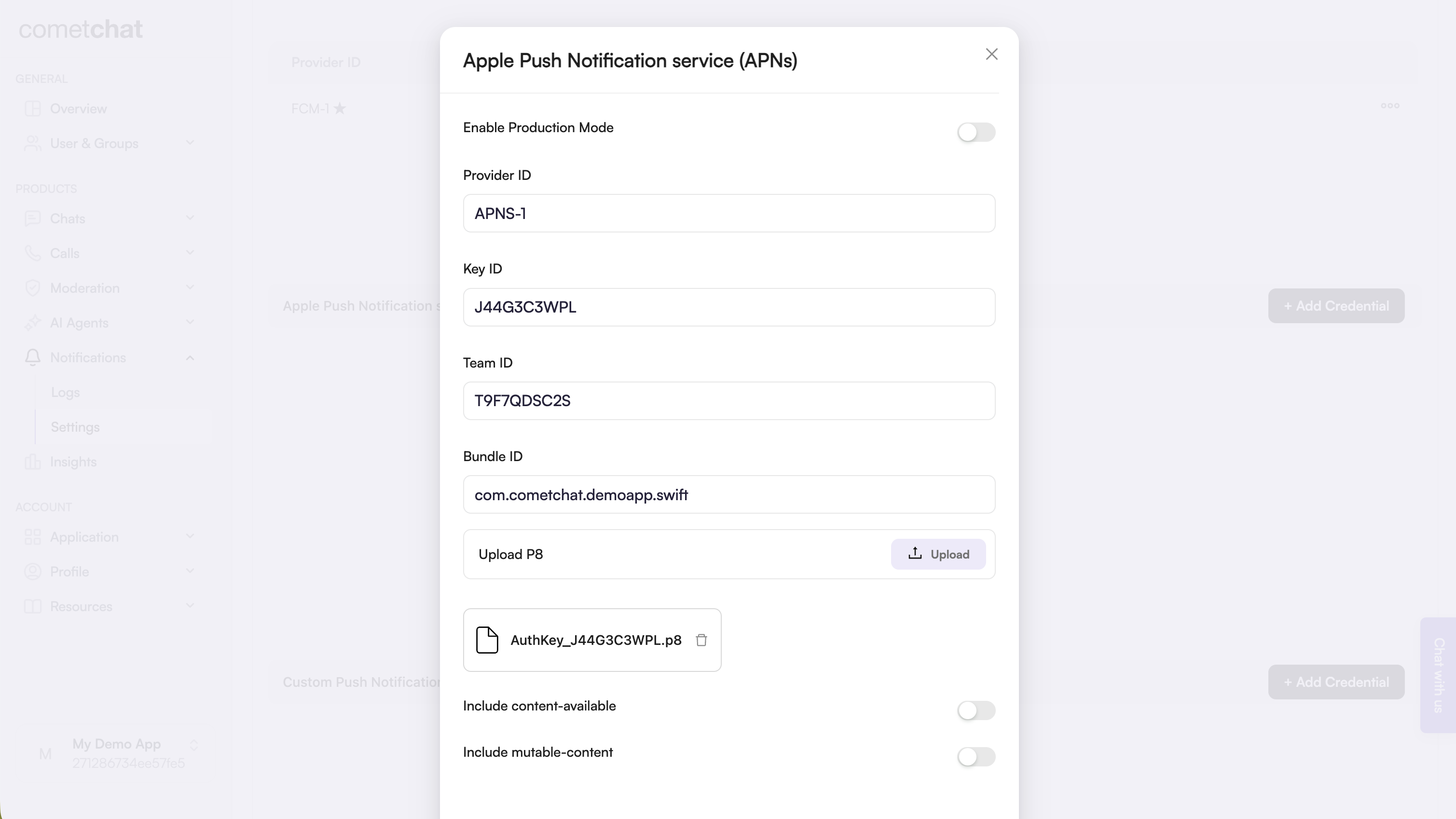
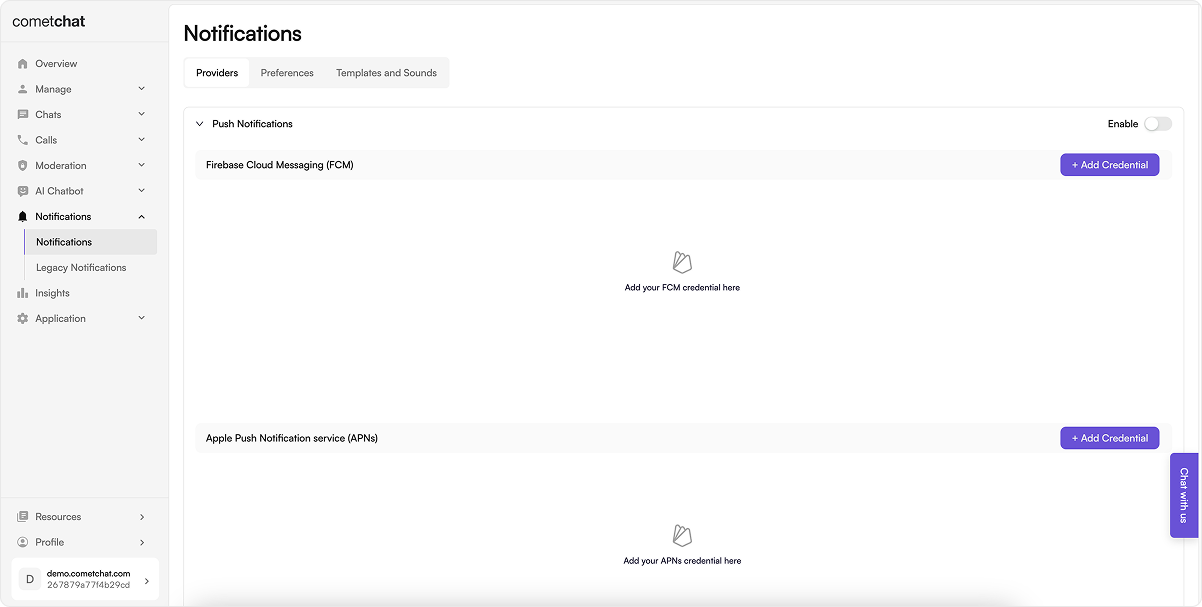 2. Click **Add Credentials**, choose **APNs** (and **APNs VoIP** if you want in-call pushes), upload your `.p8` key or certificate, and copy each Provider ID.
 3. (Optional) Add an **FCM** provider if you plan to register FCM tokens on iOS.
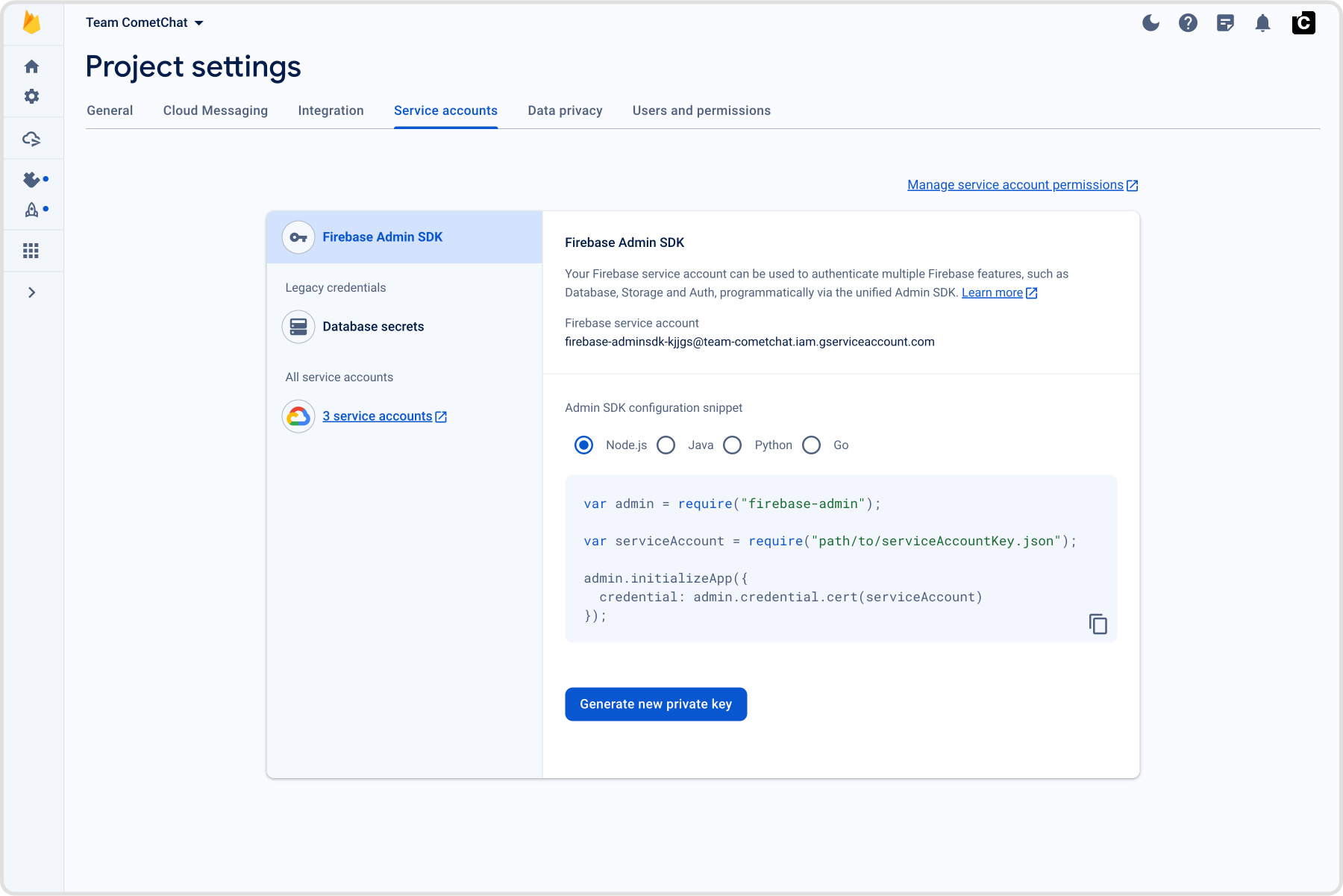 Keep the provider IDs—you’ll set them in `CometChatConfig`.
## 2. Prepare Apple + Firebase credentials
### 2.1 Apple Developer portal
1. Generate an APNs Auth Key (`.p8`) and note the **Key ID** and **Team ID**.
2. Enable Push Notifications plus Background Modes → *Remote notifications* and *Voice over IP* on the bundle ID.
3. Create a VoIP Services certificate/key if you want separate credentials.
**`.p12` certificates are deprecated.** Apple recommends using `.p8` Auth Keys for push notifications. `.p8` keys never expire and work across all your apps. Migrate to `.p8` if you haven't already.
### 2.2 Firebase Console
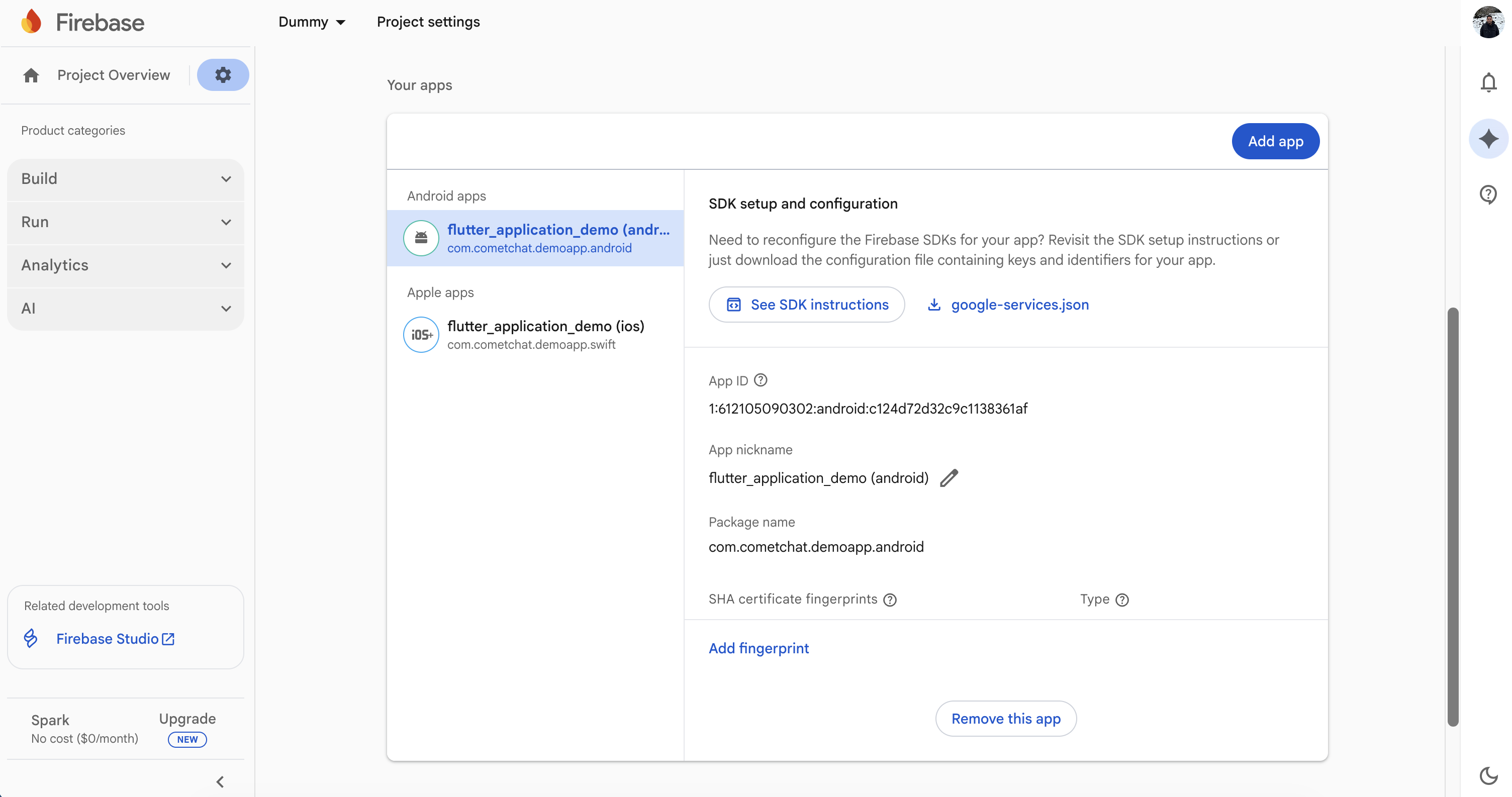
1. Register the same bundle ID and download `GoogleService-Info.plist` into `ios/Runner`.
2. Enable Cloud Messaging and upload the APNs key under *Project Settings → Cloud Messaging*.
Keep the provider IDs—you’ll set them in `CometChatConfig`.
## 2. Prepare Apple + Firebase credentials
### 2.1 Apple Developer portal
1. Generate an APNs Auth Key (`.p8`) and note the **Key ID** and **Team ID**.
2. Enable Push Notifications plus Background Modes → *Remote notifications* and *Voice over IP* on the bundle ID.
3. Create a VoIP Services certificate/key if you want separate credentials.
**`.p12` certificates are deprecated.** Apple recommends using `.p8` Auth Keys for push notifications. `.p8` keys never expire and work across all your apps. Migrate to `.p8` if you haven't already.
### 2.2 Firebase Console
1. Register the same bundle ID and download `GoogleService-Info.plist` into `ios/Runner`.
2. Enable Cloud Messaging and upload the APNs key under *Project Settings → Cloud Messaging*.
 ## 3. Local configuration file
Update [`lib/app_credentials.dart`](https://github.com/cometchat/cometchat-uikit-flutter/blob/v5/sample_app_push_notifications/lib/app_credentials.dart) (or your own config file) so it exposes:
```dart lines theme={null}
class CometChatConfig {
static const appId = "YOUR_APP_ID";
static const region = "YOUR_APP_REGION";
static const authKey = "YOUR_AUTH_KEY";
static const fcmProviderId = "FCM-PROVIDER-ID";
static const apnProviderId = "APNS-PROVIDER-ID";
static const apnVoipProviderId = "APNS-VOIP-PROVIDER-ID"; // optional but recommended
}
```
## 4. Bring the notification stack into Flutter
### 4.1 Copy [`lib/notifications`](https://github.com/cometchat/cometchat-uikit-flutter/tree/v5/sample_app_push_notifications/lib/notifications)
* Clone or download the sample once.
* Copy the entire [`lib/notifications`](https://github.com/cometchat/cometchat-uikit-flutter/tree/v5/sample_app_push_notifications/lib/notifications) directory (models, Android/iOS services, helpers) into your app.
* Update the import prefixes (for example replace `package:flutter_application_demo/...` with your own package name). Keeping the same folder names avoids manual refactors later.
### 4.2 Wire the entry points
**[`lib/main.dart`](https://github.com/cometchat/cometchat-uikit-flutter/blob/v5/sample_app_push_notifications/lib/main.dart)**
* Initialize `SharedPreferencesClass`, Firebase, and `FlutterLocalNotificationsPlugin` before calling `runApp`.
* Store `NotificationLaunchHandler.pendingNotificationResponse` when the app is opened by tapping a notification while terminated.
* On iOS, call `APNSService.setupNativeCallListener(context)` from `initState` so Flutter reacts when the native CallKit UI changes state.
**[`lib/guard_screen.dart`](https://github.com/cometchat/cometchat-uikit-flutter/blob/v5/sample_app_push_notifications/lib/guard_screen.dart) / [`lib/dashboard.dart`](https://github.com/cometchat/cometchat-uikit-flutter/blob/v5/sample_app_push_notifications/lib/dashboard.dart) (or your first screen after login)**
* Ensure `CometChatUIKit.init()` and `CometChatUIKit.login()` finish before rendering the dashboard.
* Instantiate `APNSService` (iOS only) and call `apnsService.init(context)` inside `initState`.
* Register CometChat UI + Calls listeners (`CometChatUIEventListener`, `CometChatCallEventListener`, and `CallListener`) exactly once per session; the sample stores the listener IDs inside `APNSService`.
* Replay `NotificationLaunchHandler.pendingNotificationResponse` after the widget tree builds so taps from a killed app still navigate to `MessagesScreen`.
* Forward lifecycle changes to `IncomingCallOverlay` / `BoolSingleton` to hide stale overlays when the app resumes.
### 4.3 Align dependencies and configuration
Mirror the sample `pubspec.yaml` versions (update as needed when newer releases ship):
```yaml lines theme={null}
dependencies:
firebase_core: ^3.0.0
firebase_messaging: ^15.0.0
flutter_apns_x: ^2.1.1
flutter_callkit_incoming: ^2.0.3+3
flutter_local_notifications: ^16.0.0
cometchat_chat_uikit: ^5.0.0
cometchat_calls_uikit: ^5.0.0
permission_handler: ^11.3.0
```
Run `flutter pub get`, then install the native pods:
```bash theme={null}
cd ios && pod install && cd ..
```
Then run `flutterfire configure` if you still need to generate `firebase_options.dart`.
## 5. Configure the native iOS layer
### 5.1 Capabilities and Info.plist
1. Open `ios/Runner.xcworkspace` in Xcode.
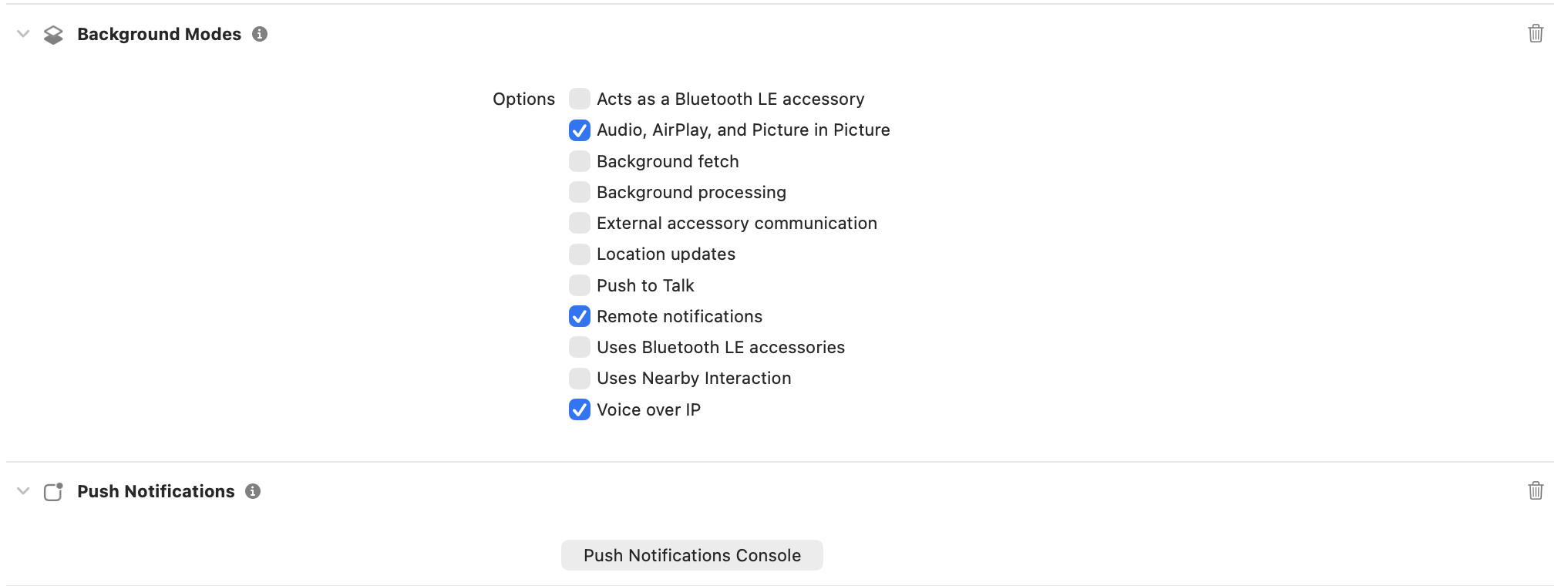
2. Under *Signing & Capabilities*, enable **Push Notifications** and **Background Modes** (Remote notifications + Voice over IP).
3. Add microphone, camera, bluetooth, and notification permission strings to `Info.plist`.
4. Set the development team that has access to the APNs/VoIP keys you generated earlier.
## 3. Local configuration file
Update [`lib/app_credentials.dart`](https://github.com/cometchat/cometchat-uikit-flutter/blob/v5/sample_app_push_notifications/lib/app_credentials.dart) (or your own config file) so it exposes:
```dart lines theme={null}
class CometChatConfig {
static const appId = "YOUR_APP_ID";
static const region = "YOUR_APP_REGION";
static const authKey = "YOUR_AUTH_KEY";
static const fcmProviderId = "FCM-PROVIDER-ID";
static const apnProviderId = "APNS-PROVIDER-ID";
static const apnVoipProviderId = "APNS-VOIP-PROVIDER-ID"; // optional but recommended
}
```
## 4. Bring the notification stack into Flutter
### 4.1 Copy [`lib/notifications`](https://github.com/cometchat/cometchat-uikit-flutter/tree/v5/sample_app_push_notifications/lib/notifications)
* Clone or download the sample once.
* Copy the entire [`lib/notifications`](https://github.com/cometchat/cometchat-uikit-flutter/tree/v5/sample_app_push_notifications/lib/notifications) directory (models, Android/iOS services, helpers) into your app.
* Update the import prefixes (for example replace `package:flutter_application_demo/...` with your own package name). Keeping the same folder names avoids manual refactors later.
### 4.2 Wire the entry points
**[`lib/main.dart`](https://github.com/cometchat/cometchat-uikit-flutter/blob/v5/sample_app_push_notifications/lib/main.dart)**
* Initialize `SharedPreferencesClass`, Firebase, and `FlutterLocalNotificationsPlugin` before calling `runApp`.
* Store `NotificationLaunchHandler.pendingNotificationResponse` when the app is opened by tapping a notification while terminated.
* On iOS, call `APNSService.setupNativeCallListener(context)` from `initState` so Flutter reacts when the native CallKit UI changes state.
**[`lib/guard_screen.dart`](https://github.com/cometchat/cometchat-uikit-flutter/blob/v5/sample_app_push_notifications/lib/guard_screen.dart) / [`lib/dashboard.dart`](https://github.com/cometchat/cometchat-uikit-flutter/blob/v5/sample_app_push_notifications/lib/dashboard.dart) (or your first screen after login)**
* Ensure `CometChatUIKit.init()` and `CometChatUIKit.login()` finish before rendering the dashboard.
* Instantiate `APNSService` (iOS only) and call `apnsService.init(context)` inside `initState`.
* Register CometChat UI + Calls listeners (`CometChatUIEventListener`, `CometChatCallEventListener`, and `CallListener`) exactly once per session; the sample stores the listener IDs inside `APNSService`.
* Replay `NotificationLaunchHandler.pendingNotificationResponse` after the widget tree builds so taps from a killed app still navigate to `MessagesScreen`.
* Forward lifecycle changes to `IncomingCallOverlay` / `BoolSingleton` to hide stale overlays when the app resumes.
### 4.3 Align dependencies and configuration
Mirror the sample `pubspec.yaml` versions (update as needed when newer releases ship):
```yaml lines theme={null}
dependencies:
firebase_core: ^3.0.0
firebase_messaging: ^15.0.0
flutter_apns_x: ^2.1.1
flutter_callkit_incoming: ^2.0.3+3
flutter_local_notifications: ^16.0.0
cometchat_chat_uikit: ^5.0.0
cometchat_calls_uikit: ^5.0.0
permission_handler: ^11.3.0
```
Run `flutter pub get`, then install the native pods:
```bash theme={null}
cd ios && pod install && cd ..
```
Then run `flutterfire configure` if you still need to generate `firebase_options.dart`.
## 5. Configure the native iOS layer
### 5.1 Capabilities and Info.plist
1. Open `ios/Runner.xcworkspace` in Xcode.
2. Under *Signing & Capabilities*, enable **Push Notifications** and **Background Modes** (Remote notifications + Voice over IP).
3. Add microphone, camera, bluetooth, and notification permission strings to `Info.plist`.
4. Set the development team that has access to the APNs/VoIP keys you generated earlier.
 ### 5.2 `AppDelegate.swift` bridge
Start from the sample [`ios/Runner/AppDelegate.swift`](https://github.com/cometchat/cometchat-uikit-flutter/blob/v5/sample_app_push_notifications/ios/Runner/AppDelegate.swift) and keep these pieces intact:
* **MethodChannel handshake** – create a channel that both Flutter and Swift know:
```swift lines theme={null}
let appInfoChannel = FlutterMethodChannel(
name: "com.flutter_application_demo/ios",
binaryMessenger: controller.binaryMessenger
)
```
Handle at least `getAppInfo`, `endCall`, `onCallAcceptedFromNative`, and `onCallEndedFromNative`, mirroring the Dart side (`APNSService.setupNativeCallListener`).
* **Firebase + plugin registration** – call `FirebaseApp.configure()` before `GeneratedPluginRegistrant.register(with: self)`.
* **PushKit** – instantiate `PKPushRegistry`, set `desiredPushTypes = [.voIP]`, and forward the token inside `pushRegistry(_:didUpdate:for:)` via `SwiftFlutterCallkitIncomingPlugin.sharedInstance?.setDevicePushTokenVoIP(tokenHex)`.
* **CallKit** – configure `CXProviderConfiguration`, keep a `CXCallController`, and implement `provider(_:perform: CXAnswerCallAction)` / `provider(_:perform: CXEndCallAction)` so native actions propagate to Flutter.
* **Incoming push handler** – inside `pushRegistry(_:didReceiveIncomingPushWith:)`, convert the CometChat payload into `flutter_callkit_incoming.Data`, set `extra` with the raw payload, and call `showCallkitIncoming(..., fromPushKit: true)`.
* **UUID helper** – reuse `createUUID(sessionid:)` to produce valid `UUID`s from long CometChat session IDs; this lets CallKit correlate calls even if the payload string exceeds 32 characters.
If you change the MethodChannel name in Swift, remember to update `APNSService.platform` in Dart to match.
## 6. Token registration and runtime events
### 6.1 Standard APNs tokens
`APNSService` hooks into `FirebaseMessaging.instance.getAPNSToken()` (and `onTokenRefresh`) before calling:
```dart lines theme={null}
await CometChatPushRegistry.register(
token: token,
isFcm: false,
isVoip: false,
);
```
This registers the device token against the APNs provider selected in `CometChatConfig.apnProviderId`.
### 6.2 VoIP tokens
* Capture the PushKit token in `AppDelegate.pushRegistry(_:didUpdate:for:)`.
* Forward it to Flutter via the MethodChannel or register it directly from Swift by invoking `CometChatPushRegistry` through `SwiftFlutterCallkitIncomingPlugin`.
* If you keep the Dart implementation, emit a MethodChannel call named `onVoipToken` and handle it in `APNSService` by calling `CometChatPushRegistry.register(token: token, isFcm: false, isVoip: true);`.
### 6.3 Local notifications and navigation
* `APNSService._showNotification` displays a local notification when the incoming CometChat message does not belong to the currently open conversation.
* `LocalNotificationService.handleNotificationTap` parses the payload, fetches the relevant user/group, and pushes `MessagesScreen`.
* `NotificationLaunchHandler.pendingNotificationResponse` caches taps triggered while the app is terminated; replay it on the dashboard once the UI is ready.
### 6.4 Call events
* `FlutterCallkitIncoming.onEvent` is already wired inside `APNSService` to accept or end calls initiated by CallKit.
* When native CallKit UI accepts/ends a call, Swift invokes `onCallAcceptedFromNative` / `onCallEndedFromNative` on the MethodChannel; `APNSService` then calls `FlutterCallkitIncoming.setCallConnected` or `CometChat.endCall()` to keep both stacks synchronized.
**Cold-start VoIP call handling:** When the app is killed (not running) and a VoIP push arrives, the standard CometChat call listeners (`onOutgoingCallAccepted`, `onIncomingCallReceived`, etc.) will **not** fire because the Flutter engine is not yet initialized. In this scenario, you need a **native-to-Flutter bridge** that:
1. Handles the VoIP push entirely in native Swift code (`AppDelegate` / `PushKit` handler).
2. Presents the CallKit UI natively.
3. When the user accepts, initializes the CometChat SDK from the native side using `CometChat.generateToken()` and `CometChat.startSession()`.
4. Bridges the call state back to Flutter via a MethodChannel once the Flutter engine is ready.
The standard `CometChatCallingExtension` call listeners only work when the app is already running (foreground or background with an active Flutter engine). See the [sample app's `AppDelegate.swift`](https://github.com/cometchat/cometchat-uikit-flutter/blob/v5/sample_app_push_notifications/ios/Runner/AppDelegate.swift) for a reference implementation of this native bridge pattern.
## 7. Badge count using `unreadMessageCount`
CometChat's Enhanced Push Notification payload includes an `unreadMessageCount` field representing the total unread messages across all conversations for the logged-in user. On iOS the badge can be updated from both the client side and the server side.
If you use only APNs (no FCM on iOS), the badge is handled entirely by the server. CometChat sets the `aps.badge` value in the push payload, and iOS updates the app icon badge automatically when the notification is delivered. No additional dependency or client-side code is required — you can skip straight to section 7.5 to handle clearing the badge when the app opens.
### 7.1 Enable unread badge count on the CometChat Dashboard
1. Go to **CometChat Dashboard → Notification Engine → Settings → Preferences → Push Notification Preferences**.
2. Scroll to the bottom and enable the **Unread Badge Count** toggle.
This ensures CometChat includes the `unreadMessageCount` field in every push payload (and sets `aps.badge` for APNs) sent to your app.
### 7.2 Expected payload format
CometChat sends APNs payloads with this structure (relevant fields):
```json theme={null}
{
"aps": {
"alert": {
"title": "New Message",
"body": "John: Hello!"
},
"badge": 5,
"sound": "default"
},
"unreadMessageCount": 5,
"conversationId": "user_abc123"
}
```
The `aps.badge` field is set by CometChat server-side. iOS updates the app icon badge automatically when the push is delivered — no client code is needed for this path.
### 7.3 Client-side badge via FCM on iOS
The steps below apply only if you register FCM tokens on iOS and show local notifications from Flutter. If you use pure APNs, skip to section 7.3.
Add the `app_badge_plus` dependency:
```yaml lines theme={null}
dependencies:
app_badge_plus: ^1.2.6
```
Run `flutter pub get`, then install the native pods:
```bash theme={null}
cd ios && pod install && cd ..
```
### 7.4 Update the badge from local notifications
Inside your notification handler (for example `APNSService._showNotification`), parse `unreadMessageCount` and set the badge:
```dart lines theme={null}
import 'package:app_badge_plus/app_badge_plus.dart';
final unreadCountRaw = notificationData['unreadMessageCount'];
int unreadMessageCount = int.tryParse(unreadCountRaw?.toString() ?? '') ?? 0;
if (unreadMessageCount >= 0) {
try {
await AppBadgePlus.updateBadge(unreadMessageCount);
} catch (e) {
debugPrint('Error updating badge count: $e');
}
}
```
On iOS, `app_badge_plus` sets the native `UIApplication.shared.applicationIconBadgeNumber`. Passing `0` clears the badge.
### 7.5 Clear badge and notifications when the app opens
This is required regardless of whether you use APNs or FCM. Clear the badge count and dismiss all local notifications when the app launches and every time it resumes from the background. Add `WidgetsBindingObserver` to your root widget and register/remove the observer in `initState()` and `dispose()`:
```dart lines theme={null}
Future _clearBadge() async {
try {
LocalNotificationService.flutterLocalNotificationsPlugin.cancelAll();
await AppBadgePlus.updateBadge(0);
debugPrint("The badge was cleared");
} catch (e) {
debugPrint("Error in clearing the badge value $e");
}
}
@override
void initState() {
super.initState();
WidgetsBinding.instance.addObserver(this);
_clearBadge();
}
@override
void didChangeAppLifecycleState(AppLifecycleState state) {
if (state == AppLifecycleState.resumed) {
_clearBadge();
}
}
@override
void dispose() {
WidgetsBinding.instance.removeObserver(this);
super.dispose();
}
```
`cancelAll()` removes stale notification banners from the tray so they stay in sync with the badge count.
## 8. Testing checklist
1. Run the app on a physical device in debug first. Grant notification, microphone, camera, and Bluetooth permissions when prompted.
2. Send a message from another user:
* Foreground: a local notification banner shows (unless you are in that chat).
* Background: APNs notification appears, tapping opens the right conversation.
3. Force-quit the app, send another message push, tap it, and confirm `NotificationLaunchHandler` launches `MessagesScreen`.
4. Trigger an incoming CometChat call. Ensure:
* CallKit UI shows contact name, call type, and Accept/Decline.
* Accepting on the lock screen notifies Flutter (`setupNativeCallListener`), starts the call session, and dismisses the native UI when the call ends.
5. Decline the call and confirm both CallKit and Flutter clean up (`BoolSingleton` resets, overlays dismissed).
6. Rotate through Wi-Fi/cellular and reinstall the app to confirm token registration works after refresh events.
## 9. Troubleshooting tips
| Symptom | Quick checks |
| ----------------------------------------- | -------------------------------------------------------------------------------------------------------------------------------------------------------------------------- |
| No VoIP pushes | Entitlements missing? Ensure Push Notifications + Background Modes (VoIP) are enabled and the bundle ID matches the CometChat provider. |
| CallKit UI never dismisses | Make sure `endCall(callUUID:)` reports to `CXProvider`, runs a `CXEndCallAction`, **and** calls `SwiftFlutterCallkitIncomingPlugin.sharedInstance?.endCall`. |
| Flutter never receives native call events | Confirm the MethodChannel names match between Swift and Dart, and `APNSService.setupNativeCallListener` runs inside `initState`. |
| Token registration errors | Double-check `CometChatConfig` provider IDs, and verify you call `registerPushToken` after `CometChatUIKit.login` succeeds. |
| Notification taps ignored | Ensure you replay `NotificationLaunchHandler.pendingNotificationResponse` **after** the navigator key is ready (typically `WidgetsBinding.instance.addPostFrameCallback`). |
### 5.2 `AppDelegate.swift` bridge
Start from the sample [`ios/Runner/AppDelegate.swift`](https://github.com/cometchat/cometchat-uikit-flutter/blob/v5/sample_app_push_notifications/ios/Runner/AppDelegate.swift) and keep these pieces intact:
* **MethodChannel handshake** – create a channel that both Flutter and Swift know:
```swift lines theme={null}
let appInfoChannel = FlutterMethodChannel(
name: "com.flutter_application_demo/ios",
binaryMessenger: controller.binaryMessenger
)
```
Handle at least `getAppInfo`, `endCall`, `onCallAcceptedFromNative`, and `onCallEndedFromNative`, mirroring the Dart side (`APNSService.setupNativeCallListener`).
* **Firebase + plugin registration** – call `FirebaseApp.configure()` before `GeneratedPluginRegistrant.register(with: self)`.
* **PushKit** – instantiate `PKPushRegistry`, set `desiredPushTypes = [.voIP]`, and forward the token inside `pushRegistry(_:didUpdate:for:)` via `SwiftFlutterCallkitIncomingPlugin.sharedInstance?.setDevicePushTokenVoIP(tokenHex)`.
* **CallKit** – configure `CXProviderConfiguration`, keep a `CXCallController`, and implement `provider(_:perform: CXAnswerCallAction)` / `provider(_:perform: CXEndCallAction)` so native actions propagate to Flutter.
* **Incoming push handler** – inside `pushRegistry(_:didReceiveIncomingPushWith:)`, convert the CometChat payload into `flutter_callkit_incoming.Data`, set `extra` with the raw payload, and call `showCallkitIncoming(..., fromPushKit: true)`.
* **UUID helper** – reuse `createUUID(sessionid:)` to produce valid `UUID`s from long CometChat session IDs; this lets CallKit correlate calls even if the payload string exceeds 32 characters.
If you change the MethodChannel name in Swift, remember to update `APNSService.platform` in Dart to match.
## 6. Token registration and runtime events
### 6.1 Standard APNs tokens
`APNSService` hooks into `FirebaseMessaging.instance.getAPNSToken()` (and `onTokenRefresh`) before calling:
```dart lines theme={null}
await CometChatPushRegistry.register(
token: token,
isFcm: false,
isVoip: false,
);
```
This registers the device token against the APNs provider selected in `CometChatConfig.apnProviderId`.
### 6.2 VoIP tokens
* Capture the PushKit token in `AppDelegate.pushRegistry(_:didUpdate:for:)`.
* Forward it to Flutter via the MethodChannel or register it directly from Swift by invoking `CometChatPushRegistry` through `SwiftFlutterCallkitIncomingPlugin`.
* If you keep the Dart implementation, emit a MethodChannel call named `onVoipToken` and handle it in `APNSService` by calling `CometChatPushRegistry.register(token: token, isFcm: false, isVoip: true);`.
### 6.3 Local notifications and navigation
* `APNSService._showNotification` displays a local notification when the incoming CometChat message does not belong to the currently open conversation.
* `LocalNotificationService.handleNotificationTap` parses the payload, fetches the relevant user/group, and pushes `MessagesScreen`.
* `NotificationLaunchHandler.pendingNotificationResponse` caches taps triggered while the app is terminated; replay it on the dashboard once the UI is ready.
### 6.4 Call events
* `FlutterCallkitIncoming.onEvent` is already wired inside `APNSService` to accept or end calls initiated by CallKit.
* When native CallKit UI accepts/ends a call, Swift invokes `onCallAcceptedFromNative` / `onCallEndedFromNative` on the MethodChannel; `APNSService` then calls `FlutterCallkitIncoming.setCallConnected` or `CometChat.endCall()` to keep both stacks synchronized.
**Cold-start VoIP call handling:** When the app is killed (not running) and a VoIP push arrives, the standard CometChat call listeners (`onOutgoingCallAccepted`, `onIncomingCallReceived`, etc.) will **not** fire because the Flutter engine is not yet initialized. In this scenario, you need a **native-to-Flutter bridge** that:
1. Handles the VoIP push entirely in native Swift code (`AppDelegate` / `PushKit` handler).
2. Presents the CallKit UI natively.
3. When the user accepts, initializes the CometChat SDK from the native side using `CometChat.generateToken()` and `CometChat.startSession()`.
4. Bridges the call state back to Flutter via a MethodChannel once the Flutter engine is ready.
The standard `CometChatCallingExtension` call listeners only work when the app is already running (foreground or background with an active Flutter engine). See the [sample app's `AppDelegate.swift`](https://github.com/cometchat/cometchat-uikit-flutter/blob/v5/sample_app_push_notifications/ios/Runner/AppDelegate.swift) for a reference implementation of this native bridge pattern.
## 7. Badge count using `unreadMessageCount`
CometChat's Enhanced Push Notification payload includes an `unreadMessageCount` field representing the total unread messages across all conversations for the logged-in user. On iOS the badge can be updated from both the client side and the server side.
If you use only APNs (no FCM on iOS), the badge is handled entirely by the server. CometChat sets the `aps.badge` value in the push payload, and iOS updates the app icon badge automatically when the notification is delivered. No additional dependency or client-side code is required — you can skip straight to section 7.5 to handle clearing the badge when the app opens.
### 7.1 Enable unread badge count on the CometChat Dashboard
1. Go to **CometChat Dashboard → Notification Engine → Settings → Preferences → Push Notification Preferences**.
2. Scroll to the bottom and enable the **Unread Badge Count** toggle.
This ensures CometChat includes the `unreadMessageCount` field in every push payload (and sets `aps.badge` for APNs) sent to your app.
### 7.2 Expected payload format
CometChat sends APNs payloads with this structure (relevant fields):
```json theme={null}
{
"aps": {
"alert": {
"title": "New Message",
"body": "John: Hello!"
},
"badge": 5,
"sound": "default"
},
"unreadMessageCount": 5,
"conversationId": "user_abc123"
}
```
The `aps.badge` field is set by CometChat server-side. iOS updates the app icon badge automatically when the push is delivered — no client code is needed for this path.
### 7.3 Client-side badge via FCM on iOS
The steps below apply only if you register FCM tokens on iOS and show local notifications from Flutter. If you use pure APNs, skip to section 7.3.
Add the `app_badge_plus` dependency:
```yaml lines theme={null}
dependencies:
app_badge_plus: ^1.2.6
```
Run `flutter pub get`, then install the native pods:
```bash theme={null}
cd ios && pod install && cd ..
```
### 7.4 Update the badge from local notifications
Inside your notification handler (for example `APNSService._showNotification`), parse `unreadMessageCount` and set the badge:
```dart lines theme={null}
import 'package:app_badge_plus/app_badge_plus.dart';
final unreadCountRaw = notificationData['unreadMessageCount'];
int unreadMessageCount = int.tryParse(unreadCountRaw?.toString() ?? '') ?? 0;
if (unreadMessageCount >= 0) {
try {
await AppBadgePlus.updateBadge(unreadMessageCount);
} catch (e) {
debugPrint('Error updating badge count: $e');
}
}
```
On iOS, `app_badge_plus` sets the native `UIApplication.shared.applicationIconBadgeNumber`. Passing `0` clears the badge.
### 7.5 Clear badge and notifications when the app opens
This is required regardless of whether you use APNs or FCM. Clear the badge count and dismiss all local notifications when the app launches and every time it resumes from the background. Add `WidgetsBindingObserver` to your root widget and register/remove the observer in `initState()` and `dispose()`:
```dart lines theme={null}
Future _clearBadge() async {
try {
LocalNotificationService.flutterLocalNotificationsPlugin.cancelAll();
await AppBadgePlus.updateBadge(0);
debugPrint("The badge was cleared");
} catch (e) {
debugPrint("Error in clearing the badge value $e");
}
}
@override
void initState() {
super.initState();
WidgetsBinding.instance.addObserver(this);
_clearBadge();
}
@override
void didChangeAppLifecycleState(AppLifecycleState state) {
if (state == AppLifecycleState.resumed) {
_clearBadge();
}
}
@override
void dispose() {
WidgetsBinding.instance.removeObserver(this);
super.dispose();
}
```
`cancelAll()` removes stale notification banners from the tray so they stay in sync with the badge count.
## 8. Testing checklist
1. Run the app on a physical device in debug first. Grant notification, microphone, camera, and Bluetooth permissions when prompted.
2. Send a message from another user:
* Foreground: a local notification banner shows (unless you are in that chat).
* Background: APNs notification appears, tapping opens the right conversation.
3. Force-quit the app, send another message push, tap it, and confirm `NotificationLaunchHandler` launches `MessagesScreen`.
4. Trigger an incoming CometChat call. Ensure:
* CallKit UI shows contact name, call type, and Accept/Decline.
* Accepting on the lock screen notifies Flutter (`setupNativeCallListener`), starts the call session, and dismisses the native UI when the call ends.
5. Decline the call and confirm both CallKit and Flutter clean up (`BoolSingleton` resets, overlays dismissed).
6. Rotate through Wi-Fi/cellular and reinstall the app to confirm token registration works after refresh events.
## 9. Troubleshooting tips
| Symptom | Quick checks |
| ----------------------------------------- | -------------------------------------------------------------------------------------------------------------------------------------------------------------------------- |
| No VoIP pushes | Entitlements missing? Ensure Push Notifications + Background Modes (VoIP) are enabled and the bundle ID matches the CometChat provider. |
| CallKit UI never dismisses | Make sure `endCall(callUUID:)` reports to `CXProvider`, runs a `CXEndCallAction`, **and** calls `SwiftFlutterCallkitIncomingPlugin.sharedInstance?.endCall`. |
| Flutter never receives native call events | Confirm the MethodChannel names match between Swift and Dart, and `APNSService.setupNativeCallListener` runs inside `initState`. |
| Token registration errors | Double-check `CometChatConfig` provider IDs, and verify you call `registerPushToken` after `CometChatUIKit.login` succeeds. |
| Notification taps ignored | Ensure you replay `NotificationLaunchHandler.pendingNotificationResponse` **after** the navigator key is ready (typically `WidgetsBinding.instance.addPostFrameCallback`). |