> ## Documentation Index
> Fetch the complete documentation index at: https://www.cometchat.com/docs/llms.txt
> Use this file to discover all available pages before exploring further.
# Email Templates
> Customize CometChat email notification templates with unread message previews, sender details, group details, subjects, and deep links.
Design the subject/body your users see in unread-message emails. No sounds apply to email. Providers like SendGrid can consume these fields—map them into Dynamic Template variables or assemble the subject/body in your service before sending.
## What to customize
* **Subjects and bodies** for 1:1 and group emails (default vs privacy-friendly).
* **Preview content** from `messages[]` (unread list) and `senderDetails`/`groupDetails`.
* **Deep links** back to the conversation (add in your provider template).
## Payload shapes
Field meanings:
* `to`: recipient identifiers and optional email.
* `messages[]`: the unread messages that triggered the notification (use for counts and previews).
* `senderDetails`: most recent sender; map to subjects or hero text.
* `groupDetails`: only present for group conversations.
* `subject`: ready-to-use subject if you do not build it in the provider.
### One-on-one
```json theme={null}
{
"to": { "uid": "customer-123", "email": "andrew@example.com", "name": "Andrew Joseph" },
"messages": [
{
"sender": { "uid": "agent-42", "avatar": "https://assets.cometchat.io/sampleapp/v2/users/cometchat-uid-4.webp", "name": "Susan Marie" },
"message": "Are we meeting this weekend?",
"messageObject": { "category": "message", "type": "text" }
},
{
"sender": { "uid": "agent-42", "avatar": "https://assets.cometchat.io/sampleapp/v2/users/cometchat-uid-4.webp", "name": "Susan Marie" },
"message": "📷 Has shared an image"
}
],
"senderDetails": { "uid": "agent-42", "name": "Susan Marie", "avatar": "https://assets.cometchat.io/sampleapp/v2/users/cometchat-uid-4.webp" },
"subject": "New messages from Susan Marie"
}
```
### Group
```json theme={null}
{
"to": { "uid": "customer-123", "name": "Andrew Joseph" },
"messages": [
{ "sender": { "uid": "mod-5", "name": "John Paul" }, "message": "Hello all! What's up?" },
{ "sender": { "uid": "agent-42", "name": "Susan Marie" }, "message": "This is the place I was thinking about" }
],
"groupDetails": { "guid": "community-1", "name": "Hiking Group" },
"subject": "New messages in Hiking Group"
}
```
## Subject examples
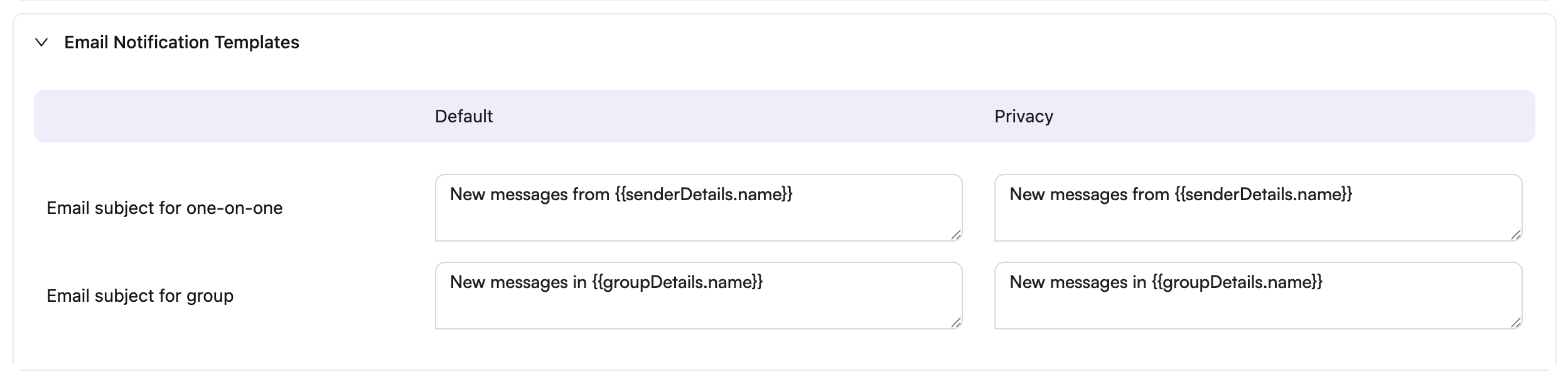
You can use the provided `subject` field or build your own using `senderDetails.name` and `groupDetails.name`. Here are default and privacy-focused subject templates:
 | Use case | Default subject | Privacy subject | Example result (default) |
| ----------------------- | ------------------------------------------ | ------------------------------------------ | ----------------------------- |
| One-on-one notification | New messages from `{{senderDetails.name}}` | New messages from `{{senderDetails.name}}` | New messages from Susan Marie |
| Group notification | New messages in `{{groupDetails.name}}` | New messages in `{{groupDetails.name}}` | New messages in Hiking Group |
## Tips
* Keep privacy variants generic to avoid leaking message content.
* Use `messages[0].message` for a short preview; use the length for unread counts.
* If you use SendGrid Dynamic Templates, map the payload into `dynamic_template_data` (subject, recipient name, sender name, unread count, preview, and the `messages` array).
| Use case | Default subject | Privacy subject | Example result (default) |
| ----------------------- | ------------------------------------------ | ------------------------------------------ | ----------------------------- |
| One-on-one notification | New messages from `{{senderDetails.name}}` | New messages from `{{senderDetails.name}}` | New messages from Susan Marie |
| Group notification | New messages in `{{groupDetails.name}}` | New messages in `{{groupDetails.name}}` | New messages in Hiking Group |
## Tips
* Keep privacy variants generic to avoid leaking message content.
* Use `messages[0].message` for a short preview; use the length for unread counts.
* If you use SendGrid Dynamic Templates, map the payload into `dynamic_template_data` (subject, recipient name, sender name, unread count, preview, and the `messages` array).