> ## Documentation Index
> Fetch the complete documentation index at: https://www.cometchat.com/docs/llms.txt
> Use this file to discover all available pages before exploring further.
# Android Push Notifications
> Setup FCM and CometChat for message and call push notifications on Android.
Reference implementation of Kotlin UI Kit, FCM and Push Notification Setup.
## What this guide covers
* FCM setup and CometChat provider wiring (credentials + Gradle + manifest).
* Token registration/unregistration so CometChat routes pushes correctly.
* Handling message pushes with grouped notifications and inline reply.
* Handling call pushes with `ConnectionService` for native telecom UI.
* Deep links/navigation from notifications and payload customization.
* App icon badge count and grouped notifications using `unreadMessageCount` from the CometChat push payload.
## How FCM and CometChat fit together
* **Why FCM?** Google issues device tokens and delivers raw push payloads to Android. You must add `google-services.json`, the Messaging SDK, and a service receiver (`FCMService`) so the device can receive pushes.
* **Why a CometChat provider?** The Provider ID tells CometChat which FCM credentials to use when sending to your app. Without registering tokens against this ID, CometChat cannot target your device.
* **Token registration bridge:** The app retrieves the FCM token and calls `CometChatNotifications.registerPushToken(pushToken, PushPlatforms.FCM_ANDROID, providerId, …)`. That binds the token to your logged-in user so CometChat can route message/call pushes to FCM on your behalf.
* **Payload handling:** When FCM delivers a push, your `FCMService`/`FCMMessageBroadcastReceiver` parses CometChat’s payload, shows notifications (grouped, inline reply), and forwards intents to your activities. For calls, `CometChatVoIPConnectionService` surfaces a telecom-grade UI and uses the same payload to accept/reject server-side.
* **Dashboard ↔ app contract:** The Provider ID in `AppConstants.FCMConstants.PROVIDER_ID` must match the dashboard provider you created. The package name in Firebase and the `applicationId` in Gradle must match, or FCM will reject the token.
## 1. Prepare Firebase and CometChat
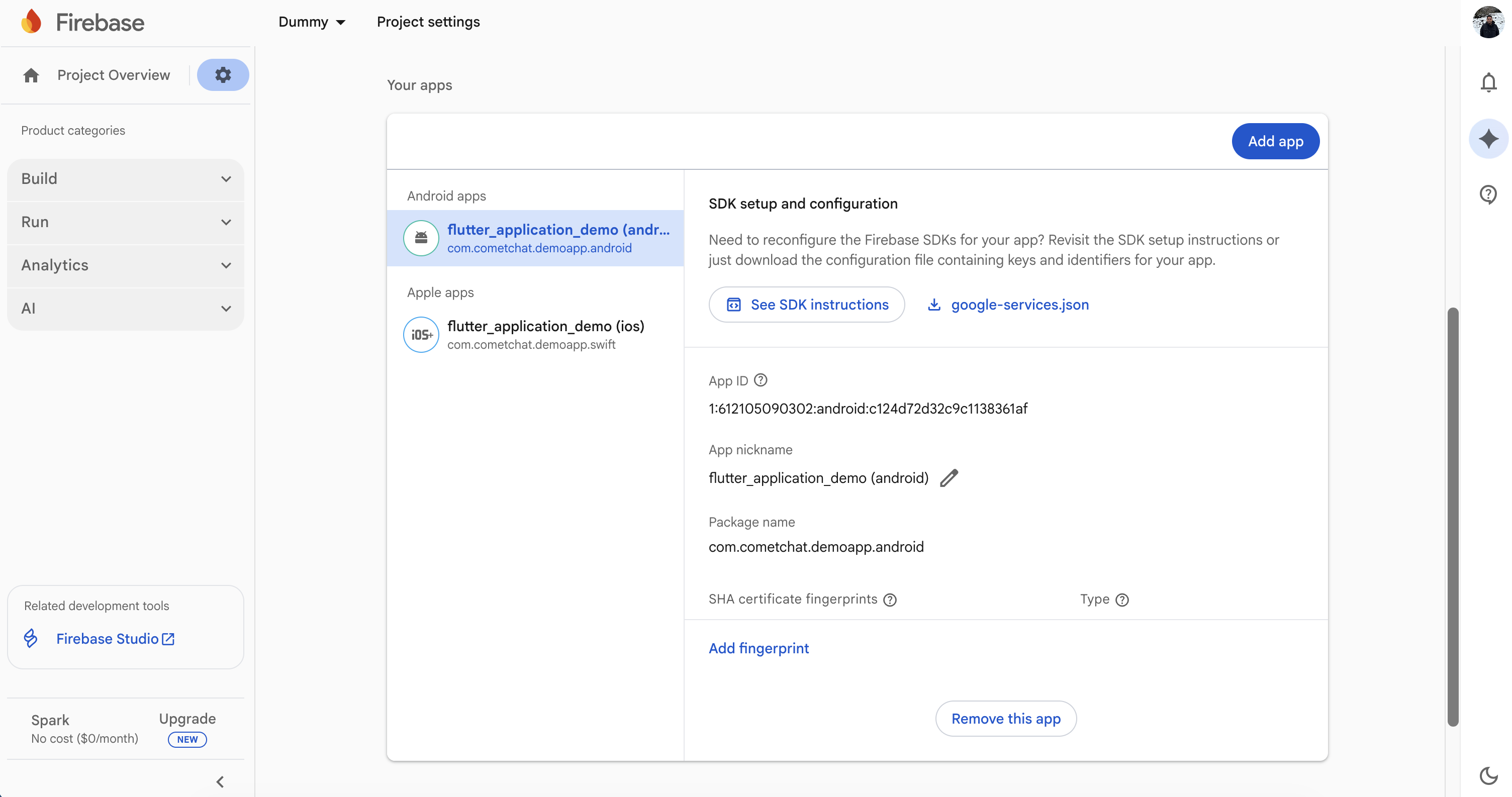
1. **Firebase Console**: Add your Android package, download `google-services.json` into the app module, and enable Cloud Messaging.
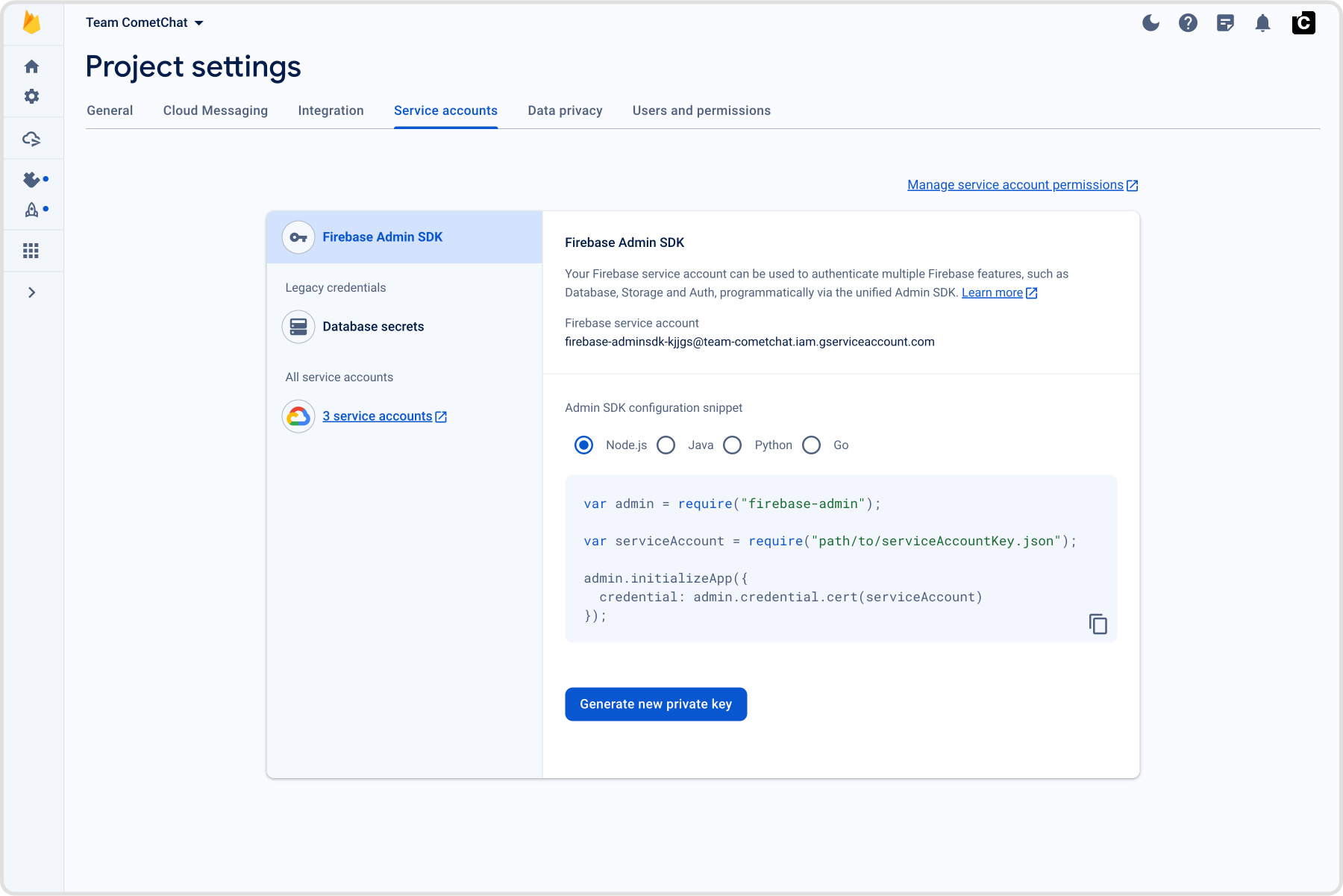
 2. **CometChat dashboard**: Go to **Notifications → Settings**, enable **Push Notifications**, click **Add Credentials** (FCM), upload the Firebase service account JSON (Project settings → Service accounts → Generate new private key), and copy the Provider ID.
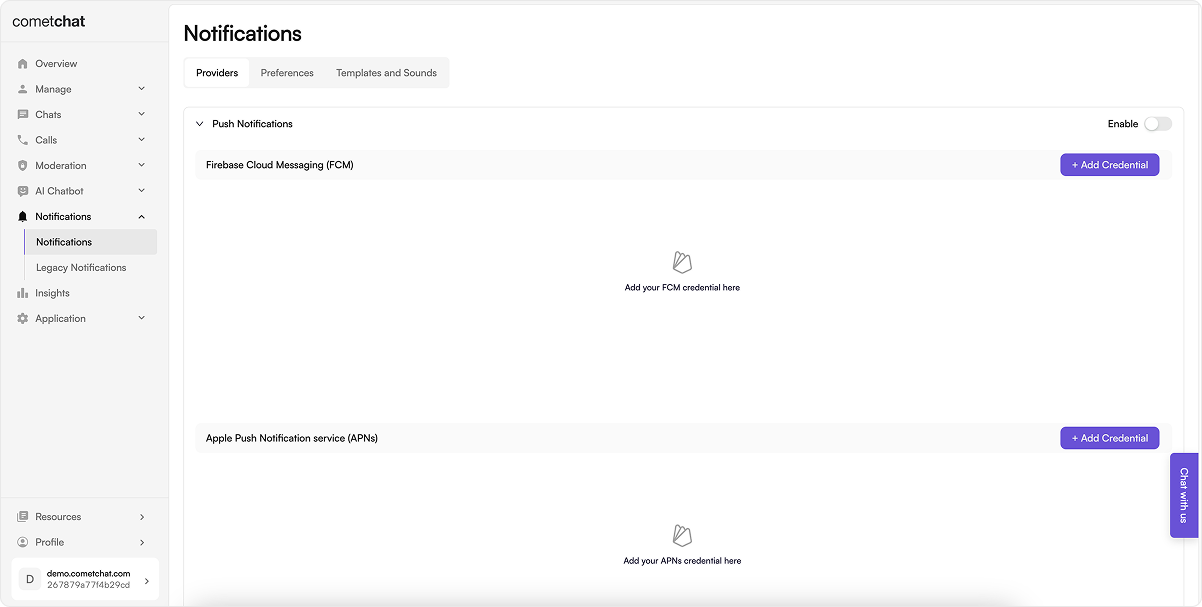 From the same screen, click **Add Provider** to upload the Firebase service account JSON. This is how you can Generate a new private key from Firebase:
 3. **App constants**:
Note down your CometChat App ID, Auth Key, and Region from the CometChat dashboard and keep them available to be added to your project's AppCrendentials.kt.
Similarly, note the FCM Provider ID generated in the CometChat dashboard and add the same in your AppConstants.kt; this will be when registering the FCM token with CometChat.
## 2. Add dependencies (Gradle)
Use a version catalog and aliases (Update `applicationId`, package names, icons, and app name.). Also, if you are new to CometChat, please review the Maven repositories and related setup requirements before proceeding.
```toml lines theme={null}
[versions]
minSdk = "26"
compileSdk = "35"
targetSdk = "35"
agp = "8.7.0"
kotlin = "2.0.0"
googleServices = "4.4.2"
cometChatUikit = "5.2.6"
cometChatSdk = "4.1.8"
cometChatCalls = "4.3.2"
firebaseBom = "33.7.0"
coreKtx = "1.13.1"
appcompat = "1.7.0"
material = "1.12.0"
gson = "2.11.0"
glide = "4.16.0"
[libraries]
cometchat-uikit = { group = "com.cometchat", name = "chat-uikit", version.ref = "cometChatUikit" }
cometchat-sdk = { group = "com.cometchat", name = "chat-sdk-android", version.ref = "cometChatSdk" }
cometchat-calls = { group = "com.cometchat", name = "calls-sdk-android", version.ref = "cometChatCalls" }
firebase-bom = { group = "com.google.firebase", name = "firebase-bom", version.ref = "firebaseBom" }
firebase-messaging = { group = "com.google.firebase", name = "firebase-messaging" }
firebase-auth = { group = "com.google.firebase", name = "firebase-auth" }
androidx-core-ktx = { group = "androidx.core", name = "core-ktx", version.ref = "coreKtx" }
androidx-appcompat = { group = "androidx.appcompat", name = "appcompat", version.ref = "appcompat" }
material = { group = "com.google.android.material", name = "material", version.ref = "material" }
gson = { group = "com.google.code.gson", name = "gson", version.ref = "gson" }
glide = { group = "com.github.bumptech.glide", name = "glide", version.ref = "glide" }
[plugins]
android-application = { id = "com.android.application", version.ref = "agp" }
kotlin-android = { id = "org.jetbrains.kotlin.android", version.ref = "kotlin" }
google-services = { id = "com.google.gms.google-services", version.ref = "googleServices" }
```
This TOML file defines versions and aliases for the required dependencies.
```gradle lines theme={null}
plugins {
alias(libs.plugins.android.application)
alias(libs.plugins.kotlin.android)
alias(libs.plugins.google.services)
}
android {
compileSdk 35
defaultConfig {
applicationId "your.package.name"
minSdk 26
targetSdk 35
}
kotlinOptions { jvmTarget = "11" }
}
dependencies {
// CometChat
implementation(libs.cometchat.uikit)
implementation(libs.cometchat.sdk)
implementation(libs.cometchat.calls)
// Firebase
implementation(platform(libs.firebase.bom))
implementation(libs.firebase.messaging)
implementation(libs.firebase.auth)
// UI + utilities
implementation(libs.androidx.core.ktx)
implementation(libs.androidx.appcompat)
implementation(libs.material)
implementation(libs.gson)
implementation(libs.glide)
}
```
* Apply the `google-services` plugin and place `google-services.json` in the same module; keep `viewBinding` enabled if you copy UI Kit screens directly from the sample.
* Update `applicationId`, package names, icons, and app name as needed.
## 3. Manifest permissions and services
Start from the sample [`AndroidManifest.xml`](https://github.com/cometchat/cometchat-uikit-android/blob/v5/sample-app-kotlin%2Bpush-notification/src/main/AndroidManifest.xml):
```xml lines highlight={15, 19, 26, 29} theme={null}
```
* Permissions cover notifications + telecom; services/receiver wire Firebase delivery (`FCMService`), notification actions (`FCMMessageBroadcastReceiver`), and telecom UI (`CometChatVoIPConnectionService`). Point `android:name` to your `MyApplication`.
* Set `android:name` on `` to your `MyApplication` subclass.
* Keep runtime permission prompts for notifications, mic, camera, and media access (see `AppUtils.kt` / `HomeActivity.kt` in the sample).
## 4. Application wiring, sample code, and callbacks
* Clone/open the [reference repo](https://github.com/cometchat/cometchat-uikit-android/tree/v5/sample-app-kotlin%2Bpush-notification).
* Copy into your app module (keep structure):
* [`fcm/fcm`](https://github.com/cometchat/cometchat-uikit-android/tree/v5/sample-app-kotlin%2Bpush-notification/src/main/java/com/cometchat/sampleapp/kotlin/fcm/fcm) for services/DTOs/notification utils/broadcast receiver.
* [`fcm/voip`](https://github.com/cometchat/cometchat-uikit-android/tree/v5/sample-app-kotlin%2Bpush-notification/src/main/java/com/cometchat/sampleapp/kotlin/fcm/voip) for ConnectionService + VoIP helpers.
* `fcm/utils` for `MyApplication`, `AppUtils`, `AppConstants`, `AppCredentials`.
* Copy String values from `res/values/strings.xml`.
* BuildConfig file `build.gradle`.
* Update packages to your namespace; set `AppCredentials` (App ID/Auth Key/Region) and `AppConstants.FCMConstants.PROVIDER_ID` to your dashboard provider. Point `` and services/receivers to your package; update app name/icons as needed.
* Keep notification constants from [`AppConstants.kt`](https://github.com/cometchat/cometchat-uikit-android/blob/v5/sample-app-kotlin%2Bpush-notification/src/main/java/com/cometchat/sampleapp/kotlin/fcm/utils/AppConstants.kt); rename channels/keys consistently if you change them.
**What the core pieces do**
* `FCMService` – receives FCM data/notification messages, parses CometChat payload, and hands off to `FCMMessageBroadcastReceiver`.
* `FCMMessageBroadcastReceiver` – builds grouped notifications, inline reply actions, and routes taps/deeplinks to your `HomeActivity`.
* `Repository.registerFCMToken` – fetches the FCM token and registers it with CometChat using `AppConstants.FCMConstants.PROVIDER_ID`; call after login.
* `Repository.acceptCall/rejectCall/rejectCallWithBusyStatus` – performs server-side call actions so the caller sees the correct state even if your UI is backgrounded.
* `MyApplication` – initializes UIKit, manages websocket connect/disconnect, tracks foreground state, and shows/dismisses incoming call overlays.
* `CometChatVoIPConnectionService` – handles Android telecom integration so call pushes display a system-grade incoming call UI and cleanly end/busy on reject.
**Splash/entry deep link handler** (adapt activity targets):
```kotlin lines theme={null}
// In your Splash/entry activity (e.g., SplashActivity)
override fun onCreate(savedInstanceState: Bundle?) {
super.onCreate(savedInstanceState)
handleDeepLinking()
}
private fun handleDeepLinking() {
NotificationManagerCompat.from(this)
.cancel(AppConstants.FCMConstants.NOTIFICATION_GROUP_SUMMARY_ID)
val notificationType = intent.getStringExtra(AppConstants.FCMConstants.NOTIFICATION_TYPE)
val notificationPayload = intent.getStringExtra(AppConstants.FCMConstants.NOTIFICATION_PAYLOAD)
startActivity(
Intent(this, HomeActivity::class.java).apply {
putExtra(AppConstants.FCMConstants.NOTIFICATION_TYPE, notificationType)
putExtra(AppConstants.FCMConstants.NOTIFICATION_PAYLOAD, notificationPayload)
}
)
finish()
}
```
This reads the push extras, clears the summary notification, and forwards the payload to `HomeActivity` so taps or deep links land in the right screen.
**SplashViewModel (init UIKit + login check)**
```kotlin lines theme={null}
class SplashViewModel : ViewModel() {
private val loginStatus = MutableLiveData()
fun initUIKit(context: Context) {
val appId = AppUtils.getDataFromSharedPref(context, String::class.java, R.string.app_cred_id, AppCredentials.APP_ID)
val region = AppUtils.getDataFromSharedPref(context, String::class.java, R.string.app_cred_region, AppCredentials.REGION)
val authKey = AppUtils.getDataFromSharedPref(context, String::class.java, R.string.app_cred_auth, AppCredentials.AUTH_KEY)
val uiKitSettings = UIKitSettings.UIKitSettingsBuilder()
.setAutoEstablishSocketConnection(false)
.setAppId(appId)
.setRegion(region)
.setAuthKey(authKey)
.subscribePresenceForAllUsers()
.build()
CometChatUIKit.init(context, uiKitSettings, object : CometChat.CallbackListener() {
override fun onSuccess(s: String) {
CometChat.setDemoMetaInfo(getAppMetadata(context))
checkUserIsNotLoggedIn()
}
override fun onError(e: CometChatException) {
Toast.makeText(context, e.message, Toast.LENGTH_SHORT).show()
}
})
}
private fun getAppMetadata(context: Context): JSONObject {
val jsonObject = JSONObject()
jsonObject.put("name", context.getString(R.string.app_name))
jsonObject.put("bundle", BuildConfig.APPLICATION_ID)
jsonObject.put("version", BuildConfig.VERSION_NAME)
jsonObject.put("platform", "android")
return jsonObject
}
fun checkUserIsNotLoggedIn() {
loginStatus.value = CometChatUIKit.getLoggedInUser() != null
}
fun getLoginStatus(): LiveData = loginStatus
}
```
Loads credentials from shared prefs, builds `UIKitSettings`, initializes CometChat UIKit (without auto socket), sets sample metadata, and exposes `loginStatus` so the splash can route to login vs home.
**Repository (push token + call helpers)**
```kotlin lines theme={null}
object Repository {
fun registerFCMToken(listener: CometChat.CallbackListener) { /* fetch FCM token and call registerPushToken */ }
fun unregisterFCMToken(listener: CometChat.CallbackListener) { /* call unregisterPushToken */ }
fun rejectCallWithBusyStatus(
call: Call,
callbackListener: CometChat.CallbackListener? = null
) { /* reject with CALL_STATUS_BUSY and notify UIKit */ }
fun acceptCall(
call: Call,
callbackListener: CometChat.CallbackListener
) { /* acceptCall and notify UIKit */ }
fun rejectCall(
call: Call,
callbackListener: CometChat.CallbackListener
) { /* rejectCall with CALL_STATUS_REJECTED and notify UIKit */ }
}
```
Thin wrappers that register/unregister FCM tokens with your Provider ID and perform server-side call actions (accept/reject/busy) so the caller sees the correct state even if your UI is backgrounded.
**MyApplication (push/call lifecycle essentials)**
```kotlin lines theme={null}
class MyApplication : Application() {
override fun onCreate() {
super.onCreate()
if (!CometChatUIKit.isSDKInitialized()) {
SplashViewModel().initUIKit(this)
}
FirebaseApp.initializeApp(this)
addCallListener()
registerActivityLifecycleCallbacks(object : ActivityLifecycleCallbacks {
override fun onActivityCreated(activity: Activity, savedInstanceState: Bundle?) { currentActivity = activity }
override fun onActivityStarted(activity: Activity) {
if (activity !is SplashActivity &&
CometChatUIKit.isSDKInitialized() &&
isConnectedToWebSockets.compareAndSet(false, true)
) {
CometChat.connect(object : CometChat.CallbackListener() {
override fun onSuccess(s: String?) { isConnectedToWebSockets.set(true) }
override fun onError(e: CometChatException) { isConnectedToWebSockets.set(false) }
})
}
currentActivity = activity
if (++activityReferences == 1 && !isActivityChangingConfigurations) {
isAppInForeground = true
}
}
override fun onActivityResumed(activity: Activity) { currentActivity = activity }
override fun onActivityPaused(activity: Activity) {}
override fun onActivityStopped(activity: Activity) {
if (activity !is SplashActivity) {
isActivityChangingConfigurations = activity.isChangingConfigurations
if (--activityReferences == 0 && !isActivityChangingConfigurations) {
isAppInForeground = false
if (CometChatUIKit.isSDKInitialized()) {
CometChat.disconnect(object : CometChat.CallbackListener() {
override fun onSuccess(s: String?) { isConnectedToWebSockets.set(false) }
override fun onError(e: CometChatException) {}
})
}
}
}
}
override fun onActivitySaveInstanceState(activity: Activity, outState: Bundle) {}
override fun onActivityDestroyed(activity: Activity) { if (currentActivity === activity) currentActivity = null }
})
}
private fun addCallListener() {
CometChat.addCallListener(LISTENER_ID, object : CometChat.CallListener() {
override fun onIncomingCallReceived(call: Call) { /* handle call UI or banner */ }
override fun onOutgoingCallAccepted(call: Call) {}
override fun onOutgoingCallRejected(call: Call) {}
override fun onIncomingCallCancelled(call: Call) {}
override fun onCallEndedMessageReceived(call: Call) {}
})
}
companion object {
var currentOpenChatId: String? = null
var currentActivity: Activity? = null
private var isAppInForeground = false
private val isConnectedToWebSockets = AtomicBoolean(false)
private var activityReferences = 0
private var isActivityChangingConfigurations = false
private var LISTENER_ID: String = System.currentTimeMillis().toString()
private var tempCall: Call? = null
fun getTempCall(): Call? = tempCall
fun setTempCall(call: Call?) {
tempCall = call
if (call == null && soundManager != null) {
soundManager?.pauseSilently()
}
}
fun isAppInForeground(): Boolean = isAppInForeground
var soundManager: CometChatSoundManager? = null
}
}
```
Initializes UIKit/Firebase, adds call listeners, manages websocket connect/disconnect tied to app foreground, tracks the current activity, and caches temp call state so banners can reappear after resume.
State to set at runtime:
* `isAppInForeground`/`currentActivity` inside lifecycle callbacks.
* `currentOpenChatId` when a chat screen opens; clear on exit to suppress notifications only for the active chat.
* `tempCall` via `setTempCall(...)` when an incoming call arrives; clear on dismiss/end. `getTempCall()` is read on resume to re-show the banner.
## 5. Application wiring and permissions
* [`AppUtils.kt`](https://github.com/cometchat/cometchat-uikit-android/blob/v5/sample-app-kotlin%2Bpush-notification/src/main/java/com/cometchat/sampleapp/kotlin/fcm/utils/AppUtils.kt) + your entry screen (e.g., `HomeActivity`): request notification/mic/camera/storage permissions early.
* In `HomeActivity`, keep the VoIP permission chain and phone-account enablement so call pushes can render the native UI:
```kotlin lines theme={null}
override fun onCreate(savedInstanceState: Bundle?) {
super.onCreate(savedInstanceState)
AppUtils.requestNotificationPermission(this)
configureVoIP()
handleDeepLinking() // open chats based on NOTIFICATION_TYPE/NOTIFICATION_PAYLOAD
}
private fun configureVoIP() {
CometChatVoIP.init(this, applicationInfo.loadLabel(packageManager).toString())
launchVoIP()
}
private fun launchVoIP() {
if (!CometChatVoIP.hasReadPhoneStatePermission(this)) {
CometChatVoIP.requestReadPhoneStatePermission(this, CometChatVoIPConstant.PermissionCode.READ_PHONE_STATE)
return
}
if (!CometChatVoIP.hasManageOwnCallsPermission(this)) {
CometChatVoIP.requestManageOwnCallsPermission(this, CometChatVoIPConstant.PermissionCode.MANAGE_OWN_CALLS)
return
}
if (!CometChatVoIP.hasAnswerPhoneCallsPermission(this)) {
CometChatVoIP.requestAnswerPhoneCallsPermission(this, CometChatVoIPConstant.PermissionCode.ANSWER_PHONE_CALLS)
return
}
CometChatVoIP.hasEnabledPhoneAccountForVoIP(this, object : VoIPPermissionListener {
override fun onPermissionsGranted() { /* ready for call pushes */ }
override fun onPermissionsDenied(error: CometChatVoIPError?) {
CometChatVoIP.alertDialogForVoIP(this@HomeActivity)
}
})
}
override fun onRequestPermissionsResult(reqCode: Int, permissions: Array, results: IntArray) {
super.onRequestPermissionsResult(reqCode, permissions, results)
when (reqCode) {
AppUtils.PushNotificationPermissionCode -> if (granted(results)) {
CometChatVoIP.requestPhoneStatePermissions(this, CometChatVoIPConstant.PermissionCode.READ_PHONE_STATE)
}
CometChatVoIPConstant.PermissionCode.READ_PHONE_STATE -> if (granted(results)) {
if (CometChatVoIP.hasManageOwnCallsPermission(this)) {
CometChatVoIP.requestAnswerPhoneCallsPermissions(this, CometChatVoIPConstant.PermissionCode.ANSWER_PHONE_CALLS)
} else {
CometChatVoIP.requestManageOwnCallsPermissions(this, CometChatVoIPConstant.PermissionCode.MANAGE_OWN_CALLS)
}
}
CometChatVoIPConstant.PermissionCode.MANAGE_OWN_CALLS -> if (granted(results)) {
CometChatVoIP.requestAnswerPhoneCallsPermissions(this, CometChatVoIPConstant.PermissionCode.ANSWER_PHONE_CALLS)
}
CometChatVoIPConstant.PermissionCode.ANSWER_PHONE_CALLS -> if (granted(results)) {
launchVoIP()
}
}
}
private fun granted(results: IntArray) =
results.isNotEmpty() && results[0] == PackageManager.PERMISSION_GRANTED
// Deep link from notification payload to Chats
private fun handleDeepLinking() {
val type = intent.getStringExtra(AppConstants.FCMConstants.NOTIFICATION_TYPE)
val payload = intent.getStringExtra(AppConstants.FCMConstants.NOTIFICATION_PAYLOAD) ?: return
if (type == AppConstants.FCMConstants.NOTIFICATION_TYPE_MESSAGE) {
val fcmMessageDTO = Gson().fromJson(payload, FCMMessageDTO::class.java)
// Set currentOpenChatId to suppress notifications for the open chat
MyApplication.currentOpenChatId = if (fcmMessageDTO.receiverType == "user") {
fcmMessageDTO.sender
} else fcmMessageDTO.receiver
}
}
```
Requests notification + telecom permissions in sequence, initializes the VoIP phone account, and maps notification payload extras to set `currentOpenChatId` so you don’t alert for the chat currently open.
## 6. Register the FCM token after login
Call registration right after `CometChatUIKit.login()` succeeds:
```kotlin lines theme={null}
FirebaseMessaging.getInstance().token.addOnCompleteListener { task ->
if (task.isSuccessful) {
val token = task.result
CometChatNotifications.registerPushToken(
token,
PushPlatforms.FCM_ANDROID,
AppConstants.FCMConstants.PROVIDER_ID,
object : CometChat.CallbackListener() {
override fun onSuccess(uid: String?) { /* token registered */ }
override fun onError(e: CometChatException) { /* handle failure */ }
}
)
}
}
```
Registers the current device token with CometChat under your Provider ID after login so the backend can target this user via FCM; retry on failure and rerun when the token rotates.
Re-register on token refresh. Keep the provider ID aligned to the FCM provider you created for this app.
Handle FCM refresh tokens too:
```kotlin lines theme={null}
// In FCMService
override fun onNewToken(token: String) {
super.onNewToken(token)
// Re-register with CometChat using your provider ID
CometChatNotifications.registerPushToken(
token,
PushPlatforms.FCM_ANDROID,
AppConstants.FCMConstants.PROVIDER_ID,
object : CometChat.CallbackListener() {
override fun onSuccess(s: String?) { /* token registered */ }
override fun onError(e: CometChatException) { /* handle failure */ }
}
)
}
```
Ensures a rotated FCM token is re-bound to the logged-in user; without this, pushes will stop after Firebase refreshes the token.
## 7. Unregister the token on logout
```kotlin lines theme={null}
CometChatNotifications.unregisterPushToken(object : CometChat.CallbackListener() {
override fun onSuccess(s: String?) { /* success */ }
override fun onError(e: CometChatException) { /* handle error */ }
})
// Then call CometChatUIKit.logout()
```
## 8. Badge count
CometChat's Enhanced Push Notification payload includes an `unreadMessageCount` field (a string) representing the total unread messages across all conversations for the logged-in user. You can use this to set the app icon badge and enrich local notifications.
### 8.1 Enable unread badge count on the CometChat Dashboard
1. Go to **CometChat Dashboard → Notification Engine → Settings → Preferences → Push Notification Preferences**.
2. Scroll to the bottom and enable the **Unread Badge Count** toggle.
This ensures CometChat includes the `unreadMessageCount` field in every push payload sent to your app.
### 8.2 Add the ShortcutBadger dependency
Add the ShortcutBadger library to your app-level `build.gradle`:
```gradle lines theme={null}
dependencies {
implementation 'me.leolin:ShortcutBadger:1.1.22@aar'
}
```
### 8.3 Expected payload format
CometChat sends FCM data messages with this structure (relevant fields):
```json theme={null}
{
"data": {
"unreadMessageCount": "5",
"title": "New Message",
"alert": "John: Hello!",
"conversationId": "user_abc123",
"conversationType": "user"
}
}
```
`unreadMessageCount` is a string representing the total unread messages across all conversations for the logged-in user.
### 8.4 Update the app badge from the push payload
Inside your notification service (for example `FCMService.onMessageReceived`), parse `unreadMessageCount` and update the badge:
```kotlin lines theme={null}
import me.leolin.shortcutbadger.ShortcutBadger
// Inside onMessageReceived, after receiving the message:
val unreadCountStr: String? = message.data["unreadMessageCount"]
unreadCountStr?.toIntOrNull()?.let { count ->
if (count >= 0) {
ShortcutBadger.applyCount(applicationContext, count)
} else {
Log.w(TAG, "Invalid badge count: $count")
}
} ?: Log.d(TAG, "No unreadMessageCount in payload")
```
`ShortcutBadger` uses launcher-specific APIs (Samsung, Huawei, Xiaomi, etc.) to display a badge number on the app icon. Passing `0` clears the badge.
### 8.5 Show unread count in the notification
Update your notification builder to display the unread count in the notification itself:
```kotlin lines theme={null}
// Inside your notification building logic
mNotificationBuilder.setNumber(count)
mNotificationBuilder.setSubText("$count unread messages")
```
* `setNumber(count)` displays a count badge on the notification icon.
* `setSubText()` shows the unread count below the notification title.
### 8.6 Clear badge when the app opens
Clear the badge count when the app launches and every time it resumes from the background. Override `onResume()` in your main activity:
```kotlin lines theme={null}
override fun onResume() {
super.onResume()
ShortcutBadger.removeCount(this)
}
```
This ensures the badge is cleared when the user opens the app, keeping the badge count in sync with the actual unread state.
## 9. Handle message pushes
* [`FCMService.onMessageReceived`](https://github.com/cometchat/cometchat-uikit-android/blob/v5/sample-app-kotlin%2Bpush-notification/src/main/java/com/cometchat/sampleapp/kotlin/fcm/fcm/FCMService.kt) checks `message.data["type"]`.
* For `type == "chat"`: mark delivered (`CometChat.markAsDelivered`), skip notifying if the chat is already open (`MyApplication.currentOpenChatId`), and build grouped notifications (avatars + BigText) via [`FCMMessageNotificationUtils`](https://github.com/cometchat/cometchat-uikit-android/blob/v5/sample-app-kotlin%2Bpush-notification/src/main/java/com/cometchat/sampleapp/kotlin/fcm/fcm/FCMMessageNotificationUtils.kt) with inline reply actions.
* [`FCMMessageBroadcastReceiver`](https://github.com/cometchat/cometchat-uikit-android/blob/v5/sample-app-kotlin%2Bpush-notification/src/main/java/com/cometchat/sampleapp/kotlin/fcm/fcm/FCMMessageBroadcastReceiver.kt) handles inline replies, initializes the SDK headlessly, sends the reply, and refreshes the notification.
* In your messaging service (e.g., `FCMService`), set the notification tap intent to your splash/entry activity (e.g., `SplashActivity`), and keep the `currentOpenChatId` check to suppress notifications for the open chat.
## 10. Handle call pushes (ConnectionService)
* For `type == "call"`, `FCMService.handleCallFlow` parses [`FCMCallDto`](https://github.com/cometchat/cometchat-uikit-android/blob/v5/sample-app-kotlin%2Bpush-notification/src/main/java/com/cometchat/sampleapp/kotlin/fcm/fcm/FCMCallDto.kt) and routes to the `voip` package.
* [`CometChatVoIP`](https://github.com/cometchat/cometchat-uikit-android/blob/v5/sample-app-kotlin%2Bpush-notification/src/main/java/com/cometchat/sampleapp/kotlin/fcm/voip/CometChatVoIP.kt) registers a `PhoneAccount` and triggers `TelecomManager.addNewIncomingCall` for native full-screen UI with Accept/Decline.
* Busy logic: if already on a call, reject with busy (`Repository.rejectCallWithBusyStatus`). Cancel/timeout pushes end the active telecom call when IDs match.
* Runtime VoIP checks: before handling call pushes, request `READ_PHONE_STATE`, `MANAGE_OWN_CALLS`, and `ANSWER_PHONE_CALLS` at runtime and ensure the phone account is enabled (`CometChatVoIP.hasEnabledPhoneAccountForVoIP`).
* Foreground suppression: the sample ignores VoIP banners if `MyApplication.isAppInForeground()` is true; keep or remove based on your UX.
* Cancel/unanswered handling: on `callAction` of `cancelled`/`unanswered`, end the active telecom call if the session IDs match.
## 11. Customize notification text or parse payloads
Parse the push into a `BaseMessage` for deep links:
```kotlin theme={null}
override fun onMessageReceived(remoteMessage: RemoteMessage) {
val messageJson = remoteMessage.data["message"] ?: return
val baseMessage = CometChatHelper.processMessage(JSONObject(messageJson))
// open the right chat/thread using baseMessage
}
```
Parses the CometChat message JSON shipped in the payload into a `BaseMessage` so you can navigate to the right conversation/thread without extra API calls.
Override the push body before sending:
```kotlin theme={null}
val meta = JSONObject().put("pushNotification", "Custom notification body")
customMessage.metadata = meta
CometChat.sendCustomMessage(customMessage, object : CallbackListener() {})
```
Adds a `pushNotification` field in metadata so CometChat uses your custom text as the push body for that message.
## 12. Navigation from notifications
Notification taps launch [`SplashActivity`](https://github.com/cometchat/cometchat-uikit-android/blob/v5/sample-app-kotlin%2Bpush-notification/src/main/java/com/cometchat/sampleapp/kotlin/fcm/ui/activity/SplashActivity.kt); it reads `NOTIFICATION_PAYLOAD` extras and opens the correct user or group in `MessagesActivity`. Keep `launchMode` settings that allow the intent extras to arrive.
## 13. Testing checklist
1. Install on a physical device and grant notification + mic permissions (Android 13+ needs `POST_NOTIFICATIONS`).
2. Log in and ensure token registration succeeds (check Logcat).
3. Send a message from another user:
* Foreground: grouped notification shows unless you are already in that chat.
* Background/terminated: tap opens the correct conversation.
4. Inline reply from the shade delivers the message and updates the notification.
5. Trigger an incoming call push:
* Native full-screen call UI appears with caller info.
* Accept/Decline work; cancel/timeout dismisses the telecom call.
6. Reinstall or clear app data to confirm token re-registration works.
## Troubleshooting
| Symptom | Quick checks |
| ----------------------------- | ---------------------------------------------------------------------------------------------------------------------------------------------------------------- |
| No notifications | Package name matches Firebase app, `google-services.json` is present, notification permission granted, Provider ID correct, Push Notifications enabled. |
| Token registration fails | Run registration after login, confirm `AppConstants.FCMConstants.PROVIDER_ID`, and verify the Firebase project matches the app ID. |
| Notification tap does nothing | Ensure `SplashActivity` reads `NOTIFICATION_PAYLOAD` and activity launch modes do not drop extras. |
| Call UI never shows | All telecom permissions declared + granted; `CometChatVoIPConnectionService` in manifest; device supports `MANAGE_OWN_CALLS`. |
| Inline reply crashes | Keep `FCMMessageBroadcastReceiver` registered; do not strip FCM or `RemoteInput` classes in ProGuard/R8. |
| Badge count not showing | Verify **Unread Badge Count** is enabled in CometChat Dashboard, ShortcutBadger dependency is added, and the launcher supports badges (Samsung, Huawei, Xiaomi). |
3. **App constants**:
Note down your CometChat App ID, Auth Key, and Region from the CometChat dashboard and keep them available to be added to your project's AppCrendentials.kt.
Similarly, note the FCM Provider ID generated in the CometChat dashboard and add the same in your AppConstants.kt; this will be when registering the FCM token with CometChat.
## 2. Add dependencies (Gradle)
Use a version catalog and aliases (Update `applicationId`, package names, icons, and app name.). Also, if you are new to CometChat, please review the Maven repositories and related setup requirements before proceeding.
```toml lines theme={null}
[versions]
minSdk = "26"
compileSdk = "35"
targetSdk = "35"
agp = "8.7.0"
kotlin = "2.0.0"
googleServices = "4.4.2"
cometChatUikit = "5.2.6"
cometChatSdk = "4.1.8"
cometChatCalls = "4.3.2"
firebaseBom = "33.7.0"
coreKtx = "1.13.1"
appcompat = "1.7.0"
material = "1.12.0"
gson = "2.11.0"
glide = "4.16.0"
[libraries]
cometchat-uikit = { group = "com.cometchat", name = "chat-uikit", version.ref = "cometChatUikit" }
cometchat-sdk = { group = "com.cometchat", name = "chat-sdk-android", version.ref = "cometChatSdk" }
cometchat-calls = { group = "com.cometchat", name = "calls-sdk-android", version.ref = "cometChatCalls" }
firebase-bom = { group = "com.google.firebase", name = "firebase-bom", version.ref = "firebaseBom" }
firebase-messaging = { group = "com.google.firebase", name = "firebase-messaging" }
firebase-auth = { group = "com.google.firebase", name = "firebase-auth" }
androidx-core-ktx = { group = "androidx.core", name = "core-ktx", version.ref = "coreKtx" }
androidx-appcompat = { group = "androidx.appcompat", name = "appcompat", version.ref = "appcompat" }
material = { group = "com.google.android.material", name = "material", version.ref = "material" }
gson = { group = "com.google.code.gson", name = "gson", version.ref = "gson" }
glide = { group = "com.github.bumptech.glide", name = "glide", version.ref = "glide" }
[plugins]
android-application = { id = "com.android.application", version.ref = "agp" }
kotlin-android = { id = "org.jetbrains.kotlin.android", version.ref = "kotlin" }
google-services = { id = "com.google.gms.google-services", version.ref = "googleServices" }
```
This TOML file defines versions and aliases for the required dependencies.
```gradle lines theme={null}
plugins {
alias(libs.plugins.android.application)
alias(libs.plugins.kotlin.android)
alias(libs.plugins.google.services)
}
android {
compileSdk 35
defaultConfig {
applicationId "your.package.name"
minSdk 26
targetSdk 35
}
kotlinOptions { jvmTarget = "11" }
}
dependencies {
// CometChat
implementation(libs.cometchat.uikit)
implementation(libs.cometchat.sdk)
implementation(libs.cometchat.calls)
// Firebase
implementation(platform(libs.firebase.bom))
implementation(libs.firebase.messaging)
implementation(libs.firebase.auth)
// UI + utilities
implementation(libs.androidx.core.ktx)
implementation(libs.androidx.appcompat)
implementation(libs.material)
implementation(libs.gson)
implementation(libs.glide)
}
```
* Apply the `google-services` plugin and place `google-services.json` in the same module; keep `viewBinding` enabled if you copy UI Kit screens directly from the sample.
* Update `applicationId`, package names, icons, and app name as needed.
## 3. Manifest permissions and services
Start from the sample [`AndroidManifest.xml`](https://github.com/cometchat/cometchat-uikit-android/blob/v5/sample-app-kotlin%2Bpush-notification/src/main/AndroidManifest.xml):
```xml lines highlight={15, 19, 26, 29} theme={null}
```
* Permissions cover notifications + telecom; services/receiver wire Firebase delivery (`FCMService`), notification actions (`FCMMessageBroadcastReceiver`), and telecom UI (`CometChatVoIPConnectionService`). Point `android:name` to your `MyApplication`.
* Set `android:name` on `` to your `MyApplication` subclass.
* Keep runtime permission prompts for notifications, mic, camera, and media access (see `AppUtils.kt` / `HomeActivity.kt` in the sample).
## 4. Application wiring, sample code, and callbacks
* Clone/open the [reference repo](https://github.com/cometchat/cometchat-uikit-android/tree/v5/sample-app-kotlin%2Bpush-notification).
* Copy into your app module (keep structure):
* [`fcm/fcm`](https://github.com/cometchat/cometchat-uikit-android/tree/v5/sample-app-kotlin%2Bpush-notification/src/main/java/com/cometchat/sampleapp/kotlin/fcm/fcm) for services/DTOs/notification utils/broadcast receiver.
* [`fcm/voip`](https://github.com/cometchat/cometchat-uikit-android/tree/v5/sample-app-kotlin%2Bpush-notification/src/main/java/com/cometchat/sampleapp/kotlin/fcm/voip) for ConnectionService + VoIP helpers.
* `fcm/utils` for `MyApplication`, `AppUtils`, `AppConstants`, `AppCredentials`.
* Copy String values from `res/values/strings.xml`.
* BuildConfig file `build.gradle`.
* Update packages to your namespace; set `AppCredentials` (App ID/Auth Key/Region) and `AppConstants.FCMConstants.PROVIDER_ID` to your dashboard provider. Point `` and services/receivers to your package; update app name/icons as needed.
* Keep notification constants from [`AppConstants.kt`](https://github.com/cometchat/cometchat-uikit-android/blob/v5/sample-app-kotlin%2Bpush-notification/src/main/java/com/cometchat/sampleapp/kotlin/fcm/utils/AppConstants.kt); rename channels/keys consistently if you change them.
**What the core pieces do**
* `FCMService` – receives FCM data/notification messages, parses CometChat payload, and hands off to `FCMMessageBroadcastReceiver`.
* `FCMMessageBroadcastReceiver` – builds grouped notifications, inline reply actions, and routes taps/deeplinks to your `HomeActivity`.
* `Repository.registerFCMToken` – fetches the FCM token and registers it with CometChat using `AppConstants.FCMConstants.PROVIDER_ID`; call after login.
* `Repository.acceptCall/rejectCall/rejectCallWithBusyStatus` – performs server-side call actions so the caller sees the correct state even if your UI is backgrounded.
* `MyApplication` – initializes UIKit, manages websocket connect/disconnect, tracks foreground state, and shows/dismisses incoming call overlays.
* `CometChatVoIPConnectionService` – handles Android telecom integration so call pushes display a system-grade incoming call UI and cleanly end/busy on reject.
**Splash/entry deep link handler** (adapt activity targets):
```kotlin lines theme={null}
// In your Splash/entry activity (e.g., SplashActivity)
override fun onCreate(savedInstanceState: Bundle?) {
super.onCreate(savedInstanceState)
handleDeepLinking()
}
private fun handleDeepLinking() {
NotificationManagerCompat.from(this)
.cancel(AppConstants.FCMConstants.NOTIFICATION_GROUP_SUMMARY_ID)
val notificationType = intent.getStringExtra(AppConstants.FCMConstants.NOTIFICATION_TYPE)
val notificationPayload = intent.getStringExtra(AppConstants.FCMConstants.NOTIFICATION_PAYLOAD)
startActivity(
Intent(this, HomeActivity::class.java).apply {
putExtra(AppConstants.FCMConstants.NOTIFICATION_TYPE, notificationType)
putExtra(AppConstants.FCMConstants.NOTIFICATION_PAYLOAD, notificationPayload)
}
)
finish()
}
```
This reads the push extras, clears the summary notification, and forwards the payload to `HomeActivity` so taps or deep links land in the right screen.
**SplashViewModel (init UIKit + login check)**
```kotlin lines theme={null}
class SplashViewModel : ViewModel() {
private val loginStatus = MutableLiveData()
fun initUIKit(context: Context) {
val appId = AppUtils.getDataFromSharedPref(context, String::class.java, R.string.app_cred_id, AppCredentials.APP_ID)
val region = AppUtils.getDataFromSharedPref(context, String::class.java, R.string.app_cred_region, AppCredentials.REGION)
val authKey = AppUtils.getDataFromSharedPref(context, String::class.java, R.string.app_cred_auth, AppCredentials.AUTH_KEY)
val uiKitSettings = UIKitSettings.UIKitSettingsBuilder()
.setAutoEstablishSocketConnection(false)
.setAppId(appId)
.setRegion(region)
.setAuthKey(authKey)
.subscribePresenceForAllUsers()
.build()
CometChatUIKit.init(context, uiKitSettings, object : CometChat.CallbackListener() {
override fun onSuccess(s: String) {
CometChat.setDemoMetaInfo(getAppMetadata(context))
checkUserIsNotLoggedIn()
}
override fun onError(e: CometChatException) {
Toast.makeText(context, e.message, Toast.LENGTH_SHORT).show()
}
})
}
private fun getAppMetadata(context: Context): JSONObject {
val jsonObject = JSONObject()
jsonObject.put("name", context.getString(R.string.app_name))
jsonObject.put("bundle", BuildConfig.APPLICATION_ID)
jsonObject.put("version", BuildConfig.VERSION_NAME)
jsonObject.put("platform", "android")
return jsonObject
}
fun checkUserIsNotLoggedIn() {
loginStatus.value = CometChatUIKit.getLoggedInUser() != null
}
fun getLoginStatus(): LiveData = loginStatus
}
```
Loads credentials from shared prefs, builds `UIKitSettings`, initializes CometChat UIKit (without auto socket), sets sample metadata, and exposes `loginStatus` so the splash can route to login vs home.
**Repository (push token + call helpers)**
```kotlin lines theme={null}
object Repository {
fun registerFCMToken(listener: CometChat.CallbackListener) { /* fetch FCM token and call registerPushToken */ }
fun unregisterFCMToken(listener: CometChat.CallbackListener) { /* call unregisterPushToken */ }
fun rejectCallWithBusyStatus(
call: Call,
callbackListener: CometChat.CallbackListener? = null
) { /* reject with CALL_STATUS_BUSY and notify UIKit */ }
fun acceptCall(
call: Call,
callbackListener: CometChat.CallbackListener
) { /* acceptCall and notify UIKit */ }
fun rejectCall(
call: Call,
callbackListener: CometChat.CallbackListener
) { /* rejectCall with CALL_STATUS_REJECTED and notify UIKit */ }
}
```
Thin wrappers that register/unregister FCM tokens with your Provider ID and perform server-side call actions (accept/reject/busy) so the caller sees the correct state even if your UI is backgrounded.
**MyApplication (push/call lifecycle essentials)**
```kotlin lines theme={null}
class MyApplication : Application() {
override fun onCreate() {
super.onCreate()
if (!CometChatUIKit.isSDKInitialized()) {
SplashViewModel().initUIKit(this)
}
FirebaseApp.initializeApp(this)
addCallListener()
registerActivityLifecycleCallbacks(object : ActivityLifecycleCallbacks {
override fun onActivityCreated(activity: Activity, savedInstanceState: Bundle?) { currentActivity = activity }
override fun onActivityStarted(activity: Activity) {
if (activity !is SplashActivity &&
CometChatUIKit.isSDKInitialized() &&
isConnectedToWebSockets.compareAndSet(false, true)
) {
CometChat.connect(object : CometChat.CallbackListener() {
override fun onSuccess(s: String?) { isConnectedToWebSockets.set(true) }
override fun onError(e: CometChatException) { isConnectedToWebSockets.set(false) }
})
}
currentActivity = activity
if (++activityReferences == 1 && !isActivityChangingConfigurations) {
isAppInForeground = true
}
}
override fun onActivityResumed(activity: Activity) { currentActivity = activity }
override fun onActivityPaused(activity: Activity) {}
override fun onActivityStopped(activity: Activity) {
if (activity !is SplashActivity) {
isActivityChangingConfigurations = activity.isChangingConfigurations
if (--activityReferences == 0 && !isActivityChangingConfigurations) {
isAppInForeground = false
if (CometChatUIKit.isSDKInitialized()) {
CometChat.disconnect(object : CometChat.CallbackListener() {
override fun onSuccess(s: String?) { isConnectedToWebSockets.set(false) }
override fun onError(e: CometChatException) {}
})
}
}
}
}
override fun onActivitySaveInstanceState(activity: Activity, outState: Bundle) {}
override fun onActivityDestroyed(activity: Activity) { if (currentActivity === activity) currentActivity = null }
})
}
private fun addCallListener() {
CometChat.addCallListener(LISTENER_ID, object : CometChat.CallListener() {
override fun onIncomingCallReceived(call: Call) { /* handle call UI or banner */ }
override fun onOutgoingCallAccepted(call: Call) {}
override fun onOutgoingCallRejected(call: Call) {}
override fun onIncomingCallCancelled(call: Call) {}
override fun onCallEndedMessageReceived(call: Call) {}
})
}
companion object {
var currentOpenChatId: String? = null
var currentActivity: Activity? = null
private var isAppInForeground = false
private val isConnectedToWebSockets = AtomicBoolean(false)
private var activityReferences = 0
private var isActivityChangingConfigurations = false
private var LISTENER_ID: String = System.currentTimeMillis().toString()
private var tempCall: Call? = null
fun getTempCall(): Call? = tempCall
fun setTempCall(call: Call?) {
tempCall = call
if (call == null && soundManager != null) {
soundManager?.pauseSilently()
}
}
fun isAppInForeground(): Boolean = isAppInForeground
var soundManager: CometChatSoundManager? = null
}
}
```
Initializes UIKit/Firebase, adds call listeners, manages websocket connect/disconnect tied to app foreground, tracks the current activity, and caches temp call state so banners can reappear after resume.
State to set at runtime:
* `isAppInForeground`/`currentActivity` inside lifecycle callbacks.
* `currentOpenChatId` when a chat screen opens; clear on exit to suppress notifications only for the active chat.
* `tempCall` via `setTempCall(...)` when an incoming call arrives; clear on dismiss/end. `getTempCall()` is read on resume to re-show the banner.
## 5. Application wiring and permissions
* [`AppUtils.kt`](https://github.com/cometchat/cometchat-uikit-android/blob/v5/sample-app-kotlin%2Bpush-notification/src/main/java/com/cometchat/sampleapp/kotlin/fcm/utils/AppUtils.kt) + your entry screen (e.g., `HomeActivity`): request notification/mic/camera/storage permissions early.
* In `HomeActivity`, keep the VoIP permission chain and phone-account enablement so call pushes can render the native UI:
```kotlin lines theme={null}
override fun onCreate(savedInstanceState: Bundle?) {
super.onCreate(savedInstanceState)
AppUtils.requestNotificationPermission(this)
configureVoIP()
handleDeepLinking() // open chats based on NOTIFICATION_TYPE/NOTIFICATION_PAYLOAD
}
private fun configureVoIP() {
CometChatVoIP.init(this, applicationInfo.loadLabel(packageManager).toString())
launchVoIP()
}
private fun launchVoIP() {
if (!CometChatVoIP.hasReadPhoneStatePermission(this)) {
CometChatVoIP.requestReadPhoneStatePermission(this, CometChatVoIPConstant.PermissionCode.READ_PHONE_STATE)
return
}
if (!CometChatVoIP.hasManageOwnCallsPermission(this)) {
CometChatVoIP.requestManageOwnCallsPermission(this, CometChatVoIPConstant.PermissionCode.MANAGE_OWN_CALLS)
return
}
if (!CometChatVoIP.hasAnswerPhoneCallsPermission(this)) {
CometChatVoIP.requestAnswerPhoneCallsPermission(this, CometChatVoIPConstant.PermissionCode.ANSWER_PHONE_CALLS)
return
}
CometChatVoIP.hasEnabledPhoneAccountForVoIP(this, object : VoIPPermissionListener {
override fun onPermissionsGranted() { /* ready for call pushes */ }
override fun onPermissionsDenied(error: CometChatVoIPError?) {
CometChatVoIP.alertDialogForVoIP(this@HomeActivity)
}
})
}
override fun onRequestPermissionsResult(reqCode: Int, permissions: Array, results: IntArray) {
super.onRequestPermissionsResult(reqCode, permissions, results)
when (reqCode) {
AppUtils.PushNotificationPermissionCode -> if (granted(results)) {
CometChatVoIP.requestPhoneStatePermissions(this, CometChatVoIPConstant.PermissionCode.READ_PHONE_STATE)
}
CometChatVoIPConstant.PermissionCode.READ_PHONE_STATE -> if (granted(results)) {
if (CometChatVoIP.hasManageOwnCallsPermission(this)) {
CometChatVoIP.requestAnswerPhoneCallsPermissions(this, CometChatVoIPConstant.PermissionCode.ANSWER_PHONE_CALLS)
} else {
CometChatVoIP.requestManageOwnCallsPermissions(this, CometChatVoIPConstant.PermissionCode.MANAGE_OWN_CALLS)
}
}
CometChatVoIPConstant.PermissionCode.MANAGE_OWN_CALLS -> if (granted(results)) {
CometChatVoIP.requestAnswerPhoneCallsPermissions(this, CometChatVoIPConstant.PermissionCode.ANSWER_PHONE_CALLS)
}
CometChatVoIPConstant.PermissionCode.ANSWER_PHONE_CALLS -> if (granted(results)) {
launchVoIP()
}
}
}
private fun granted(results: IntArray) =
results.isNotEmpty() && results[0] == PackageManager.PERMISSION_GRANTED
// Deep link from notification payload to Chats
private fun handleDeepLinking() {
val type = intent.getStringExtra(AppConstants.FCMConstants.NOTIFICATION_TYPE)
val payload = intent.getStringExtra(AppConstants.FCMConstants.NOTIFICATION_PAYLOAD) ?: return
if (type == AppConstants.FCMConstants.NOTIFICATION_TYPE_MESSAGE) {
val fcmMessageDTO = Gson().fromJson(payload, FCMMessageDTO::class.java)
// Set currentOpenChatId to suppress notifications for the open chat
MyApplication.currentOpenChatId = if (fcmMessageDTO.receiverType == "user") {
fcmMessageDTO.sender
} else fcmMessageDTO.receiver
}
}
```
Requests notification + telecom permissions in sequence, initializes the VoIP phone account, and maps notification payload extras to set `currentOpenChatId` so you don’t alert for the chat currently open.
## 6. Register the FCM token after login
Call registration right after `CometChatUIKit.login()` succeeds:
```kotlin lines theme={null}
FirebaseMessaging.getInstance().token.addOnCompleteListener { task ->
if (task.isSuccessful) {
val token = task.result
CometChatNotifications.registerPushToken(
token,
PushPlatforms.FCM_ANDROID,
AppConstants.FCMConstants.PROVIDER_ID,
object : CometChat.CallbackListener() {
override fun onSuccess(uid: String?) { /* token registered */ }
override fun onError(e: CometChatException) { /* handle failure */ }
}
)
}
}
```
Registers the current device token with CometChat under your Provider ID after login so the backend can target this user via FCM; retry on failure and rerun when the token rotates.
Re-register on token refresh. Keep the provider ID aligned to the FCM provider you created for this app.
Handle FCM refresh tokens too:
```kotlin lines theme={null}
// In FCMService
override fun onNewToken(token: String) {
super.onNewToken(token)
// Re-register with CometChat using your provider ID
CometChatNotifications.registerPushToken(
token,
PushPlatforms.FCM_ANDROID,
AppConstants.FCMConstants.PROVIDER_ID,
object : CometChat.CallbackListener() {
override fun onSuccess(s: String?) { /* token registered */ }
override fun onError(e: CometChatException) { /* handle failure */ }
}
)
}
```
Ensures a rotated FCM token is re-bound to the logged-in user; without this, pushes will stop after Firebase refreshes the token.
## 7. Unregister the token on logout
```kotlin lines theme={null}
CometChatNotifications.unregisterPushToken(object : CometChat.CallbackListener() {
override fun onSuccess(s: String?) { /* success */ }
override fun onError(e: CometChatException) { /* handle error */ }
})
// Then call CometChatUIKit.logout()
```
## 8. Badge count
CometChat's Enhanced Push Notification payload includes an `unreadMessageCount` field (a string) representing the total unread messages across all conversations for the logged-in user. You can use this to set the app icon badge and enrich local notifications.
### 8.1 Enable unread badge count on the CometChat Dashboard
1. Go to **CometChat Dashboard → Notification Engine → Settings → Preferences → Push Notification Preferences**.
2. Scroll to the bottom and enable the **Unread Badge Count** toggle.
This ensures CometChat includes the `unreadMessageCount` field in every push payload sent to your app.
### 8.2 Add the ShortcutBadger dependency
Add the ShortcutBadger library to your app-level `build.gradle`:
```gradle lines theme={null}
dependencies {
implementation 'me.leolin:ShortcutBadger:1.1.22@aar'
}
```
### 8.3 Expected payload format
CometChat sends FCM data messages with this structure (relevant fields):
```json theme={null}
{
"data": {
"unreadMessageCount": "5",
"title": "New Message",
"alert": "John: Hello!",
"conversationId": "user_abc123",
"conversationType": "user"
}
}
```
`unreadMessageCount` is a string representing the total unread messages across all conversations for the logged-in user.
### 8.4 Update the app badge from the push payload
Inside your notification service (for example `FCMService.onMessageReceived`), parse `unreadMessageCount` and update the badge:
```kotlin lines theme={null}
import me.leolin.shortcutbadger.ShortcutBadger
// Inside onMessageReceived, after receiving the message:
val unreadCountStr: String? = message.data["unreadMessageCount"]
unreadCountStr?.toIntOrNull()?.let { count ->
if (count >= 0) {
ShortcutBadger.applyCount(applicationContext, count)
} else {
Log.w(TAG, "Invalid badge count: $count")
}
} ?: Log.d(TAG, "No unreadMessageCount in payload")
```
`ShortcutBadger` uses launcher-specific APIs (Samsung, Huawei, Xiaomi, etc.) to display a badge number on the app icon. Passing `0` clears the badge.
### 8.5 Show unread count in the notification
Update your notification builder to display the unread count in the notification itself:
```kotlin lines theme={null}
// Inside your notification building logic
mNotificationBuilder.setNumber(count)
mNotificationBuilder.setSubText("$count unread messages")
```
* `setNumber(count)` displays a count badge on the notification icon.
* `setSubText()` shows the unread count below the notification title.
### 8.6 Clear badge when the app opens
Clear the badge count when the app launches and every time it resumes from the background. Override `onResume()` in your main activity:
```kotlin lines theme={null}
override fun onResume() {
super.onResume()
ShortcutBadger.removeCount(this)
}
```
This ensures the badge is cleared when the user opens the app, keeping the badge count in sync with the actual unread state.
## 9. Handle message pushes
* [`FCMService.onMessageReceived`](https://github.com/cometchat/cometchat-uikit-android/blob/v5/sample-app-kotlin%2Bpush-notification/src/main/java/com/cometchat/sampleapp/kotlin/fcm/fcm/FCMService.kt) checks `message.data["type"]`.
* For `type == "chat"`: mark delivered (`CometChat.markAsDelivered`), skip notifying if the chat is already open (`MyApplication.currentOpenChatId`), and build grouped notifications (avatars + BigText) via [`FCMMessageNotificationUtils`](https://github.com/cometchat/cometchat-uikit-android/blob/v5/sample-app-kotlin%2Bpush-notification/src/main/java/com/cometchat/sampleapp/kotlin/fcm/fcm/FCMMessageNotificationUtils.kt) with inline reply actions.
* [`FCMMessageBroadcastReceiver`](https://github.com/cometchat/cometchat-uikit-android/blob/v5/sample-app-kotlin%2Bpush-notification/src/main/java/com/cometchat/sampleapp/kotlin/fcm/fcm/FCMMessageBroadcastReceiver.kt) handles inline replies, initializes the SDK headlessly, sends the reply, and refreshes the notification.
* In your messaging service (e.g., `FCMService`), set the notification tap intent to your splash/entry activity (e.g., `SplashActivity`), and keep the `currentOpenChatId` check to suppress notifications for the open chat.
## 10. Handle call pushes (ConnectionService)
* For `type == "call"`, `FCMService.handleCallFlow` parses [`FCMCallDto`](https://github.com/cometchat/cometchat-uikit-android/blob/v5/sample-app-kotlin%2Bpush-notification/src/main/java/com/cometchat/sampleapp/kotlin/fcm/fcm/FCMCallDto.kt) and routes to the `voip` package.
* [`CometChatVoIP`](https://github.com/cometchat/cometchat-uikit-android/blob/v5/sample-app-kotlin%2Bpush-notification/src/main/java/com/cometchat/sampleapp/kotlin/fcm/voip/CometChatVoIP.kt) registers a `PhoneAccount` and triggers `TelecomManager.addNewIncomingCall` for native full-screen UI with Accept/Decline.
* Busy logic: if already on a call, reject with busy (`Repository.rejectCallWithBusyStatus`). Cancel/timeout pushes end the active telecom call when IDs match.
* Runtime VoIP checks: before handling call pushes, request `READ_PHONE_STATE`, `MANAGE_OWN_CALLS`, and `ANSWER_PHONE_CALLS` at runtime and ensure the phone account is enabled (`CometChatVoIP.hasEnabledPhoneAccountForVoIP`).
* Foreground suppression: the sample ignores VoIP banners if `MyApplication.isAppInForeground()` is true; keep or remove based on your UX.
* Cancel/unanswered handling: on `callAction` of `cancelled`/`unanswered`, end the active telecom call if the session IDs match.
## 11. Customize notification text or parse payloads
Parse the push into a `BaseMessage` for deep links:
```kotlin theme={null}
override fun onMessageReceived(remoteMessage: RemoteMessage) {
val messageJson = remoteMessage.data["message"] ?: return
val baseMessage = CometChatHelper.processMessage(JSONObject(messageJson))
// open the right chat/thread using baseMessage
}
```
Parses the CometChat message JSON shipped in the payload into a `BaseMessage` so you can navigate to the right conversation/thread without extra API calls.
Override the push body before sending:
```kotlin theme={null}
val meta = JSONObject().put("pushNotification", "Custom notification body")
customMessage.metadata = meta
CometChat.sendCustomMessage(customMessage, object : CallbackListener() {})
```
Adds a `pushNotification` field in metadata so CometChat uses your custom text as the push body for that message.
## 12. Navigation from notifications
Notification taps launch [`SplashActivity`](https://github.com/cometchat/cometchat-uikit-android/blob/v5/sample-app-kotlin%2Bpush-notification/src/main/java/com/cometchat/sampleapp/kotlin/fcm/ui/activity/SplashActivity.kt); it reads `NOTIFICATION_PAYLOAD` extras and opens the correct user or group in `MessagesActivity`. Keep `launchMode` settings that allow the intent extras to arrive.
## 13. Testing checklist
1. Install on a physical device and grant notification + mic permissions (Android 13+ needs `POST_NOTIFICATIONS`).
2. Log in and ensure token registration succeeds (check Logcat).
3. Send a message from another user:
* Foreground: grouped notification shows unless you are already in that chat.
* Background/terminated: tap opens the correct conversation.
4. Inline reply from the shade delivers the message and updates the notification.
5. Trigger an incoming call push:
* Native full-screen call UI appears with caller info.
* Accept/Decline work; cancel/timeout dismisses the telecom call.
6. Reinstall or clear app data to confirm token re-registration works.
## Troubleshooting
| Symptom | Quick checks |
| ----------------------------- | ---------------------------------------------------------------------------------------------------------------------------------------------------------------- |
| No notifications | Package name matches Firebase app, `google-services.json` is present, notification permission granted, Provider ID correct, Push Notifications enabled. |
| Token registration fails | Run registration after login, confirm `AppConstants.FCMConstants.PROVIDER_ID`, and verify the Firebase project matches the app ID. |
| Notification tap does nothing | Ensure `SplashActivity` reads `NOTIFICATION_PAYLOAD` and activity launch modes do not drop extras. |
| Call UI never shows | All telecom permissions declared + granted; `CometChatVoIPConnectionService` in manifest; device supports `MANAGE_OWN_CALLS`. |
| Inline reply crashes | Keep `FCMMessageBroadcastReceiver` registered; do not strip FCM or `RemoteInput` classes in ProGuard/R8. |
| Badge count not showing | Verify **Unread Badge Count** is enabled in CometChat Dashboard, ShortcutBadger dependency is added, and the launcher supports badges (Samsung, Huawei, Xiaomi). |