> ## Documentation Index
> Fetch the complete documentation index at: https://www.cometchat.com/docs/llms.txt
> Use this file to discover all available pages before exploring further.
# Getting Started
> Set up CometChat moderation with dashboard rules, UI Kit handling, SDK integration, and real-time moderation updates.
## Moderation Integration
To maintain a safe, respectful, and engaging environment for your users, our platform offers a powerful **Moderation Integration** system. This system allows you to automatically review, filter, and take action on user-generated messages, images, and videos before they are delivered.
With Moderation Integration, you can define flexible rules, receive real-time updates, and ensure your app meets community guidelines, legal standards, and brand values without manual intervention.
***
## Choose Your Integration Method
| Method | Description |
| ------------------------ | --------------------------------------------------------------------------------------------------------------------------------------------------------- |
| **UI Kit (Recommended)** | Zero code required — Moderation is built into CometChat UI Kits. Simply configure rules in the Dashboard and the UI Kit handles everything automatically. |
| **SDK Integration** | Full control — Use the CometChat SDK to handle moderation programmatically in your custom UI implementation. |
***
## Integrate Moderation
**Using UI Kit?** You only need Step 1 - the UI Kit handles moderation automatically!
Define content moderation rules for your app's messaging system.
If building a custom UI, implement moderation handling in your code. See [SDK Integration](#integrating-moderation-with-sdk) below.
Set up webhooks to receive real-time moderation events on your server.
***
## Setting Up Moderation Rules
Moderation rules act as filters to ensure that the messages exchanged within your app meet your safety and content guidelines.
### How It Works
* When a message, image, or video is submitted, it is automatically checked against the moderation rules you've configured.
* These rules can detect offensive language, sensitive content, spam, scams, and more.
* Based on your settings, content can be:
* **Approved:** Delivered to the recipient.
* **Disapproved:** Blocked and not delivered.
* **Flagged:** Delivered to the recipient, but flagged for review.
### Benefits
* **Safety first:** Protect your users and brand from harmful or unwanted content.
* **Customizable:** Fine-tune moderation rules to suit your app's unique needs.
* **Seamless experience:** Moderation happens in real time, keeping communication flowing smoothly.
### Creating Moderation Rules
CometChat provides a set of **default moderation rules** designed to cover common use cases such as offensive language, spam, and inappropriate content. You can enable these rules to start moderating messages immediately, without any additional setup.
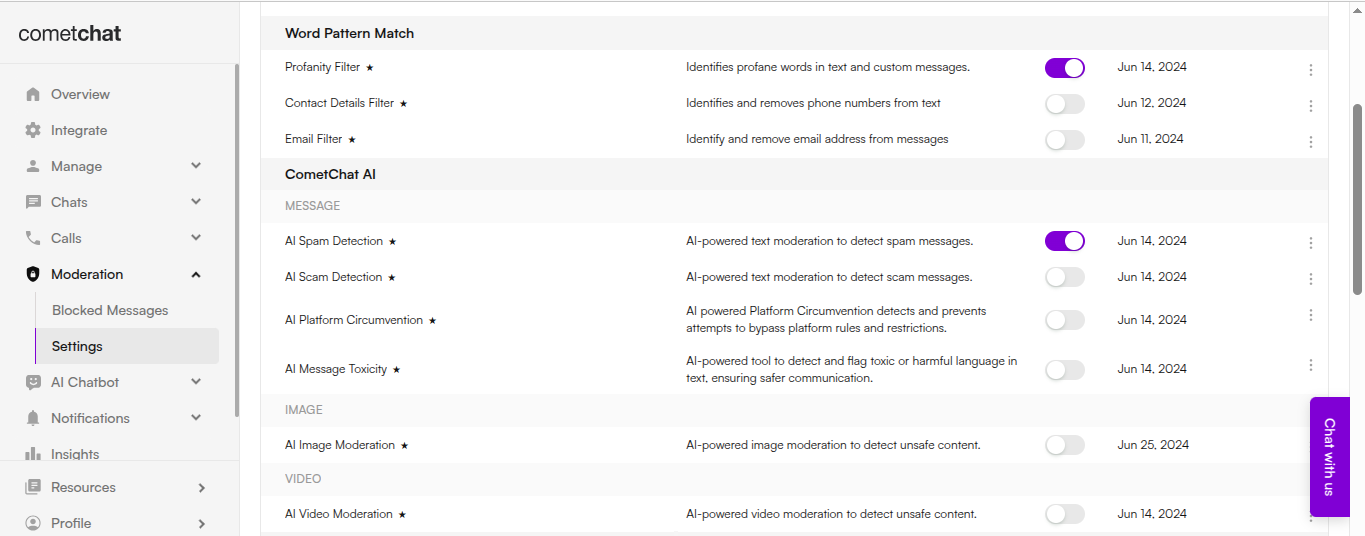 If you have specific requirements, you can create **custom moderation rules** tailored to your app's needs:
1. **Using the CometChat Dashboard** — A simple, no-code interface for visually creating and managing moderation rules.
If you have specific requirements, you can create **custom moderation rules** tailored to your app's needs:
1. **Using the CometChat Dashboard** — A simple, no-code interface for visually creating and managing moderation rules.
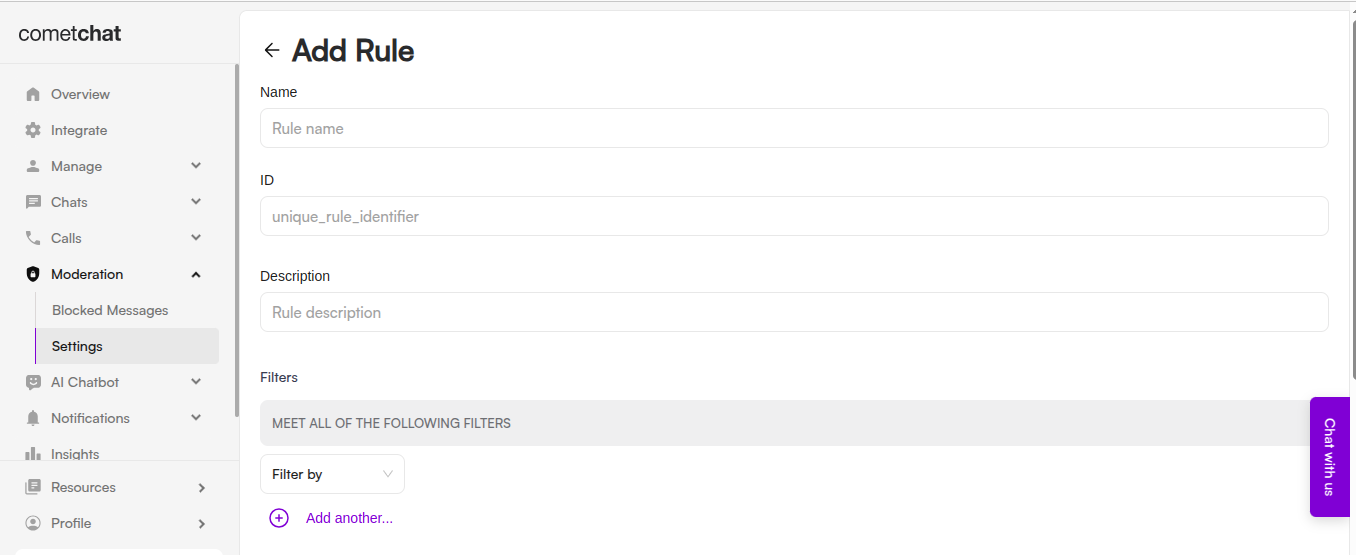 2. **Using the CometChat API** — Programmatically create and manage moderation rules for advanced or automated workflows. See the [Rules Management](/docs/moderation/rules-management) documentation.
***
## Configuring a Moderation Webhook
To automate your moderation flow and receive updates in real time, configure a **moderation webhook**. This allows your system to react instantly when a message or media is moderated.
Webhooks are optional if you're using the SDK's `onMessageModerated` listener for real-time updates.
### How It Works
* Every time content is moderated, a webhook event is triggered and sent to the URL you specify.
* Your application can then take action based on the moderation result.
### Handle Moderation Events
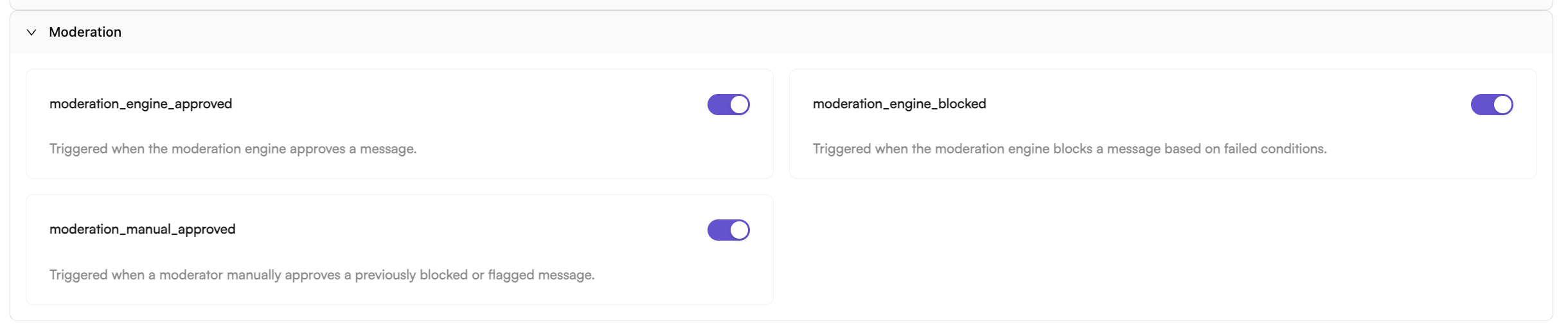
The key webhook events to handle include:
* `moderation_engine_approved` — Triggered when the engine automatically approves content.
* `moderation_engine_blocked` — Triggered when the engine automatically blocks content.
* `moderation_manual_approved` — Triggered when a moderator manually approves previously blocked content.
To receive these events, enable the relevant webhooks in the CometChat Dashboard:
> **Application → Webhooks → Create Webhook → Triggers → Moderation**
2. **Using the CometChat API** — Programmatically create and manage moderation rules for advanced or automated workflows. See the [Rules Management](/docs/moderation/rules-management) documentation.
***
## Configuring a Moderation Webhook
To automate your moderation flow and receive updates in real time, configure a **moderation webhook**. This allows your system to react instantly when a message or media is moderated.
Webhooks are optional if you're using the SDK's `onMessageModerated` listener for real-time updates.
### How It Works
* Every time content is moderated, a webhook event is triggered and sent to the URL you specify.
* Your application can then take action based on the moderation result.
### Handle Moderation Events
The key webhook events to handle include:
* `moderation_engine_approved` — Triggered when the engine automatically approves content.
* `moderation_engine_blocked` — Triggered when the engine automatically blocks content.
* `moderation_manual_approved` — Triggered when a moderator manually approves previously blocked content.
To receive these events, enable the relevant webhooks in the CometChat Dashboard:
> **Application → Webhooks → Create Webhook → Triggers → Moderation**
 ***
## Integrating Moderation with SDK
Once your moderation rules are configured in the Dashboard, integrate moderation into your application using the CometChat SDK. The SDK automatically handles moderation for all messages sent through CometChat.
**Using UI Kit?** Skip this section - the UI Kit handles everything automatically!
### Send a Message and Check Moderation Status
When you send a message, it's automatically checked against your moderation rules. The message object contains a `moderationStatus` property:
```javascript theme={null}
const textMessage = new CometChat.TextMessage(
receiverUID,
"Hello, how are you?",
CometChat.RECEIVER_TYPE.USER
);
CometChat.sendMessage(textMessage).then(
(message) => {
const status = message.getModerationStatus();
switch (status) {
case CometChat.ModerationStatus.PENDING:
console.log("Message is under moderation review");
break;
case CometChat.ModerationStatus.APPROVED:
console.log("Message approved and delivered");
break;
case CometChat.ModerationStatus.DISAPPROVED:
console.log("Message blocked by moderation");
break;
}
},
(error) => {
console.log("Message sending failed:", error);
}
);
```
```kotlin theme={null}
val textMessage = TextMessage(
receiverUID,
"Hello, how are you?",
CometChatConstants.RECEIVER_TYPE_USER
)
CometChat.sendMessage(textMessage, object : CometChat.CallbackListener() {
override fun onSuccess(message: TextMessage) {
when (message.moderationStatus) {
ModerationStatus.PENDING -> Log.d(TAG, "Message under review")
ModerationStatus.APPROVED -> Log.d(TAG, "Message approved")
ModerationStatus.DISAPPROVED -> Log.d(TAG, "Message blocked")
}
}
override fun onError(e: CometChatException) {
Log.e(TAG, "Message sending failed: ${e.message}")
}
})
```
```swift theme={null}
let textMessage = TextMessage(
receiverUid: receiverUID,
text: "Hello, how are you?",
receiverType: .user
)
CometChat.sendTextMessage(message: textMessage) { sentMessage in
if let message = sentMessage as? TextMessage {
switch message.getModerationStatus() {
case "pending":
print("Message under review")
case "approved":
print("Message approved")
case "disapproved":
print("Message blocked")
default:
break
}
}
} onError: { error in
print("Message sending failed: \(error?.errorDescription ?? "")")
}
```
```javascript theme={null}
const textMessage = new CometChat.TextMessage(
receiverUID,
"Hello, how are you?",
CometChat.RECEIVER_TYPE.USER
);
CometChat.sendMessage(textMessage).then(
(message) => {
const status = message.getModerationStatus();
if (status === CometChat.ModerationStatus.PENDING) {
console.log("Message under review");
} else if (status === CometChat.ModerationStatus.DISAPPROVED) {
console.log("Message blocked");
}
},
(error) => console.log("Failed:", error)
);
```
```dart theme={null}
TextMessage textMessage = TextMessage(
text: "Hello, how are you?",
receiverUid: receiverUID,
receiverType: ReceiverTypeConstants.user,
);
CometChat.sendMessage(
textMessage,
onSuccess: (TextMessage message) {
switch (message.moderationStatus?.value) {
case ModerationStatusEnum.PENDING:
print("Message under review");
break;
case ModerationStatusEnum.APPROVED:
print("Message approved");
break;
case ModerationStatusEnum.DISAPPROVED:
print("Message blocked");
break;
}
},
onError: (CometChatException e) {
print("Message sending failed: ${e.message}");
},
);
```
### Listen for Moderation Results
Register a message listener to receive real-time moderation updates when the moderation engine finishes processing:
```javascript theme={null}
const listenerID = "MODERATION_LISTENER";
CometChat.addMessageListener(
listenerID,
new CometChat.MessageListener({
onMessageModerated: (message) => {
const status = message.getModerationStatus();
const messageId = message.getId();
if (status === CometChat.ModerationStatus.APPROVED) {
console.log(`Message ${messageId} approved - show in UI`);
// Update UI to display the message
} else if (status === CometChat.ModerationStatus.DISAPPROVED) {
console.log(`Message ${messageId} blocked`);
// Hide message or show blocked placeholder
}
}
})
);
// Remove listener when done
// CometChat.removeMessageListener(listenerID);
```
```kotlin theme={null}
val listenerID = "MODERATION_LISTENER"
CometChat.addMessageListener(listenerID, object : CometChat.MessageListener() {
override fun onMessageModerated(message: BaseMessage) {
when (message.moderationStatus) {
ModerationStatus.APPROVED -> {
Log.d(TAG, "Message ${message.id} approved")
// Update UI to display the message
}
ModerationStatus.DISAPPROVED -> {
Log.d(TAG, "Message ${message.id} blocked")
// Hide message or show blocked placeholder
}
}
}
})
// Remove listener when done
// CometChat.removeMessageListener(listenerID)
```
```swift theme={null}
let listenerID = "MODERATION_LISTENER"
CometChat.addMessageListener(listenerID, self)
// Implement CometChatMessageDelegate
extension YourViewController: CometChatMessageDelegate {
func onMessageModerated(moderatedMessage: BaseMessage) {
if let message = moderatedMessage as? TextMessage {
switch message.getModerationStatus() {
case "approved":
print("Message \(message.id) approved")
// Update UI to display the message
case "disapproved":
print("Message \(message.id) blocked")
// Hide message or show blocked placeholder
default:
break
}
}
}
}
// Remove listener when done
// CometChat.removeMessageListener(listenerID)
```
```javascript theme={null}
const listenerID = "MODERATION_LISTENER";
CometChat.addMessageListener(
listenerID,
new CometChat.MessageListener({
onMessageModerated: (message) => {
const status = message.getModerationStatus();
if (status === CometChat.ModerationStatus.APPROVED) {
// Update UI to display the message
} else if (status === CometChat.ModerationStatus.DISAPPROVED) {
// Hide message or show blocked placeholder
}
}
})
);
```
```dart theme={null}
const listenerID = "MODERATION_LISTENER";
CometChat.addMessageListener(
listenerID,
MessageListener(
onMessageModerated: (BaseMessage message) {
if (message.moderationStatus?.value == ModerationStatusEnum.APPROVED.value) {
print("Message ${message.id} approved");
// Update UI to display the message
} else if (message.moderationStatus?.value == ModerationStatusEnum.DISAPPROVED.value) {
print("Message ${message.id} blocked");
// Hide message or show blocked placeholder
}
},
),
);
// Remove listener when done
// CometChat.removeMessageListener(listenerID);
```
### Handle Blocked Messages in UI
When a message is blocked (disapproved), handle it appropriately in your UI:
```javascript theme={null}
function handleBlockedMessage(message) {
const messageId = message.getId();
const senderUid = message.getSender().getUid();
// Option 1: Hide the message completely
removeMessageFromUI(messageId);
// Option 2: Show a placeholder
showPlaceholder(messageId, "This message was blocked by moderation");
// Option 3: Notify the sender
if (senderUid === currentUserUID) {
showToast("Your message was blocked due to policy violation");
}
}
```
```kotlin theme={null}
fun handleBlockedMessage(message: BaseMessage) {
val messageId = message.id
val senderUid = message.sender.uid
// Option 1: Hide the message completely
removeMessageFromUI(messageId)
// Option 2: Show a placeholder
showPlaceholder(messageId, "This message was blocked by moderation")
// Option 3: Notify the sender
if (senderUid == currentUserUID) {
Toast.makeText(context, "Your message was blocked", Toast.LENGTH_SHORT).show()
}
}
```
```swift theme={null}
func handleBlockedMessage(_ message: BaseMessage) {
let messageId = message.id
let senderUid = message.sender?.uid
// Option 1: Hide the message completely
removeMessageFromUI(messageId)
// Option 2: Show a placeholder
showPlaceholder(messageId, text: "This message was blocked by moderation")
// Option 3: Notify the sender
if senderUid == currentUserUID {
showAlert("Your message was blocked due to policy violation")
}
}
```
### Moderation Status Reference
| Status | Value | Description |
| ----------- | ------------- | ------------------------------------------------------ |
| Pending | `PENDING` | Message is being processed by moderation engine |
| Approved | `APPROVED` | Message passed moderation and is visible to recipients |
| Disapproved | `DISAPPROVED` | Message violated rules and was blocked |
***
## Summary
By combining well-defined moderation rules with SDK integration, you can build a safe and user-friendly content moderation system:
* **UI Kit users**: Just configure rules in the Dashboard - everything else is automatic
* **SDK users**: Implement `onMessageModerated` listener to handle moderation results
## REST API Reference
For programmatic management of moderation rules, keywords, and blocked messages, see the [Moderation APIs](/docs/rest-api/moderation-apis/overview).
***
## Integrating Moderation with SDK
Once your moderation rules are configured in the Dashboard, integrate moderation into your application using the CometChat SDK. The SDK automatically handles moderation for all messages sent through CometChat.
**Using UI Kit?** Skip this section - the UI Kit handles everything automatically!
### Send a Message and Check Moderation Status
When you send a message, it's automatically checked against your moderation rules. The message object contains a `moderationStatus` property:
```javascript theme={null}
const textMessage = new CometChat.TextMessage(
receiverUID,
"Hello, how are you?",
CometChat.RECEIVER_TYPE.USER
);
CometChat.sendMessage(textMessage).then(
(message) => {
const status = message.getModerationStatus();
switch (status) {
case CometChat.ModerationStatus.PENDING:
console.log("Message is under moderation review");
break;
case CometChat.ModerationStatus.APPROVED:
console.log("Message approved and delivered");
break;
case CometChat.ModerationStatus.DISAPPROVED:
console.log("Message blocked by moderation");
break;
}
},
(error) => {
console.log("Message sending failed:", error);
}
);
```
```kotlin theme={null}
val textMessage = TextMessage(
receiverUID,
"Hello, how are you?",
CometChatConstants.RECEIVER_TYPE_USER
)
CometChat.sendMessage(textMessage, object : CometChat.CallbackListener() {
override fun onSuccess(message: TextMessage) {
when (message.moderationStatus) {
ModerationStatus.PENDING -> Log.d(TAG, "Message under review")
ModerationStatus.APPROVED -> Log.d(TAG, "Message approved")
ModerationStatus.DISAPPROVED -> Log.d(TAG, "Message blocked")
}
}
override fun onError(e: CometChatException) {
Log.e(TAG, "Message sending failed: ${e.message}")
}
})
```
```swift theme={null}
let textMessage = TextMessage(
receiverUid: receiverUID,
text: "Hello, how are you?",
receiverType: .user
)
CometChat.sendTextMessage(message: textMessage) { sentMessage in
if let message = sentMessage as? TextMessage {
switch message.getModerationStatus() {
case "pending":
print("Message under review")
case "approved":
print("Message approved")
case "disapproved":
print("Message blocked")
default:
break
}
}
} onError: { error in
print("Message sending failed: \(error?.errorDescription ?? "")")
}
```
```javascript theme={null}
const textMessage = new CometChat.TextMessage(
receiverUID,
"Hello, how are you?",
CometChat.RECEIVER_TYPE.USER
);
CometChat.sendMessage(textMessage).then(
(message) => {
const status = message.getModerationStatus();
if (status === CometChat.ModerationStatus.PENDING) {
console.log("Message under review");
} else if (status === CometChat.ModerationStatus.DISAPPROVED) {
console.log("Message blocked");
}
},
(error) => console.log("Failed:", error)
);
```
```dart theme={null}
TextMessage textMessage = TextMessage(
text: "Hello, how are you?",
receiverUid: receiverUID,
receiverType: ReceiverTypeConstants.user,
);
CometChat.sendMessage(
textMessage,
onSuccess: (TextMessage message) {
switch (message.moderationStatus?.value) {
case ModerationStatusEnum.PENDING:
print("Message under review");
break;
case ModerationStatusEnum.APPROVED:
print("Message approved");
break;
case ModerationStatusEnum.DISAPPROVED:
print("Message blocked");
break;
}
},
onError: (CometChatException e) {
print("Message sending failed: ${e.message}");
},
);
```
### Listen for Moderation Results
Register a message listener to receive real-time moderation updates when the moderation engine finishes processing:
```javascript theme={null}
const listenerID = "MODERATION_LISTENER";
CometChat.addMessageListener(
listenerID,
new CometChat.MessageListener({
onMessageModerated: (message) => {
const status = message.getModerationStatus();
const messageId = message.getId();
if (status === CometChat.ModerationStatus.APPROVED) {
console.log(`Message ${messageId} approved - show in UI`);
// Update UI to display the message
} else if (status === CometChat.ModerationStatus.DISAPPROVED) {
console.log(`Message ${messageId} blocked`);
// Hide message or show blocked placeholder
}
}
})
);
// Remove listener when done
// CometChat.removeMessageListener(listenerID);
```
```kotlin theme={null}
val listenerID = "MODERATION_LISTENER"
CometChat.addMessageListener(listenerID, object : CometChat.MessageListener() {
override fun onMessageModerated(message: BaseMessage) {
when (message.moderationStatus) {
ModerationStatus.APPROVED -> {
Log.d(TAG, "Message ${message.id} approved")
// Update UI to display the message
}
ModerationStatus.DISAPPROVED -> {
Log.d(TAG, "Message ${message.id} blocked")
// Hide message or show blocked placeholder
}
}
}
})
// Remove listener when done
// CometChat.removeMessageListener(listenerID)
```
```swift theme={null}
let listenerID = "MODERATION_LISTENER"
CometChat.addMessageListener(listenerID, self)
// Implement CometChatMessageDelegate
extension YourViewController: CometChatMessageDelegate {
func onMessageModerated(moderatedMessage: BaseMessage) {
if let message = moderatedMessage as? TextMessage {
switch message.getModerationStatus() {
case "approved":
print("Message \(message.id) approved")
// Update UI to display the message
case "disapproved":
print("Message \(message.id) blocked")
// Hide message or show blocked placeholder
default:
break
}
}
}
}
// Remove listener when done
// CometChat.removeMessageListener(listenerID)
```
```javascript theme={null}
const listenerID = "MODERATION_LISTENER";
CometChat.addMessageListener(
listenerID,
new CometChat.MessageListener({
onMessageModerated: (message) => {
const status = message.getModerationStatus();
if (status === CometChat.ModerationStatus.APPROVED) {
// Update UI to display the message
} else if (status === CometChat.ModerationStatus.DISAPPROVED) {
// Hide message or show blocked placeholder
}
}
})
);
```
```dart theme={null}
const listenerID = "MODERATION_LISTENER";
CometChat.addMessageListener(
listenerID,
MessageListener(
onMessageModerated: (BaseMessage message) {
if (message.moderationStatus?.value == ModerationStatusEnum.APPROVED.value) {
print("Message ${message.id} approved");
// Update UI to display the message
} else if (message.moderationStatus?.value == ModerationStatusEnum.DISAPPROVED.value) {
print("Message ${message.id} blocked");
// Hide message or show blocked placeholder
}
},
),
);
// Remove listener when done
// CometChat.removeMessageListener(listenerID);
```
### Handle Blocked Messages in UI
When a message is blocked (disapproved), handle it appropriately in your UI:
```javascript theme={null}
function handleBlockedMessage(message) {
const messageId = message.getId();
const senderUid = message.getSender().getUid();
// Option 1: Hide the message completely
removeMessageFromUI(messageId);
// Option 2: Show a placeholder
showPlaceholder(messageId, "This message was blocked by moderation");
// Option 3: Notify the sender
if (senderUid === currentUserUID) {
showToast("Your message was blocked due to policy violation");
}
}
```
```kotlin theme={null}
fun handleBlockedMessage(message: BaseMessage) {
val messageId = message.id
val senderUid = message.sender.uid
// Option 1: Hide the message completely
removeMessageFromUI(messageId)
// Option 2: Show a placeholder
showPlaceholder(messageId, "This message was blocked by moderation")
// Option 3: Notify the sender
if (senderUid == currentUserUID) {
Toast.makeText(context, "Your message was blocked", Toast.LENGTH_SHORT).show()
}
}
```
```swift theme={null}
func handleBlockedMessage(_ message: BaseMessage) {
let messageId = message.id
let senderUid = message.sender?.uid
// Option 1: Hide the message completely
removeMessageFromUI(messageId)
// Option 2: Show a placeholder
showPlaceholder(messageId, text: "This message was blocked by moderation")
// Option 3: Notify the sender
if senderUid == currentUserUID {
showAlert("Your message was blocked due to policy violation")
}
}
```
### Moderation Status Reference
| Status | Value | Description |
| ----------- | ------------- | ------------------------------------------------------ |
| Pending | `PENDING` | Message is being processed by moderation engine |
| Approved | `APPROVED` | Message passed moderation and is visible to recipients |
| Disapproved | `DISAPPROVED` | Message violated rules and was blocked |
***
## Summary
By combining well-defined moderation rules with SDK integration, you can build a safe and user-friendly content moderation system:
* **UI Kit users**: Just configure rules in the Dashboard - everything else is automatic
* **SDK users**: Implement `onMessageModerated` listener to handle moderation results
## REST API Reference
For programmatic management of moderation rules, keywords, and blocked messages, see the [Moderation APIs](/docs/rest-api/moderation-apis/overview).