> ## Documentation Index
> Fetch the complete documentation index at: https://www.cometchat.com/docs/llms.txt
> Use this file to discover all available pages before exploring further.
# Reminders
> Create, list, edit, and delete CometChat reminders for messages or custom notes using the reminders bot.
Create reminders for messages or anything else.
 ## Extension Settings
1. Login to [CometChat](https://app.cometchat.com/login) and select your app.
2. Go to the Extensions section and enable the Reminders extension.
3. Go to the Users section and create a new user with `cc_reminder_bot` as the UID. The name and Avatar can be of your choice.
The `cc_reminder_bot` user should be available for your app in order to use the Reminders extension. There shouldn't be an existing user using the same `UID`.
## How do reminders work?
## Extension Settings
1. Login to [CometChat](https://app.cometchat.com/login) and select your app.
2. Go to the Extensions section and enable the Reminders extension.
3. Go to the Users section and create a new user with `cc_reminder_bot` as the UID. The name and Avatar can be of your choice.
The `cc_reminder_bot` user should be available for your app in order to use the Reminders extension. There shouldn't be an existing user using the same `UID`.
## How do reminders work?
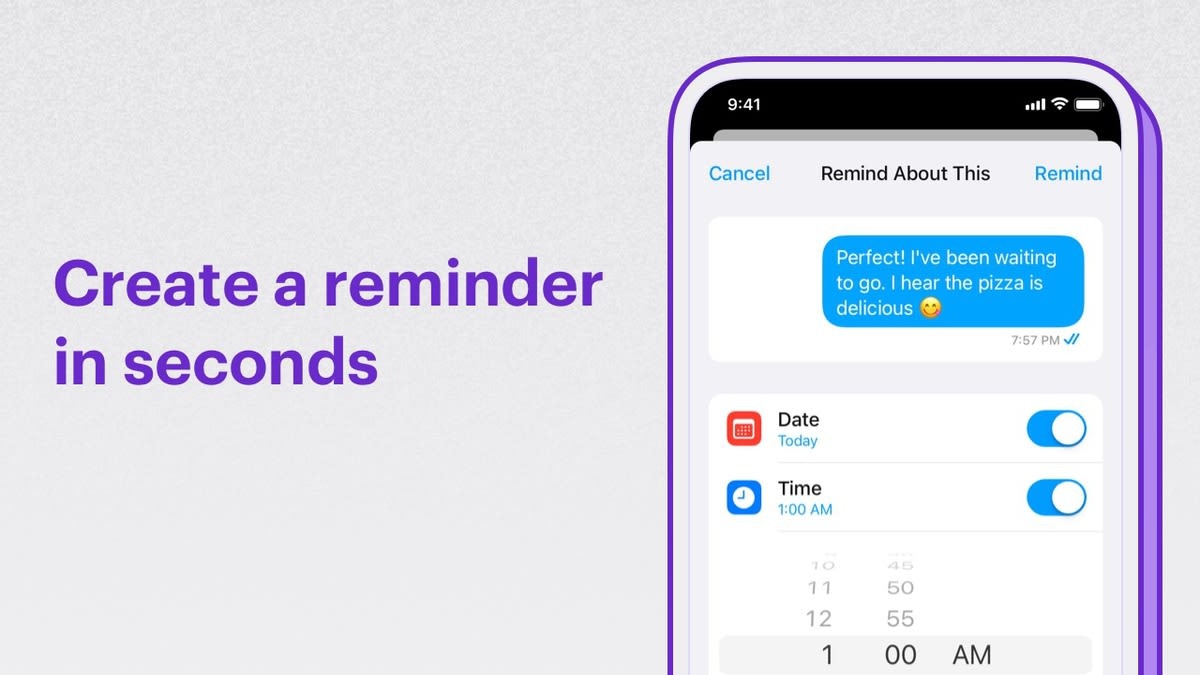
 Users can choose to be reminded about a message from a conversation or set some sort of custom personalized reminder.
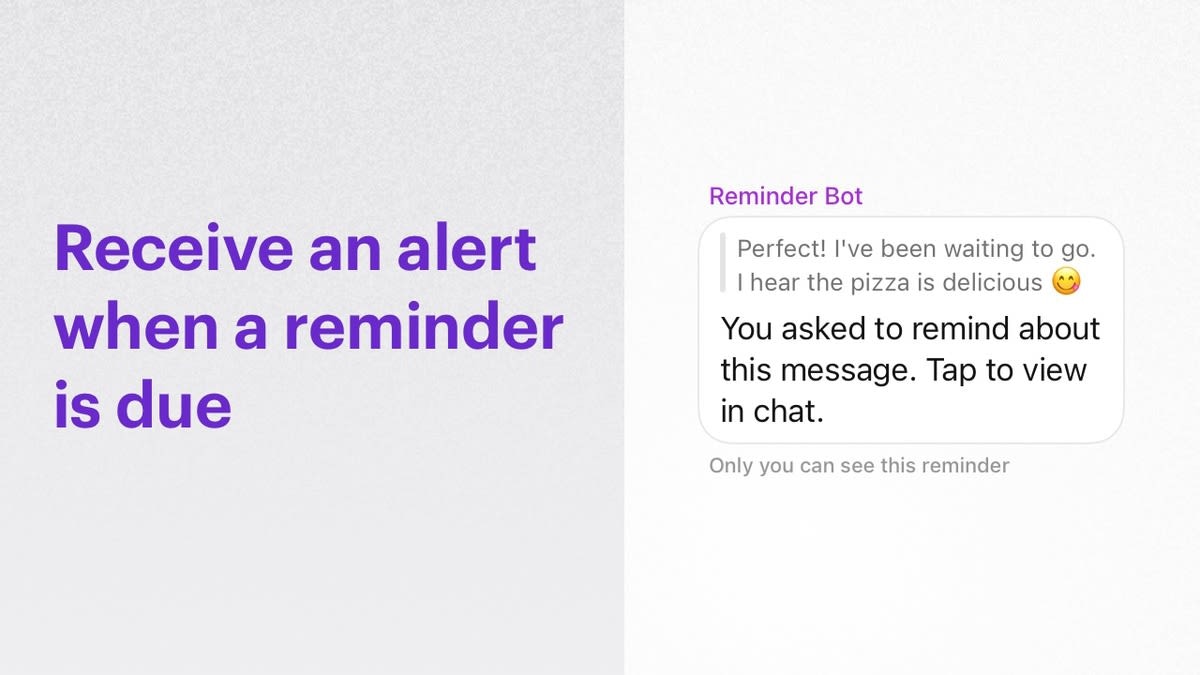
When the reminder is due, `cc_reminder_bot` will send a message to the user.
Users can then list, edit or delete reminders.
### Set reminders
The following parameters are required for setting a reminder
| Parameter | Value | Description |
| ---------- | -------------- | ----------------------------------------------------------------------------------------- |
| `about` | Integer/String | `Integer` => For setting a message reminder. `String` => For setting a personal reminder. |
| `isCustom` | Boolean | `false` => For setting a message reminder. `true` => For setting a personal reminder. |
| `timeInMS` | Integer | Unix timestamp: (e.g.: `1638351344989`) |
#### Message reminders
To set Message reminders, the `about` should be an integer corresponding to the message id. The `isCustom` value should be set to`false`.
In order to set the reminders, use the `CometChat.callExtension` method as shown below:
```js theme={null}
CometChat.callExtension('reminders', 'POST', 'v1/reminder', {
about: 1,
isCustom: false,
timeInMS: 1638351344989
}).then(response => {
// Reminder created successfully
// Reminder details with reminderId.
}).catch(error => {
// Some error occured
});
```
```java theme={null}
import org.json.simple.JSONObject;
JSONObject body=new JSONObject();
body.put("about", ID_OF_THE_MESSAGE);
body.put("isCustom", false);
body.put("timeInMS", 1638351344989);
CometChat.callExtension("reminders", "POST", "/v1/reminder", body,
new CometChat.CallbackListener() {
@Override
public void onSuccess(JSONObject responseObject) {
// Reminder created successfully.
// Reminder details with reminderId.
}
@Override
public void onError(CometChatException e) {
// Some error occured.
}
});
```
```swift theme={null}
CometChat.callExtension(slug: "reminders", type: .post, endPoint: "v1/reminder", body: ["about":MESSAGE_ID, "isCustom":false, "timeInMS": 1638351344989], onSuccess: { (response) in
// Reminder created successfully.
// Reminder details with reminderId.
}) { (error) in
// Some error occured
}
```
#### Personal reminders
To set Personal reminders, the about can contain the description. The `isCustom` value should be set to`true`.
In order to set the reminders, use the `CometChat.callExtension` method as shown below:
```js theme={null}
CometChat.callExtension('reminders', 'POST', 'v1/reminder', {
about: "Drinking water",
isCustom: true,
timeInMS: 1638351344989
}).then(response => {
// Reminder created successfully
// Reminder details with reminderId.
}).catch(error => {
// Some error occured
});
```
```java theme={null}
import org.json.simple.JSONObject;
JSONObject body=new JSONObject();
body.put("about", "Drinking water");
body.put("isCustom", true);
body.put("timeInMS", 1638351344989);
CometChat.callExtension("reminders", "POST", "/v1/reminder", body,
new CometChat.CallbackListener() {
@Override
public void onSuccess(JSONObject responseObject) {
// Reminder created successfully.
// Reminder details with reminderId.
}
@Override
public void onError(CometChatException e) {
// Some error occured.
}
});
```
```swift theme={null}
CometChat.callExtension(slug: "reminders", type: .post, endPoint: "v1/reminder", body: ["about":"Drinking water", "isCustom":true, "timeInMS": 1638351344989], onSuccess: { (response) in
// Reminder created successfully.
// Reminder details with reminderId.
}) { (error) in
// Some error occured
}
```
If the reminder has been created successfully, you will receive the reminder object with `reminderId` in the success response.
### List reminders
List the reminders set by a user using the `CometChat.callExtension` method as shown below:
```js theme={null}
CometChat.callExtension('reminders', 'GET', 'v1/fetch', null).then(response => {
// reminders array
}).catch(error => {
// Some error occured
});
```
```java theme={null}
CometChat.callExtension("reminders", "GET", "/v1/fetch", null,
new CometChat.CallbackListener() {
@Override
public void onSuccess(JSONObject responseObject) {
// reminders array
}
@Override
public void onError(CometChatException e) {
// Some error occured.
}
});
```
```swift theme={null}
CometChat.callExtension(slug: "reminders", type: .get, endPoint: "v1/fetch", body: nil, onSuccess: { (response) in
// reminders array
}) { (error) in
// Some error occured
}
```
### Delete reminders
Reminders can be deleted using the `reminderId` as shown below:
```js theme={null}
CometChat.callExtension('reminders', 'DELETE', 'v1/reminder', {
reminderId: "e9cda52a-3839-4fd5-a010-b70db136f0f1"
}).then(response => {
// Reminder deleted successfully
}).catch(error => {
// Some error occured
});
```
```java theme={null}
import org.json.simple.JSONObject;
JSONObject body = new JSONObject();
body.put("reminderId", "e9cda52a-3839-4fd5-a010-b70db136f0f1");
CometChat.callExtension("reminders", "DELETE", "/v1/reminder", body,
new CometChat.CallbackListener() {
@Override
public void onSuccess(JSONObject responseObject) {
// Reminder deleted successfully
}
@Override
public void onError(CometChatException e) {
// Some error occured.
}
});
```
```swift theme={null}
CometChat.callExtension(slug: "reminders", type: .delete, endPoint: "v1/reminder", body: ["reminderId": "e9cda52a-3839-4fd5-a010-b70db136f0f1"], onSuccess: { (response) in
// Reminder deleted successfully
}) { (error) in
// Some error occured
}
```
### Edit reminders
In case a reminder needs to be preponed or postponed, it can be done using the Edit reminders functionality. The following updates the reminder with `reminderId: "e9cda52a-3839-4fd5-a010-b70db136f0f1"`
For editing, use the `CometChat.callExtension` method as shown below:
```js theme={null}
CometChat.callExtension('reminders', 'PUT', 'v1/reminder', {
reminderId: "e9cda52a-3839-4fd5-a010-b70db136f0f1",
about: 1,
isCustom: false,
timeInMS: 1638351344999
}).then(response => {
// Reminder updated successfully.
}).catch(error => {
// Some error occured
});
```
```java theme={null}
import org.json.simple.JSONObject;
JSONObject body=new JSONObject();
body.put("about", ID_OF_THE_MESSAGE);
body.put("isCustom", false);
body.put("timeInMS", 1638351344989);
CometChat.callExtension("reminders", "PUT", "/v1/reminder", body,
new CometChat.CallbackListener() {
@Override
public void onSuccess(JSONObject responseObject) {
// Reminder updated successfully.
}
@Override
public void onError(CometChatException e) {
// Some error occured.
}
});
```
```swift theme={null}
CometChat.callExtension(slug: "reminders", type: .put, endPoint: "v1/reminder", body: ["about":MESSAGE_ID, "isCustom":false, "timeInMS": 1638351344989], onSuccess: { (response) in
// Reminder updated successfully.
}) { (error) in
// Some error occured
}
```
For Message reminders, `timeInMS` can be updated.\
For Personal reminders, `timeInMS` & `about` can be updated.
### Receive reminders
The user will receive reminders from a special user - `cc_reminder_bot` - that was configured before.
These reminders are sent as messages with `category: custom` and `type: extension_reminders`. The `customData` object will have an `about` field that the user had mentioned while setting the reminder.
Learn more about [Custom messages listener](/sdk/javascript/receive-message#real-time-messages) for receiving reminders.
## Notifications
Customize the push, email, and SMS notification templates for reminder messages.
Users can choose to be reminded about a message from a conversation or set some sort of custom personalized reminder.
When the reminder is due, `cc_reminder_bot` will send a message to the user.
Users can then list, edit or delete reminders.
### Set reminders
The following parameters are required for setting a reminder
| Parameter | Value | Description |
| ---------- | -------------- | ----------------------------------------------------------------------------------------- |
| `about` | Integer/String | `Integer` => For setting a message reminder. `String` => For setting a personal reminder. |
| `isCustom` | Boolean | `false` => For setting a message reminder. `true` => For setting a personal reminder. |
| `timeInMS` | Integer | Unix timestamp: (e.g.: `1638351344989`) |
#### Message reminders
To set Message reminders, the `about` should be an integer corresponding to the message id. The `isCustom` value should be set to`false`.
In order to set the reminders, use the `CometChat.callExtension` method as shown below:
```js theme={null}
CometChat.callExtension('reminders', 'POST', 'v1/reminder', {
about: 1,
isCustom: false,
timeInMS: 1638351344989
}).then(response => {
// Reminder created successfully
// Reminder details with reminderId.
}).catch(error => {
// Some error occured
});
```
```java theme={null}
import org.json.simple.JSONObject;
JSONObject body=new JSONObject();
body.put("about", ID_OF_THE_MESSAGE);
body.put("isCustom", false);
body.put("timeInMS", 1638351344989);
CometChat.callExtension("reminders", "POST", "/v1/reminder", body,
new CometChat.CallbackListener() {
@Override
public void onSuccess(JSONObject responseObject) {
// Reminder created successfully.
// Reminder details with reminderId.
}
@Override
public void onError(CometChatException e) {
// Some error occured.
}
});
```
```swift theme={null}
CometChat.callExtension(slug: "reminders", type: .post, endPoint: "v1/reminder", body: ["about":MESSAGE_ID, "isCustom":false, "timeInMS": 1638351344989], onSuccess: { (response) in
// Reminder created successfully.
// Reminder details with reminderId.
}) { (error) in
// Some error occured
}
```
#### Personal reminders
To set Personal reminders, the about can contain the description. The `isCustom` value should be set to`true`.
In order to set the reminders, use the `CometChat.callExtension` method as shown below:
```js theme={null}
CometChat.callExtension('reminders', 'POST', 'v1/reminder', {
about: "Drinking water",
isCustom: true,
timeInMS: 1638351344989
}).then(response => {
// Reminder created successfully
// Reminder details with reminderId.
}).catch(error => {
// Some error occured
});
```
```java theme={null}
import org.json.simple.JSONObject;
JSONObject body=new JSONObject();
body.put("about", "Drinking water");
body.put("isCustom", true);
body.put("timeInMS", 1638351344989);
CometChat.callExtension("reminders", "POST", "/v1/reminder", body,
new CometChat.CallbackListener() {
@Override
public void onSuccess(JSONObject responseObject) {
// Reminder created successfully.
// Reminder details with reminderId.
}
@Override
public void onError(CometChatException e) {
// Some error occured.
}
});
```
```swift theme={null}
CometChat.callExtension(slug: "reminders", type: .post, endPoint: "v1/reminder", body: ["about":"Drinking water", "isCustom":true, "timeInMS": 1638351344989], onSuccess: { (response) in
// Reminder created successfully.
// Reminder details with reminderId.
}) { (error) in
// Some error occured
}
```
If the reminder has been created successfully, you will receive the reminder object with `reminderId` in the success response.
### List reminders
List the reminders set by a user using the `CometChat.callExtension` method as shown below:
```js theme={null}
CometChat.callExtension('reminders', 'GET', 'v1/fetch', null).then(response => {
// reminders array
}).catch(error => {
// Some error occured
});
```
```java theme={null}
CometChat.callExtension("reminders", "GET", "/v1/fetch", null,
new CometChat.CallbackListener() {
@Override
public void onSuccess(JSONObject responseObject) {
// reminders array
}
@Override
public void onError(CometChatException e) {
// Some error occured.
}
});
```
```swift theme={null}
CometChat.callExtension(slug: "reminders", type: .get, endPoint: "v1/fetch", body: nil, onSuccess: { (response) in
// reminders array
}) { (error) in
// Some error occured
}
```
### Delete reminders
Reminders can be deleted using the `reminderId` as shown below:
```js theme={null}
CometChat.callExtension('reminders', 'DELETE', 'v1/reminder', {
reminderId: "e9cda52a-3839-4fd5-a010-b70db136f0f1"
}).then(response => {
// Reminder deleted successfully
}).catch(error => {
// Some error occured
});
```
```java theme={null}
import org.json.simple.JSONObject;
JSONObject body = new JSONObject();
body.put("reminderId", "e9cda52a-3839-4fd5-a010-b70db136f0f1");
CometChat.callExtension("reminders", "DELETE", "/v1/reminder", body,
new CometChat.CallbackListener() {
@Override
public void onSuccess(JSONObject responseObject) {
// Reminder deleted successfully
}
@Override
public void onError(CometChatException e) {
// Some error occured.
}
});
```
```swift theme={null}
CometChat.callExtension(slug: "reminders", type: .delete, endPoint: "v1/reminder", body: ["reminderId": "e9cda52a-3839-4fd5-a010-b70db136f0f1"], onSuccess: { (response) in
// Reminder deleted successfully
}) { (error) in
// Some error occured
}
```
### Edit reminders
In case a reminder needs to be preponed or postponed, it can be done using the Edit reminders functionality. The following updates the reminder with `reminderId: "e9cda52a-3839-4fd5-a010-b70db136f0f1"`
For editing, use the `CometChat.callExtension` method as shown below:
```js theme={null}
CometChat.callExtension('reminders', 'PUT', 'v1/reminder', {
reminderId: "e9cda52a-3839-4fd5-a010-b70db136f0f1",
about: 1,
isCustom: false,
timeInMS: 1638351344999
}).then(response => {
// Reminder updated successfully.
}).catch(error => {
// Some error occured
});
```
```java theme={null}
import org.json.simple.JSONObject;
JSONObject body=new JSONObject();
body.put("about", ID_OF_THE_MESSAGE);
body.put("isCustom", false);
body.put("timeInMS", 1638351344989);
CometChat.callExtension("reminders", "PUT", "/v1/reminder", body,
new CometChat.CallbackListener() {
@Override
public void onSuccess(JSONObject responseObject) {
// Reminder updated successfully.
}
@Override
public void onError(CometChatException e) {
// Some error occured.
}
});
```
```swift theme={null}
CometChat.callExtension(slug: "reminders", type: .put, endPoint: "v1/reminder", body: ["about":MESSAGE_ID, "isCustom":false, "timeInMS": 1638351344989], onSuccess: { (response) in
// Reminder updated successfully.
}) { (error) in
// Some error occured
}
```
For Message reminders, `timeInMS` can be updated.\
For Personal reminders, `timeInMS` & `about` can be updated.
### Receive reminders
The user will receive reminders from a special user - `cc_reminder_bot` - that was configured before.
These reminders are sent as messages with `category: custom` and `type: extension_reminders`. The `customData` object will have an `about` field that the user had mentioned while setting the reminder.
Learn more about [Custom messages listener](/sdk/javascript/receive-message#real-time-messages) for receiving reminders.
## Notifications
Customize the push, email, and SMS notification templates for reminder messages.