> ## Documentation Index
> Fetch the complete documentation index at: https://www.cometchat.com/docs/llms.txt
> Use this file to discover all available pages before exploring further.
# Reactions (Legacy)
> Add, remove, and fetch CometChat message reactions with emoji metadata and reaction extension calls.
**Legacy Notice**: This extension is already included as part of the core messaging experience and is scheduled for deprecation in the near future.
Please note: Legacy extensions are no longer actively maintained and will not receive feature updates or enhancements.
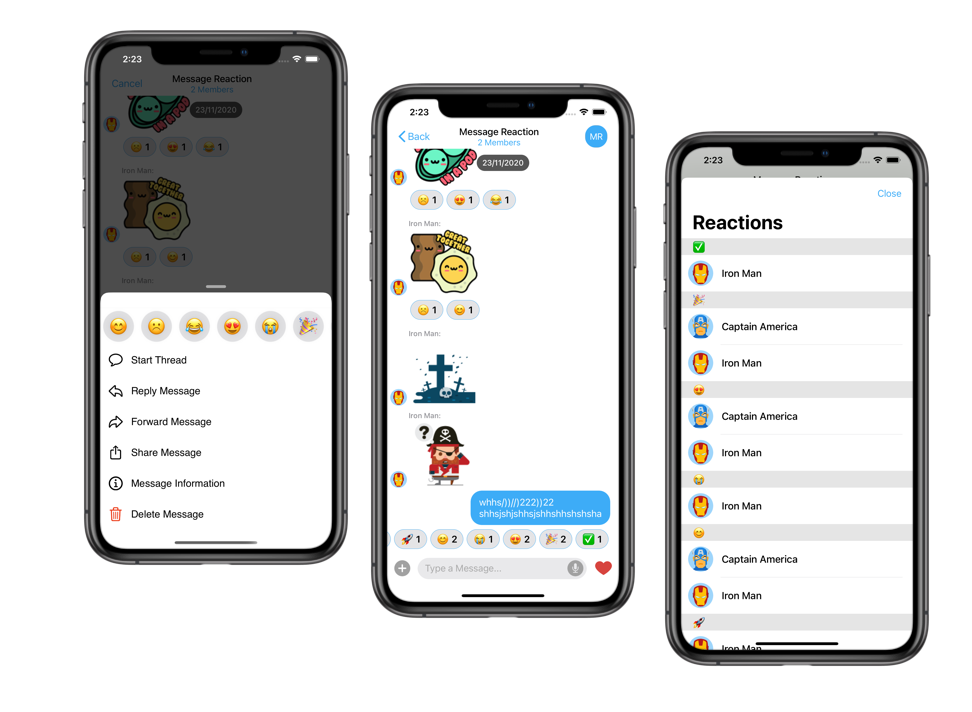
Reactions are the ability to react to an individual message with a specific emotion, quickly showing acknowledgment or expressing how you feel in a lightweight way.
 ## Extension settings
1. Login to [CometChat](https://app.cometchat.com/login) and select your app.
2. Go to the Extensions section and enable the Reactions extension.
## How do reactions work?
A user can react to a message using multiple emojis.
To allow a user to react to a message, show a popup with all the available emojis. Once the user clicks on a particular emoji, add that emoji as a reaction to the target message.
If a user has reacted to a message using a certain emoji and clicks on the same emoji, remove it from the target message.
Sending Reactions
To add a reaction using selected emoji, use the `callExtension` method provided by our SDKs as follows:
```js theme={null}
CometChat.callExtension('reactions', 'POST', 'v1/react', {
msgId: MESSAGE_ID,
emoji: "😊"
}).then(response => {
// Reaction added successfully
}).catch(error => {
// Some error occured
});
```
```java theme={null}
import org.json.simple.JSONObject;
JSONObject body=new JSONObject();
body.put("msgId", ID_OF_THE_MESSAGE);
body.put("emoji", "😊");
CometChat.callExtension("reactions", "POST", "/v1/react", body,
new CometChat.CallbackListener() {
@Override
public void onSuccess(JSONObject responseObject) {
// Reaction added successfully.
}
@Override
public void onError(CometChatException e) {
// Some error occured.
}
});
```
```swift theme={null}
CometChat.callExtension(slug: "reactions", type: .post, endPoint: "v1/react", body: ["msgId":MESSAGE_ID, "emoji":"😊"], onSuccess: { (response) in
// Reaction added successfully
}) { (error) in
// Some error occured
}
```
## Receiving Reactions
The messages will be updated later with Reactions as and when users react to them. Hence, you need to implement the `onMessageEdited` listener. Please check our [Edit message](/sdk/javascript/edit-message) documentation under the SDK of your choice.
The updated details will be available in the metadata of the message. Here is a sample response:
```json theme={null}
"@injected": {
"extensions": {
"reactions": {
"😊": {
"cometchat-uid-2": {
"name": "George Alan",
"avatar": "https://assets.cometchat.io/sampleapp/v2/users/cometchat-uid-2.webp"
},
"cometchat-uid-1": {
"name": "Andrew Joseph",
"avatar": "https://assets.cometchat.io/sampleapp/v2/users/cometchat-uid-1.webp"
},
},
"👍": {
"cometchat-uid-3": {
"name": "George Alan",
}
}
}
}
}
```
## Implementation
At the recipients' end, from the message object, you can fetch the metadata by calling the getMetadata() method. Using this metadata, you can fetch the reaction details for that message.
```js theme={null}
var metadata = message.getMetadata();
if (metadata != null) {
var injectedObject = metadata["@injected"];
if (injectedObject != null && injectedObject.hasOwnProperty("extensions")) {
var extensionsObject = injectedObject["extensions"];
if (
extensionsObject != null &&
extensionsObject.hasOwnProperty("reactions")
) {
var reactionsObject = extensionsObject["reactions"];
}
}
}
```
```java theme={null}
JSONObject metadata = message.getMetadata();
if (metadata != null) {
JSONObject injectedObject = metadata.getJSONObject("@injected");
if (injectedObject != null && injectedObject.has("extensions")) {
JSONObject extensionsObject = injectedObject.getJSONObject("extensions");
if (extensionsObject != null && extensionsObject.has("reactions")) {
JSONObject reactionsObject = extensionsObject.getJSONObject("reactions");
}
}
}
```
```kotlin theme={null}
if (metadata != null) {
if (metadata.has("@injected")) {
val injectedJSONObject = metadata.getJSONObject("@injected")
if (injectedJSONObject != null && injectedJSONObject.has("extensions")) {
val extensionsObject = injectedJSONObject.getJSONObject("extensions")
if (extensionsObject != null && extensionsObject.has("reactions")) {
val reactionsObject = extensionsObject.getJSONObject("reactions")
}
}
}
}
```
```swift theme={null}
let textMessage = message as? TextMessage
var metadata : [String : Any]? = textMessage.metaData
if metadata != nil {
var injectedObject : [String : Any]? = (metadata?["@injected"] as? [String : Any])!
if injectedObject != nil && (injectedObject!["extensions"] != nil) {
var extensionsObject : [String : Any]? = injectedObject?["extensions"] as? [String : Any]
if extensionsObject != nil && extensionsObject?["reactions"] != nil {
var reactionsObject = extensionsObject?["reactions"] as! [String : Any]
}
}
}
```
## Extension settings
1. Login to [CometChat](https://app.cometchat.com/login) and select your app.
2. Go to the Extensions section and enable the Reactions extension.
## How do reactions work?
A user can react to a message using multiple emojis.
To allow a user to react to a message, show a popup with all the available emojis. Once the user clicks on a particular emoji, add that emoji as a reaction to the target message.
If a user has reacted to a message using a certain emoji and clicks on the same emoji, remove it from the target message.
Sending Reactions
To add a reaction using selected emoji, use the `callExtension` method provided by our SDKs as follows:
```js theme={null}
CometChat.callExtension('reactions', 'POST', 'v1/react', {
msgId: MESSAGE_ID,
emoji: "😊"
}).then(response => {
// Reaction added successfully
}).catch(error => {
// Some error occured
});
```
```java theme={null}
import org.json.simple.JSONObject;
JSONObject body=new JSONObject();
body.put("msgId", ID_OF_THE_MESSAGE);
body.put("emoji", "😊");
CometChat.callExtension("reactions", "POST", "/v1/react", body,
new CometChat.CallbackListener() {
@Override
public void onSuccess(JSONObject responseObject) {
// Reaction added successfully.
}
@Override
public void onError(CometChatException e) {
// Some error occured.
}
});
```
```swift theme={null}
CometChat.callExtension(slug: "reactions", type: .post, endPoint: "v1/react", body: ["msgId":MESSAGE_ID, "emoji":"😊"], onSuccess: { (response) in
// Reaction added successfully
}) { (error) in
// Some error occured
}
```
## Receiving Reactions
The messages will be updated later with Reactions as and when users react to them. Hence, you need to implement the `onMessageEdited` listener. Please check our [Edit message](/sdk/javascript/edit-message) documentation under the SDK of your choice.
The updated details will be available in the metadata of the message. Here is a sample response:
```json theme={null}
"@injected": {
"extensions": {
"reactions": {
"😊": {
"cometchat-uid-2": {
"name": "George Alan",
"avatar": "https://assets.cometchat.io/sampleapp/v2/users/cometchat-uid-2.webp"
},
"cometchat-uid-1": {
"name": "Andrew Joseph",
"avatar": "https://assets.cometchat.io/sampleapp/v2/users/cometchat-uid-1.webp"
},
},
"👍": {
"cometchat-uid-3": {
"name": "George Alan",
}
}
}
}
}
```
## Implementation
At the recipients' end, from the message object, you can fetch the metadata by calling the getMetadata() method. Using this metadata, you can fetch the reaction details for that message.
```js theme={null}
var metadata = message.getMetadata();
if (metadata != null) {
var injectedObject = metadata["@injected"];
if (injectedObject != null && injectedObject.hasOwnProperty("extensions")) {
var extensionsObject = injectedObject["extensions"];
if (
extensionsObject != null &&
extensionsObject.hasOwnProperty("reactions")
) {
var reactionsObject = extensionsObject["reactions"];
}
}
}
```
```java theme={null}
JSONObject metadata = message.getMetadata();
if (metadata != null) {
JSONObject injectedObject = metadata.getJSONObject("@injected");
if (injectedObject != null && injectedObject.has("extensions")) {
JSONObject extensionsObject = injectedObject.getJSONObject("extensions");
if (extensionsObject != null && extensionsObject.has("reactions")) {
JSONObject reactionsObject = extensionsObject.getJSONObject("reactions");
}
}
}
```
```kotlin theme={null}
if (metadata != null) {
if (metadata.has("@injected")) {
val injectedJSONObject = metadata.getJSONObject("@injected")
if (injectedJSONObject != null && injectedJSONObject.has("extensions")) {
val extensionsObject = injectedJSONObject.getJSONObject("extensions")
if (extensionsObject != null && extensionsObject.has("reactions")) {
val reactionsObject = extensionsObject.getJSONObject("reactions")
}
}
}
}
```
```swift theme={null}
let textMessage = message as? TextMessage
var metadata : [String : Any]? = textMessage.metaData
if metadata != nil {
var injectedObject : [String : Any]? = (metadata?["@injected"] as? [String : Any])!
if injectedObject != nil && (injectedObject!["extensions"] != nil) {
var extensionsObject : [String : Any]? = injectedObject?["extensions"] as? [String : Any]
if extensionsObject != nil && extensionsObject?["reactions"] != nil {
var reactionsObject = extensionsObject?["reactions"] as! [String : Any]
}
}
}
```