> ## Documentation Index
> Fetch the complete documentation index at: https://www.cometchat.com/docs/llms.txt
> Use this file to discover all available pages before exploring further.
# Polls
> Create CometChat polls in conversations, collect votes from users, fetch poll results, and manage poll options.
Polls let you quickly record the opinions directly in the Conversations and also view the results.
## Extension settings
1. Login to [CometChat](https://app.cometchat.com/login) and select your app.
2. Go to the Extensions section and enable the Polls extension.
## How do polls work?
Polls extension has the following 3 parts:
1. Creating a poll by submitting a question along with the possible options.
2. Voting in a poll.
3. Fetching the results for a particular poll.
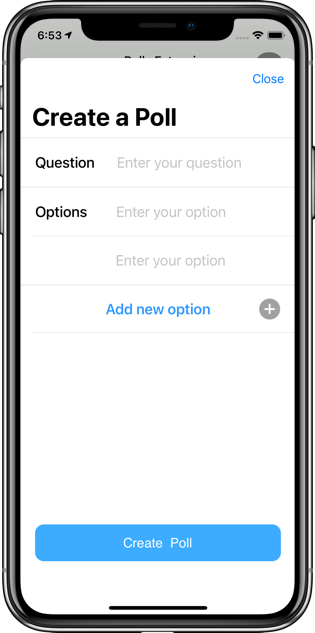
## 1. Creating a Poll
In order to create a poll, you need to submit the following details:
1. Question
2. Array of options
3. Receiver (UID/GUID)
4. Receiver type (user/group)
The options in the array are assigned an index appropriately (starting from 1). You can create a poll by using `callExtension` method provided by our SDKs:
```js theme={null}
CometChat.callExtension('polls', 'POST', 'v2/create', {
"question": "Which OS do you use?",
"options": ["Windows", "Ubuntu", "MacOS", "Other"],
"receiver": "cometchat-uid-1",
"receiverType": "user"
}).then(response => {
// Details about the created poll
})
.catch(error => {
// Error occured
});
```
```java theme={null}
import org.json.simple.JSONObject;
JSONObject body=new JSONObject();
JSONArray options = new JSONArray();
options.add("Milk");
options.add("Cereal");
body.put("question", "Milk goes first or the cereal?");
body.put("options", options);
body.put("receiver", "cometchat-guid-1");
body.put("receiverType", "group");
CometChat.callExtension("polls", "POST", "/v2/create", body,
new CometChat.CallbackListener < JSONObject > () {
@Override
public void onSuccess(JSONObject jsonObject) {
//On Success
}
@Override
public void onError(CometChatException e) {
//On Failure
}
});
```
```swift theme={null}
CometChat.callExtension(slug: "polls", type: .post, endPoint: "v2/create", body: ["question": "Which OS do you use?" ,"options":["Windows", "Ubuntu", "MacOS", "Other"],"receiver":"cometchat-uid-1","receiverType":"user"] as [String : Any], onSuccess: { (response) in
// Details about the created poll
}) { (error) in
// Error occured
}
```
 ## 2. Receiving a poll
Polls are custom messages. So, you have to implement our `onCustomMessageReceived` listener in order to receive the Poll-related message. Please refer to our [Receive Messages](/docs/sdk/javascript/receive-message) documentation under the SDK of your choice.
The `metadata` stores all the information about the poll. You will find the following details in `metadata` -> `@injected` -> `extensions` -> `polls`.
| Key | Value |
| -------- | ------------------------------------------------------------------------------------ |
| id | A String representing a unique ID for the poll. |
| options | An Object with the option number as the key and the option description as the value. |
| question | A string representing the question asked in the poll. |
| results | An object that stores voting results. |
Apart from the above Poll-related details, the `metadata` will also contain `incrementUnreadCount` with value as `true`. This will be useful for incrementing the unread count every time a poll is received.
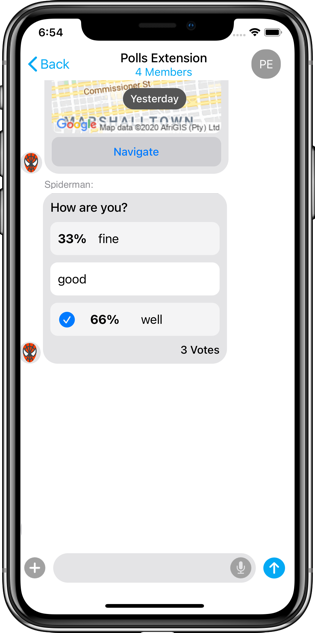
## 3. Voting in a poll
Voting in a poll simply requires you to provide the `id` of the poll and the option you intend to vote for. The `vote` parameter is basically the option number.
You can allow users to vote for a poll by using the `callExtension` method provided by our SDKs:
```js theme={null}
CometChat.callExtension('polls', 'POST', 'v2/vote', {
vote: "3",
id: "d5441d53-c191-4696-9e92-e4d79da7463",
}).then(response => {
// Successfully voted
})
.catch(error => {
// Error Occured
});
```
```java theme={null}
import org.json.simple.JSONObject;
JSONObject body=new JSONObject();
body.put("vote", OPTION_NUMBER);
body.put("id", POLL_ID);
CometChat.callExtension("polls", "POST", "/v2/vote", body,
new CometChat.CallbackListener < JSONObject > () {
@Override
public void onSuccess(JSONObject jsonObject) {
// Voted successfully
}
@Override
public void onError(CometChatException e) {
// Some error occured
}
});
```
```swift theme={null}
CometChat.callExtension(slug: "polls", type: .post, endPoint: "v2/vote", body: ["vote": "3","id": "d5441d53-c191-4696-9e92-e4d79da7463"], onSuccess: { (response) in
// Successfully voted
}) { (error) in
// Error Occured
}
```
## 2. Receiving a poll
Polls are custom messages. So, you have to implement our `onCustomMessageReceived` listener in order to receive the Poll-related message. Please refer to our [Receive Messages](/docs/sdk/javascript/receive-message) documentation under the SDK of your choice.
The `metadata` stores all the information about the poll. You will find the following details in `metadata` -> `@injected` -> `extensions` -> `polls`.
| Key | Value |
| -------- | ------------------------------------------------------------------------------------ |
| id | A String representing a unique ID for the poll. |
| options | An Object with the option number as the key and the option description as the value. |
| question | A string representing the question asked in the poll. |
| results | An object that stores voting results. |
Apart from the above Poll-related details, the `metadata` will also contain `incrementUnreadCount` with value as `true`. This will be useful for incrementing the unread count every time a poll is received.
## 3. Voting in a poll
Voting in a poll simply requires you to provide the `id` of the poll and the option you intend to vote for. The `vote` parameter is basically the option number.
You can allow users to vote for a poll by using the `callExtension` method provided by our SDKs:
```js theme={null}
CometChat.callExtension('polls', 'POST', 'v2/vote', {
vote: "3",
id: "d5441d53-c191-4696-9e92-e4d79da7463",
}).then(response => {
// Successfully voted
})
.catch(error => {
// Error Occured
});
```
```java theme={null}
import org.json.simple.JSONObject;
JSONObject body=new JSONObject();
body.put("vote", OPTION_NUMBER);
body.put("id", POLL_ID);
CometChat.callExtension("polls", "POST", "/v2/vote", body,
new CometChat.CallbackListener < JSONObject > () {
@Override
public void onSuccess(JSONObject jsonObject) {
// Voted successfully
}
@Override
public void onError(CometChatException e) {
// Some error occured
}
});
```
```swift theme={null}
CometChat.callExtension(slug: "polls", type: .post, endPoint: "v2/vote", body: ["vote": "3","id": "d5441d53-c191-4696-9e92-e4d79da7463"], onSuccess: { (response) in
// Successfully voted
}) { (error) in
// Error Occured
}
```
 ## 4. Getting Results
There are 2 ways to fetch the results of the poll:
1. Real-time updates from the `metadata`
2. Fetch the results by using the `callExtension` method.
### Real-time updates
As mentioned earlier, a Poll is a message of the category: `custom`. When the votes are cast by the users, the metadata for the message will be updated accordingly. To get real-time voting information, you need to implement the `onMessageEdited` listener. Please check our [Edit message](/docs/sdk/javascript/edit-message) documentation under the SDK of your choice.
The updated details will be available in the metadata of the message. Here is a sample response:
```json theme={null}
"@injected": {
"extensions": {
"polls": {
"id": "d5441d53-c191-4696-9e92-e4d79da7463",
"options": {
"1": "Chicken",
"2": "The Egg"
},
"results": {
"total": 2,
"options": {
"1": {
"text": "Chicken",
"count": 1,
"voters": {
"cometchat-uid-1": {
"name": "Andrew Joseph",
"avatar": "https://assets.cometchat.io/sampleapp/v2/users/cometchat-uid-1.webp"
}
}
},
"2": {
"text": "The Egg",
"count": 1,
"voters": {
"cometchat-uid-2": {
"name": "George Alan",
"avatar": "https://assets.cometchat.io/sampleapp/v2/users/cometchat-uid-2.webp"
}
}
}
}
},
"question": "Which came first? The chicken or the egg?"
}
}
}
```
### Using callExtension() method
For fetching results, the only parameter required is the id of the poll. You can use this method only when you are the creator of the poll. Others cannot call this method to get the poll results. Result for a poll can be fetched using a `callExtension` method provided by our SDKs:
```js theme={null}
CometChat.callExtension('polls', 'GET', 'v2/results?id='+POLL_ID, null)
.then(results => {
// Poll results
})
.catch(error => {
// Some error occured
});
```
```java theme={null}
String URL = "/v2/results?id=" + POLL_ID;
CometChat.callExtension("polls", "GET", URL, null,
new CometChat.CallbackListener < JSONObject > () {
@Override
public void onSuccess(JSONObject jsonObject) {
// Poll results
}
@Override
public void onError(CometChatException e) {
// Some error occured
}
});
```
```swift theme={null}
CometChat.callExtension(slug: "polls", type: .get, endPoint: "v2/results?id=\(POLL_ID)", body: nil, onSuccess: { (response) in
// Poll results
}) { (error) in
// Some error occured
}
}
```
A sample response for the results is as follows:
```json theme={null}
"polls": {
"id": "d5441d53-c191-4696-9e92-e4d79da7463",
"options": {
"1": "Chicken",
"2": "The Egg"
},
"results": {
"total": 2,
"options": {
"1": {
"text": "Chicken",
"count": 1,
"voters": {
"cometchat-uid-1": {
"name": "Andrew Joseph",
"avatar": "https://assets.cometchat.io/sampleapp/v2/users/cometchat-uid-1.webp"
}
}
},
"2": {
"text": "The Egg",
"count": 1,
"voters": {
"cometchat-uid-2": {
"name": "George Alan",
"avatar": "https://assets.cometchat.io/sampleapp/v2/users/cometchat-uid-2.webp"
}
}
}
}
},
"question": "Which came first? The chicken or the egg?"
}
```
## Notifications
Customize the push, email, and SMS notification templates for poll messages.
## 4. Getting Results
There are 2 ways to fetch the results of the poll:
1. Real-time updates from the `metadata`
2. Fetch the results by using the `callExtension` method.
### Real-time updates
As mentioned earlier, a Poll is a message of the category: `custom`. When the votes are cast by the users, the metadata for the message will be updated accordingly. To get real-time voting information, you need to implement the `onMessageEdited` listener. Please check our [Edit message](/docs/sdk/javascript/edit-message) documentation under the SDK of your choice.
The updated details will be available in the metadata of the message. Here is a sample response:
```json theme={null}
"@injected": {
"extensions": {
"polls": {
"id": "d5441d53-c191-4696-9e92-e4d79da7463",
"options": {
"1": "Chicken",
"2": "The Egg"
},
"results": {
"total": 2,
"options": {
"1": {
"text": "Chicken",
"count": 1,
"voters": {
"cometchat-uid-1": {
"name": "Andrew Joseph",
"avatar": "https://assets.cometchat.io/sampleapp/v2/users/cometchat-uid-1.webp"
}
}
},
"2": {
"text": "The Egg",
"count": 1,
"voters": {
"cometchat-uid-2": {
"name": "George Alan",
"avatar": "https://assets.cometchat.io/sampleapp/v2/users/cometchat-uid-2.webp"
}
}
}
}
},
"question": "Which came first? The chicken or the egg?"
}
}
}
```
### Using callExtension() method
For fetching results, the only parameter required is the id of the poll. You can use this method only when you are the creator of the poll. Others cannot call this method to get the poll results. Result for a poll can be fetched using a `callExtension` method provided by our SDKs:
```js theme={null}
CometChat.callExtension('polls', 'GET', 'v2/results?id='+POLL_ID, null)
.then(results => {
// Poll results
})
.catch(error => {
// Some error occured
});
```
```java theme={null}
String URL = "/v2/results?id=" + POLL_ID;
CometChat.callExtension("polls", "GET", URL, null,
new CometChat.CallbackListener < JSONObject > () {
@Override
public void onSuccess(JSONObject jsonObject) {
// Poll results
}
@Override
public void onError(CometChatException e) {
// Some error occured
}
});
```
```swift theme={null}
CometChat.callExtension(slug: "polls", type: .get, endPoint: "v2/results?id=\(POLL_ID)", body: nil, onSuccess: { (response) in
// Poll results
}) { (error) in
// Some error occured
}
}
```
A sample response for the results is as follows:
```json theme={null}
"polls": {
"id": "d5441d53-c191-4696-9e92-e4d79da7463",
"options": {
"1": "Chicken",
"2": "The Egg"
},
"results": {
"total": 2,
"options": {
"1": {
"text": "Chicken",
"count": 1,
"voters": {
"cometchat-uid-1": {
"name": "Andrew Joseph",
"avatar": "https://assets.cometchat.io/sampleapp/v2/users/cometchat-uid-1.webp"
}
}
},
"2": {
"text": "The Egg",
"count": 1,
"voters": {
"cometchat-uid-2": {
"name": "George Alan",
"avatar": "https://assets.cometchat.io/sampleapp/v2/users/cometchat-uid-2.webp"
}
}
}
}
},
"question": "Which came first? The chicken or the egg?"
}
```
## Notifications
Customize the push, email, and SMS notification templates for poll messages.