> ## Documentation Index
> Fetch the complete documentation index at: https://www.cometchat.com/docs/llms.txt
> Use this file to discover all available pages before exploring further.
# End To End Encryption (Deprecated)
> Configure CometChat end-to-end encryption with Virgil Security keys, local message encryption, and sample app setup.
Deprecated: This extension is no longer maintained and will not receive further updates.
Ensure only your users can read what is sent and nobody in between.
End-to-end encryption is intended to prevent data being read or modified by anyone but the sender and recipient(s). The messages are encrypted by the sender and decrypted by the recipient locally on their device. [Virgil Security](https://virgilsecurity.com/) is an industry leader in end-to-end encryption.
I want to checkout the sample app
End-to-end Encryption Sample app for Web (React)
Follow the steps mentioned in the `README.md` file.
Kindly, click on below button to download.
[Sample app](https://github.com/cometchat/javascript-react-chat-end-to-end-encryption-app/archive/refs/tags/3.0.5-1.zip)
[View on Github](https://github.com/cometchat/javascript-react-chat-end-to-end-encryption-app)
## Before you begin
1. Sign up or Log in to [https://dashboard.virgilsecurity.com/apps](https://dashboard.virgilsecurity.com/apps)
2. Create a New application.
3. Go to E3Kit section and create the .env file. Copy the following details:
1. `APP_ID`
2. `APP_KEY_ID`
3. `APP_KEY`
## Extension settings
1. Login to [CometChat](https://app.cometchat.com/login) and select your app.
2. Go to the Extensions section and enable the End-to-end encryption extension.
3. Open the Settings for this extension and save the following:
1. `APP_ID`
2. `APP_KEY_ID`
3. `APP_KEY`
4. Save your settings.
## How does it work?
Virgil E3Kit uses the concept of Asymmetric key cryptography for achieving End-to-end encryption of messages. The process and code for encryption and decryption for your platform can be found at Virgil's documentation [here](https://developer.virgilsecurity.com/docs/e3kit/end-to-end-encryption/default/#sign-and-encrypt-data).
CometChat users and groups are considered as `identities` on Virgil.
### Handled by the extension
#### 1. Creation of Virgil token and identity
`VIRGIL TOKEN` is required for initialization of E3Kit on the client-side.
CometChat users and groups have `IDENTITIES` on Virgil.
```js theme={null}
CometChat.callExtension('e2ee', 'GET', '/v1/virgil-jwt', null)
.then(response => {
const { virgilToken, identity } = response;
})
.catch(error => {
// Error occured
});
```
```java theme={null}
CometChat.callExtension("e2ee", "GET", "/v1/virgil-jwt", null,
new CometChat.CallbackListener < JSONObject > () {
@Override
public void onSuccess(JSONObject jsonObject) {
// virgilToken, identity
}
@Override
public void onError(CometChatException e) {
// Some error occured
}
});
```
```swift theme={null}
CometChat.callExtension(slug: "e2ee", type: .get, endPoint: "/v1/virgil-jwt", body: nil, onSuccess: { (response) in
// virgilToken, identity
}) { (error) in
// Some error occured
}
}
```
#### 2. Fetching the identities for users and groups
In order to encrypt and decrypt messages, the E3Kit requires the `IDENTITIES`. These can be cached in your app for reuse.
```js theme={null}
const uids = ['cometchat-uid-1'];
const guids = ['cometchat-guid-1', 'anothergroup'];
CometChat.callExtension('e2ee', 'POST', '/v1/get-identities', { uids, guids })
.then(response => {
// userIdentities and groupIdentities are array of objects.
// Each object has (g)uid as the key and the identity as its value.
const { userIdentities, groupIdentities } = response;
})
.catch(error => {
// Error occured
});
```
```java theme={null}
import org.json.simple.JSONObject;
JSONObject body=new JSONObject();
JSONArray uids = new JSONArray();
JSONArray guids = new JSONArray();
uids.add("cometchat-uid-1");
guids.add("cometchat-guid-1", "anothergroup");
body.put(uids);
body.put(guids);
CometChat.callExtension("e2ee", "POST", "/v1/get-identities", body,
new CometChat.CallbackListener < JSONObject > () {
@Override
public void onSuccess(JSONObject jsonObject) {
// userIdentities, groupIdentities
}
@Override
public void onError(CometChatException e) {
// Some error occured
}
});
```
```swift theme={null}
CometChat.callExtension(slug: "e2ee", type: .post, endPoint: "v1/get-identities", body: ["uids":["cometchat-uid-1"], "guids":["cometchat-guid-1", "anothergroup"]] as [String : Any], onSuccess: { (response) in
// userIdentities, groupIdentities
}) { (error) in
// Error occured
}
```
#### 3. Group actions
Group Management on Virgil is different from the Group Management on CometChat.
Virgil groups have the following restrictions:
1. The creator of the group is called as the `GROUP OWNER.`
2. Only the `GROUP OWNER` can add members to or remove members from a Virgil group.
3. Group can be deleted only by the `GROUP OWNER`.
Hence, to reduce the development efforts on the front-end, the following group actions are handled by the extension:
1. Create group
2. Delete group
3. Add member(s) to group
4. Kick a member from a group
5. Ban a member from a group
6. Member joins a group
7. Change in group owner/moderator/admin
You will need the `GROUP OWNER` identity to list the groups followed by encrypting or decrypting messages from those groups. The `IDENTITY` for the `GROUP OWNER` is `2137f9ef75295ea`.
Learn more about Virgil Group Encryption [here](https://developer.virgilsecurity.com/docs/e3kit/end-to-end-encryption/group-chat/).
### To be handled on app
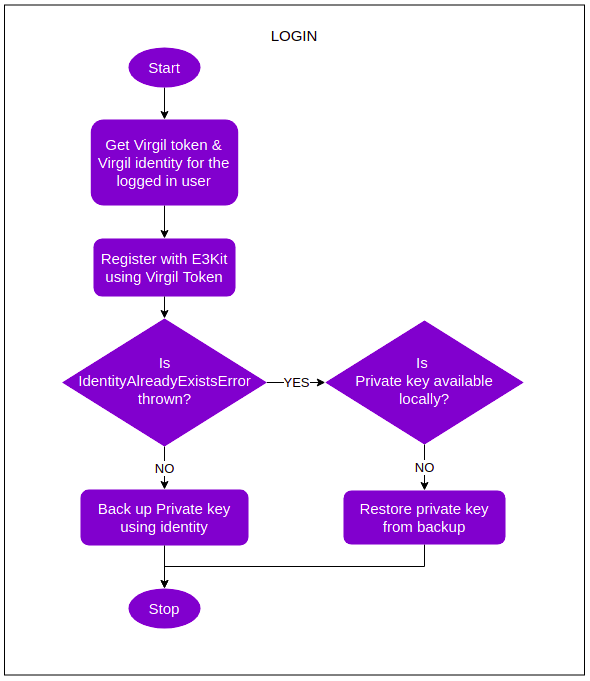
#### Login
1. The user logs in to CometChat.
2. Your app makes a call to the extension to get the `VIRGIL TOKEN` and `VIRGIL IDENTITY` for the logged in user.
3. Logged in user is then registered on Virgil cloud using the client-side E3Kit. This step requires the `VIRGIL TOKEN` that was generated before. Learn more about setting up E3Kit client [here](https://developer.virgilsecurity.com/docs/e3kit/get-started/setup-client/). The `EThree.initialize` method takes a second parameter that is object with the following two keys:
1. `groupStorageName`: Pass the value as `.g_${current_timestamp}`
2. `storageName`: Pass the value as`.l_${current_timestamp}`
4. In this process of registration, a `CARD` is generated for the logged in user. It contains the `PUBLIC KEY` that is available for everyone else.
5. Also, a `PRIVATE KEY` is generated and stored locally for the logged in user.
6. This `PRIVATE KEY` is very important and must be backed up using E3Kit. This step requires the `VIRGIL IDENTITY` that was generated for the logged in user.
#### Message encryption (Send a message)
1. The logged in user fetches the `VIRGIL IDENTITY` of the receiver by making a call to the extension.
2. This `VIRGIL IDENTITY` is then used for fetching the receiver's `CARD`.
3. This `CARD` is then used to encrypt the text message.
4. The encrypted message is then sent to the receiver using the CometChat SDK.
#### Message decryption (Receive a message)
1. The encrypted message is received by the logged in user in the appropriate listener provided by CometChat SDK.
2. The logged in user decrypts the message using the `PRIVATE KEY` at his end to view the original text.
Learn more about encryption and decryption of one-on-one messages [here](https://developer.virgilsecurity.com/docs/e3kit/end-to-end-encryption/default/).\
Learn more about encryption and decryption of group messages [here](https://developer.virgilsecurity.com/docs/e3kit/end-to-end-encryption/group-chat/#encrypt-and-decrypt-messages).
#### Logout
1. Call the `cleanup()` method provided by the E3Kit to remove the Private key from the user's device.
2. Make sure that the back up was created during the Login process in **Step 1**.
For implementation details on the platform of your choice, please refer to Virgil E3Kit [documentation](https://developer.virgilsecurity.com/docs/e3kit/).
Private key backup
It is very important that you take a backup of the Private key for the logged in users. If that is lost, a new CARD has to be generated on Virgil that leads to creation of new Private and Public key pair.\
Older messages cannot be decrypted using the new Private key. More details can be found [here](https://developer.virgilsecurity.com/docs/e3kit/key-backup/).
#### Recommended Login flow
The following flow is recommended to make sure that:
1. The `PRIVATE KEY` is backed up during the first time a user registers using Virgil's E3Kit.
2. Your users are able to restore the `PRIVATE KEY`, thus ensuring multi-device support and continued access to older messages.
3. Virgil Group actions can be performed on behalf of the user by the extension.
 CAVEATS
1. Other extensions will not work once the End-to-end encryption extension is enabled. As the messages will only be visible to your end users.
2. The extension needs to be enabled and correctly configured immediately after an app is created on the CometChat Dashboard.
3. Extension does not work for existing groups.
4. If the user loses the Private Key, they will not be able to decrypt older messages encrypted using the lost key pair. Hence, backup of Private key is very important.
CAVEATS
1. Other extensions will not work once the End-to-end encryption extension is enabled. As the messages will only be visible to your end users.
2. The extension needs to be enabled and correctly configured immediately after an app is created on the CometChat Dashboard.
3. Extension does not work for existing groups.
4. If the user loses the Private Key, they will not be able to decrypt older messages encrypted using the lost key pair. Hence, backup of Private key is very important.