> ## Documentation Index
> Fetch the complete documentation index at: https://www.cometchat.com/docs/llms.txt
> Use this file to discover all available pages before exploring further.
# Collaborative Document
> Start CometChat collaborative document sessions from one-on-one or group chats and share document links with participants.
Learn how to collaborate using a document.
## Extension settings
1. Login to [CometChat](https://app.cometchat.com/login) and select your app.
2. Go to the Extensions section and enable the Collaborative Document extension.
## How does it work?
### Initiating the session
Using the Collaborative Document extension is pretty straight-forward. As an initiator, you only have to create a session. The extension will handle the following for you:
1. Provide you with a link for collaboration.
2. Forward the link as an invitation to the receivers.
You can initiate the session in either one-on-one chat or a group chat. The session can be shared by simply submitting the `receiver` (uid/guid) and `receiverType` (user/group).
This extension uses the `callExtension` method provided by our SDKs.
```js theme={null}
CometChat.callExtension("document", "POST", "v1/create", {
"receiver": "UID/GUID",
"receiverType": "user/group"
}).then(response => {
// Response with document url
}).catch(error => {
// Some error occured
});
```
```java theme={null}
import org.json.simple.JSONObject;
JSONObject body=new JSONObject();
body.put("receiverType", "user/group");
body.put("receiver", "uid/guid");
CometChat.callExtension("document", "POST", "/v1/create", body,
new CometChat.CallbackListener() {
@Override
public void onSuccess(JSONObject responseObject) {
// The document link to join as an initiator.
}
@Override
public void onError(CometChatException e) {
// Some error occured.
}
});
```
```swift theme={null}
CometChat.callExtension(slug: "document", type: .post, endPoint: "v1/create",
body: ["receiverType":"user/group", "receiver":"uid/guid"], onSuccess: { (response) in
// Success response
}) { (error) in
// Some error occured
}
```
### Receiving the details
#### As an initiator
You will be receiving the `document_url` of the session in the success callback of the `callExtension` method as shown in the above code sample.
#### As a collaborator
The receiver (can be a user or group) will get a message with the following properties:
1. category: `custom`
2. type: `extension_document`
You have to implement the Custom message listener to get the message. Please check out our [Receive Messages](/docs/sdk/javascript/receive-message) documentation under the SDK of your choice.
By default, the unread count is not incremented for Custom Messages.
Hence, the `metadata`contains `incrementUnreadCount` with value as `true`. Use this for incrementing the unread count every time a Collaborative Document's custom message is received.
### Document metadata
The metadata section will have the details about the `document_url`.
```json theme={null}
"metadata": {
"incrementUnreadCount": true,
"@injected": {
"extensions": {
"document": {
"document_url": "https://document.cometchat.io/p/uniqdocid"
}
}
}
}
```
You can make use of the getMetadata() method for extracting the details. Refer the code samples below:
```js theme={null}
if (metadata != null) {
var injectedObject = metadata["@injected"];
if (injectedObject != null && injectedObject.hasOwnProperty("extensions")) {
var extensionsObject = injectedObject["extensions"];
if (
extensionsObject != null &&
extensionsObject.hasOwnProperty("document")
) {
var documentExtension = extensionsObject["document"];
var document_url = documentExtension["document_url"];
}
}
}
```
```java theme={null}
JSONObject metadata = message.getMetadata();
if (metadata != null) {
JSONObject injectedObject = metadata.getJSONObject("@injected");
if (injectedObject != null && injectedObject.has("extensions")) {
JSONObject extensionsObject = injectedObject.getJSONObject("extensions");
if (extensionsObject != null && extensionsObject.has("document"))
{
JSONObject documentObj = extensionsObject.getJSONObject("document");
String board_url = documentObj.getString("document_url");
}
}
}
```
```kotlin theme={null}
if (metadata != null) {
if (metadata.has("@injected")) {
val injectedJSONObject = metadata.getJSONObject("@injected")
if (injectedJSONObject != null && injectedJSONObject.has("extensions")) {
val extensionsObject = injectedJSONObject.getJSONObject("extensions")
if (extensionsObject != null && extensionsObject.has("document")) {
val documentObj = extensionsObject.getJSONObject("document")
val document_url = documentObj.getString("document_url")
}
}
}
}
```
```swift theme={null}
let textMessage = message as? TextMessage
var metadata : [String : Any]? = textMessage.metaData
if metadata != nil {
var injectedObject : [String : Any]? = (metadata?["@injected"] as? [String : Any])!
if injectedObject != nil && (injectedObject!["extensions"] != nil){
var extensionsObject : [String : Any]? = injectedObject?["extensions"] as? [String : Any]
if extensionsObject != nil && extensionsObject?["document"] != nil {
var documentObj = extensionsObject?["document"] as! [String : Any]
let document_url = documentObj["document_url"] as! String
}
}
}
```
### Start collaborating
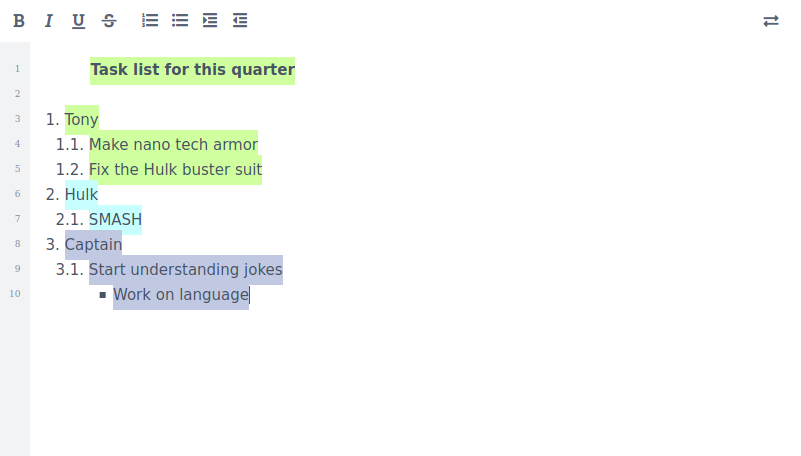 The Collaborative document has the following editing features:
1. Bold
2. Italic
3. Underline
4. Strikethrough
5. Numbered list
6. Bulleted list
7. Indent and Outdent
You can export your document as:
1. Etherpad
2. HTML
3. Plain text
The Collaborative document has the following editing features:
1. Bold
2. Italic
3. Underline
4. Strikethrough
5. Numbered list
6. Bulleted list
7. Indent and Outdent
You can export your document as:
1. Etherpad
2. HTML
3. Plain text