> ## Documentation Index
> Fetch the complete documentation index at: https://www.cometchat.com/docs/llms.txt
> Use this file to discover all available pages before exploring further.
# Smart Replies
> Generate CometChat AI smart replies for conversations with positive, negative, and neutral response suggestions.
**Smart Replies** enable the retrieval of an AI-generated response message within a conversation.
## Before you begin
1. Configure the AI settings through the CometChat dashboard as detailed in the [Overview section](/fundamentals/ai-user-copilot/overview).
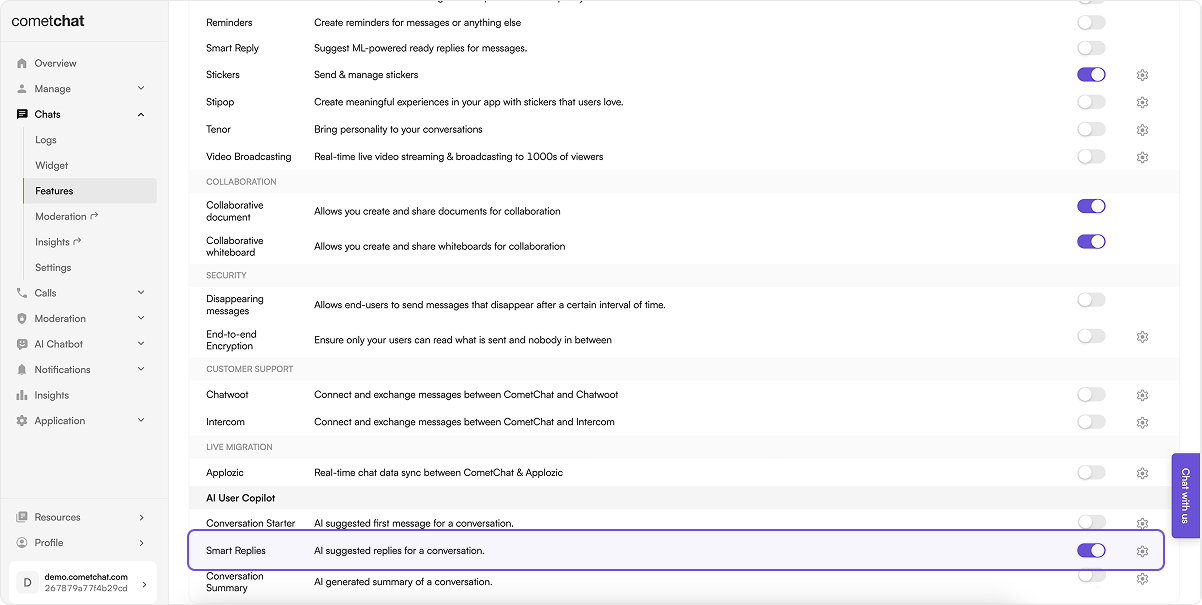
2. Navigate to Chat > Features, under **AI User Copilot**, enable **Smart Replies**.
 3. Implement the chat functionality in your applications using [CometChat's **v4** Chat SDKs](/sdk/javascript/overview).
## How does it work?
CometChat AI goes through the messages of a conversation to understand the context of a conversation & provide relevant replies. It returns three replies: `positive, negative & neutral`.
The CometChat SDK has a method to fetch the smart replies in a conversation. It returns an object of three replies with keys: `positive, negative & neutral`.
The number of messages to be fetched to generate relevant Smart Replies is configurable. By default the CometChat AI takes the latest `1000` messages. This can be configured to specific timestamps as well.
| Configuration | Value |
| ------------- | ------------------------------------------------------ |
| lastNMessages | This will fetch specific number of messages. |
| fromTimestamp | This will fetch messages from a particular timestamp. |
| toTimestamp | This will fetch messages until a particular timestamp. |
| unreadOnly | This will fetch only the unread messages. |
While using any configuration mentioned above a maximum of **only** `1000` messages will be fetched.
## Implementation
### SDKs
To implement Smart Replies in the platform of your choice, you may utilize the following code samples:
```js theme={null}
const receiverId = "UID/GUID";
const receiverType = "user/group";
const configuration = { lastNMessages: 100 };
CometChat.getSmartReplies(receiverId, receiverType, configuration).then(
(smartReplies) => {
const { positive, negative, neutral } = smartReplies;
console.log("Positive Reply", positive);
console.log("Negative Reply", negative);
console.log("Neutral Reply", neutral);
},
(error) => {
console.log("An error occurred while fetching smart replies", error);
}
);
```
```java theme={null}
String receiverId = 'UID/GUID';
String receiverType = 'user/group';
JSONObject configuration = new JSONObject();
try {
configuration.put("lastNMessages", 100);
} catch (JSONException e) {
throw new RuntimeException(e);
}
CometChat.getSmartReplies(receiverId, CometChatConstants.RECEIVER_TYPE_USER, configuration, new CometChat.CallbackListener>() {
@Override
public void onSuccess(HashMap smartReplies) {
Iterator iterator = smartReplies.keySet().iterator();
for (String s : smartReplies.keySet()) {
Log.e(TAG, "Smart Reply : " + iterator.next() + " " + smartReplies.get(s));
}
}
@Override
public void onError(CometChatException e) {
Logger.error(TAG, e.getMessage());
}
});
```
```kotlin theme={null}
val receiverId: String = 'UID/GUID'
val receiverType: String = 'user/group'
val configuration = JSONObject()
try {
configuration.put("lastNMessages", 100)
} catch (e: JSONException) {
throw RuntimeException(e)
}
CometChat.getSmartReplies(
receiverId,
CometChatConstants.RECEIVER_TYPE_USER,
configuration,
object : CallbackListener>() {
override fun onSuccess(smartReplies: HashMap) {
val iterator: Iterator = smartReplies.keys.iterator()
for (s in smartReplies.keys) {
Log.e(TAG, "Smart Reply : " + iterator.next() + " " + smartReplies[s])
}
}
override fun onError(e: CometChatException) {
Logger.error(TAG, e.message)
}
}
)
```
```swift theme={null}
let receiverId = ""
let receiverType = CometChat.ReceiverType.user
let configuration = [ "lastNMessages": 100 ]
CometChat.getSmartReplies(receiverId: receiverId, receiverType: receiverType, configuration: configuration) { smartRepliesMap in
print("GetSmartReplies success: \(smartRepliesMap)")
} onError: { error in
print("GetSmartReplies error: \(error?.errorDescription)")
}
```
```dart theme={null}
String receiveId = "";
String receiverType = CometChatConversationType.user;
Map configuration = { "lastNMessages": 100 };
CometChat.getSmartReplies(receiveId, receiverType, configuration: configuration, onSuccess: (HashMap map) {
debugPrint("getSmartReplies Success: $map");
}, onError: (CometChatException e) {
debugPrint("getSmartReplies Error: $e");
});
```
### UI Kits
Assuming the necessary prerequisites are met, Smart Replies function seamlessly starting from v4 of the Chat UI Kits. In v4, Smart Replies are accessible manually, whereas in v5, they work automatically.
3. Implement the chat functionality in your applications using [CometChat's **v4** Chat SDKs](/sdk/javascript/overview).
## How does it work?
CometChat AI goes through the messages of a conversation to understand the context of a conversation & provide relevant replies. It returns three replies: `positive, negative & neutral`.
The CometChat SDK has a method to fetch the smart replies in a conversation. It returns an object of three replies with keys: `positive, negative & neutral`.
The number of messages to be fetched to generate relevant Smart Replies is configurable. By default the CometChat AI takes the latest `1000` messages. This can be configured to specific timestamps as well.
| Configuration | Value |
| ------------- | ------------------------------------------------------ |
| lastNMessages | This will fetch specific number of messages. |
| fromTimestamp | This will fetch messages from a particular timestamp. |
| toTimestamp | This will fetch messages until a particular timestamp. |
| unreadOnly | This will fetch only the unread messages. |
While using any configuration mentioned above a maximum of **only** `1000` messages will be fetched.
## Implementation
### SDKs
To implement Smart Replies in the platform of your choice, you may utilize the following code samples:
```js theme={null}
const receiverId = "UID/GUID";
const receiverType = "user/group";
const configuration = { lastNMessages: 100 };
CometChat.getSmartReplies(receiverId, receiverType, configuration).then(
(smartReplies) => {
const { positive, negative, neutral } = smartReplies;
console.log("Positive Reply", positive);
console.log("Negative Reply", negative);
console.log("Neutral Reply", neutral);
},
(error) => {
console.log("An error occurred while fetching smart replies", error);
}
);
```
```java theme={null}
String receiverId = 'UID/GUID';
String receiverType = 'user/group';
JSONObject configuration = new JSONObject();
try {
configuration.put("lastNMessages", 100);
} catch (JSONException e) {
throw new RuntimeException(e);
}
CometChat.getSmartReplies(receiverId, CometChatConstants.RECEIVER_TYPE_USER, configuration, new CometChat.CallbackListener>() {
@Override
public void onSuccess(HashMap smartReplies) {
Iterator iterator = smartReplies.keySet().iterator();
for (String s : smartReplies.keySet()) {
Log.e(TAG, "Smart Reply : " + iterator.next() + " " + smartReplies.get(s));
}
}
@Override
public void onError(CometChatException e) {
Logger.error(TAG, e.getMessage());
}
});
```
```kotlin theme={null}
val receiverId: String = 'UID/GUID'
val receiverType: String = 'user/group'
val configuration = JSONObject()
try {
configuration.put("lastNMessages", 100)
} catch (e: JSONException) {
throw RuntimeException(e)
}
CometChat.getSmartReplies(
receiverId,
CometChatConstants.RECEIVER_TYPE_USER,
configuration,
object : CallbackListener>() {
override fun onSuccess(smartReplies: HashMap) {
val iterator: Iterator = smartReplies.keys.iterator()
for (s in smartReplies.keys) {
Log.e(TAG, "Smart Reply : " + iterator.next() + " " + smartReplies[s])
}
}
override fun onError(e: CometChatException) {
Logger.error(TAG, e.message)
}
}
)
```
```swift theme={null}
let receiverId = ""
let receiverType = CometChat.ReceiverType.user
let configuration = [ "lastNMessages": 100 ]
CometChat.getSmartReplies(receiverId: receiverId, receiverType: receiverType, configuration: configuration) { smartRepliesMap in
print("GetSmartReplies success: \(smartRepliesMap)")
} onError: { error in
print("GetSmartReplies error: \(error?.errorDescription)")
}
```
```dart theme={null}
String receiveId = "";
String receiverType = CometChatConversationType.user;
Map configuration = { "lastNMessages": 100 };
CometChat.getSmartReplies(receiveId, receiverType, configuration: configuration, onSuccess: (HashMap map) {
debugPrint("getSmartReplies Success: $map");
}, onError: (CometChatException e) {
debugPrint("getSmartReplies Error: $e");
});
```
### UI Kits
Assuming the necessary prerequisites are met, Smart Replies function seamlessly starting from v4 of the Chat UI Kits. In v4, Smart Replies are accessible manually, whereas in v5, they work automatically.