> ## Documentation Index
> Fetch the complete documentation index at: https://www.cometchat.com/docs/llms.txt
> Use this file to discover all available pages before exploring further.
# AI User Copilot
> Overview of AI User Copilot in CometChat.
## AI-Enabled Messaging Experience
Picture a chat that effortlessly starts and flows, like catching up with your best buddy over a cup of coffee. With CometChat AI, we're making that a reality! Introducing **Conversation Starter** and **Smart Replies** that ignite natural and organic conversations. Say goodbye to awkward silences and hello to chat-filled adventures!
For those who require a concise overview of their discussions, the **Conversation Summary** feature is available to provide a succinct recap.
## Pre-requisite
* Login to your [CometChat dashboard](https://app.cometchat.com/login) and choose your app.
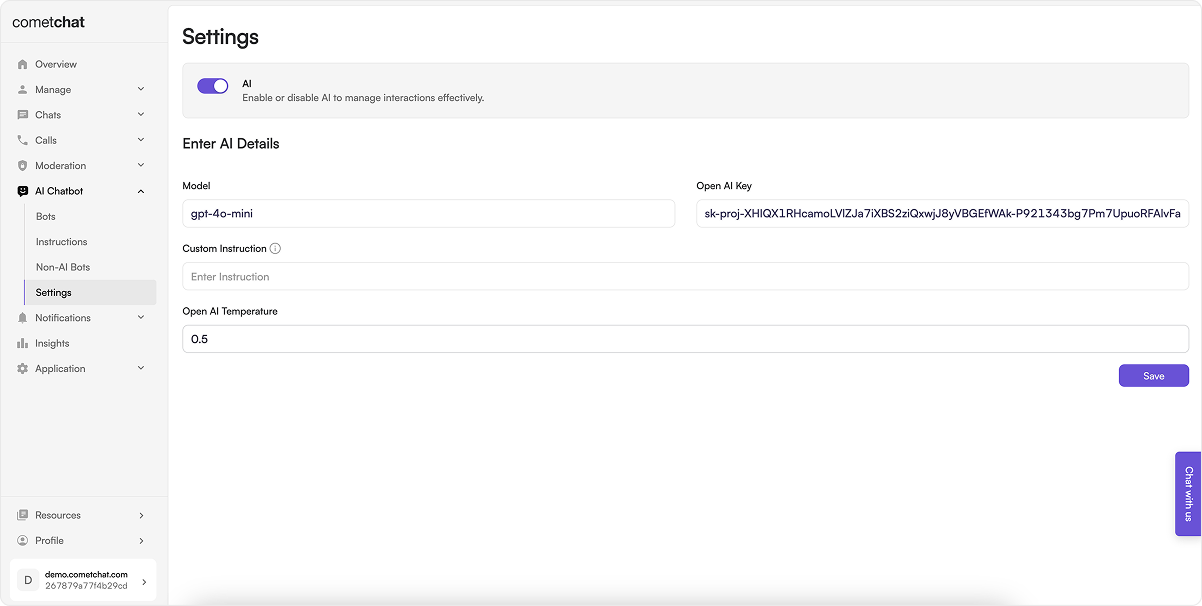
* Navigate to **AI Chatbot** > **Settings** in the left-hand menu.
 ### Set the GPT Model
Enter the name of the Open AI ChatGPT model that you intend to use.
### Save the Open AI Key
You can get the Open AI Key from your [Open AI Account](https://platform.openai.com/account/api-keys). This will be used by CometChat to interact with the Open AI APIs.
### Set a Custom Instruction
Custom Instruction is an information which gets added in each and every ChatGPT prompt made by the CometChat AI. Custom Instruction is app-level information you can add to describe your use-case & inform what kind of responses you need from the CometChat AI.
### Set the Temperature
The API is non-deterministic by default. This means that you might get a slightly different completion every time you call it, even if your prompt stays the same. Setting temperature to 0 will make the outputs mostly deterministic, but a small amount of variability will remain.
Lower values for temperature result in more consistent outputs, while higher values generate more diverse and creative results. Select a temperature value based on the desired trade-off between coherence and creativity for your specific application.
### Enable AI
Toggle on AI.
### Set the GPT Model
Enter the name of the Open AI ChatGPT model that you intend to use.
### Save the Open AI Key
You can get the Open AI Key from your [Open AI Account](https://platform.openai.com/account/api-keys). This will be used by CometChat to interact with the Open AI APIs.
### Set a Custom Instruction
Custom Instruction is an information which gets added in each and every ChatGPT prompt made by the CometChat AI. Custom Instruction is app-level information you can add to describe your use-case & inform what kind of responses you need from the CometChat AI.
### Set the Temperature
The API is non-deterministic by default. This means that you might get a slightly different completion every time you call it, even if your prompt stays the same. Setting temperature to 0 will make the outputs mostly deterministic, but a small amount of variability will remain.
Lower values for temperature result in more consistent outputs, while higher values generate more diverse and creative results. Select a temperature value based on the desired trade-off between coherence and creativity for your specific application.
### Enable AI
Toggle on AI.