> ## Documentation Index
> Fetch the complete documentation index at: https://www.cometchat.com/docs/llms.txt
> Use this file to discover all available pages before exploring further.

# Create an AI Agent with Vercel AI SDK

> Connect a Vercel AI SDK agent to CometChat, customize it with UI Kit Builder, and ship it as React UI Kit code or a Chat Widget.

## What you’ll build

* A **Vercel AI SDK** agent with streaming + tools
* The same agent **connected to CometChat** (Agent ID + Deployment URL)
* A **customized chat experience** using **UI Kit Builder**
* An export to **React UI Kit code** *or* **Chat Widget** for integration

***

## Prerequisites

* A CometChat account and an app: **[Create App](https://app.cometchat.com/apps)**
* A Vercel AI SDK agent (HTTP endpoint) plus the adaptor package:\
  **[`vercel-cometchat-adaptor`](https://www.npmjs.com/package/@cometchat/vercel-adapter)**
* Node.js environment with: `ai`, `@ai-sdk/openai`, `zod`, and Express (or another HTTP framework)

***

## Step 1 - Create your CometChat app

<Steps>
  <Step title="Create or open an app">
    Sign in at <b><a href="https://app.cometchat.com/apps">app.cometchat.com</a></b>. Create a new app or open an existing one.
  </Step>

  <Step title="Copy credentials">
    Note your <b>App ID</b>, <b>Region</b>, and <b>Auth Key</b> (needed if you export the Chat Widget later).
  </Step>
</Steps>

***

## Step 2 - Connect your Vercel AI SDK Agent

Navigate to **AI Agent → Get Started** and then **AI Agents → Add Agent**.

<Steps>
  <Step title="Choose provider">
    Select **Vercel AI SDK**.
  </Step>

  <Step title="Basic details">
    Provide:

    * **Name** and optional **Icon**
    * (Optional) **Greeting** and **Introductory Message**
    * (Optional) **Suggested messages**
  </Step>

  <Step title="Vercel configuration">
    Paste/define:

    * **Agent ID** — a unique handle that matches how you route traffic (e.g., <code>support</code>).
    * **Deployment URL** — the public HTTPS endpoint that receives CometChat requests.
    * (Optional) **Headers** — JSON auth headers that your endpoint expects.
  </Step>

  <Step title="Save & enable">
    Click **Save**, then ensure the agent’s toggle is **ON** in the **AI Agents** list.
  </Step>
</Steps>

> **Tip:** The <code>vercel-cometchat-adaptor</code> handles conversion between CometChat events and the Vercel AI SDK. Keep the **Agent ID** and **Deployment URL** stable so you don’t need to reconnect.

***

## Step 3 - Define Frontend Actions (Optional)

<Steps>
  <Step title="Add an action">
    Go to <b>AI Agent → Actions</b> and click <b>Add</b> to create a frontend action your agent can call (e.g., “Open Product,” “Start Demo,” “Book Slot”).
  </Step>

  <Step title="Define fields">
    Include:

    <ul>
      <li><b>Display Name</b> — Shown to users (e.g., “Open Product Page”).</li>
      <li><b>Execution Text</b> — How the agent describes running it (e.g., “Opening product details for the user.”).</li>
      <li><b>Name</b> — A unique, code-friendly key (e.g., <code>open\_product</code>).</li>
      <li><b>Description</b> — What the tool does and when to use it.</li>
      <li><b>Parameters</b> — JSON Schema describing inputs (the agent will fill these).</li>
    </ul>
  </Step>

  <Step title="Validate inputs (schema)">
    Example parameters JSON:

    ```json theme={null}
    {
      "type": "object",
      "required": ["productId"],
      "properties": {
        "productId": {
          "type": "string",
          "description": "The internal product ID to open"
        },
        "utm": {
          "type": "string",
          "description": "Optional tracking code"
        }
      }
    }
    ```
  </Step>

  <Step title="Handle in your UI">
    At runtime, listen for tool calls and execute them client-side (e.g., route changes, modals, highlights).
  </Step>
</Steps>

***

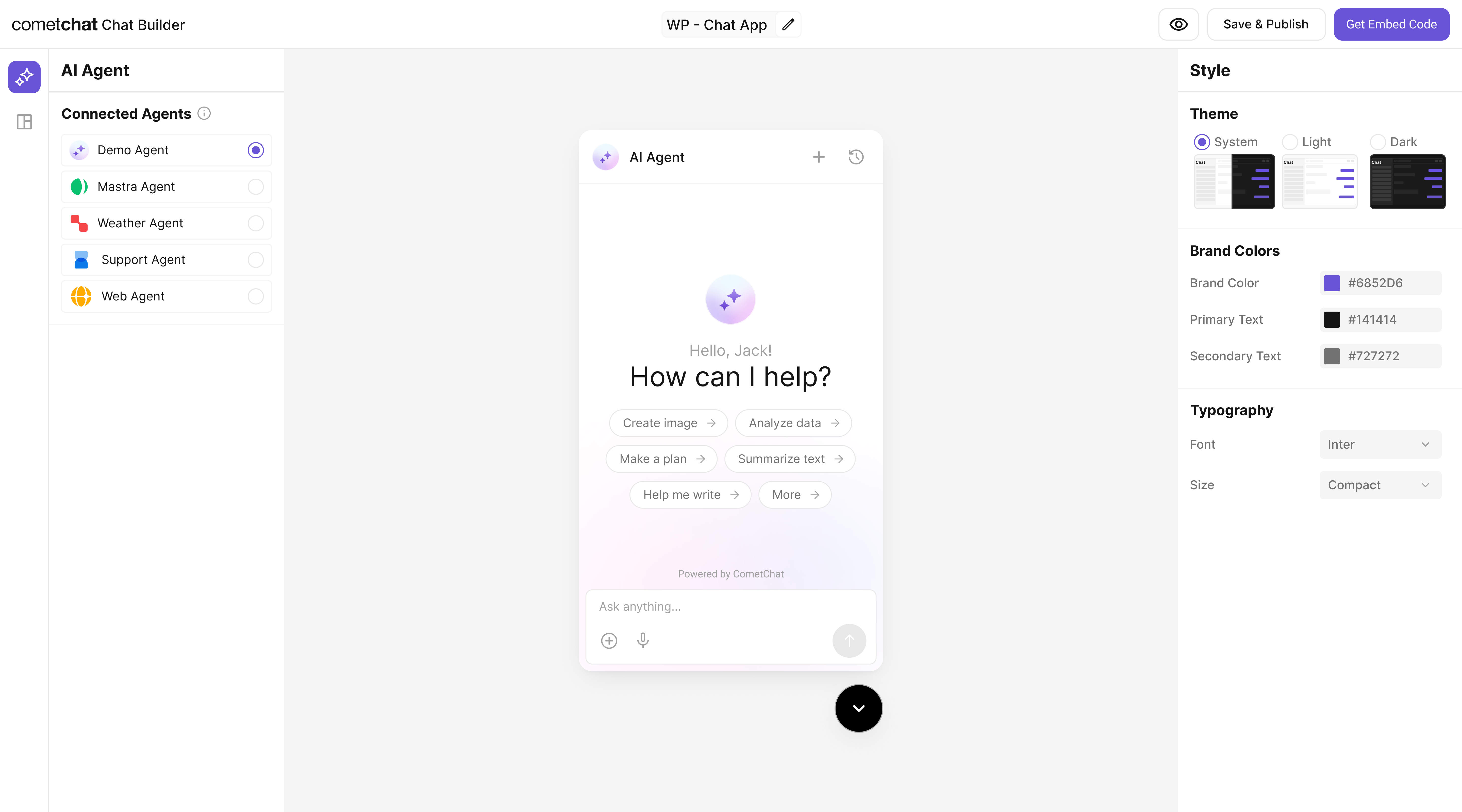
## Step 4 - Customize in UI Kit Builder

<Steps>
  <Step title="Open variant">From <b>AI Agents</b> click the variant (or Get Started) to enter UI Kit Builder.</Step>
  <Step title="Customize & Deploy">Select <b>Customize and Deploy</b>.</Step>
  <Step title="Adjust settings">Update theme, layout, and features; confirm the Vercel agent is attached.</Step>
  <Step title="Preview">Use live preview to validate responses & any tool triggers.</Step>
</Steps>

<Frame>
  <img src="https://mintcdn.com/cometchat-22654f5b/2U5tVIzH12dbbFtr/images/ai-agent-chat-builder-preview.png?fit=max&auto=format&n=2U5tVIzH12dbbFtr&q=85&s=7e5a476c0f779f984406b979ed12f972" width="5760" height="3200" data-path="images/ai-agent-chat-builder-preview.png" />
</Frame>

***

## Step 5 - Export & Integrate

Choose how you’ll ship the experience (Widget or React UI Kit export).

<CardGroup>
  <Card title="Widget Builder" icon={<img src="/docs/images/products/ai-agents.svg" alt="Widget" />} description="Embed / script" href="/widget/ai-agents" horizontal />

  <Card title="React UI Kit" icon={<img src="/docs/images/icons/react.svg" alt="React" />} href="https://www.cometchat.com/docs/ui-kit/react/ai-assistant-chat" horizontal>Pre Built UI Components</Card>
</CardGroup>

> The Vercel AI SDK agent from Step 2 is included automatically in exported variants—no extra code needed for basic conversations.

<Steps>
  <Step title="Decide delivery mode">Pick <b>Chat Widget</b> (fastest) or export <b>React UI Kit</b> for code-level customization.</Step>
  <Step title="Widget path">Open <b>Widget Builder</b> → Get Embedded Code → copy script + credentials.</Step>
  <Step title="React UI Kit path">Export the variant as code (UI Kit) if you need deep theming or custom logic.</Step>
  <Step title="Verify agent inclusion">Preview: the Vercel agent should appear without extra config.</Step>
</Steps>

***

## Step 6 - Deploy & Secure (Reference)

<Callout>
  Need a public Vercel AI SDK agent? Use these reference blocks to define, expose, and deploy one securely.
</Callout>

<AccordionGroup>
  <Accordion title="Define your Vercel AI SDK agent">
    ```ts theme={null}
    // vercel/agent.ts
    import { streamText, stepCountIs, tool } from "ai";
    import { openai } from "@ai-sdk/openai";
    import { z } from "zod";

    const weatherTool = tool({
      description: "Get a simple temperature estimate for a location",
      inputSchema: z.object({
        location: z.string().describe("City or region to check"),
      }),
      outputSchema: z.object({
        location: z.string(),
        temperature: z.number(),
      }),
      execute: async ({ location }) => {
        // Replace with a real data source; this is a stub.
        return {
          location,
          temperature: 72 + Math.floor(Math.random() * 10) - 5,
        };
      },
    });

    export async function runVercelAgent({
      messages,
      tools = {},
    }: {
      messages: any[];
      tools?: Record<string, unknown>;
    }) {
      return streamText({
        model: openai("gpt-4o-mini"),
        stopWhen: stepCountIs(100),
        messages,
        tools: {
          weather: weatherTool,
          ...tools,
        },
      });
    }
    ```
  </Accordion>

  <Accordion title="Expose a CometChat-compatible endpoint">
    <Tabs>
      <Tab title="TypeScript (Express)">
        ```ts theme={null}
        // server.ts
        import express from "express";
        import cors from "cors";
        import bodyParser from "body-parser";
        import {
          convertCometChatMessagesToVercelMessages,
          convertCometChatToolsToVercelAISDKTools,
          mapVercelStreamChunkToCometChatEvent,
        } from "vercel-cometchat-adaptor";
        import { runVercelAgent } from "./vercel/agent";

        const app = express();
        const port = process.env.PORT || 4000;

        app.use(cors());
        app.use(bodyParser.json());

        app.post("/agent/vercel", async (req, res) => {
          try {
            const cometChatTools = Array.isArray(req.body.tools)
              ? convertCometChatToolsToVercelAISDKTools(req.body.tools)
              : {};

            const messages = convertCometChatMessagesToVercelMessages(req.body.messages);
            if (!Array.isArray(messages) || messages.length === 0) {
              return res.status(400).json({ error: "Invalid request" });
            }

            res.setHeader("Content-Type", "text/event-stream");
            res.setHeader("Cache-Control", "no-cache");
            res.setHeader("Connection", "keep-alive");

            const runId = req.body.runId || `run_${Date.now()}`;
            const threadId = req.body.threadId || "thread_1";

            const stream = await runVercelAgent({ messages, tools: cometChatTools });

            for await (const chunk of stream.fullStream) {
              const events = mapVercelStreamChunkToCometChatEvent(chunk);
              for (const event of events) {
                event.runId = runId;
                event.threadId = threadId;
                event.timestamp = event.timestamp || Date.now();
                res.write(`data: ${JSON.stringify(event)}\n\n`);
              }
            }

            res.end();
          } catch (error) {
            console.error(error);
            res.write(
              `data: ${JSON.stringify({
                type: "error",
                message: "Agent processing failed",
                timestamp: Date.now(),
              })}\n\n`
            );
            res.end();
          }
        });

        app.listen(port, () => {
          console.log(`Server running at http://localhost:${port}/agent/vercel`);
        });
        ```
      </Tab>

      <Tab title="JavaScript (Express)">
        ```js theme={null}
        // server.js
        const express = require("express");
        const cors = require("cors");
        const bodyParser = require("body-parser");
        const {
          convertCometChatMessagesToVercelMessages,
          convertCometChatToolsToVercelAISDKTools,
          mapVercelStreamChunkToCometChatEvent,
        } = require("vercel-cometchat-adaptor");
        const { runVercelAgent } = require("./vercel/agent");

        const app = express();
        const port = process.env.PORT || 4000;

        app.use(cors());
        app.use(bodyParser.json());

        app.post("/agent/vercel", async (req, res) => {
          try {
            const cometChatTools = Array.isArray(req.body.tools)
              ? convertCometChatToolsToVercelAISDKTools(req.body.tools)
              : {};

            const messages = convertCometChatMessagesToVercelMessages(req.body.messages);
            if (!Array.isArray(messages) || messages.length === 0) {
              return res.status(400).json({ error: "Invalid request" });
            }

            res.setHeader("Content-Type", "text/event-stream");
            res.setHeader("Cache-Control", "no-cache");
            res.setHeader("Connection", "keep-alive");

            const runId = req.body.runId || `run_${Date.now()}`;
            const threadId = req.body.threadId || "thread_1";

            const stream = await runVercelAgent({ messages, tools: cometChatTools });

            for await (const chunk of stream.fullStream) {
              const events = mapVercelStreamChunkToCometChatEvent(chunk);
              for (const event of events) {
                event.runId = runId;
                event.threadId = threadId;
                event.timestamp = event.timestamp || Date.now();
                res.write(`data: ${JSON.stringify(event)}\n\n`);
              }
            }

            res.end();
          } catch (error) {
            console.error(error);
            res.write(
              `data: ${JSON.stringify({
                type: "error",
                message: "Agent processing failed",
                timestamp: Date.now(),
              })}\n\n`
            );
            res.end();
          }
        });

        app.listen(port, () => {
          console.log(`Server running at http://localhost:${port}/agent/vercel`);
        });
        ```
      </Tab>
    </Tabs>
  </Accordion>

  <Accordion title="Run & Deploy Your Vercel Agent">
    <h4>Local Development</h4>

    <ol>
      <li><code>npm install</code> to pull dependencies (including <code>vercel-cometchat-adaptor</code>).</li>
      <li><code>npm run dev</code> (or <code>vercel dev</code>) to start the local server.</li>
    </ol>

    <p><b>Quick test</b> against the Express route:</p>

    ```bash theme={null}
    curl -N -X POST http://localhost:4000/agent/vercel \
      -H "Content-Type: application/json" \
      -d '{"messages":[{"role":"user","content":"Say hi"}]}'
    ```

    <h4>Temporary Public Tunnel</h4>

    ```bash theme={null}
    ngrok http 4000
    cloudflared tunnel --url http://localhost:4000
    loca.lt --port 4000
    ```

    <p>Append route (e.g. <code>/agent/vercel</code>) to the forwarded HTTPS URL.</p>
    <h4>Production Patterns</h4>

    <ul>
      <li><b>Serverless:</b> Convert the route to a Vercel /api handler or edge function.</li>
      <li><b>Container:</b> Run the Express app in Docker; add health checks.</li>
      <li><b>Edge:</b> Use <code>@vercel/edge</code> runtime and keep tools stateless.</li>
    </ul>

    <h4>Security</h4>

    <ul>
      <li>Rate limit by IP + user.</li>
      <li>Add auth (Bearer / JWT) for private agents.</li>
      <li>Log tool calls (id, latency) for observability.</li>
    </ul>

    <h4>CometChat Mapping</h4>
    <p>Use the final HTTPS URL + path for <b>Deployment URL</b>. Reuse the same string you configured in code as the <b>Agent ID</b>.</p>
  </Accordion>

  <Accordion title="Deploy & copy IDs">
    Deploy (Vercel, Render, Fly, etc.) then copy the <b>public URL</b> as your <b>Deployment URL</b> and confirm the <b>Agent ID</b> used in code.

    <br />

    <br />

    <b>Docs</b>: [https://sdk.vercel.ai/docs](https://sdk.vercel.ai/docs)
  </Accordion>
</AccordionGroup>

***

## Test your setup

<Steps>
  <Step title="Enable the agent">In <b>AI Agents</b>, ensure your Vercel agent shows <b>Enabled</b>.</Step>
  <Step title="Preview in UI Kit Builder">Open <b>UI Kit Builder</b> and start a preview session.</Step>
  <Step title="Validate conversation">Send a message; confirm the agent streams responses.</Step>
  <Step title="Test actions">Trigger a <b>Frontend Action</b> and verify your UI handles the tool call.</Step>
</Steps>

***

## Troubleshooting

<AccordionGroup>
  <Accordion title="Agent not responding">
    <ul>
      <li>Verify your <b>Deployment URL</b> is publicly reachable and returns <code>text/event-stream</code>.</li>
      <li>Check server logs for runtime errors or missing environment variables.</li>
    </ul>
  </Accordion>

  <Accordion title="Tool call not executed">
    <ul>
      <li>Confirm the Action’s <b>Name</b> in CometChat exactly matches the tool name your UI listens for.</li>
      <li>Validate the <b>Parameters</b> JSON Schema; the agent uses this to fill inputs.</li>
    </ul>
  </Accordion>

  <Accordion title="Auth issues in exports">
    <ul>
      <li>Use <code>authKey</code> only for development. For production, implement a <b>secure token</b> flow for user login.</li>
    </ul>
  </Accordion>
</AccordionGroup>

***

By combining the **CometChat Agentic Interface** with the **Vercel AI SDK**, you can connect intelligent agents with end users instantly and securely.\
The <code>vercel-cometchat-adaptor</code> library simplifies message and event translation, creating a reliable bridge between CometChat and Vercel-powered AI systems.

## REST API Reference

For programmatic agent management, see the [Agent Builder APIs](/rest-api/ai-agents-apis/overview) and [BYO Agent APIs](/rest-api/byo-ai-agents-apis/overview).