> ## Documentation Index
> Fetch the complete documentation index at: https://www.cometchat.com/docs/llms.txt
> Use this file to discover all available pages before exploring further.
# Build Your Knowledge Agent with Mastra
> Create a Mastra Knowledge Agent that answers documentation questions when invoked, then connect it to CometChat.
Imagine an agent that answers policy, product, and FAQ questions by looking them up in your docs—concise, cited, and available right inside chat without derailing the conversation.
***
## What You’ll Build
* A **Mastra agent** that can participate in conversations as a documentation expert.
* Triggered only when explicitly mentioned (e.g., `@agent`).
* Can fetch knowledge from your docs and return short, sourced answers.
* Integrated into **CometChat** chats.
***
## Prerequisites
* A Mastra project (`npx create-mastra@latest my-mastra-app`).
* Node.js installed.
* OpenAI API key in `.env` as `OPENAI_API_KEY`.
* A CometChat app.
***
## Quick links
* Repo: [mastra-knowledge-agent](https://github.com/cometchat/ai-agent-mastra-examples/tree/main/mastra-knowledge-agent)
* Quickstart: [Knowledge Agent Quickstart](https://github.com/cometchat/ai-agent-mastra-examples/blob/main/mastra-knowledge-agent/README.md#knowledge-agent-quickstart)
* Swagger UI (local): [http://localhost:4111/swagger-ui](http://localhost:4111/swagger-ui)
* Environment variables: [README#environment-variables](https://github.com/cometchat/ai-agent-mastra-examples/blob/main/mastra-knowledge-agent/README.md#environment-variables)
***
## How it works
This example implements a retrieval-augmented Knowledge Agent that:
* Ingests sources (URLs, files, or raw text) into a local knowledge folder per namespace using the ingestSources tool. Parsed content is stored under knowledge/\ for repeatable retrieval.
* Retrieves relevant snippets with the docsRetriever tool. It scans your knowledge/\ content, chunks and ranks results, and returns the best matches with source metadata.
* Generates answers using only retrieved context. The agent replies when invoked (e.g., @agent), composes a concise answer, and appends a short “Sources” list with citations.
* Handles errors defensively. Server utilities sanitize errors before returning responses.
Key components (source-linked below): the agent, docs retriever tool, ingest endpoints, and server routes.
***
## Setup
Create a Mastra app and add OPENAI\_API\_KEY in .env. See the repository README for exact steps.
Add a knowledge agent that answers from retrieved docs only, and responds when explicitly mentioned (e.g., @agent).
Register the agent and expose endpoints for /api/tools/ingestSources, /api/tools/searchDocs, and /api/agents/knowledge/generate (see server entry).
Choose a namespace (e.g., docs) and POST sources to /api/tools/ingestSources. Use URLs, file paths, or raw text. Request shape is documented in the README Quickstart.
Send chat turns to /api/agents/knowledge/generate with a messages array. Optionally pass toolParams.namespace to scope retrieval.
In Dashboard → AI Agents, set Provider=Mastra, Agent ID=knowledge, and point Deployment URL to your public generate endpoint.
Make the API public, verify via Swagger UI, and re-run ingestion when docs change.
***
## Project Structure
Core files and folders for the Knowledge Agent (browse source on GitHub):
* Environment
* [.env.example](https://github.com/cometchat/ai-agent-mastra-examples/blob/main/mastra-knowledge-agent/.env.example)
* Runtime & config
* [package.json](https://github.com/cometchat/ai-agent-mastra-examples/blob/main/mastra-knowledge-agent/package.json)
* [tsconfig.json](https://github.com/cometchat/ai-agent-mastra-examples/blob/main/mastra-knowledge-agent/tsconfig.json)
* [README.md](https://github.com/cometchat/ai-agent-mastra-examples/blob/main/mastra-knowledge-agent/README.md)
* Agent
* [src/mastra/agents/knowledge-agent.ts](https://github.com/cometchat/ai-agent-mastra-examples/blob/main/mastra-knowledge-agent/src/mastra/agents/knowledge-agent.ts)
* [src/mastra/agents/index.ts](https://github.com/cometchat/ai-agent-mastra-examples/blob/main/mastra-knowledge-agent/src/mastra/agents/index.ts)
* Tools
* [src/mastra/tools/docs-retriever.ts](https://github.com/cometchat/ai-agent-mastra-examples/blob/main/mastra-knowledge-agent/src/mastra/tools/docs-retriever.ts)
* [src/mastra/tools/ingest-sources.ts](https://github.com/cometchat/ai-agent-mastra-examples/blob/main/mastra-knowledge-agent/src/mastra/tools/ingest-sources.ts)
* [src/mastra/tools/index.ts](https://github.com/cometchat/ai-agent-mastra-examples/blob/main/mastra-knowledge-agent/src/mastra/tools/index.ts)
* Server
* [src/mastra/index.ts](https://github.com/cometchat/ai-agent-mastra-examples/blob/main/mastra-knowledge-agent/src/mastra/index.ts)
* [src/mastra/server/routes.ts](https://github.com/cometchat/ai-agent-mastra-examples/blob/main/mastra-knowledge-agent/src/mastra/server/routes.ts)
* [src/mastra/server/routes/ingest.ts](https://github.com/cometchat/ai-agent-mastra-examples/blob/main/mastra-knowledge-agent/src/mastra/server/routes/ingest.ts)
* [src/mastra/server/routes/searchDocs.ts](https://github.com/cometchat/ai-agent-mastra-examples/blob/main/mastra-knowledge-agent/src/mastra/server/routes/searchDocs.ts)
* [src/mastra/server/util/safeErrorMessage.ts](https://github.com/cometchat/ai-agent-mastra-examples/blob/main/mastra-knowledge-agent/src/mastra/server/util/safeErrorMessage.ts)
* Workflows
* [src/mastra/workflows/index.ts](https://github.com/cometchat/ai-agent-mastra-examples/blob/main/mastra-knowledge-agent/src/mastra/workflows/index.ts)
* Knowledge base (sample)
* [knowledge/default/raw/Acme-Enterprises-FAQ.pdf](https://github.com/cometchat/ai-agent-mastra-examples/blob/main/mastra-knowledge-agent/knowledge/default/raw/Acme-Enterprises-FAQ.pdf)
* [knowledge/default/acme-enterprises-faq-pdf.md](https://github.com/cometchat/ai-agent-mastra-examples/blob/main/mastra-knowledge-agent/knowledge/default/acme-enterprises-faq-pdf.md)
***
## Step 1 - Create the Agent
**`src/mastra/agents/knowledge-agent.ts`** ([view in repo](https://github.com/cometchat/ai-agent-mastra-examples/blob/main/mastra-knowledge-agent/src/mastra/agents/knowledge-agent.ts)):
* Agent file: [src/mastra/agents/knowledge-agent.ts](https://github.com/cometchat/ai-agent-mastra-examples/blob/main/mastra-knowledge-agent/src/mastra/agents/knowledge-agent.ts)
* Docs retriever tool: [src/mastra/tools/docs-retriever.ts](https://github.com/cometchat/ai-agent-mastra-examples/blob/main/mastra-knowledge-agent/src/mastra/tools/docs-retriever.ts)
* Knowledge folder: [knowledge](https://github.com/cometchat/ai-agent-mastra-examples/tree/main/mastra-knowledge-agent/knowledge)
Checklist for the agent:
* Set `name` to **"knowledge"** so the API path is `/api/agents/knowledge/*`.
* Respond **only when mentioned** (e.g., `@agent`).
* Answer **from retrieved docs** and include a short **“Sources:”** list.
* Register `docsRetriever`.
***
## Step 2 - Register the Agent in Mastra
**`src/mastra/index.ts`** ([view in repo](https://github.com/cometchat/ai-agent-mastra-examples/blob/main/mastra-knowledge-agent/src/mastra/index.ts)):
* Server entry: [src/mastra/index.ts](https://github.com/cometchat/ai-agent-mastra-examples/blob/main/mastra-knowledge-agent/src/mastra/index.ts)
* Ensure the agent is registered with key **"knowledge"** → API path `/api/agents/knowledge/*`.
* Storage/logger configuration as per repo [README.md](https://github.com/cometchat/ai-agent-mastra-examples/blob/main/mastra-knowledge-agent/README.md).
***
## Step 3 - Run the Agent
*Dev script & local server details are tracked in your repo:*
* Scripts: [package.json](https://github.com/cometchat/ai-agent-mastra-examples/blob/main/mastra-knowledge-agent/package.json)
* Quickstart: [Knowledge Agent Quickstart](https://github.com/cometchat/ai-agent-mastra-examples/blob/main/mastra-knowledge-agent/README.md#knowledge-agent-quickstart)
Expected local API base: `http://localhost:4111/api`
Use the commands in the Quickstart (kept in the repository).
Follow the Quickstart to run the local Mastra server.
POST to /api/tools/ingestSources with a namespace. Example commands are in the README Quickstart.
POST to /api/agents/knowledge/generate. See the README Quickstart for request bodies and examples.
API endpoints exposed by this example (see [Swagger UI](http://localhost:4111/swagger-ui)):
* POST `/api/tools/ingestSources` — ingest URLs/files/text into `knowledge/`
* POST `/api/tools/searchDocs` — retrieve relevant snippets from `knowledge/`
* POST `/api/agents/knowledge/generate` — chat with the agent
***
## Step 4 - Deploy the API
* [Swagger UI (local)](http://localhost:4111/swagger-ui)
* [Environment variables](https://github.com/cometchat/ai-agent-mastra-examples/blob/main/mastra-knowledge-agent/README.md#environment-variables)
Ensure the public route: **`/api/agents/knowledge/generate`** is reachable.
***
## Step 5 - Configure in CometChat
Open the CometChat Dashboard.
Go to your App → AI Agents.
Set Provider=Mastra, Agent ID=knowledge, Deployment URL=your public generate endpoint.
Add greeting, prompts, and configure actions/tools if you use frontend tools.
Save and ensure the agent toggle shows Enabled.
> For more on CometChat AI Agents, see the docs: [Overview](/ai-agents/agent-builder/overview) · [Instructions](/ai-agents/agent-builder/instructions) · [Custom agents](/ai-agents/agent-builder/tools/overview)
***
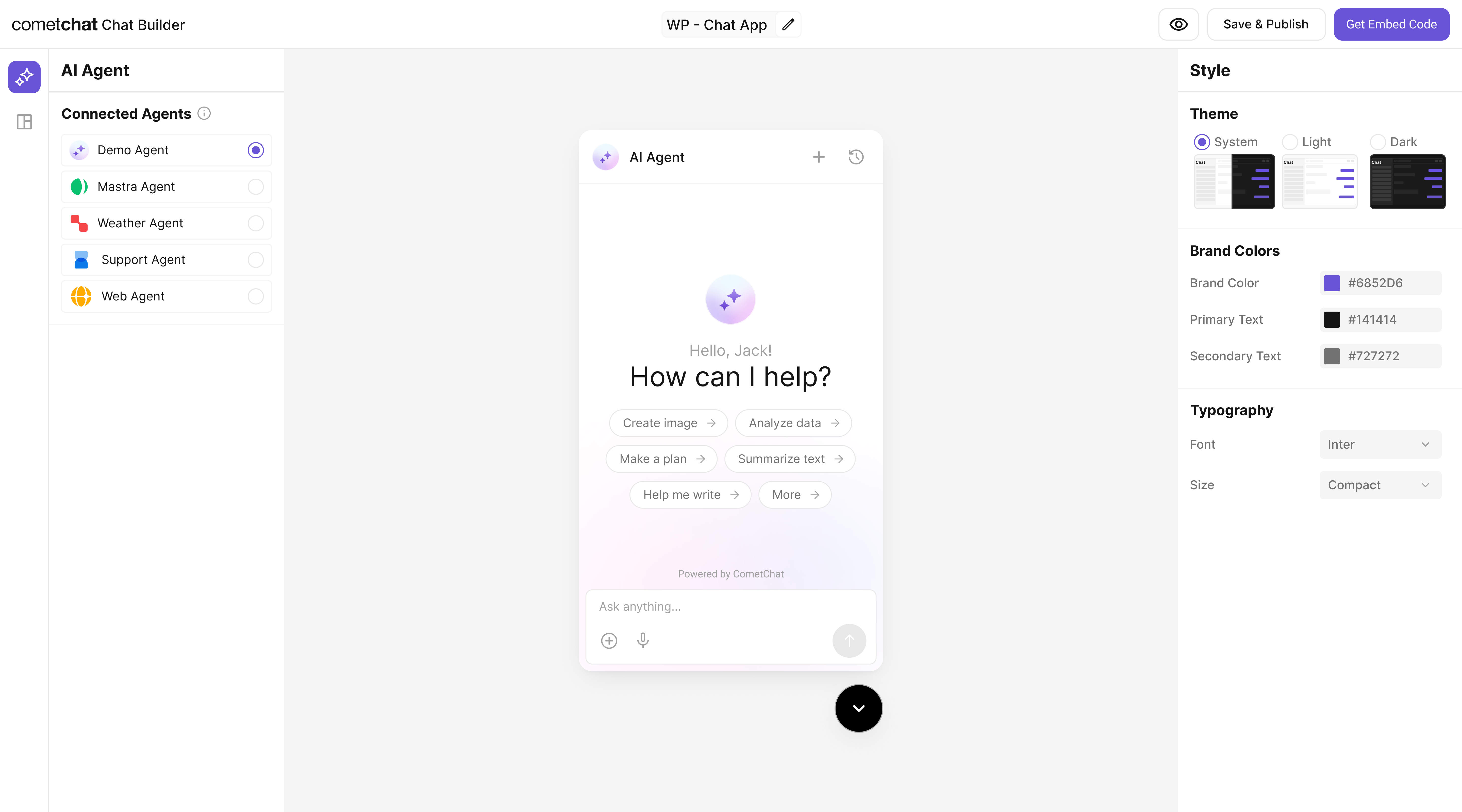
## Step 6 - Customize in UI Kit Builder
From AI Agents click the variant (or Get Started) to enter UI Kit Builder.
Select Customize and Deploy.
Theme, layout, features; ensure the Mastra Knowledge agent is attached.
Use live preview to validate responses & any tool triggers.
 ***
## Step 7 - Integrate
Once your Knowledge Agent is configured, you can integrate it into your app using the CometChat Widget Builder:
} description="Embed / script" href="/widget/ai-agents" horizontal />
} href="https://www.cometchat.com/docs/ui-kit/react/ai-assistant-chat" horizontal>Pre Built UI Components
> **Note:** The **Mastra Knowledge agent** you connected in earlier steps is already part of the exported configuration, so your end-users will chat with that agent immediately.
***
## Step 8 - Test Your Setup
POST to
***
## Step 7 - Integrate
Once your Knowledge Agent is configured, you can integrate it into your app using the CometChat Widget Builder:
} description="Embed / script" href="/widget/ai-agents" horizontal />
} href="https://www.cometchat.com/docs/ui-kit/react/ai-assistant-chat" horizontal>Pre Built UI Components
> **Note:** The **Mastra Knowledge agent** you connected in earlier steps is already part of the exported configuration, so your end-users will chat with that agent immediately.
***
## Step 8 - Test Your Setup
POST to /api/agents/knowledge/generate returns a doc-grounded answer.
/api/agents includes "knowledge".
UI handles docsRetriever tool invocation.
See curl command below.
```bash theme={null}
curl -X POST http://localhost:4111/api/agents/knowledge/generate \
-H "Content-Type: application/json" \
-d '{
"messages": [
{ "role": "user", "content": "@agent where is the refund policy documented?" }
]
}'
```
***
## Security & production checklist
* Protect endpoints with auth (API key/JWT) and restrict CORS to trusted origins.
* Add basic rate limiting and request size limits to ingestion and generate routes.
* Validate inputs: enforce allowed namespaces, URL/file whitelists, and payload schemas.
* Monitor logs and errors; sanitize responses using server utilities.
* For public deploys, keep your OpenAI key in server-side env only; never expose it to the client.
## Troubleshooting
* **Agent talks too much**: tighten instructions to only respond when mentioned and to answer from docs.
* **No results**: ensure `/knowledge` contains `.md/.mdx` files or your ingestion job populated the store.
* **Not visible in chat**: verify the agent is added as a user in CometChat and enabled in the Dashboard.
* **404 / Agent not found**: check that the server registers the agent with key `knowledge`.
***
## Next Steps
* Add tools like `summarize-doc`, `fetch-policy`, or `link-to-source`.
* Use embeddings + chunking for better retrieval.
* Restrict answers to whitelisted folders or domains.
* Inspect and try endpoints via Swagger UI (`/swagger-ui`).
* Set up CI/CD in your own repo as needed.